How to Add SEO Keywords to Your Website: Where and How
How to Add SEO Keywords to Your Website: Where and How
Last Updated:
Table of Content
Case Studies









Indra Singh
Indra Singh
Indra Singh
SEO
SEO
SEO
5 Min Read
5 Min Read
The strongest keyword placements are the title tag, the URL, the H1, the first 100 words of body copy, at least one subheading, an image alt tag, and one internal link's anchor text. Hit those seven spots naturally, and you've covered the placement zones that actually move rankings, without needing to force the phrase into every sentence.
You did the keyword research. You've got a list sitting in a spreadsheet. Now what?
This is where most people get stuck. Adding keywords to my website sounds simple until you're staring at a blank page wondering if the keyword goes in the first sentence, the headline, or somewhere else entirely. Get it wrong, and you either confuse Google about what the page is even for, or you stuff the word in so many times that readers bounce before they finish paragraph two.
Here's what actually works, section by section.
What Is Keyword Placement?
Keyword placement is just telling search engines, in the language they understand, what a page is about and who it's for. That's it. It's not a trick, and it's not a loophole. It's the same reason a book has a title on the spine instead of buried on page 40.
Search engines want clear signals, and readers want to keep reading. A page can satisfy both, but only if you place keywords where they'd naturally appear anyway. If you have to twist a sentence into something a human would never say just to fit the phrase in, that's the wrong placement. Google's algorithms have gotten frighteningly good at spotting text written for a crawler instead of a person, and pages written that way tend to outrank those that weren't.
So before touching a single sentence, know your primary keyword, your two or three secondary variations, and the actual search intent behind the search. Someone looking up how to add SEO keywords to your website wants a how-to, not a lecture on what SEO is. Match that intent first. Placement only works if the content underneath it deserves to rank.
Essential On-Page Placement Zones
These are the spots search engines weigh most heavily. Miss these and no amount of body copy will save the page.
Title Tags and Meta Descriptions
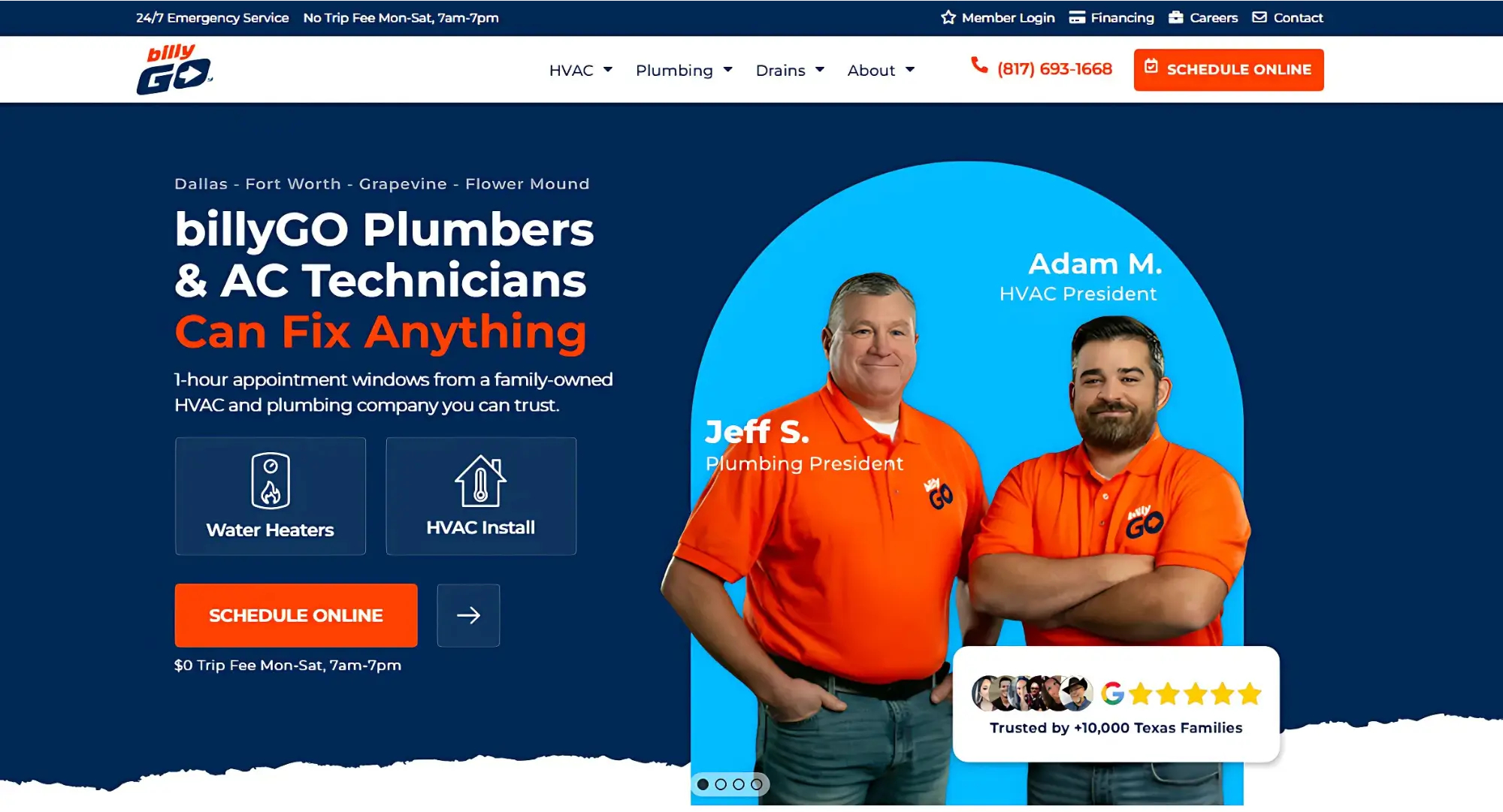
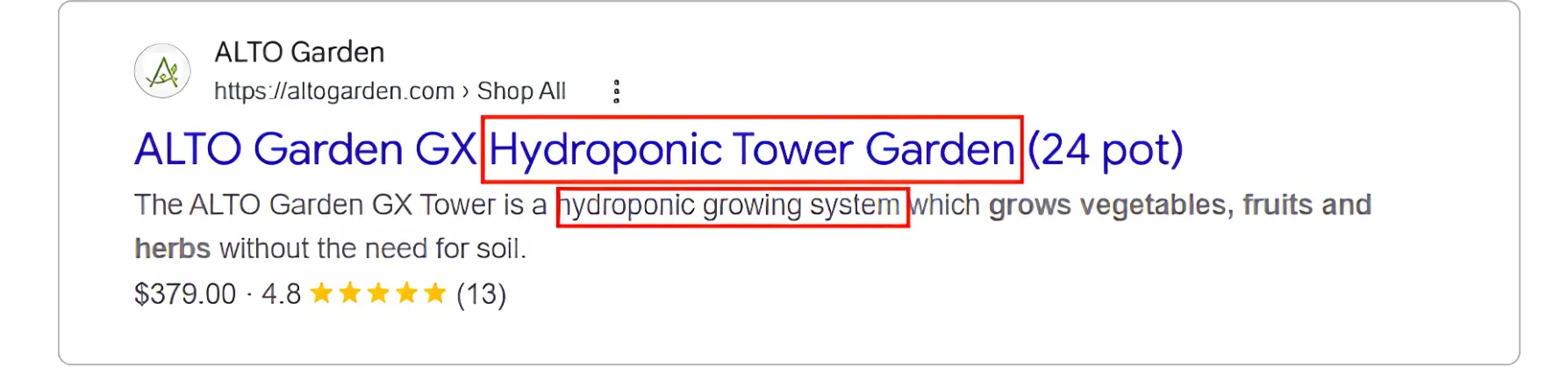
The title tag is the single strongest on-page signal you control. Put your primary keyword near the front of it, keep it under 60 characters, and make sure it still reads like something a person would click. "How to Add SEO Keywords to Your Website: Where and How" does both jobs at once.
Meta descriptions don't directly affect rankings, but they affect search engine visibility and click-through rate, and click-through rate absolutely affects how a page performs over time. Include the keyword so it bolds in the search result, then spend the rest of the 150-ish characters on a reason to click.
URLs and Slugs
Short, descriptive URLs beat long ones stuffed with filler words. /how-to-add-seo-keywords tells a search engine and a human exactly what's on the page. /blog/post-4521/marketing-tips-and-tricks-for-2026 tells them nothing. Skip stop words like "the," "and," and "a" in the slug, and use hyphens, not underscores.
Headings: H1 Down to H3
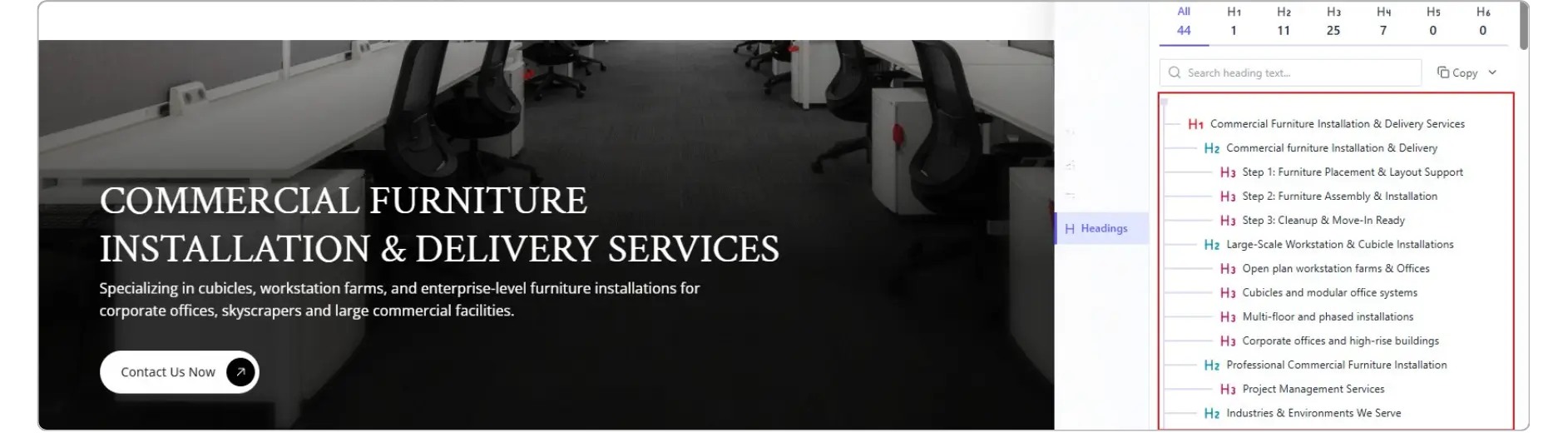
One H1 per page. It should contain your primary keyword and closely match the title tag without being identical. From there, H2s and H3s carry your secondary keywords and semantic variations, such as places to put keywords on your site or keyword placement itself. Headings do double duty: they organize the page for skimmers, and they give search engines a table of contents for what each section actually covers.
Body Copy
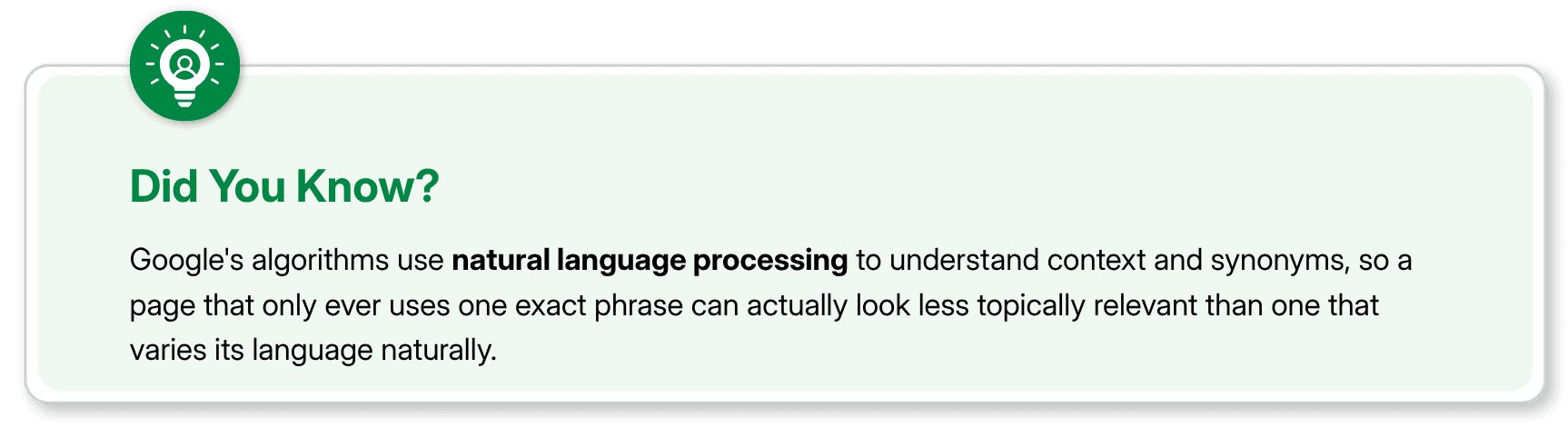
Get your primary keyword into the first 100 words. Not some magic algorithmic rule, but because it quickly confirms to the reader that they landed on the right page. After that, write normally. Use the exact phrase two or three more times where it fits, then lean on synonyms and related terms for the rest of the piece: "keyword placement," "on-page optimization," and "search visibility." That semantic variety is what modern search engines actually reward, not repetition.
Technical and Visual Optimization
Image Optimization
Every image is a missed opportunity if it's still named IMG_4471.jpg.
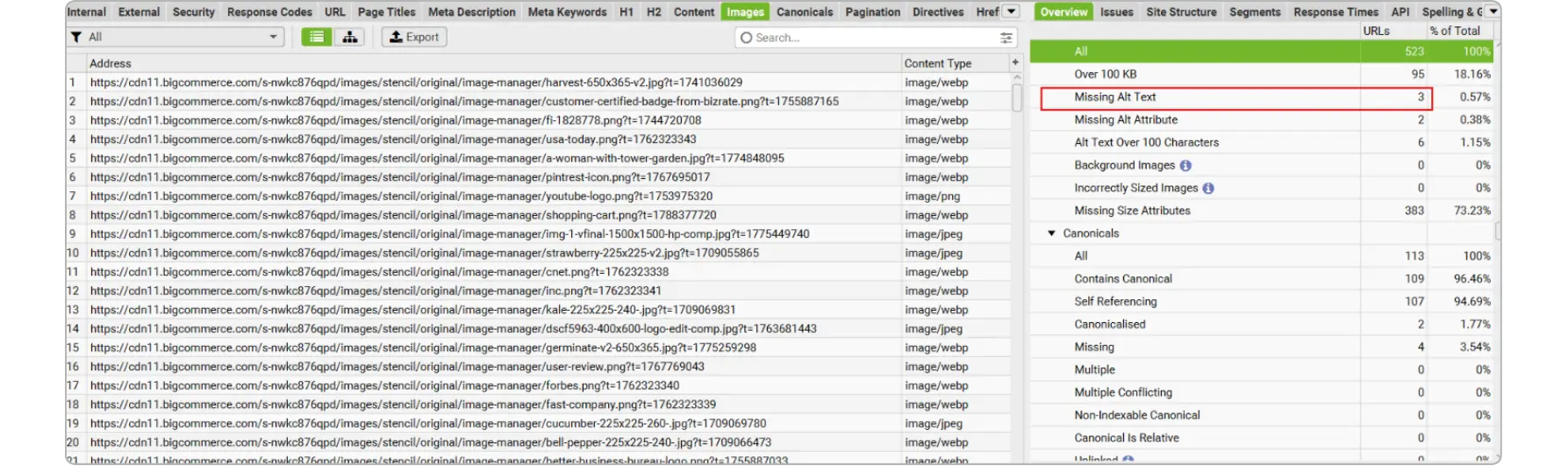
Rename files with descriptive, hyphenated text before upload: keyword-placement-example.jpg instead of a camera-generated string. Alt text should describe the image for someone using a screen reader first and work a keyword in only where it's genuinely accurate. Captions are read more than any other text on a page, so if you're going to place a keyword conversationally, a caption is a good spot. Compress images too. A gorgeous photo that triples your load time is dragging down every other ranking signal on the page.
Internal Link Strategy
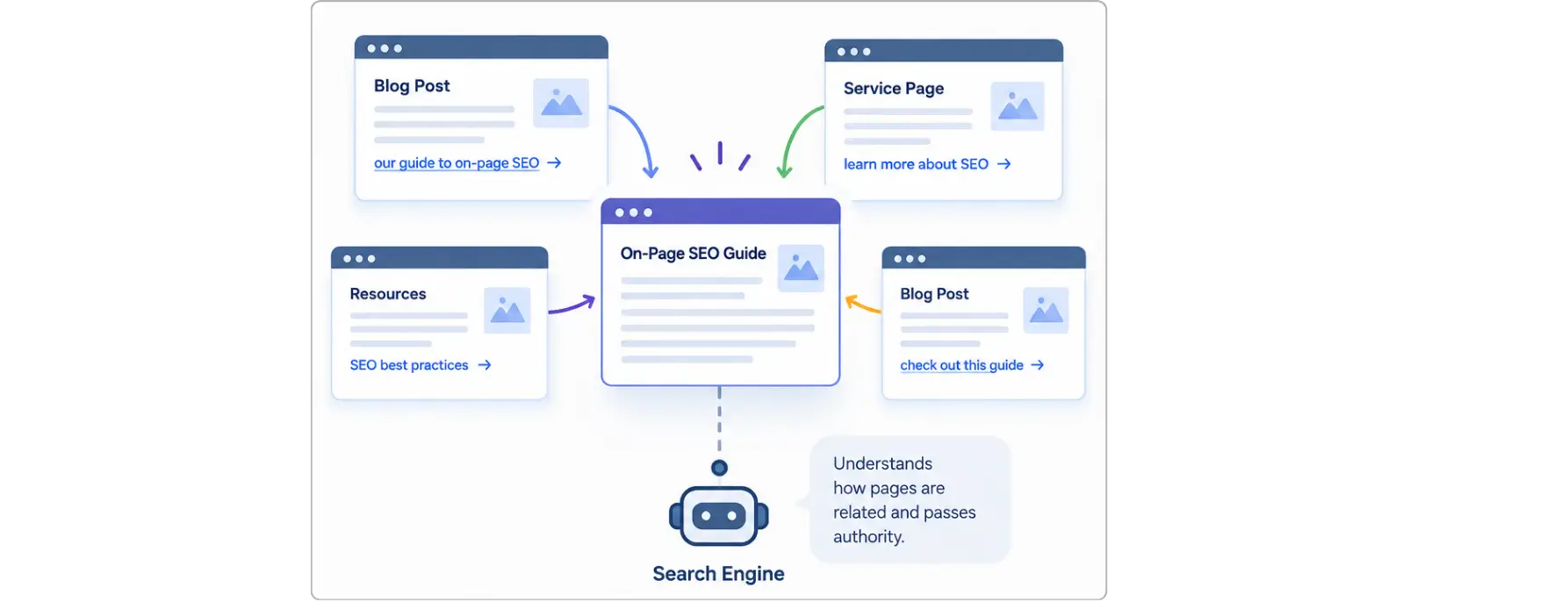
Internal links tell search engines how pages on your site relate to each other, and they pass authority from strong pages to newer ones. The anchor text matters here. "Click here" tells a crawler nothing. "Our guide to on-page SEO" tells it exactly what the destination page covers. Vary the anchor text across different links pointing to the same page instead of repeating the identical phrase every time. That variation looks natural because it is natural; nobody links to the same thing with the exact same words every single time.
Schema Markup
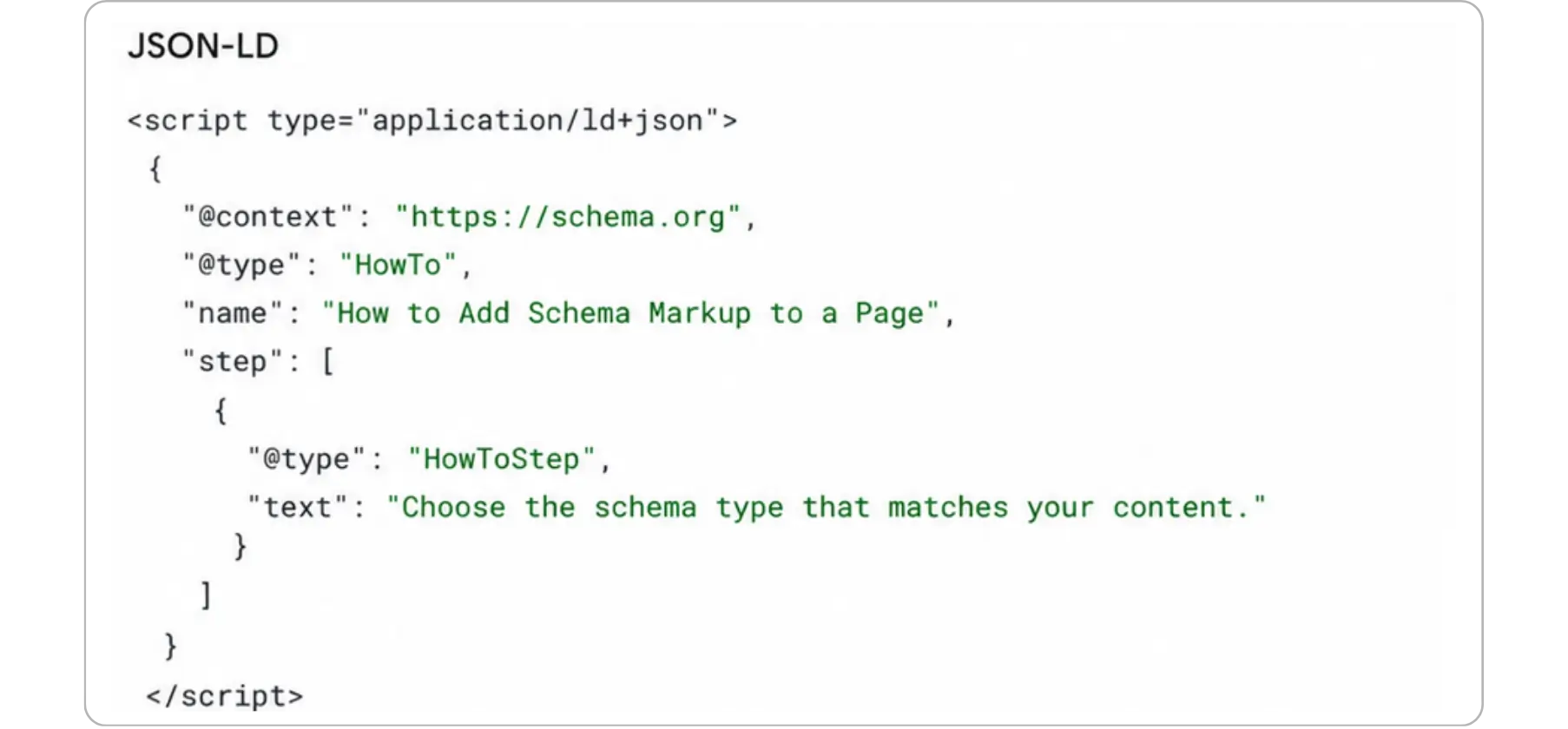
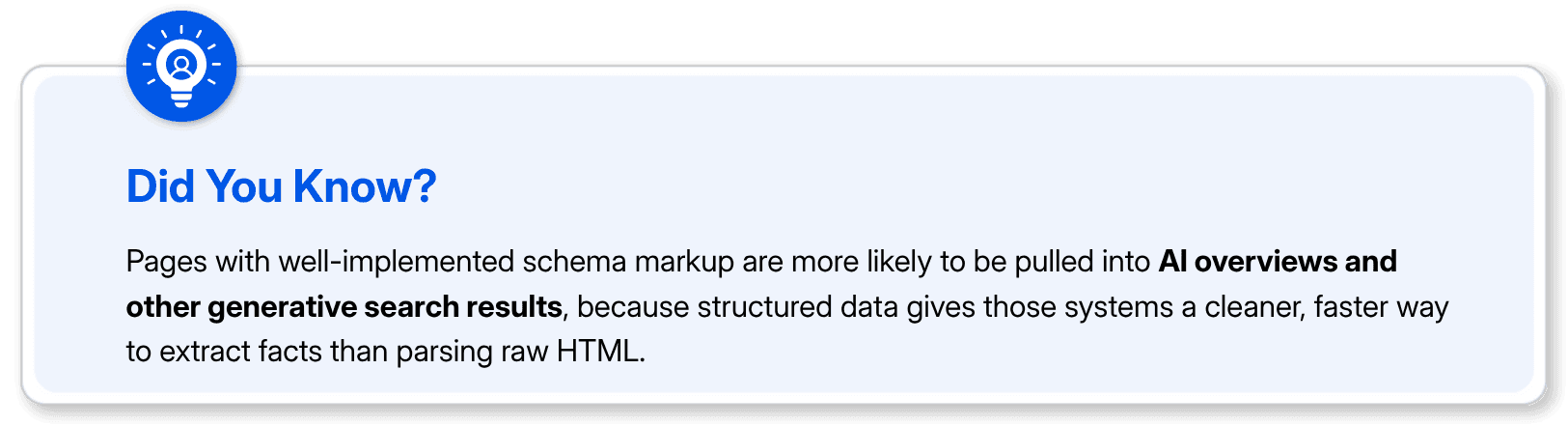
Structured data doesn't move rankings directly, but it helps algorithms categorize a page correctly and can earn rich results in the SERP. For a blog post, an Article schema with clear name, description, and keywords fields helps search engines and AI-driven search tools alike understand exactly what the page covers before they've even crawled the full body. This matters more now than it did a few years ago, since generative search tools lean on structured data to decide what to cite.
How to Find Low Competition Keywords
Placement only matters if you're targeting keywords you can actually win. Chasing a term with a dozen entrenched competitors on page one is a slow way to burn a content budget.
Start with long-tail variations of your main topic. "Keyword placement" is broad and competitive. "Where to place keywords in a blog post" is narrower, has clearer intent, and usually has a fraction of the competition. The longer and more specific the phrase, the more likely it is to be winnable.
A few practical ways to find these:
Check the "People also ask" and related searches on the SERP for your main keyword. These are almost always lower-competition long-tail variations of what people are already searching for.
Use a keyword difficulty score, not just search volume, to filter your list. A keyword with 50 searches a month and a difficulty score of 15 is often a better target than one with 500 searches and a difficulty score of 70.
Look at question-based queries. Questions tend to have less commercial competition because bigger sites often skip them in favor of shorter, higher-volume terms.
Mine your own site's Search Console data for queries you're already ranking on page two or three for. Those are often the fastest wins, since you just need to strengthen a page you already have instead of building authority from scratch.
Our keyword difficulty glossary entry breaks down how difficulty scores are calculated if you want to go deeper on the topic, and the long-tail keywords covers why these specific phrases convert at a higher rate than broad head terms.
Execution Best Practices and Common Mistakes
Relevance Over Density
Rigid keyword density targets are outdated advice. There's no magic percentage Google is checking for. What actually gets evaluated is whether the content comprehensively covers the topic using the vocabulary a real expert would use, which includes synonyms, related entities, and natural phrasing, not just the exact target phrase over and over.
Over-Optimization and Keyword Stuffing
If a sentence sounds wrong when you read it out loud, it's wrong. That's the simplest test. Repeating "places to put keywords on your site" five times in one paragraph doesn't help you rank for that phrase; it flags the page as manipulative and can trigger a ranking penalty instead of a boost. The same goes for stuffing keywords into alt text, footer links, or hidden text. Google's spam policies exist specifically to catch this, and the algorithms updating those policies get more precise every year.
Manual Placement vs. AI Tools
AI content tools are genuinely useful for the first pass, drafting an outline, generating meta description options, or checking density after the fact. Where they still fall short is judgment: knowing when a keyword fits naturally versus when it's being forced. Run your draft through a density checker after you write it, not while you're writing it. Write for the person first, then go back and confirm the technical boxes are checked. Doing it in that order is the difference between content that reads like it was written for a machine and content that just happens to also work for one.
Final Thoughts
Adding keywords to your website isn't about hitting a percentage or checking a box in a plugin. It's about placing the right words in the spots where search engines are already looking, title tags, headings, the opening lines, alt text, a link or two, and then writing the rest like you're explaining the topic to someone who actually asked. Do the placement work well and the density takes care of itself. Skip the placement work and no amount of density will fix it.
If you want a second pair of eyes on where your keywords currently sit, our content grader and optimizer tool will show you exactly what's missing on a live page.
FAQs
How many times should I use my keyword on a page?

There's no fixed number. Aim for the exact phrase in the title, H1, the first 100 words, and one or two more natural spots in the body. After that, switch to synonyms and related terms instead of repeating the same phrase.
Where is the single most important place to put a keyword?
The title tag. It's the first thing both search engines and searchers see, and it carries more ranking weight than any other individual element on the page.
Do I need to use my exact keyword in the URL?
It helps, but it doesn't need to be an exact match. A short, descriptive slug that includes the core phrase or a close variation works just as well and often reads cleaner.
What's the fastest way to find low-competition keywords?
Pull long-tail, question-based variations from "People also ask" and related searches, then filter by difficulty score instead of search volume alone. Your own Search Console data for page two and three rankings is usually the quickest win.
Can keyword stuffing actually get a page penalized?
Yes. Google's spam policies specifically call out keyword stuffing, and pages that trip those filters can see rankings drop rather than improve, which defeats the entire point of adding the keywords in the first place.
The strongest keyword placements are the title tag, the URL, the H1, the first 100 words of body copy, at least one subheading, an image alt tag, and one internal link's anchor text. Hit those seven spots naturally, and you've covered the placement zones that actually move rankings, without needing to force the phrase into every sentence.
You did the keyword research. You've got a list sitting in a spreadsheet. Now what?
This is where most people get stuck. Adding keywords to my website sounds simple until you're staring at a blank page wondering if the keyword goes in the first sentence, the headline, or somewhere else entirely. Get it wrong, and you either confuse Google about what the page is even for, or you stuff the word in so many times that readers bounce before they finish paragraph two.
Here's what actually works, section by section.
What Is Keyword Placement?
Keyword placement is just telling search engines, in the language they understand, what a page is about and who it's for. That's it. It's not a trick, and it's not a loophole. It's the same reason a book has a title on the spine instead of buried on page 40.
Search engines want clear signals, and readers want to keep reading. A page can satisfy both, but only if you place keywords where they'd naturally appear anyway. If you have to twist a sentence into something a human would never say just to fit the phrase in, that's the wrong placement. Google's algorithms have gotten frighteningly good at spotting text written for a crawler instead of a person, and pages written that way tend to outrank those that weren't.
So before touching a single sentence, know your primary keyword, your two or three secondary variations, and the actual search intent behind the search. Someone looking up how to add SEO keywords to your website wants a how-to, not a lecture on what SEO is. Match that intent first. Placement only works if the content underneath it deserves to rank.
Essential On-Page Placement Zones
These are the spots search engines weigh most heavily. Miss these and no amount of body copy will save the page.
Title Tags and Meta Descriptions
The title tag is the single strongest on-page signal you control. Put your primary keyword near the front of it, keep it under 60 characters, and make sure it still reads like something a person would click. "How to Add SEO Keywords to Your Website: Where and How" does both jobs at once.
Meta descriptions don't directly affect rankings, but they affect search engine visibility and click-through rate, and click-through rate absolutely affects how a page performs over time. Include the keyword so it bolds in the search result, then spend the rest of the 150-ish characters on a reason to click.
URLs and Slugs
Short, descriptive URLs beat long ones stuffed with filler words. /how-to-add-seo-keywords tells a search engine and a human exactly what's on the page. /blog/post-4521/marketing-tips-and-tricks-for-2026 tells them nothing. Skip stop words like "the," "and," and "a" in the slug, and use hyphens, not underscores.
Headings: H1 Down to H3
One H1 per page. It should contain your primary keyword and closely match the title tag without being identical. From there, H2s and H3s carry your secondary keywords and semantic variations, such as places to put keywords on your site or keyword placement itself. Headings do double duty: they organize the page for skimmers, and they give search engines a table of contents for what each section actually covers.
Body Copy
Get your primary keyword into the first 100 words. Not some magic algorithmic rule, but because it quickly confirms to the reader that they landed on the right page. After that, write normally. Use the exact phrase two or three more times where it fits, then lean on synonyms and related terms for the rest of the piece: "keyword placement," "on-page optimization," and "search visibility." That semantic variety is what modern search engines actually reward, not repetition.
Technical and Visual Optimization
Image Optimization
Every image is a missed opportunity if it's still named IMG_4471.jpg.
Rename files with descriptive, hyphenated text before upload: keyword-placement-example.jpg instead of a camera-generated string. Alt text should describe the image for someone using a screen reader first and work a keyword in only where it's genuinely accurate. Captions are read more than any other text on a page, so if you're going to place a keyword conversationally, a caption is a good spot. Compress images too. A gorgeous photo that triples your load time is dragging down every other ranking signal on the page.
Internal Link Strategy
Internal links tell search engines how pages on your site relate to each other, and they pass authority from strong pages to newer ones. The anchor text matters here. "Click here" tells a crawler nothing. "Our guide to on-page SEO" tells it exactly what the destination page covers. Vary the anchor text across different links pointing to the same page instead of repeating the identical phrase every time. That variation looks natural because it is natural; nobody links to the same thing with the exact same words every single time.
Schema Markup
Structured data doesn't move rankings directly, but it helps algorithms categorize a page correctly and can earn rich results in the SERP. For a blog post, an Article schema with clear name, description, and keywords fields helps search engines and AI-driven search tools alike understand exactly what the page covers before they've even crawled the full body. This matters more now than it did a few years ago, since generative search tools lean on structured data to decide what to cite.
How to Find Low Competition Keywords
Placement only matters if you're targeting keywords you can actually win. Chasing a term with a dozen entrenched competitors on page one is a slow way to burn a content budget.
Start with long-tail variations of your main topic. "Keyword placement" is broad and competitive. "Where to place keywords in a blog post" is narrower, has clearer intent, and usually has a fraction of the competition. The longer and more specific the phrase, the more likely it is to be winnable.
A few practical ways to find these:
Check the "People also ask" and related searches on the SERP for your main keyword. These are almost always lower-competition long-tail variations of what people are already searching for.
Use a keyword difficulty score, not just search volume, to filter your list. A keyword with 50 searches a month and a difficulty score of 15 is often a better target than one with 500 searches and a difficulty score of 70.
Look at question-based queries. Questions tend to have less commercial competition because bigger sites often skip them in favor of shorter, higher-volume terms.
Mine your own site's Search Console data for queries you're already ranking on page two or three for. Those are often the fastest wins, since you just need to strengthen a page you already have instead of building authority from scratch.
Our keyword difficulty glossary entry breaks down how difficulty scores are calculated if you want to go deeper on the topic, and the long-tail keywords covers why these specific phrases convert at a higher rate than broad head terms.
Execution Best Practices and Common Mistakes
Relevance Over Density
Rigid keyword density targets are outdated advice. There's no magic percentage Google is checking for. What actually gets evaluated is whether the content comprehensively covers the topic using the vocabulary a real expert would use, which includes synonyms, related entities, and natural phrasing, not just the exact target phrase over and over.
Over-Optimization and Keyword Stuffing
If a sentence sounds wrong when you read it out loud, it's wrong. That's the simplest test. Repeating "places to put keywords on your site" five times in one paragraph doesn't help you rank for that phrase; it flags the page as manipulative and can trigger a ranking penalty instead of a boost. The same goes for stuffing keywords into alt text, footer links, or hidden text. Google's spam policies exist specifically to catch this, and the algorithms updating those policies get more precise every year.
Manual Placement vs. AI Tools
AI content tools are genuinely useful for the first pass, drafting an outline, generating meta description options, or checking density after the fact. Where they still fall short is judgment: knowing when a keyword fits naturally versus when it's being forced. Run your draft through a density checker after you write it, not while you're writing it. Write for the person first, then go back and confirm the technical boxes are checked. Doing it in that order is the difference between content that reads like it was written for a machine and content that just happens to also work for one.
Final Thoughts
Adding keywords to your website isn't about hitting a percentage or checking a box in a plugin. It's about placing the right words in the spots where search engines are already looking, title tags, headings, the opening lines, alt text, a link or two, and then writing the rest like you're explaining the topic to someone who actually asked. Do the placement work well and the density takes care of itself. Skip the placement work and no amount of density will fix it.
If you want a second pair of eyes on where your keywords currently sit, our content grader and optimizer tool will show you exactly what's missing on a live page.
FAQs
How many times should I use my keyword on a page?
There's no fixed number. Aim for the exact phrase in the title, H1, the first 100 words, and one or two more natural spots in the body. After that, switch to synonyms and related terms instead of repeating the same phrase.
Where is the single most important place to put a keyword?
The title tag. It's the first thing both search engines and searchers see, and it carries more ranking weight than any other individual element on the page.
Do I need to use my exact keyword in the URL?
It helps, but it doesn't need to be an exact match. A short, descriptive slug that includes the core phrase or a close variation works just as well and often reads cleaner.
What's the fastest way to find low-competition keywords?
Pull long-tail, question-based variations from "People also ask" and related searches, then filter by difficulty score instead of search volume alone. Your own Search Console data for page two and three rankings is usually the quickest win.
Can keyword stuffing actually get a page penalized?
Yes. Google's spam policies specifically call out keyword stuffing, and pages that trip those filters can see rankings drop rather than improve, which defeats the entire point of adding the keywords in the first place.



Summarize with AI



Want to Skyrocket Revenue? Get a Free Audit Today!
Want to Skyrocket Revenue? Get a Free Audit Today!



4.9/5 Ratings!


Don’t miss our revenue growth tips!
Get expert marketing tips—straight to your inbox, like thousands of happy clients.
Don’t miss our revenue growth tips!
Get expert marketing tips—straight to your inbox, like thousands of happy clients.
Don’t miss our revenue growth tips!
Don’t miss our revenue growth tips!
Get expert marketing tips—straight to your inbox, like thousands of happy clients.
Relevant Blogs on Organic SEO
Relevant Blogs on Organic SEO
Unlock data-driven insights in Organic SEO—explore our featured blogs and skyrocket your revenue before your competitors do.
Unlock data-driven insights in Organic SEO—explore our featured blogs and skyrocket your revenue before your competitors do.

SEO
Sep 21, 2026
5 Min Read
Audience-First SEO: How to Rank by Putting Readers First
SEO
Sep 21, 2026
5 Min Read
Audience-First SEO: How to Rank by Putting Readers First
SEO
Sep 21, 2026
5 Min Read
Audience-First SEO: How to Rank by Putting Readers First

SEO
Sep 18, 2026
5 Min Read
How XML Sitemaps Help Search Engines Discover New Pages
SEO
Sep 18, 2026
5 Min Read
How XML Sitemaps Help Search Engines Discover New Pages
SEO
Sep 18, 2026
5 Min Read
How XML Sitemaps Help Search Engines Discover New Pages

SEO
Sep 14, 2026
8 Min Read
15 SEO KPIs to measure organic & AI search performance
SEO
Sep 14, 2026
8 Min Read
15 SEO KPIs to measure organic & AI search performance
SEO
Sep 14, 2026
8 Min Read
15 SEO KPIs to measure organic & AI search performance


































Ready to speak with an expert?
Data-Driven Marketing Agency That Elevates ROI
1100+
Websites Designed & Optimized to Convert
$280M+
Client Revenue Driven & Growing Strong
Discover how to skyrocket
your revenue today!
Trusted by 1000+ Owners!
Ready to speak with an expert?
Data-Driven Marketing Agency That Elevates ROI
1100+
Websites Designed & Optimized to Convert
$280M+
Client Revenue Driven & Growing Strong
Discover how to skyrocket
your revenue today!
Trusted by 1000+ Owners!
Want to skyrocket revenue?
4.9/5 Ratings!
Ready to speak with an expert?
Data-Driven Marketing Agency That Elevates ROI
1100+
Websites Designed & Optimized to Convert
$280M+
Client Revenue Driven & Growing Strong
Discover how to skyrocket
your revenue today!
Trusted by 1000+ Owners!
Call
Meet