How XML Sitemaps Help Search Engines Discover New Pages
How XML Sitemaps Help Search Engines Discover New Pages
Last Updated:
Table of Content
Case Studies









Indra Singh
Indra Singh
Indra Singh
SEO
SEO
SEO
5 Min Read
8 Min
5 Min Read
If you've ever published a page and then watched it sit unindexed for weeks, you already know the frustration. An XML sitemap is a file that lists every important URL on your site so search engines like Google and Bing can find, crawl, and index your pages faster - especially new pages, ones buried deep in your site structure, or pages with few internal links pointing to them. It won't guarantee rankings, but it removes discovery as the bottleneck.
Here's the thing: search engines don't magically know your new blog post exists the second you hit publish. They find pages by crawling links, and if a page is orphaned or new, it can take days or even months to show up organically. A sitemap short-circuits that wait.
What Is a Sitemap for A Website?
A sitemap is essentially a roadmap of your website handed directly to search engines. Instead of Googlebot wandering through your navigation menu hoping to stumble onto every page, your sitemap tells it: here's everything, here's when it was last updated, and here's roughly how it fits together.
Most sitemaps live at a predictable location, like yoursite.com/sitemap.xml, and are written in a machine-readable format search engines can parse instantly. For each URL, a sitemap can include:
Loc: the page's actual URL
Lastmod: when the page was last changed
Changefreq: how often the page tends to update (rarely used by Google anymore, but still valid)
Priority: a relative weighting between pages (also largely ignored by modern crawlers)
Small sites with solid internal linking can often manage without one. Large sites, e-commerce catalogs, and anything with pages that aren't well-linked internally need a sitemap. A sitemap isn't optional at that point; it's infrastructure.
Sitemapxml: The Format Search Engines Actually Read
When people search "sitemapxml," they're usually looking for the actual file format, not the concept. XML sitemap files follow a strict schema so crawlers can parse them without guesswork. A bare-bones entry looks like this:
<url>
  <loc>https://example.com/blog/xml-sitemaps</loc>
  <lastmod>2026-09-01</lastmod>
</url>
<url>
  <loc>https://example.com/blog/xml-sitemaps</loc>
  <lastmod>2026-09-01</lastmod>
</url>
<url>
  <loc>https://example.com/blog/xml-sitemaps</loc>
  <lastmod>2026-09-01</lastmod>
</url>
Wrap a batch of these inside <urlset> tags, save it as sitemap.xml, and you've got a valid file. Most CMS platforms (WordPress via Yoast or RankMath, Shopify, and Webflow) generate the sitemap automatically; you rarely need to hand-code it unless you're troubleshooting something odd.
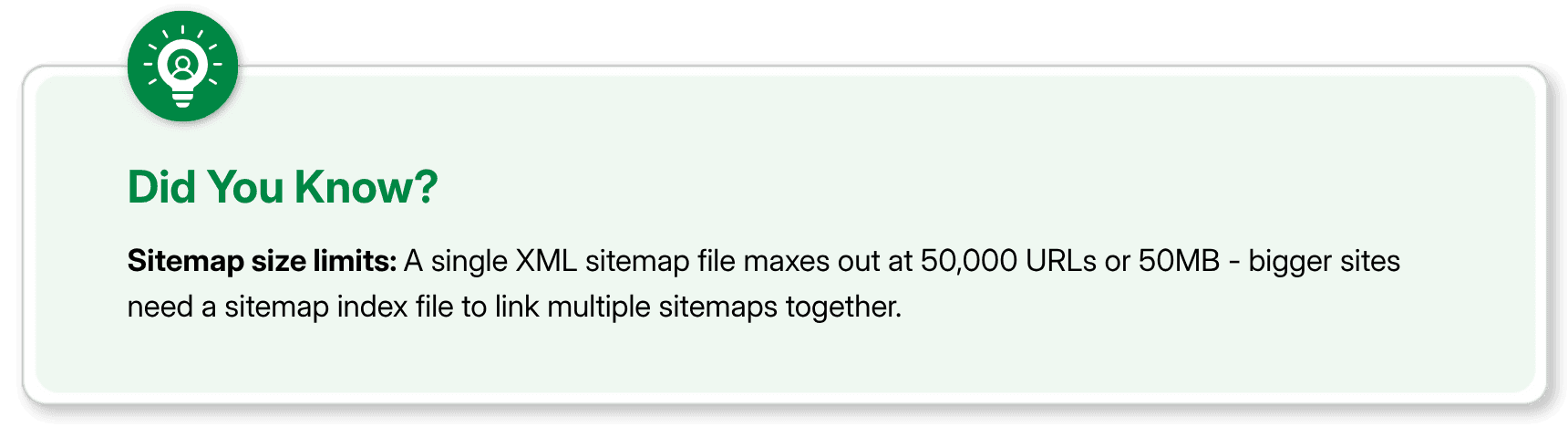
One limit worth knowing: a single XML sitemap file caps out at 50,000 URLs or 50 MB uncompressed. Past that, you need a sitemap index file, a sitemap of sitemaps, which most large-site platforms handle without you lifting a finger.
Types of Sitemaps You Should Know About
Not every sitemap is XML, and not every XML sitemap does the same job. Here's the breakdown:
Sitemap Type | Purpose | Who It's For |
|---|---|---|
XML Sitemap | Lists URLs for search engine crawlers | Every site with more than a handful of pages |
HTML Sitemap | A human-readable page listing site sections | Photography, e-commerce, visual-heavy sites |
Flags images for indexing in Google Images | Photography, e-commerce, visual-heavy sites | |
Surfaces video metadata (duration, thumbnail) | Sites hosting native video content | |
Fast-tracks fresh content for Google News | Publishers approved for Google News |
Most sites only need a standard XML sitemap plus, if relevant, an image sitemap. Don't overbuild this, a news sitemap on a site that isn't in Google News is just extra maintenance for zero benefit.

How Do Search Engines Use Sitemaps?
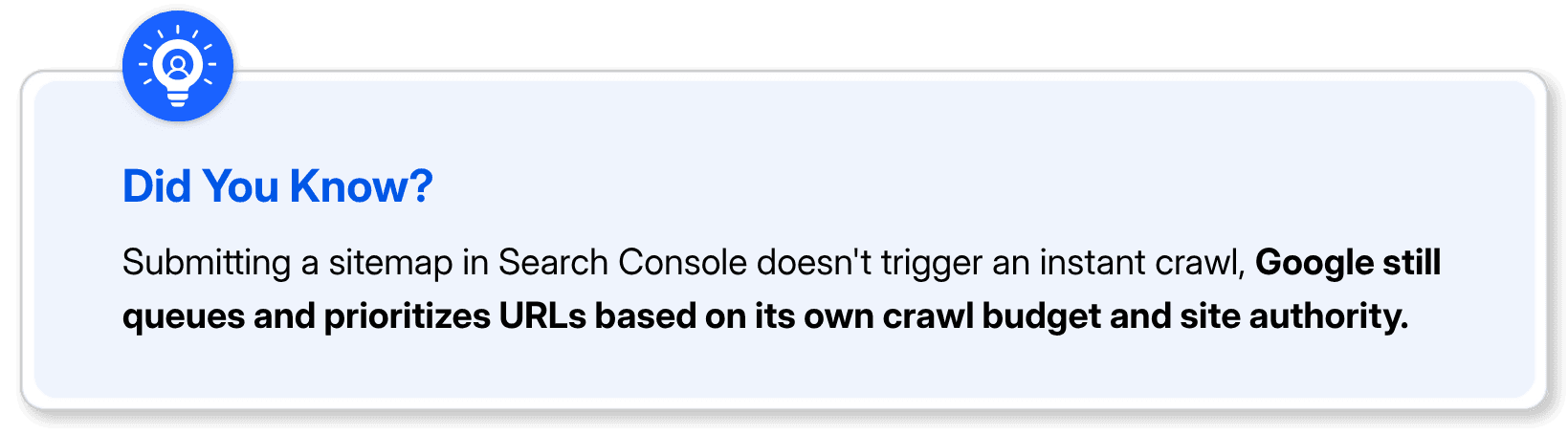
This is where a lot of confusion sets in, so let's be direct: a sitemap is a hint, not a command. Submitting a URL doesn't force Google to index it. What it does is tell crawlers where to look and signal that a URL is worth checking.
Here's what actually happens on the backend:
Discovery: Googlebot reads your sitemap and adds new or updated URLs to its crawl queue
Prioritization: Pages with recent lastmod dates tend to get revisited sooner
Crawling: The bot fetches the page and renders it
Indexing decision: Google evaluates content quality, duplication, and value before deciding whether to index it
Most guides stop at "submit your sitemap and you're done." That's not quite right. If your content is thin, duplicated, or blocked by a noindex tag or robots.txt rule, the sitemap won't override that. It just gets you noticed faster; what happens after is still on the page itself.
For sites publishing frequently, daily news, active blogs, and large product catalogs, a sitemap that updates automatically and reflects lastmod accurately is one of the more reliable ways to shrink the gap between publish and crawl.
How to Submit a Sitemap to Google (Step by Step)
You don't need to email anyone or wait in line. Submission takes about five minutes:
Confirm your sitemap is live: visit yoursite.com/sitemap.xml directly and check it loads without errors
Open Google Search Console and select your verified property
Go to Sitemaps in the left-hand menu (under Indexing)
Enter your sitemap URL: Just the path after your domain, like sitemap.xml or sitemap_index.xml
Click Submit
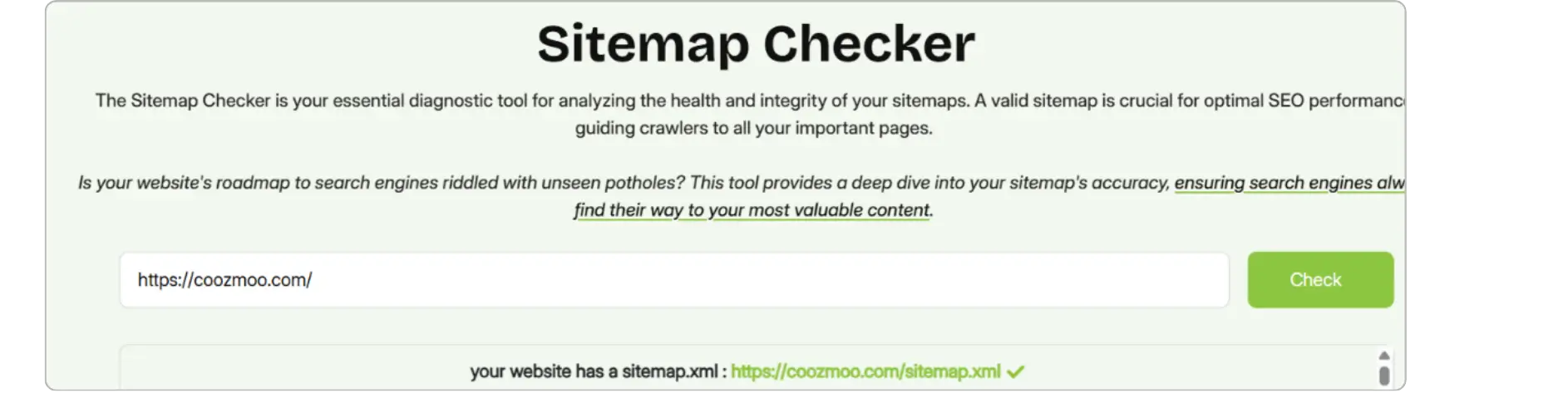
Step 1: Go to Sitemap checker: https://coozmoo.com/tools/site-map-checker
Step 2: Go to Google Search Console
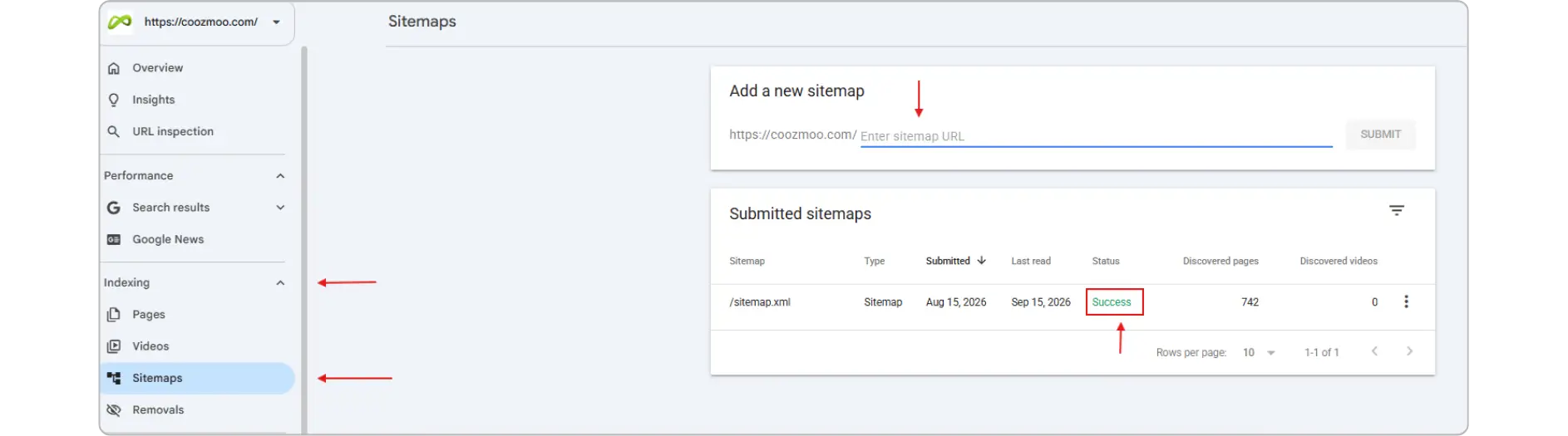
Google will show a status of "Success" once it's processed the file, along with a count of discovered URLs. If it shows an error, check for broken URLs, incorrect formatting, or a sitemap that's blocked in robots.txt, that last one trips up more people than you'd expect.
Worth noting: you can also reference your sitemap location directly inside your robots.txt file (Sitemap: https://yoursite.com/sitemap.xml).
This helps other crawlers, Bing, DuckDuckGo, and AI crawlers, find it even without a manual submission in their respective webmaster tools.
Final Thoughts
A sitemap isn't a ranking factor, and it won't fix bad content. What it does is remove friction between "I published this" and "a search engine noticed." For small sites with clean internal linking, that friction is minor. For anything larger or any site that publishes often, it's one of the cheapest, lowest-effort technical SEO wins available. Set it up once, keep it updating automatically, and stop thinking about it.
FAQs
Do I need a sitemap if my site is small?

Not strictly. If every page is reachable within a few clicks from your homepage and is internally linked, search engines will likely find everything anyway. A sitemap still helps, but it's less critical under roughly 50 pages.
Can a sitemap hurt my SEO?
Indirectly, yes, if it's poorly maintained. A sitemap full of broken URLs (404s), redirect chains, duplicate content, or pages you've deliberately blocked with noindex sends mixed signals to Google and wastes crawl budget and time the crawler spends on garbage instead of your actual priority pages. On very large sites, that wasted crawl budget can genuinely slow down how fast new, legitimate content gets discovered.
How often should I update my sitemap?
You shouldn't have to think about it, most CMS platforms regenerate the sitemap automatically whenever you publish or update content. If yours doesn't, that's a sign to switch tools or add a plugin.
Does submitting a sitemap guarantee indexing?
No. It guarantees discovery, not indexing. Google still evaluates each page for quality and duplication before deciding whether to index it.
What's the difference between an XML sitemap and robots.txt?
They serve opposite but complementary purposes. An XML sitemap is a "please look here" list, it points search engines toward URLs you want crawled and indexed. A robots.txt file is a "please don't look here" instruction; it tells crawlers which directories or URL patterns to skip entirely, like admin panels, internal search results, or duplicate parameter-based URLs. Used together correctly, robots.txt keeps crawlers away from low-value or sensitive areas of your site, while your sitemap directs their attention to what actually matters.
If you've ever published a page and then watched it sit unindexed for weeks, you already know the frustration. An XML sitemap is a file that lists every important URL on your site so search engines like Google and Bing can find, crawl, and index your pages faster - especially new pages, ones buried deep in your site structure, or pages with few internal links pointing to them. It won't guarantee rankings, but it removes discovery as the bottleneck.
Here's the thing: search engines don't magically know your new blog post exists the second you hit publish. They find pages by crawling links, and if a page is orphaned or new, it can take days or even months to show up organically. A sitemap short-circuits that wait.
What Is a Sitemap for A Website?
A sitemap is essentially a roadmap of your website handed directly to search engines. Instead of Googlebot wandering through your navigation menu hoping to stumble onto every page, your sitemap tells it: here's everything, here's when it was last updated, and here's roughly how it fits together.
Most sitemaps live at a predictable location, like yoursite.com/sitemap.xml, and are written in a machine-readable format search engines can parse instantly. For each URL, a sitemap can include:
Loc: the page's actual URL
Lastmod: when the page was last changed
Changefreq: how often the page tends to update (rarely used by Google anymore, but still valid)
Priority: a relative weighting between pages (also largely ignored by modern crawlers)
Small sites with solid internal linking can often manage without one. Large sites, e-commerce catalogs, and anything with pages that aren't well-linked internally need a sitemap. A sitemap isn't optional at that point; it's infrastructure.
Sitemapxml: The Format Search Engines Actually Read
When people search "sitemapxml," they're usually looking for the actual file format, not the concept. XML sitemap files follow a strict schema so crawlers can parse them without guesswork. A bare-bones entry looks like this:
<url>
  <loc>https://example.com/blog/xml-sitemaps</loc>
  <lastmod>2026-09-01</lastmod>
</url>
Wrap a batch of these inside <urlset> tags, save it as sitemap.xml, and you've got a valid file. Most CMS platforms (WordPress via Yoast or RankMath, Shopify, and Webflow) generate the sitemap automatically; you rarely need to hand-code it unless you're troubleshooting something odd.
One limit worth knowing: a single XML sitemap file caps out at 50,000 URLs or 50 MB uncompressed. Past that, you need a sitemap index file, a sitemap of sitemaps, which most large-site platforms handle without you lifting a finger.
Types of Sitemaps You Should Know About
Not every sitemap is XML, and not every XML sitemap does the same job. Here's the breakdown:
Sitemap Type | Purpose | Who It's For |
|---|---|---|
XML Sitemap | Lists URLs for search engine crawlers | Every site with more than a handful of pages |
HTML Sitemap | A human-readable page listing site sections | Photography, e-commerce, visual-heavy sites |
Flags images for indexing in Google Images | Photography, e-commerce, visual-heavy sites | |
Surfaces video metadata (duration, thumbnail) | Sites hosting native video content | |
Fast-tracks fresh content for Google News | Publishers approved for Google News |
Most sites only need a standard XML sitemap plus, if relevant, an image sitemap. Don't overbuild this, a news sitemap on a site that isn't in Google News is just extra maintenance for zero benefit.
How Do Search Engines Use Sitemaps?
This is where a lot of confusion sets in, so let's be direct: a sitemap is a hint, not a command. Submitting a URL doesn't force Google to index it. What it does is tell crawlers where to look and signal that a URL is worth checking.
Here's what actually happens on the backend:
Discovery: Googlebot reads your sitemap and adds new or updated URLs to its crawl queue
Prioritization: Pages with recent lastmod dates tend to get revisited sooner
Crawling: The bot fetches the page and renders it
Indexing decision: Google evaluates content quality, duplication, and value before deciding whether to index it
Most guides stop at "submit your sitemap and you're done." That's not quite right. If your content is thin, duplicated, or blocked by a noindex tag or robots.txt rule, the sitemap won't override that. It just gets you noticed faster; what happens after is still on the page itself.
For sites publishing frequently, daily news, active blogs, and large product catalogs, a sitemap that updates automatically and reflects lastmod accurately is one of the more reliable ways to shrink the gap between publish and crawl.
How to Submit a Sitemap to Google (Step by Step)
You don't need to email anyone or wait in line. Submission takes about five minutes:
Confirm your sitemap is live: visit yoursite.com/sitemap.xml directly and check it loads without errors
Open Google Search Console and select your verified property
Go to Sitemaps in the left-hand menu (under Indexing)
Enter your sitemap URL: Just the path after your domain, like sitemap.xml or sitemap_index.xml
Click Submit
Step 1: Go to Sitemap checker: https://coozmoo.com/tools/site-map-checker
Step 2: Go to Google Search Console
Google will show a status of "Success" once it's processed the file, along with a count of discovered URLs. If it shows an error, check for broken URLs, incorrect formatting, or a sitemap that's blocked in robots.txt, that last one trips up more people than you'd expect.
Worth noting: you can also reference your sitemap location directly inside your robots.txt file (Sitemap: https://yoursite.com/sitemap.xml).
This helps other crawlers, Bing, DuckDuckGo, and AI crawlers, find it even without a manual submission in their respective webmaster tools.
Final Thoughts
A sitemap isn't a ranking factor, and it won't fix bad content. What it does is remove friction between "I published this" and "a search engine noticed." For small sites with clean internal linking, that friction is minor. For anything larger or any site that publishes often, it's one of the cheapest, lowest-effort technical SEO wins available. Set it up once, keep it updating automatically, and stop thinking about it.
FAQs
Do I need a sitemap if my site is small?
Not strictly. If every page is reachable within a few clicks from your homepage and is internally linked, search engines will likely find everything anyway. A sitemap still helps, but it's less critical under roughly 50 pages.
Can a sitemap hurt my SEO?
Indirectly, yes, if it's poorly maintained. A sitemap full of broken URLs (404s), redirect chains, duplicate content, or pages you've deliberately blocked with noindex sends mixed signals to Google and wastes crawl budget and time the crawler spends on garbage instead of your actual priority pages. On very large sites, that wasted crawl budget can genuinely slow down how fast new, legitimate content gets discovered.
How often should I update my sitemap?
You shouldn't have to think about it, most CMS platforms regenerate the sitemap automatically whenever you publish or update content. If yours doesn't, that's a sign to switch tools or add a plugin.
Does submitting a sitemap guarantee indexing?
No. It guarantees discovery, not indexing. Google still evaluates each page for quality and duplication before deciding whether to index it.
What's the difference between an XML sitemap and robots.txt?
They serve opposite but complementary purposes. An XML sitemap is a "please look here" list, it points search engines toward URLs you want crawled and indexed. A robots.txt file is a "please don't look here" instruction; it tells crawlers which directories or URL patterns to skip entirely, like admin panels, internal search results, or duplicate parameter-based URLs. Used together correctly, robots.txt keeps crawlers away from low-value or sensitive areas of your site, while your sitemap directs their attention to what actually matters.
If you've ever published a page and then watched it sit unindexed for weeks, you already know the frustration. An XML sitemap is a file that lists every important URL on your site so search engines like Google and Bing can find, crawl, and index your pages faster - especially new pages, ones buried deep in your site structure, or pages with few internal links pointing to them. It won't guarantee rankings, but it removes discovery as the bottleneck.
Here's the thing: search engines don't magically know your new blog post exists the second you hit publish. They find pages by crawling links, and if a page is orphaned or new, it can take days or even months to show up organically. A sitemap short-circuits that wait.
What Is a Sitemap for A Website?
A sitemap is essentially a roadmap of your website handed directly to search engines. Instead of Googlebot wandering through your navigation menu hoping to stumble onto every page, your sitemap tells it: here's everything, here's when it was last updated, and here's roughly how it fits together.
Most sitemaps live at a predictable location, like yoursite.com/sitemap.xml, and are written in a machine-readable format search engines can parse instantly. For each URL, a sitemap can include:
Loc: the page's actual URL
Lastmod: when the page was last changed
Changefreq: how often the page tends to update (rarely used by Google anymore, but still valid)
Priority: a relative weighting between pages (also largely ignored by modern crawlers)
Small sites with solid internal linking can often manage without one. Large sites, e-commerce catalogs, and anything with pages that aren't well-linked internally need a sitemap. A sitemap isn't optional at that point; it's infrastructure.
Sitemapxml: The Format Search Engines Actually Read
When people search "sitemapxml," they're usually looking for the actual file format, not the concept. XML sitemap files follow a strict schema so crawlers can parse them without guesswork. A bare-bones entry looks like this:
<url>
  <loc>https://example.com/blog/xml-sitemaps</loc>
  <lastmod>2026-09-01</lastmod>
</url>
Wrap a batch of these inside <urlset> tags, save it as sitemap.xml, and you've got a valid file. Most CMS platforms (WordPress via Yoast or RankMath, Shopify, and Webflow) generate the sitemap automatically; you rarely need to hand-code it unless you're troubleshooting something odd.
One limit worth knowing: a single XML sitemap file caps out at 50,000 URLs or 50 MB uncompressed. Past that, you need a sitemap index file, a sitemap of sitemaps, which most large-site platforms handle without you lifting a finger.
Types of Sitemaps You Should Know About
Not every sitemap is XML, and not every XML sitemap does the same job. Here's the breakdown:
Sitemap Type | Purpose | Who It's For |
|---|---|---|
XML Sitemap | Lists URLs for search engine crawlers | Every site with more than a handful of pages |
HTML Sitemap | A human-readable page listing site sections | Photography, e-commerce, visual-heavy sites |
Flags images for indexing in Google Images | Photography, e-commerce, visual-heavy sites | |
Surfaces video metadata (duration, thumbnail) | Sites hosting native video content | |
Fast-tracks fresh content for Google News | Publishers approved for Google News |
Most sites only need a standard XML sitemap plus, if relevant, an image sitemap. Don't overbuild this, a news sitemap on a site that isn't in Google News is just extra maintenance for zero benefit.
How Do Search Engines Use Sitemaps?
This is where a lot of confusion sets in, so let's be direct: a sitemap is a hint, not a command. Submitting a URL doesn't force Google to index it. What it does is tell crawlers where to look and signal that a URL is worth checking.
Here's what actually happens on the backend:
Discovery: Googlebot reads your sitemap and adds new or updated URLs to its crawl queue
Prioritization: Pages with recent lastmod dates tend to get revisited sooner
Crawling: The bot fetches the page and renders it
Indexing decision: Google evaluates content quality, duplication, and value before deciding whether to index it
Most guides stop at "submit your sitemap and you're done." That's not quite right. If your content is thin, duplicated, or blocked by a noindex tag or robots.txt rule, the sitemap won't override that. It just gets you noticed faster; what happens after is still on the page itself.
For sites publishing frequently, daily news, active blogs, and large product catalogs, a sitemap that updates automatically and reflects lastmod accurately is one of the more reliable ways to shrink the gap between publish and crawl.
How to Submit a Sitemap to Google (Step by Step)
You don't need to email anyone or wait in line. Submission takes about five minutes:
Confirm your sitemap is live: visit yoursite.com/sitemap.xml directly and check it loads without errors
Open Google Search Console and select your verified property
Go to Sitemaps in the left-hand menu (under Indexing)
Enter your sitemap URL: Just the path after your domain, like sitemap.xml or sitemap_index.xml
Click Submit
Step 1: Go to Sitemap checker: https://coozmoo.com/tools/site-map-checker
Step 2: Go to Google Search Console
Google will show a status of "Success" once it's processed the file, along with a count of discovered URLs. If it shows an error, check for broken URLs, incorrect formatting, or a sitemap that's blocked in robots.txt, that last one trips up more people than you'd expect.
Worth noting: you can also reference your sitemap location directly inside your robots.txt file (Sitemap: https://yoursite.com/sitemap.xml).
This helps other crawlers, Bing, DuckDuckGo, and AI crawlers, find it even without a manual submission in their respective webmaster tools.
Final Thoughts
A sitemap isn't a ranking factor, and it won't fix bad content. What it does is remove friction between "I published this" and "a search engine noticed." For small sites with clean internal linking, that friction is minor. For anything larger or any site that publishes often, it's one of the cheapest, lowest-effort technical SEO wins available. Set it up once, keep it updating automatically, and stop thinking about it.
FAQs
Do I need a sitemap if my site is small?
Not strictly. If every page is reachable within a few clicks from your homepage and is internally linked, search engines will likely find everything anyway. A sitemap still helps, but it's less critical under roughly 50 pages.
Can a sitemap hurt my SEO?
Indirectly, yes, if it's poorly maintained. A sitemap full of broken URLs (404s), redirect chains, duplicate content, or pages you've deliberately blocked with noindex sends mixed signals to Google and wastes crawl budget and time the crawler spends on garbage instead of your actual priority pages. On very large sites, that wasted crawl budget can genuinely slow down how fast new, legitimate content gets discovered.
How often should I update my sitemap?
You shouldn't have to think about it, most CMS platforms regenerate the sitemap automatically whenever you publish or update content. If yours doesn't, that's a sign to switch tools or add a plugin.
Does submitting a sitemap guarantee indexing?
No. It guarantees discovery, not indexing. Google still evaluates each page for quality and duplication before deciding whether to index it.
What's the difference between an XML sitemap and robots.txt?
They serve opposite but complementary purposes. An XML sitemap is a "please look here" list, it points search engines toward URLs you want crawled and indexed. A robots.txt file is a "please don't look here" instruction; it tells crawlers which directories or URL patterns to skip entirely, like admin panels, internal search results, or duplicate parameter-based URLs. Used together correctly, robots.txt keeps crawlers away from low-value or sensitive areas of your site, while your sitemap directs their attention to what actually matters.



Summarize with AI



Want to Skyrocket Revenue? Get a Free Audit Today!
Want to Skyrocket Revenue? Get a Free Audit Today!



4.9/5 Ratings!


Don’t miss our revenue growth tips!
Get expert marketing tips—straight to your inbox, like thousands of happy clients.
Don’t miss our revenue growth tips!
Get expert marketing tips—straight to your inbox, like thousands of happy clients.
Don’t miss our revenue growth tips!
Don’t miss our revenue growth tips!
Get expert marketing tips—straight to your inbox, like thousands of happy clients.
Relevant Blogs on Organic SEO
Relevant Blogs on Organic SEO
Unlock data-driven insights in Organic SEO—explore our featured blogs and skyrocket your revenue before your competitors do.
Unlock data-driven insights in Organic SEO—explore our featured blogs and skyrocket your revenue before your competitors do.

SEO
Sep 21, 2026
5 Min Read
Audience-First SEO: How to Rank by Putting Readers First
SEO
Sep 21, 2026
5 Min Read
Audience-First SEO: How to Rank by Putting Readers First
SEO
Sep 21, 2026
5 Min Read
Audience-First SEO: How to Rank by Putting Readers First

SEO
Sep 19, 2026
5 Min Read
How to Add SEO Keywords to Your Website: Where and How
SEO
Sep 19, 2026
5 Min Read
How to Add SEO Keywords to Your Website: Where and How
SEO
Sep 19, 2026
5 Min Read
How to Add SEO Keywords to Your Website: Where and How

SEO
Sep 14, 2026
8 Min Read
15 SEO KPIs to measure organic & AI search performance
SEO
Sep 14, 2026
8 Min Read
15 SEO KPIs to measure organic & AI search performance
SEO
Sep 14, 2026
8 Min Read
15 SEO KPIs to measure organic & AI search performance




































Ready to speak with an expert?
Data-Driven Marketing Agency That Elevates ROI
1100+
Websites Designed & Optimized to Convert
$280M+
Client Revenue Driven & Growing Strong
Discover how to skyrocket
your revenue today!
Trusted by 1000+ Owners!
Ready to speak with an expert?
Data-Driven Marketing Agency That Elevates ROI
1100+
Websites Designed & Optimized to Convert
$280M+
Client Revenue Driven & Growing Strong
Discover how to skyrocket
your revenue today!
Trusted by 1000+ Owners!
Want to skyrocket revenue?
4.9/5 Ratings!
Ready to speak with an expert?
Data-Driven Marketing Agency That Elevates ROI
1100+
Websites Designed & Optimized to Convert
$280M+
Client Revenue Driven & Growing Strong
Discover how to skyrocket
your revenue today!
Trusted by 1000+ Owners!
Call
Meet