
Mobile-First Design: Why it’s Essential for Modern Web Success?
Mobile-First Design: Why it’s Essential for Modern Web Success?
Mobile-First Design
Mobile-First Design
Mobile-First Design
Mobile-first design is a web development and UX approach that focuses on creating an optimal experience for mobile devices first, before scaling it for larger screens.
Mobile-first design is a web development and UX approach that focuses on creating an optimal experience for mobile devices first, before scaling it for larger screens.

Table of Content

Turn Mobile Visitors into Buyers with a Fast Mobile-First Website



4.9/5 Ratings!

Megha Gehlot
Megha Gehlot
8 Min Read
8 Min Read
Oct 8, 2025
Oct 8, 2025
What is Mobile-First Design?
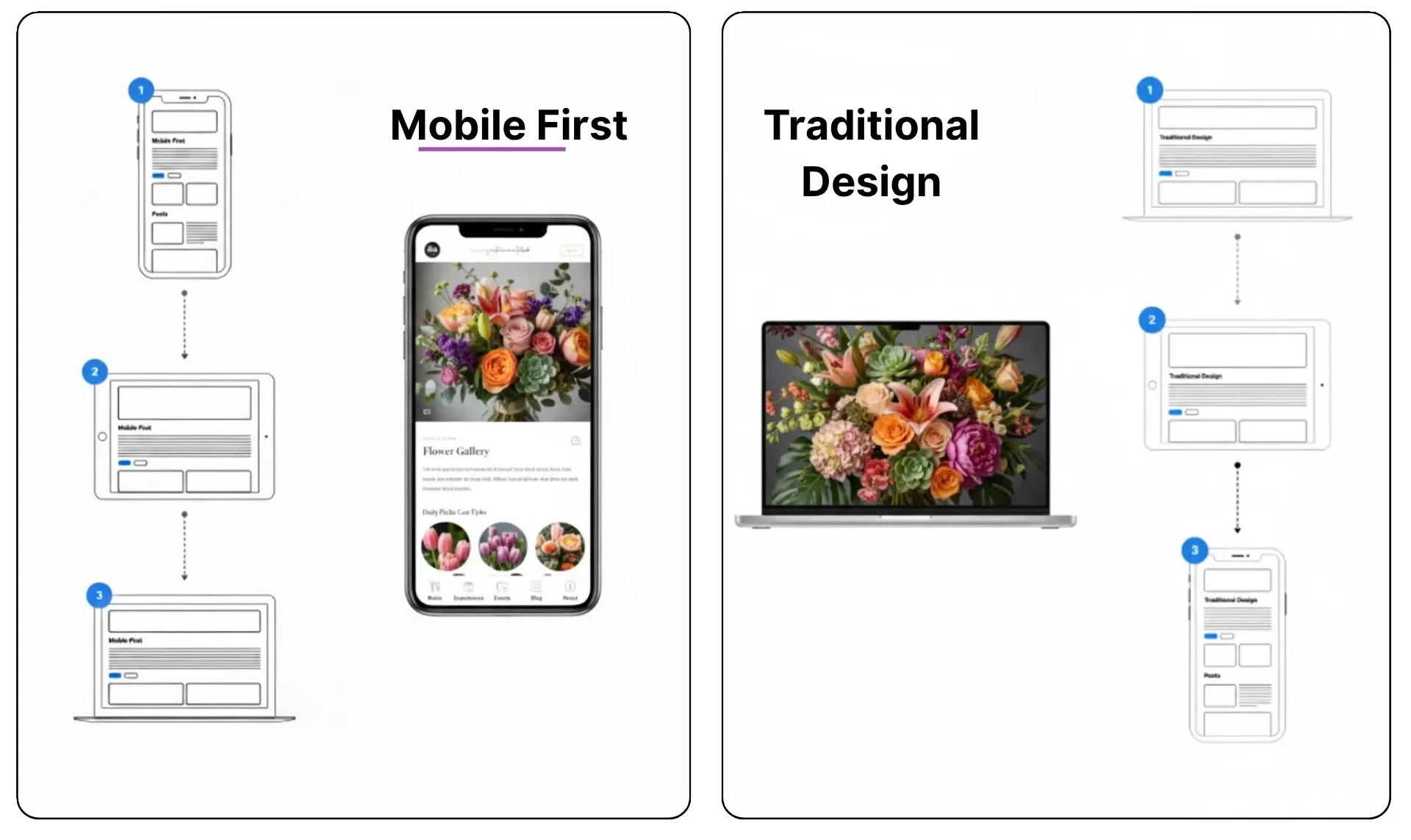
Mobile-first approach is a process where web designers and developers start designing with the smallest screen in mind, i.e., smartphones, and then scale up to larger screens like tablets and desktops. This process enables basic content and functionality to be implemented for mobile users first and then have additions for larger screens.
Mobile-first approach is a process where web designers and developers start designing with the smallest screen in mind, i.e., smartphones, and then scale up to larger screens like tablets and desktops. This process enables basic content and functionality to be implemented for mobile users first and then have additions for larger screens.
Why Mobile-First Matters?
•
•
User Behavior: Most users browse, buy, and interact with sites on mobile.
User Behavior: Most users browse, buy, and interact with sites on mobile.
•
•
Benefits of SEO: Google is using mobile-first indexing, thus it indexes and ranks predominantly from the mobile version of your website.
Benefits of SEO: Google is using mobile-first indexing, thus it indexes and ranks predominantly from the mobile version of your website.
•
•
Performance: Mobile-first sites are faster and more efficient, optimizing user experience and reducing bounce rates.
Performance: Mobile-first sites are faster and more efficient, optimizing user experience and reducing bounce rates.
Key Principles of Mobile-First Design
Strategy
Strategy
Strategy
Strategy
Description
Description
Description
Description
Prioritize Content
Prioritize Content
Prioritize Content
Start by identifying the most critical content and functionality customers need on mobile. Eliminate everything extraneous and focus on clarity and usability.
Start by identifying the most critical content and functionality customers need on mobile. Eliminate everything extraneous and focus on clarity and usability.
Start by identifying the most critical content and functionality customers need on mobile. Eliminate everything extraneous and focus on clarity and usability.
Responsive Layouts
Responsive Layouts
Responsive Layouts
Use fluid grids and media queries to enable your design to adapt automatically on devices.
Use fluid grids and media queries to enable your design to adapt automatically on devices.
Use fluid grids and media queries to enable your design to adapt automatically on devices.
Touch-Friendly UI
Touch-Friendly UI
Touch-Friendly UI
Design buttons, menus, and interactive elements with touch in mind.
Design buttons, menus, and interactive elements with touch in mind.
Design buttons, menus, and interactive elements with touch in mind.
Optimize Performance
Optimize Performance
Optimize Performance
Use small file sizes, compressed images, and cut scripts to enable fast loading.
Use small file sizes, compressed images, and cut scripts to enable fast loading.
Use small file sizes, compressed images, and cut scripts to enable fast loading.
Progressive Enhancement
Progressive Enhancement
Progressive Enhancement
Once the mobile one is stable, enhance the layout for larger screens.
Once the mobile one is stable, enhance the layout for larger screens.
Once the mobile one is stable, enhance the layout for larger screens.
Common Mistakes to Avoid
•
•
Overloading Mobile Pages: Too much content or too much media can slow down mobile performance.
Overloading Mobile Pages: Too much content or too much media can slow down mobile performance.
•
•
Ignoring Testing: Test always on a variety of devices and screen sizes to catch usability issues.
Ignoring Testing: Test always on a variety of devices and screen sizes to catch usability issues.
•
•
Ignoring Accessibility: Make your mobile design accessible to everyone, not just individuals with disabilities.
Ignoring Accessibility: Make your mobile design accessible to everyone, not just individuals with disabilities.
Real-World Example
Think about how Airbnb uses mobile-first design. Its mobile site loads quickly, is easy to navigate, and prioritizes required information like search and booking. The desktop site continues this with added images and features.
Think about how Airbnb uses mobile-first design. Its mobile site loads quickly, is easy to navigate, and prioritizes required information like search and booking. The desktop site continues this with added images and features.
Mobile-First Indexing and SEO
Google's mobile-first indexing ensures that your mobile website is the main version utilized for ranking and indexing. Poorly optimized mobile site can affect your visibility in search results negatively. With a mobile-first design, your site will comply with what Google expects and increase your rank probability.
In addition, mobile-friendly websites also have lower bounce rates and higher engagement that benefit search engines. Quick load times, readable text, and navigable menus on hand-held devices make a positive impression on SEO performance.
Google's mobile-first indexing ensures that your mobile website is the main version utilized for ranking and indexing. Poorly optimized mobile site can affect your visibility in search results negatively. With a mobile-first design, your site will comply with what Google expects and increase your rank probability.
In addition, mobile-friendly websites also have lower bounce rates and higher engagement that benefit search engines. Quick load times, readable text, and navigable menus on hand-held devices make a positive impression on SEO performance.

Companies like Spotify and Amazon have embraced mobile-first design to improve user experience. Amazon's mobile site is designed for immediate purchases, and Spotify's app-like experience on mobile browsers allows for seamless navigation and media playback. These examples demonstrate how mobile-first design has a direct impact on user satisfaction and business success
Companies like Spotify and Amazon have embraced mobile-first design to improve user experience. Amazon's mobile site is designed for immediate purchases, and Spotify's app-like experience on mobile browsers allows for seamless navigation and media playback. These examples demonstrate how mobile-first design has a direct impact on user satisfaction and business success
Tools and Frameworks for Mobile-First Design
Numerous tools and frameworks enable mobile-first design. Bootstrap is a widely used front-end framework that incorporates a mobile-first grid system and responsive utilities. Figma and Adobe XD enable designers to prototype mobile-first interfaces with ease. Google's Lighthouse tool can test your site's mobile performance and give actionable recommendations.
Numerous tools and frameworks enable mobile-first design. Bootstrap is a widely used front-end framework that incorporates a mobile-first grid system and responsive utilities. Figma and Adobe XD enable designers to prototype mobile-first interfaces with ease. Google's Lighthouse tool can test your site's mobile performance and give actionable recommendations.
Final Thoughts
Mobile-first design isn't just about making your site work on smaller displays; it's about completely changing how people use your site. In today's world, where most people use their phones, designing for mobile first makes sure that most of your visitors have quick, easy, and fun experiences on your site.
Starting with mobile puts clarity, performance, and accessibility first, all of which make users happier and lead to more conversions. It also fits with Google's mobile-first indexing, which means that your mobile site has a direct effect on your search engine rankings. A mobile experience that is well-optimized will have reduced bounce rates, more engagement, and better SEO results.
If you want to be ready for the future, you need to think about mobile-first design when you're establishing a new site or updating an old one. When designing a website, you should always think about how it will look and work on mobile devices first, and then make it better for larger screens.
Mobile-first design isn't just about making your site work on smaller displays; it's about completely changing how people use your site. In today's world, where most people use their phones, designing for mobile first makes sure that most of your visitors have quick, easy, and fun experiences on your site.
Starting with mobile puts clarity, performance, and accessibility first, all of which make users happier and lead to more conversions. It also fits with Google's mobile-first indexing, which means that your mobile site has a direct effect on your search engine rankings. A mobile experience that is well-optimized will have reduced bounce rates, more engagement, and better SEO results.
If you want to be ready for the future, you need to think about mobile-first design when you're establishing a new site or updating an old one. When designing a website, you should always think about how it will look and work on mobile devices first, and then make it better for larger screens.
Frequently Asked Questions (FAQs)
Frequently Asked Questions
How does mobile-first designs impact conversion rates and sales?

Mobile-first websites reduce friction in the user journey, meaning customers can easily scroll, click, and complete actions such as purchasing or filling out forms. Faster load times and cleaner layouts significantly boost conversion rates. Many brands report up to two to three times higher conversions after optimizing for mobile-first.
How does mobile-first designs reduce bounce rates?
When pages load quickly, buttons are easy to tap, menus are well-structured, and content is easy to read, users stay longer. Slow-loading or poorly formatted mobile pages are one of the top reasons for high bounce rates.
How does mobile-first designs help improve SEO performance?
Mobile-first design improves page loading speed, enhances readability, reduces layout shifts, and ensures consistent usability—all factors tied to Google’s Core Web Vitals. Since Google uses mobile-first indexing, a mobile-optimized site ranks higher, gains more organic traffic, and provides a better user experience across devices.
What tools are most helpful when building mobile-first websites?
Top tools include:
Google Lighthouse (mobile performance audits)
Bootstrap or Tailwind CSS (mobile-first responsive frameworks)
Figma and Adobe XD (mobile prototyping)
Chrome DevTools (device emulation)
PageSpeed Insights (performance metrics)
These tools streamline everything from wireframes to final optimization.
Can a mobile-first design improve customer retention?
Yes. When users experience faster load times, intuitive navigation, and easy access to information on mobile, they are more likely to revisit your website. Customer retention improves significantly when the mobile user journey is smooth and frustration-free.
How does designing for mobile first help highlight essential website features?
By starting with limited screen space, mobile-first forces designers to prioritize:
Core content
Essential services
Key CTAs
This eliminates unnecessary clutter and ensures users see what’s most important without distractions.
How does mobile-first designs affect website analytics and tracking?
Mobile-first design helps reduce inconsistent layouts and script issues across devices, creating cleaner tracking data. It allows for more accurate measurement of mobile user behavior, heat maps, and conversion paths—which improves UX and marketing decisions.
How does mobile-first designs impact conversion rates and sales?
Mobile-first websites reduce friction in the user journey, meaning customers can easily scroll, click, and complete actions such as purchasing or filling out forms. Faster load times and cleaner layouts significantly boost conversion rates. Many brands report up to two to three times higher conversions after optimizing for mobile-first.
How does mobile-first designs reduce bounce rates?
When pages load quickly, buttons are easy to tap, menus are well-structured, and content is easy to read, users stay longer. Slow-loading or poorly formatted mobile pages are one of the top reasons for high bounce rates.
How does mobile-first designs help improve SEO performance?
Mobile-first design improves page loading speed, enhances readability, reduces layout shifts, and ensures consistent usability—all factors tied to Google’s Core Web Vitals. Since Google uses mobile-first indexing, a mobile-optimized site ranks higher, gains more organic traffic, and provides a better user experience across devices.
What tools are most helpful when building mobile-first websites?
Top tools include:
Google Lighthouse (mobile performance audits)
Bootstrap or Tailwind CSS (mobile-first responsive frameworks)
Figma and Adobe XD (mobile prototyping)
Chrome DevTools (device emulation)
PageSpeed Insights (performance metrics)
These tools streamline everything from wireframes to final optimization.
Can a mobile-first design improve customer retention?
Yes. When users experience faster load times, intuitive navigation, and easy access to information on mobile, they are more likely to revisit your website. Customer retention improves significantly when the mobile user journey is smooth and frustration-free.
How does designing for mobile first help highlight essential website features?
By starting with limited screen space, mobile-first forces designers to prioritize:
Core content
Essential services
Key CTAs
This eliminates unnecessary clutter and ensures users see what’s most important without distractions.
How does mobile-first designs affect website analytics and tracking?
Mobile-first design helps reduce inconsistent layouts and script issues across devices, creating cleaner tracking data. It allows for more accurate measurement of mobile user behavior, heat maps, and conversion paths—which improves UX and marketing decisions.
Turn Mobile Visitors into Buyers with a Fast Mobile-First Website
Turn Mobile Visitors into Buyers with a Fast Mobile-First Website
Keep your site fast, smooth, and mobile-friendly to boost UX and rankings.
Keep your site fast, smooth, and mobile-friendly to boost UX and rankings.
Keep your site fast, smooth, and mobile-friendly to boost UX and rankings.
4.9/5 Ratings!
Share this article

Related Resources
Latest Blogs






Don’t miss our revenue growth tips!
Don’t miss our revenue growth tips!
Get expert marketing tips—straight to your inbox, like thousands of happy clients.
Get expert marketing tips—straight to your inbox, like thousands of happy clients.
Latest Blogs




































Ready to speak with an expert?
Data-Driven Marketing Agency That Elevates ROI
1100+
Websites Designed & Optimized to Convert
$280M+
Client Revenue Driven & Growing Strong
Discover how to skyrocket
your revenue today!
Trusted by 1000+ Owners!
Ready to speak with an expert?
Data-Driven Marketing Agency That Elevates ROI
1100+
Websites Designed & Optimized to Convert
$280M+
Client Revenue Driven & Growing Strong
Discover how to skyrocket
your revenue today!
Trusted by 1000+ Owners!
Want to skyrocket revenue?
4.9/5 Ratings!
Ready to speak with an expert?
Data-Driven Marketing Agency That Elevates ROI
1100+
Websites Designed & Optimized to Convert
$280M+
Client Revenue Driven & Growing Strong
Discover how to skyrocket
your revenue today!
Trusted by 1000+ Owners!
Call
Meet