Google Indexing: From Crawling To Ranking (Needed SEO Fixes)
Google Indexing: From Crawling To Ranking (Needed SEO Fixes)
Google Indexing
Google Indexing
Google Indexing
Indexing is the process where Google stores and organizes web pages it has discovered through crawling. It’s like adding pages to a huge online library so Google can quickly find and show them when someone searches for related information.
Indexing is the process where Google stores and organizes web pages it has discovered through crawling. It’s like adding pages to a huge online library so Google can quickly find and show them when someone searches for related information.


Table of Content

Make Sure Every Important Page on Your Site Gets Indexed and Ranked.


4.9/5 Ratings!

Nimisha G.
Nimisha G.
5 Min Read
5 Min
Oct 30, 2025
Oct 30, 2025
When it comes to SEO, you often hear about keywords, backlinks, and content quality — but there’s one fundamental concept that makes all of that possible: Indexing. Without proper indexing, your website’s pages won’t appear in Google’s search results, no matter how well-optimized they are. So, what exactly is indexing? Why is it so important? And how can you make sure your site gets indexed quickly and correctly?
In this blog, we’ll answer these questions and share practical tips to help you improve your website’s indexing and visibility.
When it comes to SEO, you often hear about keywords, backlinks, and content quality — but there’s one fundamental concept that makes all of that possible: Indexing. Without proper indexing, your website’s pages won’t appear in Google’s search results, no matter how well-optimized they are. So, what exactly is indexing? Why is it so important? And how can you make sure your site gets indexed quickly and correctly?
In this blog, we’ll answer these questions and share practical tips to help you improve your website’s indexing and visibility.
What Does the Google Index Do?
Think of the internet as a huge library that never ends. The Google Index is like the main list of books at a library. Google's strong computers keep a huge database that has a duplicate of every webpage (or the best version of it) that Google has located and thinks is good enough to show in search results.
When you type something into Google, it doesn't search the whole internet. Instead, it quickly finds the right pages in this super-fast, pre-sorted index and shows you the results. Searchers can't see your page if it's not in the Index. That's all there is to it!
Think of the internet as a huge library that never ends. The Google Index is like the main list of books at a library. Google's strong computers keep a huge database that has a duplicate of every webpage (or the best version of it) that Google has located and thinks is good enough to show in search results.
When you type something into Google, it doesn't search the whole internet. Instead, it quickly finds the right pages in this super-fast, pre-sorted index and shows you the results. Searchers can't see your page if it's not in the Index. That's all there is to it!
Difference Between Crawling, Indexing & Ranking
Phase
Phase
Phase
Description
Description
Description
Crawling (The Discovery Phase)
Crawling (The Discovery Phase)
Crawling (The Discovery Phase)
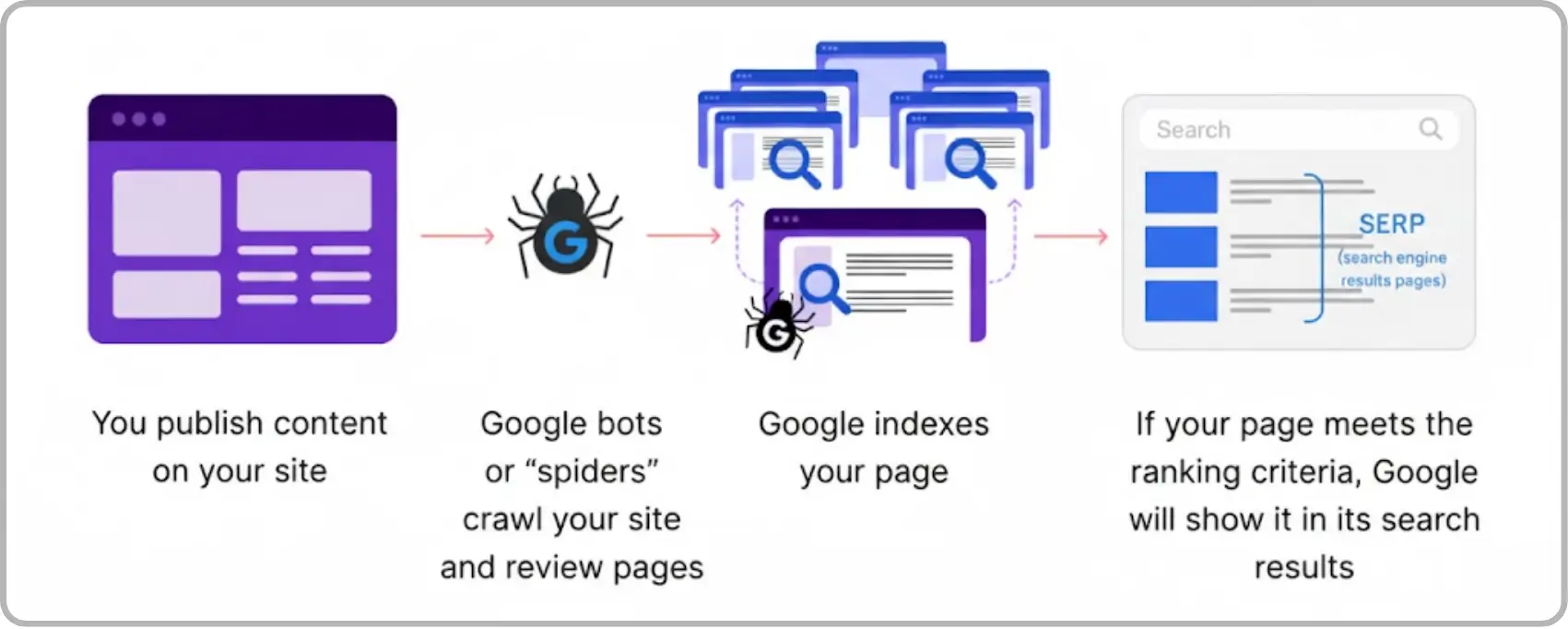
This is when Google's robots, which are also known as crawlers or bots, move about on the internet. They begin with a list of known URLs and move from page to page by following links, like a spider spinning a web. They want to find new pages and modifications to pages that are already there.
This is when Google's robots, which are also known as crawlers or bots, move about on the internet. They begin with a list of known URLs and move from page to page by following links, like a spider spinning a web. They want to find new pages and modifications to pages that are already there.
This is when Google's robots, which are also known as crawlers or bots, move about on the internet. They begin with a list of known URLs and move from page to page by following links, like a spider spinning a web. They want to find new pages and modifications to pages that are already there.
Indexing (The Filing Phase)
Indexing (The Filing Phase)
Indexing (The Filing Phase)
After a crawler finds a page, it sends the content back to Google's computers. Indexing is when Google looks at the text, images, and links on a page, figures out what it's about, and then puts it in the huge Google Index. To put it simply, crawling is the process of discovering a book, and indexing is the process of putting it in a catalog so that people can find it on the shelves.
After a crawler finds a page, it sends the content back to Google's computers. Indexing is when Google looks at the text, images, and links on a page, figures out what it's about, and then puts it in the huge Google Index. To put it simply, crawling is the process of discovering a book, and indexing is the process of putting it in a catalog so that people can find it on the shelves.
After a crawler finds a page, it sends the content back to Google's computers. Indexing is when Google looks at the text, images, and links on a page, figures out what it's about, and then puts it in the huge Google Index. To put it simply, crawling is the process of discovering a book, and indexing is the process of putting it in a catalog so that people can find it on the shelves.
Ranking
Ranking
Ranking
Ordering the indexed pages based on relevance and quality for a given search query.
Ordering the indexed pages based on relevance and quality for a given search query.
Ordering the indexed pages based on relevance and quality for a given search query.
All three are interconnected, but indexing is the critical middle step that allows pages to appear in search results.
All three are interconnected, but indexing is the critical middle step that allows pages to appear in search results.
How Long does Indexing Take?
Indexing time varies based on several factors:
Site Authority: Established, trusted sites get crawled and indexed faster.
Frequency of Updates: Sites updated regularly tend to get crawled more often.
Content Quality: High-quality pages are prioritized.
Technical Setup: Proper sitemaps, internal links, and crawlability speed up indexing.
Typically, new pages can take anywhere from a few hours to several days to get indexed.
Indexing time varies based on several factors:
Site Authority: Established, trusted sites get crawled and indexed faster.
Frequency of Updates: Sites updated regularly tend to get crawled more often.
Content Quality: High-quality pages are prioritized.
Technical Setup: Proper sitemaps, internal links, and crawlability speed up indexing.
Typically, new pages can take anywhere from a few hours to several days to get indexed.
Role of Search Engine Bots/Crawlers (Googlebot, etc)
These bots, such as Googlebot (Google's official crawler), are programs that crawl the web on their own. Their job is very important:
• They are always looking for new or updated content on the web.
• They get the code for your page.
• They tell you what they found.
You create rules for them in a file called robots.txt that tell them which portions of your site they should and shouldn't look at.
These bots, such as Googlebot (Google's official crawler), are programs that crawl the web on their own. Their job is very important:
• They are always looking for new or updated content on the web.
• They get the code for your page.
• They tell you what they found.
You create rules for them in a file called robots.txt that tell them which portions of your site they should and shouldn't look at.
Why is Indexing Important for SEO?
The most important step for SEO is indexing. Your page can't rank if it isn't indexed.
You could have the best, most useful material in the world, but if Google hasn't indexed it, it won't show up in any search results. When your page gets indexed, it signifies that it is now officially in the running for a spot on the search engine results page (SERP).
The most important step for SEO is indexing. Your page can't rank if it isn't indexed.
You could have the best, most useful material in the world, but if Google hasn't indexed it, it won't show up in any search results. When your page gets indexed, it signifies that it is now officially in the running for a spot on the search engine results page (SERP).

How to Check Indexing Status?
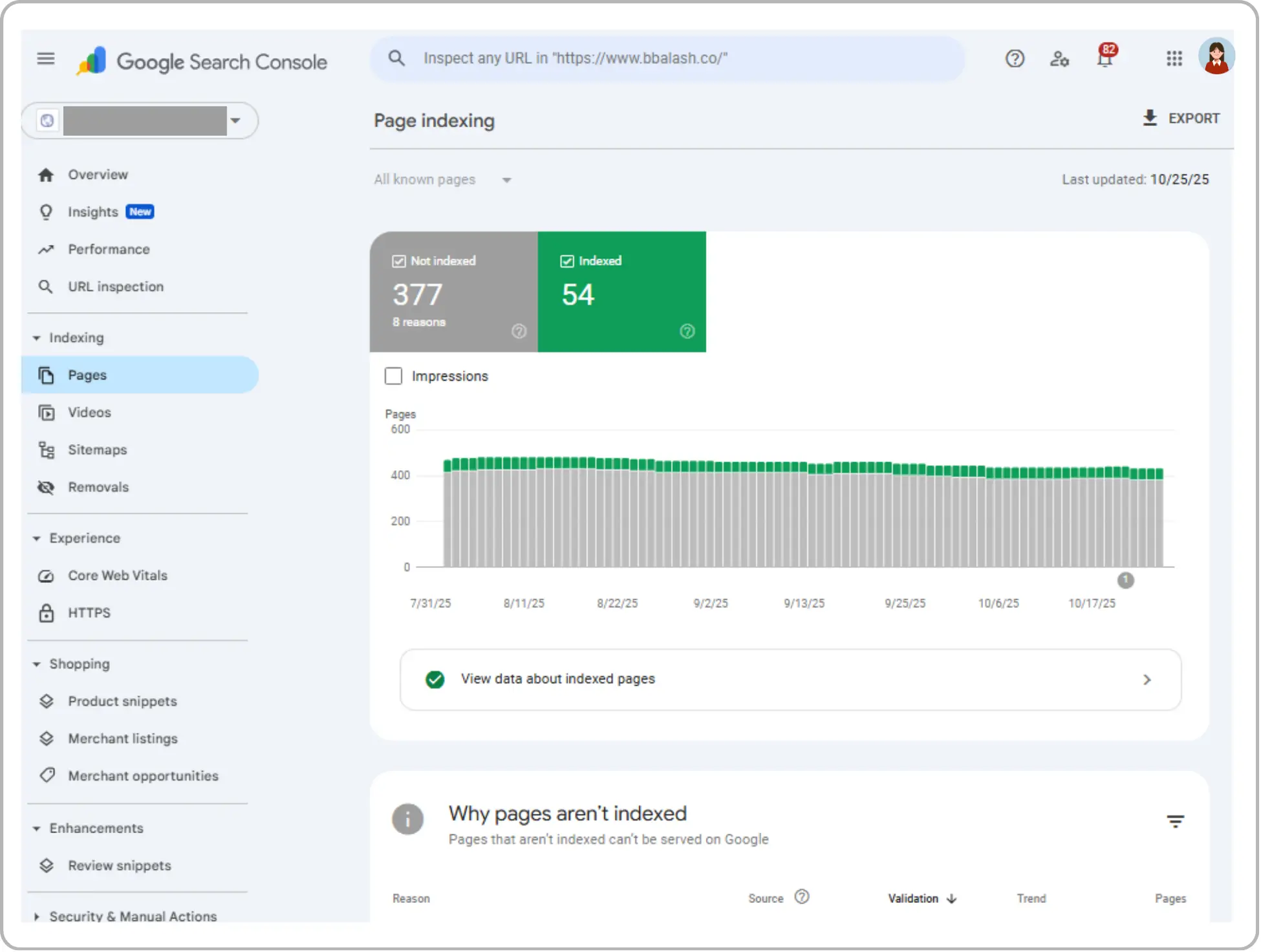
Using Google Search Console (GSC) is the easiest and most reliable approach to find out if a page is in the Google Index.
1. GSC's URL Inspection Tool: Simply copy and paste the whole URL of your page into the URL Inspection bar at the top of GSC. If the URL is "on Google," Google will tell you and explain why. If it's "not on Google," it will inform you.
2. The site: Operator: To see all the pages on your site that are indexed, type site:yourdomain.com into Google Search. To check a single page, type site:yourdomain.com/specific-page-url. If the page shows up, it's in the index.
Using Google Search Console (GSC) is the easiest and most reliable approach to find out if a page is in the Google Index.
1. GSC's URL Inspection Tool: Simply copy and paste the whole URL of your page into the URL Inspection bar at the top of GSC. If the URL is "on Google," Google will tell you and explain why. If it's "not on Google," it will inform you.
2. The site: Operator: To see all the pages on your site that are indexed, type site:yourdomain.com into Google Search. To check a single page, type site:yourdomain.com/specific-page-url. If the page shows up, it's in the index.
How to Ensure Your Pages are Indexed?
You want to make it as easy as possible for the crawler to do its job:
1. Send in a sitemap. A sitemap is a list of all the pages on your site that you want Google to know about. If you send this to Google Search Console, the bots will have a straight path to follow.
2. Internal Linking: Make sure that other pages on your site link to all of your important pages. These links help crawlers find fresh content.
3. No noindex Tags: Make sure you didn't use a "noindex" tag by mistake in your page code. This tag notifies search engines not to index the page.
4. Good material: Google gives priority to crawling and indexing pages that have original, useful material that people want to read.
You want to make it as easy as possible for the crawler to do its job:
1. Send in a sitemap. A sitemap is a list of all the pages on your site that you want Google to know about. If you send this to Google Search Console, the bots will have a straight path to follow.
2. Internal Linking: Make sure that other pages on your site link to all of your important pages. These links help crawlers find fresh content.
3. No noindex Tags: Make sure you didn't use a "noindex" tag by mistake in your page code. This tag notifies search engines not to index the page.
4. Good material: Google gives priority to crawling and indexing pages that have original, useful material that people want to read.
Final Thoughts
Indexing is the foundation of SEO. Without proper indexing, none of your SEO efforts can yield results in search rankings. By regularly monitoring your site’s indexing status, fixing issues, and following best practices, you ensure that your content is discovered and ranked by Google.
Whether you're managing an established website or launching a new one, understanding and optimizing for indexing is essential to your online success.
Indexing is the foundation of SEO. Without proper indexing, none of your SEO efforts can yield results in search rankings. By regularly monitoring your site’s indexing status, fixing issues, and following best practices, you ensure that your content is discovered and ranked by Google.
Whether you're managing an established website or launching a new one, understanding and optimizing for indexing is essential to your online success.
Frequently Asked Questions (FAQs)
Frequently Asked Questions
How can I tell if Google has crawled my website but not indexed it yet?

Use the URL Inspection Tool in Google Search Console.
You’ll see:
When Google last crawled the page
Whether it found the page eligible for indexing
Any reasons why it wasn’t indexed
This helps identify issues like noindex tags, blocked resources, or quality problems.
Does updating old content help it get re-indexed faster?
Absolutely.
Adding fresh information, improving readability, updating metadata, or enhancing visuals signals Google that the page has renewed value.
Updated pages often get recrawled and re-indexed faster than brand-new ones.
Do all websites need a sitemap for indexing?
Small sites with excellent internal linking may get indexed without one.
However, a sitemap:
Helps Google find pages faster
Highlights the most important URLs
Ensures large, new, or complex sites are fully discovered.
Google strongly recommends sitemaps for optimal indexing.
How often should I check my site’s indexing status?
For active or growing sites, check indexing weekly or bi-weekly.
For established sites, a monthly review is enough.
Regular monitoring helps detect issues such as sudden deindexing or crawl errors.
What is crawl budget and how do I optimize it?
Crawl budget is essentially how many pages Googlebot is willing to crawl in a given timeframe.
Optimize by:
Removing duplicate/thin pages
Fixing broken links
Compressing large images and scripts
Avoiding endless URL parameters (filters, pagination loops)
A healthier site gets crawled more efficiently.
Does switching hosting providers affect crawling and indexing?
Yes.
If your new server is faster, more stable, and closer to your primary audience, crawling can improve.
But downtime or misconfigured hosting can temporarily halt crawling.
Does blocking pages in robots.txt help with crawl budget?
Yes, but only if done correctly.
Blocking unnecessary pages (admin pages, filter URLs, internal search pages) helps Google focus on your important content.
However, blocking valuable pages can stop them from ever being indexed.
How can I tell if Google has crawled my website but not indexed it yet?
Use the URL Inspection Tool in Google Search Console.
You’ll see:
When Google last crawled the page
Whether it found the page eligible for indexing
Any reasons why it wasn’t indexed
This helps identify issues like noindex tags, blocked resources, or quality problems.
Does updating old content help it get re-indexed faster?
Absolutely.
Adding fresh information, improving readability, updating metadata, or enhancing visuals signals Google that the page has renewed value.
Updated pages often get recrawled and re-indexed faster than brand-new ones.
Do all websites need a sitemap for indexing?
Small sites with excellent internal linking may get indexed without one.
However, a sitemap:
Helps Google find pages faster
Highlights the most important URLs
Ensures large, new, or complex sites are fully discovered.
Google strongly recommends sitemaps for optimal indexing.
How often should I check my site’s indexing status?
For active or growing sites, check indexing weekly or bi-weekly.
For established sites, a monthly review is enough.
Regular monitoring helps detect issues such as sudden deindexing or crawl errors.
What is crawl budget and how do I optimize it?
Crawl budget is essentially how many pages Googlebot is willing to crawl in a given timeframe.
Optimize by:
Removing duplicate/thin pages
Fixing broken links
Compressing large images and scripts
Avoiding endless URL parameters (filters, pagination loops)
A healthier site gets crawled more efficiently.
Does switching hosting providers affect crawling and indexing?
Yes.
If your new server is faster, more stable, and closer to your primary audience, crawling can improve.
But downtime or misconfigured hosting can temporarily halt crawling.
Does blocking pages in robots.txt help with crawl budget?
Yes, but only if done correctly.
Blocking unnecessary pages (admin pages, filter URLs, internal search pages) helps Google focus on your important content.
However, blocking valuable pages can stop them from ever being indexed.



Make Sure Every Important Page on Your Site Gets Indexed and Ranked.
Make Sure Every Important Page on Your Site Gets Indexed and Ranked.
Check and optimize page indexing to improve visibility, traffic, and overall search performance effectively.
Check and optimize page indexing to improve visibility, traffic, and overall search performance effectively.
4.9/5 Ratings!
Share this article

Related Resources






Don’t miss our revenue growth tips!
Don’t miss our revenue growth tips!
Get expert marketing tips—straight to your inbox, like thousands of happy clients.
Get expert marketing tips—straight to your inbox, like thousands of happy clients.






























Ready to speak with an expert?
Data-Driven Marketing Agency That Elevates ROI
1100+
Websites Designed & Optimized to Convert
$280M+
Client Revenue Driven & Growing Strong
Discover how to skyrocket
your revenue today!



Trusted by 1000+ Owners!
Ready to speak with an expert?
Data-Driven Marketing Agency That Elevates ROI
1100+
Websites Designed & Optimized to Convert
$280M+
Client Revenue Driven & Growing Strong
Discover how to skyrocket
your revenue today!
Trusted by 1000+ Owners!
Want to skyrocket revenue?
4.9/5 Ratings!
Ready to speak with an expert?
Data-Driven Marketing Agency That Elevates ROI
1100+
Websites Designed & Optimized to Convert
$280M+
Client Revenue Driven & Growing Strong
Discover how to skyrocket
your revenue today!
Trusted by 1000+ Owners!
Call
Meet