
What is Responsive Web Design & Why it’s Crucial for SEO & UX?
What is Responsive Web Design & Why it’s Crucial for SEO & UX?
Responsive Design
Responsive Design
Responsive Design
Responsive Web Design means making websites that work well on all screen sizes, like phones, tablets, and computers. It uses flexible layouts and smart styling so the site looks good and is easy to use everywhere.
Responsive Web Design means making websites that work well on all screen sizes, like phones, tablets, and computers. It uses flexible layouts and smart styling so the site looks good and is easy to use everywhere.

Table of Content

Make Your Website Look and Work Perfectly on Every Device



4.9/5 Ratings!

Akhilesh S.
Akhilesh S.
8 Min Read
8 Min Read
Oct 10, 2025
Oct 10, 2025
What is Responsive Web Design?
Responsive design is all about creating a website that looks fantastic and functions well on any device, whether it's a desktop, tablet, smartphone, or even a smart TV. Instead of juggling multiple versions of your site, you have one that adapts to fit any screen. It employs flexible grids, scalable images, and clever CSS code to ensure every visitor enjoys a seamless experience.
These days, responsive design is a must-have. Over 90% of websites are using it, and mobile devices account for more than 64% of all web traffic.
Responsive design is all about creating a website that looks fantastic and functions well on any device, whether it's a desktop, tablet, smartphone, or even a smart TV. Instead of juggling multiple versions of your site, you have one that adapts to fit any screen. It employs flexible grids, scalable images, and clever CSS code to ensure every visitor enjoys a seamless experience.
These days, responsive design is a must-have. Over 90% of websites are using it, and mobile devices account for more than 64% of all web traffic.
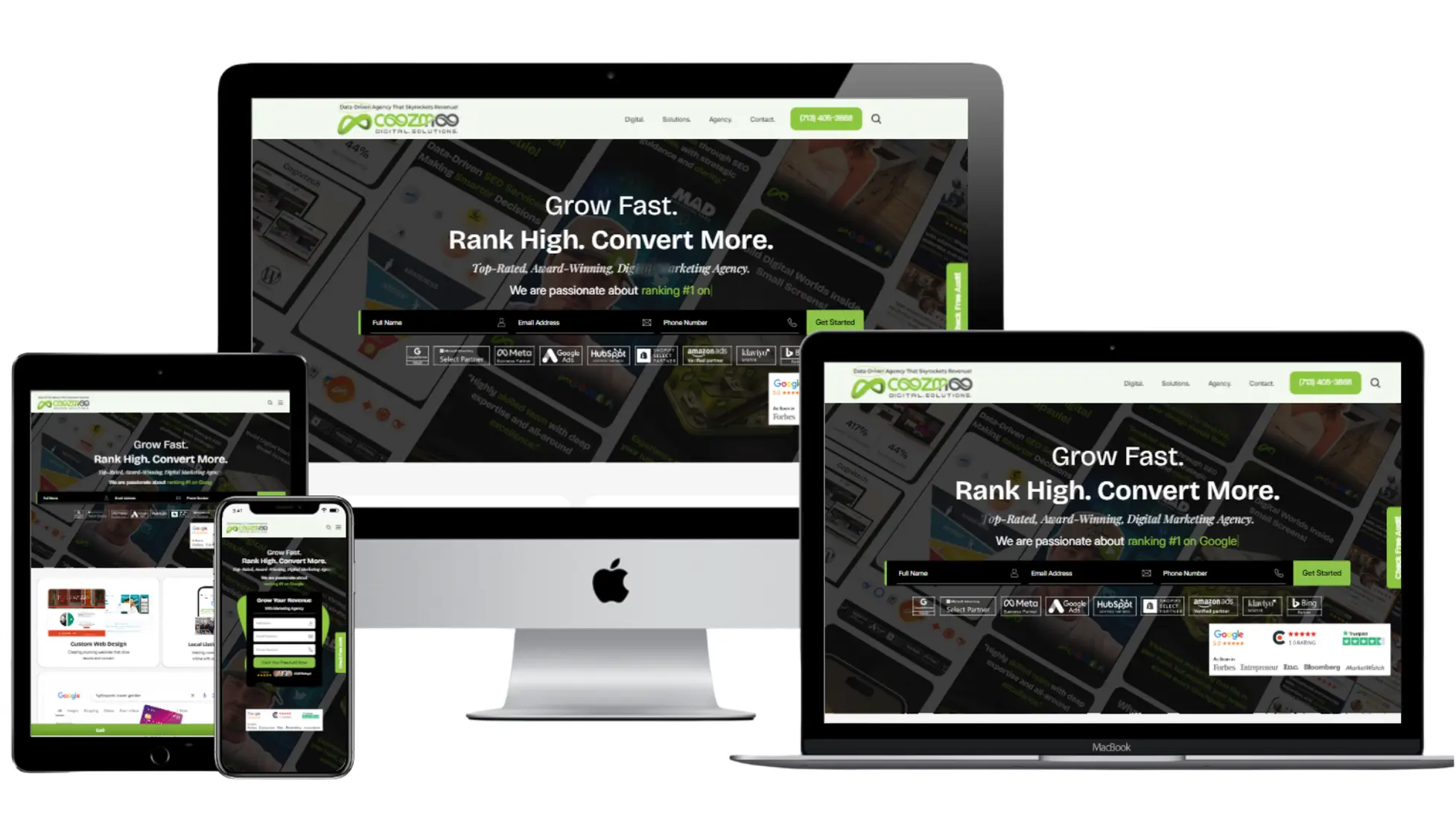
Responsive vs. Mobile-First: What's the Difference?
Responsive design begins with the desktop version and scales down for smaller screens. On the other hand, mobile-first design flips that approach, starting with the smallest screen and then adding features for larger displays.
So, what's the best way to go? Start with simple, fast designs for mobile and then enhance them for desktops. Since more than half of users will bounce if a site takes longer than three seconds to load on mobile, this strategy is essential.
Responsive design begins with the desktop version and scales down for smaller screens. On the other hand, mobile-first design flips that approach, starting with the smallest screen and then adding features for larger displays.
So, what's the best way to go? Start with simple, fast designs for mobile and then enhance them for desktops. Since more than half of users will bounce if a site takes longer than three seconds to load on mobile, this strategy is essential.
Key Elements of Modern Responsive Design
Category
Category
Category
Category
Details
Details
Details
Details
Flexible Grids and Layouts
Flexible Grids and Layouts
Flexible Grids and Layouts
Utilize CSS Grid and Flexbox to craft layouts that adjust effortlessly to any screen size. Content flows naturally, never breaking or getting stuck.
Utilize CSS Grid and Flexbox to craft layouts that adjust effortlessly to any screen size. Content flows naturally, never breaking or getting stuck.
Utilize CSS Grid and Flexbox to craft layouts that adjust effortlessly to any screen size. Content flows naturally, never breaking or getting stuck.
Fluid Images & Media
Fluid Images & Media
Fluid Images & Media
Images and videos should use max-width: 100% for perfect sizing. SVG graphics remain sharp and clear, no matter the size.
Images and videos should use max-width: 100% for perfect sizing. SVG graphics remain sharp and clear, no matter the size.
Images and videos should use max-width: 100% for perfect sizing. SVG graphics remain sharp and clear, no matter the size.
CSS Media Queries
CSS Media Queries
CSS Media Queries
Adjust styles based on screen size, device orientation, and even user preferences like dark mode, ensuring everyone feels comfortable.
Adjust styles based on screen size, device orientation, and even user preferences like dark mode, ensuring everyone feels comfortable.
Adjust styles based on screen size, device orientation, and even user preferences like dark mode, ensuring everyone feels comfortable.
Touch-Friendly Elements
Touch-Friendly Elements
Touch-Friendly Elements
Make sure buttons and links are at least 44 pixels wide for easy tapping. Nearly 80% of users say poor mobile usability makes them leave!
Make sure buttons and links are at least 44 pixels wide for easy tapping. Nearly 80% of users say poor mobile usability makes them leave!
Make sure buttons and links are at least 44 pixels wide for easy tapping. Nearly 80% of users say poor mobile usability makes them leave!
Why Responsive Design Matters?
First Impressions: Did you know that a whopping 94% of visitors believe that a website's design plays a crucial role in their trust in your brand? If your site feels clunky, you might lose 38% of visitors after just one quick look.
Better SEO: Search engines are all about your mobile site when it comes to ranking. A fast, responsive design can really give your search results and voice search visibility a nice boost.
Higher Conversions: Responsive websites see an impressive 11% increase in completed actions, whether that's purchases or sign-ups.
Retention & Loyalty: A solid 88% of users are likely to return to a site after having a positive experience, which is largely driven by how easy it is to use.
Cost & Simplicity: Having one site that works across all devices means fewer headaches and lower maintenance costs.
First Impressions: Did you know that a whopping 94% of visitors believe that a website's design plays a crucial role in their trust in your brand? If your site feels clunky, you might lose 38% of visitors after just one quick look.
Better SEO: Search engines are all about your mobile site when it comes to ranking. A fast, responsive design can really give your search results and voice search visibility a nice boost.
Higher Conversions: Responsive websites see an impressive 11% increase in completed actions, whether that's purchases or sign-ups.
Retention & Loyalty: A solid 88% of users are likely to return to a site after having a positive experience, which is largely driven by how easy it is to use.
Cost & Simplicity: Having one site that works across all devices means fewer headaches and lower maintenance costs.

Best Practices
Design for Mobile First: Start by focusing on the essential features for mobile devices, then build out for larger screens.
Speed Counts: Make sure to compress images, optimize your code, and prioritize what users need first—39% of people will leave if a page takes too long to load.
Test Everywhere: Utilize real devices and online emulators to cover a wide range of browsers and operating systems.
Accessibility: Choose large, easy-to-read fonts (16px or larger), make sure there is a lot of color contrast, and always add alt text to images to help screen readers.
Progressive Enhancement: First, build a strong base, and then add advanced features for users with the most up-to-date browsers or devices.
Design for Mobile First: Start by focusing on the essential features for mobile devices, then build out for larger screens.
Speed Counts: Make sure to compress images, optimize your code, and prioritize what users need first—39% of people will leave if a page takes too long to load.
Test Everywhere: Utilize real devices and online emulators to cover a wide range of browsers and operating systems.
Accessibility: Choose large, easy-to-read fonts (16px or larger), make sure there is a lot of color contrast, and always add alt text to images to help screen readers.
Progressive Enhancement: First, build a strong base, and then add advanced features for users with the most up-to-date browsers or devices.
Mistakes to Avoid
Layouts with fixed widths that don't work well on mobile
Small buttons or targets that aren't clear when you tap them
Putting important navigation or content out of sight on smaller screens
Images that aren't compressed and scripts that are too big to load quickly
Not testing on different devices and browsers
Layouts with fixed widths that don't work well on mobile
Small buttons or targets that aren't clear when you tap them
Putting important navigation or content out of sight on smaller screens
Images that aren't compressed and scripts that are too big to load quickly
Not testing on different devices and browsers
The Future: Beyond Phones
Responsive design is no longer just for tablets and phones. People can now get to websites from smartwatches, car consoles, VR headsets, and other new technologies. A truly responsive site works on any screen, so your business is ready for whatever the future holds.
Responsive design is no longer just for tablets and phones. People can now get to websites from smartwatches, car consoles, VR headsets, and other new technologies. A truly responsive site works on any screen, so your business is ready for whatever the future holds.

Final Thoughts
Think about how you browse the web; you might start on your phone, switch to a laptop at work, and finish on a tablet at home. Your users do the same, and they expect your site to keep up.
That’s the power of responsive design. It ensures your website looks great and functions smoothly on any device, helping your brand stand out and your content shine, without frustrating users with slow loads or clunky layouts.
And it’s not just about looks. Responsive design improves SEO, lowers bounce rates, and drives conversions. It’s one of the smartest, most future-proof investments you can make for your business.
Think about how you browse the web; you might start on your phone, switch to a laptop at work, and finish on a tablet at home. Your users do the same, and they expect your site to keep up.
That’s the power of responsive design. It ensures your website looks great and functions smoothly on any device, helping your brand stand out and your content shine, without frustrating users with slow loads or clunky layouts.
And it’s not just about looks. Responsive design improves SEO, lowers bounce rates, and drives conversions. It’s one of the smartest, most future-proof investments you can make for your business.
Frequently Asked Questions (FAQs)
Frequently Asked Questions
How does responsive design improve user experience beyond just resizing content?

Responsive sites adapt not only in size but also in usability. They ensure touch-friendly interactions, readable text without zooming, accessible color contrast, intuitive navigation, and minimal clutter on small screens. These enhancements reduce user frustration and support seamless browsing, which improves overall engagement.
How does a responsive website help with SEO rankings?
Google evaluates websites based on mobile performance first. Fast-loading, mobile-friendly pages rank better because they satisfy Google’s focus on user experience. A responsive layout reduces bounce rates, improves dwell time, enhances crawl efficiency, and ensures content is unified under one URL—boosting overall search performance.
Can a responsive website increase my conversion rates?
Yes. Conversion rates often rise because responsive layouts improve clarity, simplify purchase or sign-up flows, and minimize friction. Users trust mobile-friendly sites more, and clear CTAs, quick load time, and intuitive navigation all lead to more completed actions.
How often should I test my site’s responsiveness?
Testing should happen at every stage of development and after every major update. Because new devices and screen sizes constantly enter the market, periodic testing guarantees your website stays compatible across browsers, operating systems, and display resolutions.
What’s the first step toward creating a fully responsive website?
Start by analyzing your audience’s device usage and identifying pain points. Then create a mobile-first design that focuses on essential functions, fast load time, and user-friendly navigation. Once the mobile foundation is strong, enhancements can be layered for tablets and desktops.
Why should businesses invest in responsive redesign even if their site “looks fine”?
A site might look acceptable on desktop, but looks can be deceiving. If it’s slow, difficult to navigate, or confusing on mobile, users will abandon it. A responsive redesign improves performance, usability, SEO, and brand perception.
How does responsive design influence brand credibility?
A responsive site shows visitors that your business is modern, attentive, and professional. When users see a seamless experience across all devices, they’re more likely to trust your brand, perceive your company as reliable, and feel confident engaging with your services or products.
How does responsive design improve user experience beyond just resizing content?
Responsive sites adapt not only in size but also in usability. They ensure touch-friendly interactions, readable text without zooming, accessible color contrast, intuitive navigation, and minimal clutter on small screens. These enhancements reduce user frustration and support seamless browsing, which improves overall engagement.
How does a responsive website help with SEO rankings?
Google evaluates websites based on mobile performance first. Fast-loading, mobile-friendly pages rank better because they satisfy Google’s focus on user experience. A responsive layout reduces bounce rates, improves dwell time, enhances crawl efficiency, and ensures content is unified under one URL—boosting overall search performance.
Can a responsive website increase my conversion rates?
Yes. Conversion rates often rise because responsive layouts improve clarity, simplify purchase or sign-up flows, and minimize friction. Users trust mobile-friendly sites more, and clear CTAs, quick load time, and intuitive navigation all lead to more completed actions.
How often should I test my site’s responsiveness?
Testing should happen at every stage of development and after every major update. Because new devices and screen sizes constantly enter the market, periodic testing guarantees your website stays compatible across browsers, operating systems, and display resolutions.
What’s the first step toward creating a fully responsive website?
Start by analyzing your audience’s device usage and identifying pain points. Then create a mobile-first design that focuses on essential functions, fast load time, and user-friendly navigation. Once the mobile foundation is strong, enhancements can be layered for tablets and desktops.
Why should businesses invest in responsive redesign even if their site “looks fine”?
A site might look acceptable on desktop, but looks can be deceiving. If it’s slow, difficult to navigate, or confusing on mobile, users will abandon it. A responsive redesign improves performance, usability, SEO, and brand perception.
How does responsive design influence brand credibility?
A responsive site shows visitors that your business is modern, attentive, and professional. When users see a seamless experience across all devices, they’re more likely to trust your brand, perceive your company as reliable, and feel confident engaging with your services or products.
Make Your Website Look and Work Perfectly on Every Device
Make Your Website Look and Work Perfectly on Every Device
Enhance usability and accessibility with mobile-friendly layouts that improve user experience and search rankings.
Enhance usability and accessibility with mobile-friendly layouts that improve user experience and search rankings.
Enhance usability and accessibility with mobile-friendly layouts that improve user experience and search rankings.
4.9/5 Ratings!
Share this article
Share this article

Related Resources
Latest Blogs






Don’t miss our revenue growth tips!
Don’t miss our revenue growth tips!
Don’t miss our revenue growth tips!
Get expert marketing tips—straight to your inbox, like thousands of happy clients.
Get expert marketing tips—straight to your inbox, like thousands of happy clients.
Latest Blogs




































Ready to speak with an expert?
Data-Driven Marketing Agency That Elevates ROI
1100+
Websites Designed & Optimized to Convert
$280M+
Client Revenue Driven & Growing Strong
Discover how to skyrocket
your revenue today!
Trusted by 1000+ Owners!
Ready to speak with an expert?
Data-Driven Marketing Agency That Elevates ROI
1100+
Websites Designed & Optimized to Convert
$280M+
Client Revenue Driven & Growing Strong
Discover how to skyrocket
your revenue today!
Trusted by 1000+ Owners!
Want to skyrocket revenue?
4.9/5 Ratings!
Ready to speak with an expert?
Data-Driven Marketing Agency That Elevates ROI
1100+
Websites Designed & Optimized to Convert
$280M+
Client Revenue Driven & Growing Strong
Discover how to skyrocket
your revenue today!
Trusted by 1000+ Owners!
Call
Meet