How Ecommerce Brands Can Advertise in Google AI Mode?
How Ecommerce Brands Can Advertise in Google AI Mode?
Last Updated:
Table of Content
Case Studies





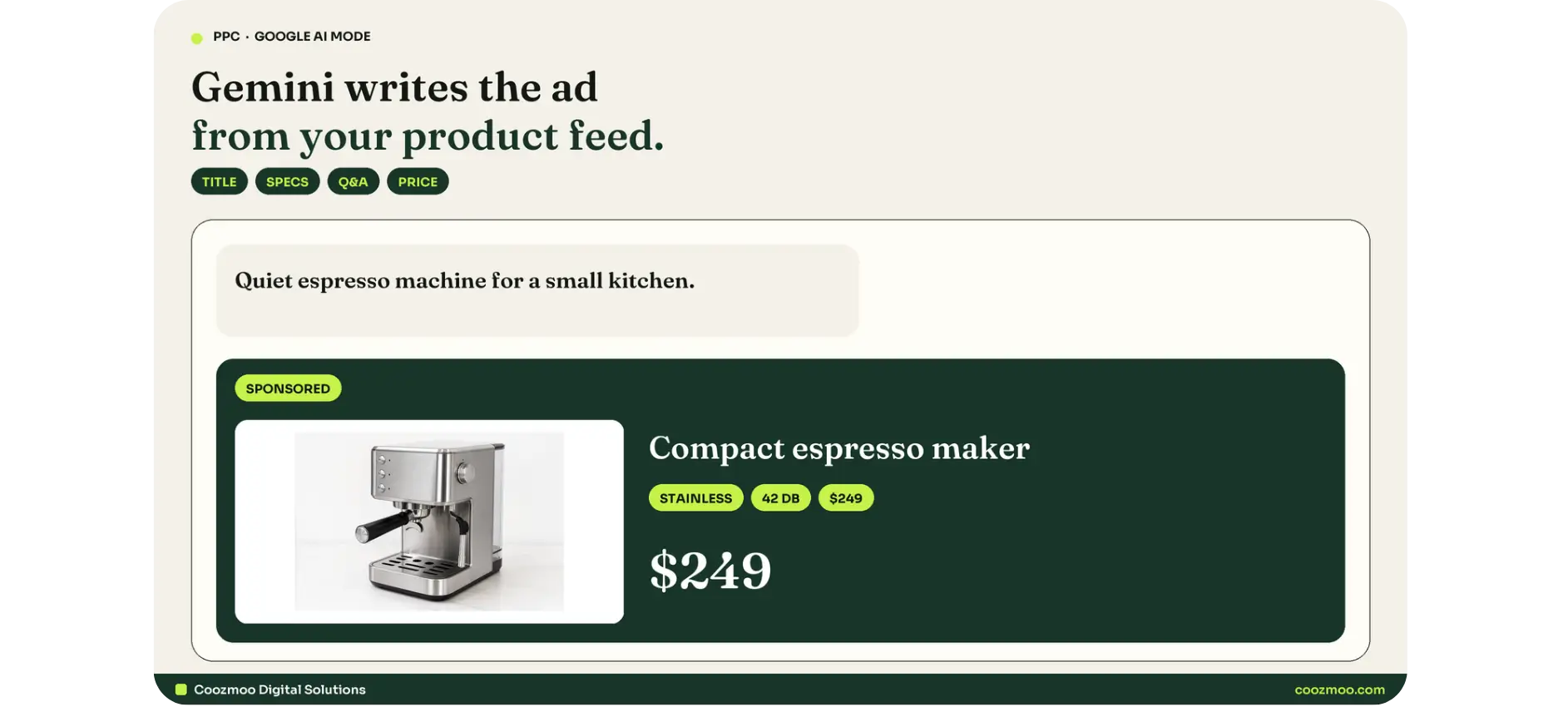
Nobody on your paid media team is writing the ads that will show up in Google AI Mode. Gemini writes them, on the fly, from your Merchant Center feed, while a shopper is mid-conversation about a product they have not even named yet.
That is the whole shift. You do not buy an AI Mode placement. You become eligible, then you give the model enough product data to answer the question better than the next store.
Google said at I/O 2026 that AI Mode had passed a billion monthly users, with queries more than doubling every quarter. At Marketing Live on 20 May 2026, Google showed the ad formats built for that surface. An Ipsos study Google commissioned in December 2025 found 75 percent of shoppers make faster, more confident decisions using AI Mode.
If your catalog still talks like a spreadsheet, you will not be in that conversation.
This is the playbook for ecommerce brands: how Google AI Mode ads actually appear, which campaigns make you eligible, how to rebuild the feed as creative, and what to do in the next 30 days.
What Google AI Mode actually is?
Google AI Mode is the conversational search surface inside Google Search. Shoppers type (or speak, or show) a long question. Gemini answers in a thread. They refine. They compare. Many of them never click a blue link.
That is not the same thing as AI Overviews. Overviews sit on a classic results page as a summary block. AI Mode is the thread itself. Ads can show in both, but the formats, the query shape, and the data Google reads are different.
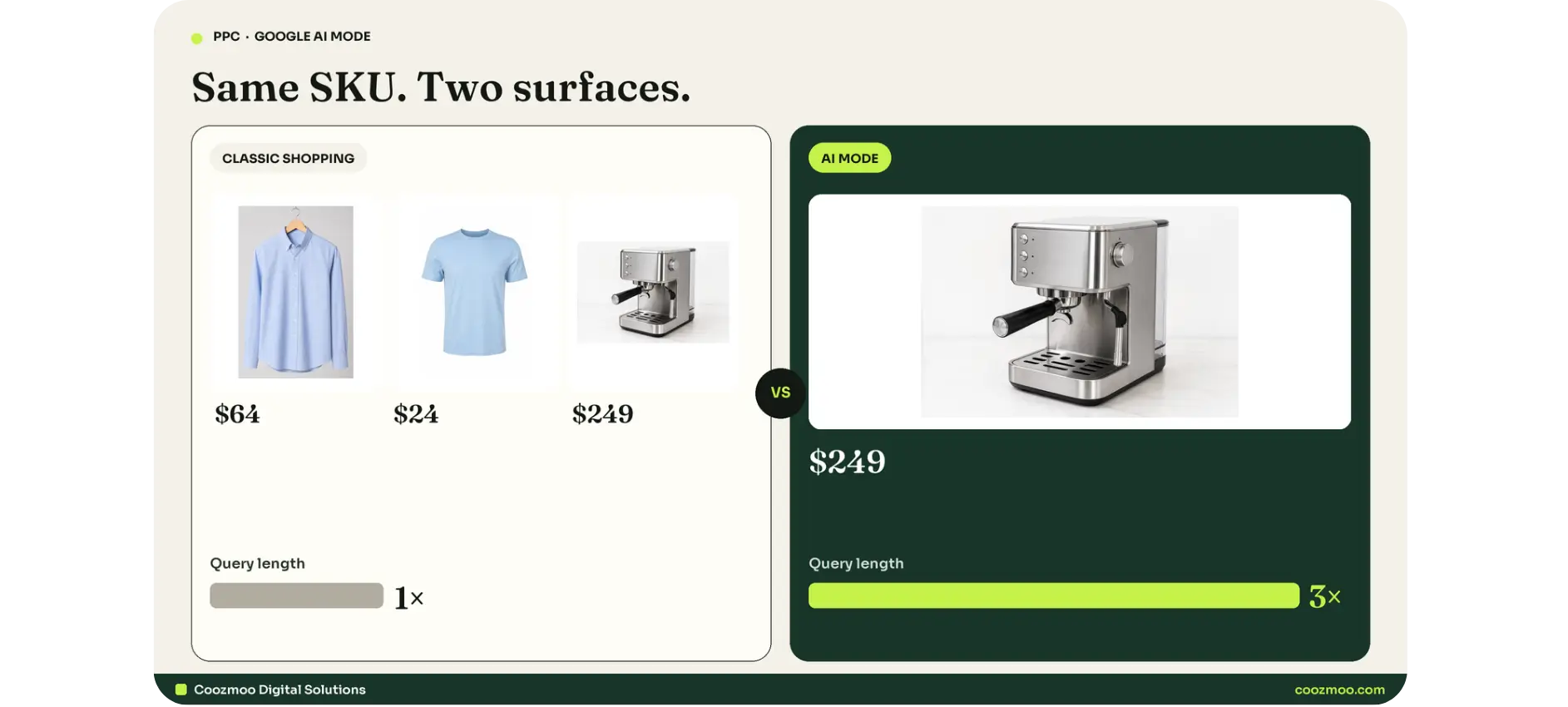
Google has said searches in AI Mode run about two to three times longer than classic search. Nobody types "running shoes" into a conversation. They type "a neutral running shoe with extra cushion for a heavy runner under 150 dollars that does not squeak on wet pavement."
A two-word keyword list cannot catch that. A product feed that names the cushion, the weight, the price band, and the wet-grip claim can.
How Google AI Mode ads show up?
Google introduced four Gemini-built formats at Marketing Live 2026. Three of them matter for most stores. The fourth is a lead tool.
1. Conversational Discovery Ads
These appear while the shopper is still describing the problem. Gemini writes a short explainer that ties your product to the exact question they asked. The unit carries a Sponsored label. It reads like part of the answer, not like a banner parked next to it.
Example query: "I want my living room to smell like a rainy forest without lighting candles every night." The explainer does not shout "Buy diffuser." It names the low-maintenance claim that matches the ask.
2. Highlighted Answers
When AI Mode returns a list of recommendations, a high-quality ad can sit on that list as a Highlighted Answer. Again, Sponsored. Again, Gemini writes why it fits. You are not buying the number-one organic citation. You are earning a labeled seat next to it.
3. AI-powered Shopping Ads
This is the considered-purchase format. Someone is researching a fridge, a TV, an espresso machine. Gemini pulls your most relevant SKU and writes a custom explainer from feed attributes such as material, fit, and durability. Google said this format rolls out more broadly on Search after the May announcement, with dates and markets still filling in.
4. Business Agent for Leads
A chat agent sits inside the ad. The shopper asks questions instead of filling a form. Useful for high-consideration goods and services. For a catalog-led store, this is secondary to the three shopping formats.
All four stay labeled Sponsored. Google is not hiding the paid unit. What changed is who writes the copy, and what data it writes from.
AI Mode ads vs AI Overviews ads vs classic Shopping
Dimensions | Classic Shopping | Ads in AI Overviews | Google AI Mode ads |
|---|---|---|---|
Where it shows | Search, Shopping tab, image surfaces | Inside or around the Overview block | Inside the AI Mode thread |
Query shape | Short to mid keywords | Complex "no one right answer" queries | Multi-turn, 2–3x longer |
Who writes the ad | You (assets) + feed | Existing text / Shopping ads | Gemini, per query, from feed + assets |
Matching | Keywords, product groups, PMax | Broad match, Shopping, PMax, AI Max | PMax, AI Max, Shopping. No placement toggle |
Shopper next step | Click to PDP | Click to site or product | Stay in-thread, sometimes check out |
What you control | Bids, groups, feed, negatives | Same, plus landing-page quality | Feed quality, assets, offers, conversion signals |
Ads in AI Overviews, per Google Ads Help, can sit above, below, or inside the Overview. Inside-Overview ads are English, mobile and desktop, in a defined country list. Sensitive verticals (adult, alcohol, gambling, finance, healthcare, politics, and more) are excluded there.
AI Mode is a separate surface. Do not mix the two in reporting, and do not assume a Search campaign that wins Overviews automatically wins the thread.
Classic Shopping does not go away. You still need it for typed, high-intent product queries. That is still the fastest way to get traffic when someone already knows the product name. AI Mode is the conversation that happens before that query, or instead of it.
How to advertise in Google AI Mode (eligibility)?
There is no AI Mode campaign type. There is no placement checkbox. You cannot bid on "AI Mode" the way you bid on YouTube.
Eligibility comes from running Google's AI-powered matching:
Performance Max with a Merchant Center feed
AI Max for Search
AI Max for Shopping
Shopping campaigns
Broad match or Dynamic Search Ads as they move into AI Max
Smart Bidding (Target ROAS, Target CPA, Maximize Conversion Value). Manual CPC is not the path in.
Once you are enrolled, Gemini decides when your product is a strong match for the thread, then assembles the ad from your feed and assets.
That is why "raise the bid" is the wrong first move. The first move is: are we even eligible, and is the catalog specific enough to be chosen?
If you already run PMax or Shopping, you may already be eligible and not know it. The work is not launching a new campaign. The work is making the one you have worth assembling.
For the broader paid-search foundation this sits on, see this guide to what PPC advertising is and how it works. The same digital marketing stack (PPC plus catalog work) is what makes a store eligible here. There is no standalone AI Mode buy.
Your product feed is now the ad
In AI Mode, the feed does the job ad copy used to do.
Vague data produces vague ads. Rich, specific data gives Gemini something to write with.
That is the difference between a title that says "Blue Shirt" and one that says "Men's Blue Oxford Slim Fit Shirt, 100% Cotton." It is the difference between a description that says "high quality for every need" and one that names the material, the use case, the fit, and what the product is not right for.
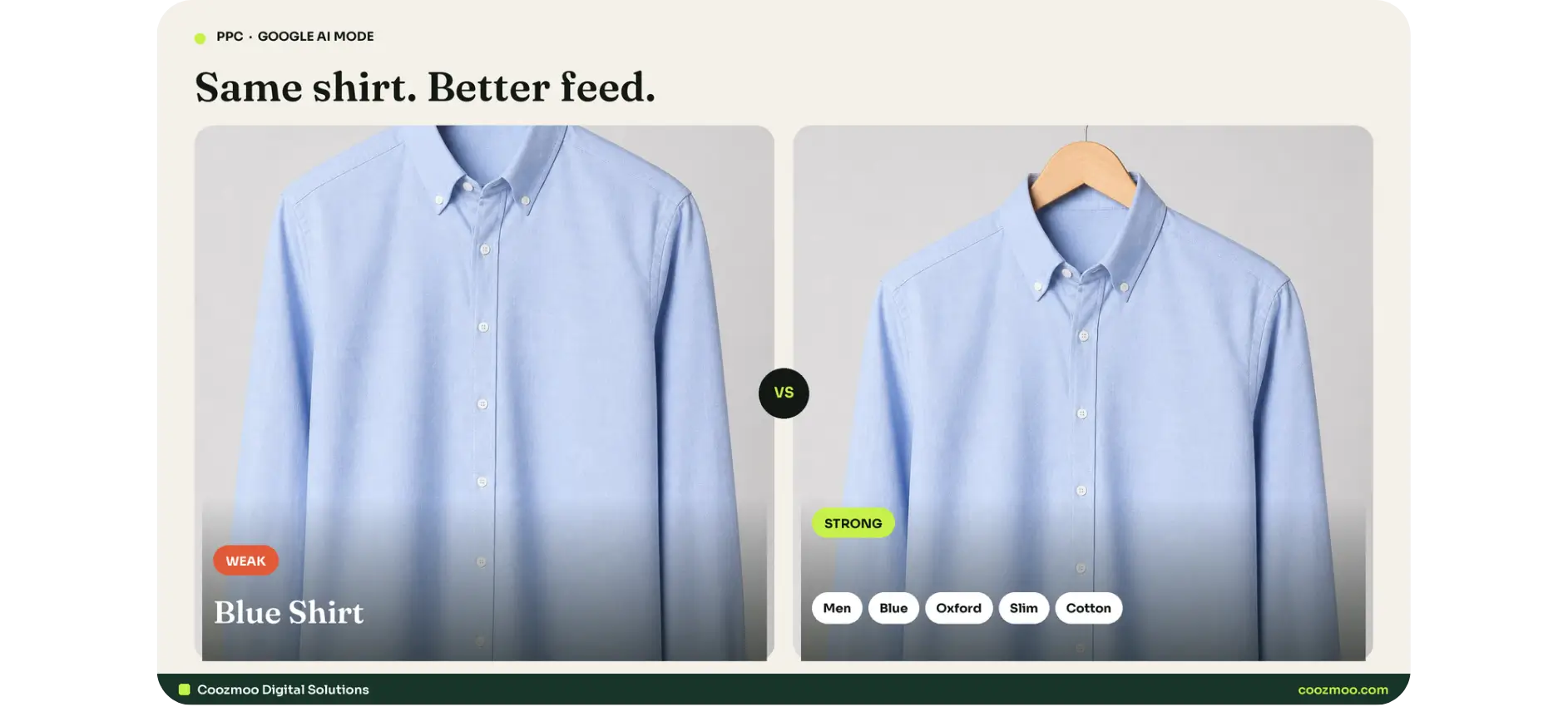
Google's own shopping guidance for AI surfaces points to length and specificity: rich titles, descriptions with real detail, complete attributes, current price and availability, and enough images that a visual query has something to match.
A one-line description that looks fine in a classic Shopping tile gives a conversational model nothing to answer with.
This also changes who owns the work. For years the creative lever in paid was more RSA variants. In AI Mode the lever sits upstream, usually with merchandising or ops, not with the media buyer. If those teams do not share a backlog, the ads team is optimizing a hollow catalog.
Title formula on money SKUs:
[Audience or gender] + [color / material + [product type] + [fit or use] + [one proof spec]
Keep it human. Do not keyword-stuff. Gemini already reads semantics. What it cannot do is invent a waterproof rating you never submitted.
The ARC method: Answer-Ready Catalog
Most stores try to "turn on AI ads." That is not a strategy. You have to run a five-step method we call ARC: Answer-Ready Catalog.
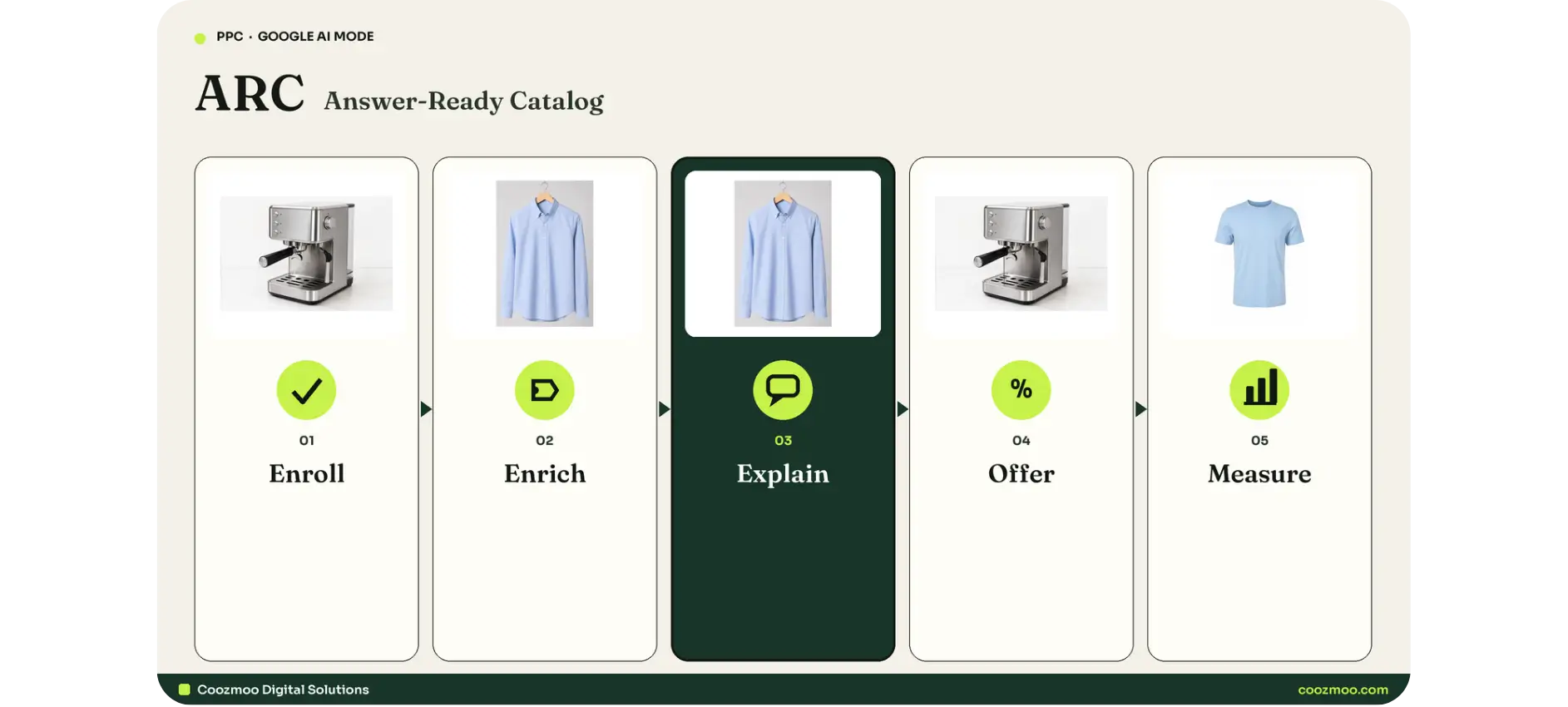
1. Enroll
Confirm PMax and AI Max are live on the catalog, Smart Bidding is on, conversion tracking is clean, and brand safety controls (location, inventory filters, account-level negatives where they still apply) are set. Eligibility is the ticket. It is not the show.
2. Enrich
Fix titles, descriptions, GTINs, product type, color, size, material, gender, age group, shipping, returns, and image set on the SKUs that already spend. Start where the money is. Do not boil the ocean on day one.
3. Explain
Load question_and_answer pairs and the rest of the conversational attributes so Gemini can answer "does this work for me?" instead of only "what is this and what does it cost?"
4. Offer
Put real promotions into Direct Offers: discounts, bundles, giveaways, and free shipping. Gemini can then present a deal at the moment of intent, not as a sitewide banner the shopper has to go hunting for.
5. Measure
Until Google ships a dedicated AI Mode ads report, use proxies: AI Max conversational queries, branded search, Merchant Center AI Performance Insights (share of voice, where it is live), and ROAS on the eligible campaigns. Tell leadership this is positioning plus incremental demand, not a weekly line item yet.
Paid and organic compound here. The same structured product data that helps Gemini write a Conversational Discovery ad is the data that helps your products get cited in unpaid AI answers. You are not choosing one. You are funding one catalog that works twice. Generative search work is the unpaid half of that catalog.
That is the same "revenue, not traffic" logic behind ecommerce marketing work: Shopping Ads, Merchant Center, and feed engineering as one system.
Conversational attributes that decide whether Gemini picks you
At Marketing Live, Google added optional conversational attributes to Merchant Center. Several are flagged in the product-data spec as being intended for conversational experiences such as AI Mode.
They do not change what shoppers see on your live listings. They do not affect product approval. They are additive. Submit them through a supplemental feed (Google's usual recommendation), the primary source, or the Merchant API.
Attribute | What it is | Why AI Mode cares |
|---|---|---|
question_and_answer | FAQ pairs: a plain question and a plain answer | Highest value. Maps onto how people actually ask. |
document_link | URLs to PDFs: manuals, spec sheets, care guides, ingredients | Lets the model cite real specs instead of guessing. |
related_product | Accessories, required parts, substitutes, bundles | Answers "what goes with this?" |
item_group_title | Family name for a variant group | Stops the model treating every size as a different product. |
variant_option | Structured name/value pairs (color, size, material) | Needed so fit and finish can be explained. |
popularity_rank | Relative popularity across the catalog | Helps Google know which SKUs actually sell. |
How to fill question_and_answer without inventing claims
Mine what you already have:
Product-page FAQs
Presale chat and email
Return reasons
Review questions ("does it pill?", "is it quiet?", "will it fit a 15-inch laptop?")
Spec sheets and size charts
Write the pair the way a shopper would ask it.
Q: Does it have a headphone jack?
A: Yes. It has a 3.5 mm headphone jack on the bottom edge.
Q: Is it quiet enough for an open-plan office?
A: It runs at 42 dB, about as quiet as a library.
Ground every answer in a source you would defend. If the spec is not in the catalog, leave the pair empty. An ungrounded answer in AI Mode is a public product claim.
Start with 3 to 5 pairs on your top-spend SKUs. Ten empty pairs help nobody.
On the AI-powered Shopping side, fill material, fit, and durability first for anything considered. Those are the fields Google has said the explainer leans on.
Platform note: default Shopify, WooCommerce, and Magento feed apps will not invent these fields. You map them in a feed tool, a supplemental TSV, or the Merchant API. Treat that as data engineering, not a plugin toggle.
Direct Offers, bundles, and checkout inside the conversation
Direct Offers started as a Google Ads pilot in January 2026. At Marketing Live, Google expanded it.
What is coming (and rolling) according to Google:
Promotion bundling: Upload discounts, giveaways, and local coupons. Set eligible products and guardrails. Gemini can construct a relevant bundle for that search.
Native checkout: Merchants on the Universal Commerce Protocol (UCP) can let shoppers secure the promotion without a long hop to the site.
Travel expansion: Trip-planning offers inside AI-assisted planning. Ignore this if you sell physical goods.
For a store, the practical move is simple. Stop treating promotions as homepage banners only. Put the same offers into Google Ads so they can surface in the thread when intent is high.
Guardrails still matter. Set product eligibility, discount floors, and inventory rules. A model that bundles two SKUs you cannot fulfill is not "AI magic." It is a support ticket.
Agentic checkout (an assistant that buys on the shopper's behalf) is a related shift. It is not this article. Feed quality is the shared foundation. Measurement and liability are a different brief.
Campaign architecture that actually gets you in
Think in layers, not in one "AI campaign."
Layer A: Performance Max (catalog)
Your default eligibility engine. Feed attached. Asset groups with text, image, and video. Target ROAS or Maximize Conversion Value. Audience signals as hints, not cages. Exclude junk URLs (policy, shipping, blog tag pages).
Layer B: AI Max on Search and Shopping
This is how conversational queries get matched when the shopper never used your keyword. Smart Bidding is required. Keep a separate branded Search campaign if you need to protect brand CPC and attribution. Do not let AI Max quietly recapture brand at a worse cost.
Layer C: Standard Shopping (control)
Still useful for structured product groups, custom labels (margin, seasonality, bestsellers), and cleaner diagnostics. AI Max features have been extending into Shopping. Use them when you want format selection and text customization without giving up product-group logic.
Layer D: Demand Gen / YouTube
Not the AI Mode ticket. Useful for creative that later becomes PMax assets, and for the interruptive discovery you still run in social media marketing. Do not expect these campaigns to place you in the thread.
Conversion hygiene (non-negotiable)
Both eligible types bid on the conversions you send. Duplicate purchases, missing new-customer value, or a lagging pixel will steer AI Mode spend as surely as they steer classic PMax. If the signal is dirty, you will win the wrong conversations.
If you are already wasting budget on the wrong queries in classic Search, fix that first. Notes on getting more Google Ads results without raising spend still apply: negatives, tighter offers, better follow-up. AI Mode does not forgive a messy account. It scales it.
A 30-day sprint for ecommerce brands
You do not need a six-month replatform. You need the SKUs that already make money to become answer-ready.
Days 1–7: Eligibility and money SKUs
Confirm Merchant Center is approved, feed is daily, and disapprovals on bestsellers are at zero.
Confirm PMax (and AI Max where available) run on Smart Bidding.
Pull the 20 percent of SKUs that drive 80 percent of ad revenue.
Rewrite those titles with the formula above.
Expand descriptions past one line: material, use, fit, what it is not for.
Check GTIN / MPN / brand completeness.
Days 8–18: Explain
Export PDP FAQs, chat logs, and return reasons for those SKUs.
Write 3–5 grounded Q&A pairs per SKU.
Add document_link for any real spec PDF.
Map related_product for the obvious accessories and substitutes.
Fill material, fit, durability, variant_option, and item_group_title.
Ship as a supplemental feed. Do not overwrite a working primary feed.
Days 19–24: Offer and assets
Load live promotions into Direct Offers with product eligibility.
Add lifestyle and detail images (neutral background plus in-use). Visual queries are growing inside AI Mode.
Give PMax real video even if it is simple PDP footage. Empty video slots get filled with whatever Google can scrape.
Align landing pages with the conversational promise. If the explainer says "quiet at 42 dB," that number must be on the PDP. That is conversion rate optimization, not a new ad setting.
Days 25–30: Measure and expand
Build the proxy dashboard (next section).
Spot-check AI Mode yourself on 10 real customer questions. Note whether you appear, how you are described, and whether the claim is true.
Roll the same enrichment to the next SKU tier.
Brief merchandising: feed fields are now creative. Put them on the weekly merch agenda, not only on the ads agenda.
Shopify, WooCommerce, Magento, BigCommerce: the sprint is the same. Only the export path changes. Coozmoo Digital Solutions ecommerce marketing work already treats feed export as part of the store, not a side plugin.
How to measure this when there is no clean report?
Be honest with whoever signs the budget. As of late 2026 there is still no dedicated Google Ads report that isolates AI Mode ad performance the way you isolate Search Partners. Several formats are still rolling by market. You also cannot simply opt out of AI Mode the way you opt out of a display placement.
That does not mean "do nothing." It means you pick proxies and you say so.
Signal | Where | What it tells you |
|---|---|---|
Conversational / long queries | AI Max search-term and query insights | Whether the language of AI Mode is already feeding campaigns |
Branded search | Search campaigns + organic GSC | Lagging sign that discovery is working |
Share of voice in AI surfaces | Merchant Center AI Performance Insights (limited rollout: US first, then more markets) | Visibility vs competitors, plus feed attribute gaps |
ROAS / CPA on eligible campaigns | PMax, AI Max, Shopping | Directional, not a pure AI Mode number |
Manual thread checks | 10 shopper questions, weekly | Qualitative: did Gemini describe you accurately? |
When leadership wants a number, share of voice against the competitive set is the one to point to once Insights is in the account. Until then, branded search plus "we are enrolled and the top SKUs are answer-ready" is the truthful status.
Do not invent a UTM that claims to isolate AI Mode if Google is not passing a distinct placement. Fake channels create fake decisions.
Mistakes that keep stores invisible
Treating AI Mode like a keyword list. Conversational queries will not match your exact-match ad groups. Eligibility is AI matching. Your control is data, not a new phrase match.
Leaving titles as vendor dumps. "SHIRT-BLU-M-2024" is not a product. It is a SKU code. Gemini cannot explain a code.
Ungrounded Q&A. If you generate FAQ pairs with a model and never check the spec sheet, you are advertising claims you may not fulfill.
Enriching the whole catalog before the winners. The first pass is revenue SKUs. Coverage vanity wastes a quarter.
Dirty conversion data. Smart Bidding will happily spend into the wrong thread if "purchase" includes $1 test orders and excludes high-AOV repeat buyers.
Ignoring organic product content. Paid does not buy you an unpaid citation. Schema, unique PDP copy, and reviews still matter. The feed and the page should say the same thing. That is organic search work, not a PMax toggle.
Running only Meta and hoping Google "just works." Meta still wins interruptive discovery. Google still wins declared intent. AI Mode is declared intent with more words. For the channel split, see Google Ads vs Meta Ads. For the spend picture, see Google Ads, Meta Ads, and PPC statistics. You still want both. The feed work is Google-specific.
Waiting for perfect reporting. The brands that show up in 2027 are the ones whose catalogs became answer-ready in 2026.
What to do this week?
Pick twenty SKUs that already spend. Rewrite the titles. Write five grounded questions per SKU. Confirm PMax is on Smart Bidding. Load one real offer.
That is more progress than a strategy deck about "being in AI."
Google already moved the storefront into the conversation. The brands that treat the catalog as creative will show up. The brands that keep arguing about bids will watch Gemini recommend someone else.
If you want Coozmoo Digital Solutions to run ARC across the catalog, request an ecommerce proposal, get in touch, or call (713) 405-3868. Shopping Ads, Merchant Center, and feed engineering are one system here, not three vendors.
FAQs
How do you advertise in Google AI Mode?

You do not buy the placement. You become eligible by running Performance Max and AI Max for Search and Shopping (plus Shopping campaigns) on Smart Bidding. Google assembles a Sponsored unit from your Merchant Center feed and assets when your product matches the shopper's question. Feed specificity decides whether you are chosen.
Do I need a new campaign type for AI Mode?
No. There is no AI Mode campaign. Enrollment is through existing AI-powered campaigns. If those are already live, you may already be eligible.
Do I need to change my product feed for AI Mode?
Yes. That is the highest-value action. Thin titles and one-line descriptions produce weak explainers. Add detail on money SKUs, then add conversational attributes (question_and_answer first) via a supplemental feed.
What is the difference between AI Mode ads and AI Overviews ads?
Overviews sit on a classic results page. AI Mode is the conversational thread. Overviews can show existing text and Shopping ads from Search, Shopping, and PMax. AI Mode uses Gemini-written formats assembled from your feed. Report them separately.
Can I track performance in Google AI Mode?
Not cleanly in Google Ads today. Use AI Max conversational query reporting, branded search, and Merchant Center AI Performance Insights (share of voice, where available) as proxies. Manual thread checks catch bad claims early.
Nobody on your paid media team is writing the ads that will show up in Google AI Mode. Gemini writes them, on the fly, from your Merchant Center feed, while a shopper is mid-conversation about a product they have not even named yet.
That is the whole shift. You do not buy an AI Mode placement. You become eligible, then you give the model enough product data to answer the question better than the next store.
Google said at I/O 2026 that AI Mode had passed a billion monthly users, with queries more than doubling every quarter. At Marketing Live on 20 May 2026, Google showed the ad formats built for that surface. An Ipsos study Google commissioned in December 2025 found 75 percent of shoppers make faster, more confident decisions using AI Mode.
If your catalog still talks like a spreadsheet, you will not be in that conversation.
This is the playbook for ecommerce brands: how Google AI Mode ads actually appear, which campaigns make you eligible, how to rebuild the feed as creative, and what to do in the next 30 days.
What Google AI Mode actually is?
Google AI Mode is the conversational search surface inside Google Search. Shoppers type (or speak, or show) a long question. Gemini answers in a thread. They refine. They compare. Many of them never click a blue link.
That is not the same thing as AI Overviews. Overviews sit on a classic results page as a summary block. AI Mode is the thread itself. Ads can show in both, but the formats, the query shape, and the data Google reads are different.
Google has said searches in AI Mode run about two to three times longer than classic search. Nobody types "running shoes" into a conversation. They type "a neutral running shoe with extra cushion for a heavy runner under 150 dollars that does not squeak on wet pavement."
A two-word keyword list cannot catch that. A product feed that names the cushion, the weight, the price band, and the wet-grip claim can.
How Google AI Mode ads show up?
Google introduced four Gemini-built formats at Marketing Live 2026. Three of them matter for most stores. The fourth is a lead tool.
1. Conversational Discovery Ads
These appear while the shopper is still describing the problem. Gemini writes a short explainer that ties your product to the exact question they asked. The unit carries a Sponsored label. It reads like part of the answer, not like a banner parked next to it.
Example query: "I want my living room to smell like a rainy forest without lighting candles every night." The explainer does not shout "Buy diffuser." It names the low-maintenance claim that matches the ask.
2. Highlighted Answers
When AI Mode returns a list of recommendations, a high-quality ad can sit on that list as a Highlighted Answer. Again, Sponsored. Again, Gemini writes why it fits. You are not buying the number-one organic citation. You are earning a labeled seat next to it.
3. AI-powered Shopping Ads
This is the considered-purchase format. Someone is researching a fridge, a TV, an espresso machine. Gemini pulls your most relevant SKU and writes a custom explainer from feed attributes such as material, fit, and durability. Google said this format rolls out more broadly on Search after the May announcement, with dates and markets still filling in.
4. Business Agent for Leads
A chat agent sits inside the ad. The shopper asks questions instead of filling a form. Useful for high-consideration goods and services. For a catalog-led store, this is secondary to the three shopping formats.
All four stay labeled Sponsored. Google is not hiding the paid unit. What changed is who writes the copy, and what data it writes from.
AI Mode ads vs AI Overviews ads vs classic Shopping
Dimensions | Classic Shopping | Ads in AI Overviews | Google AI Mode ads |
|---|---|---|---|
Where it shows | Search, Shopping tab, image surfaces | Inside or around the Overview block | Inside the AI Mode thread |
Query shape | Short to mid keywords | Complex "no one right answer" queries | Multi-turn, 2–3x longer |
Who writes the ad | You (assets) + feed | Existing text / Shopping ads | Gemini, per query, from feed + assets |
Matching | Keywords, product groups, PMax | Broad match, Shopping, PMax, AI Max | PMax, AI Max, Shopping. No placement toggle |
Shopper next step | Click to PDP | Click to site or product | Stay in-thread, sometimes check out |
What you control | Bids, groups, feed, negatives | Same, plus landing-page quality | Feed quality, assets, offers, conversion signals |
Ads in AI Overviews, per Google Ads Help, can sit above, below, or inside the Overview. Inside-Overview ads are English, mobile and desktop, in a defined country list. Sensitive verticals (adult, alcohol, gambling, finance, healthcare, politics, and more) are excluded there.
AI Mode is a separate surface. Do not mix the two in reporting, and do not assume a Search campaign that wins Overviews automatically wins the thread.
Classic Shopping does not go away. You still need it for typed, high-intent product queries. That is still the fastest way to get traffic when someone already knows the product name. AI Mode is the conversation that happens before that query, or instead of it.
How to advertise in Google AI Mode (eligibility)?
There is no AI Mode campaign type. There is no placement checkbox. You cannot bid on "AI Mode" the way you bid on YouTube.
Eligibility comes from running Google's AI-powered matching:
Performance Max with a Merchant Center feed
AI Max for Search
AI Max for Shopping
Shopping campaigns
Broad match or Dynamic Search Ads as they move into AI Max
Smart Bidding (Target ROAS, Target CPA, Maximize Conversion Value). Manual CPC is not the path in.
Once you are enrolled, Gemini decides when your product is a strong match for the thread, then assembles the ad from your feed and assets.
That is why "raise the bid" is the wrong first move. The first move is: are we even eligible, and is the catalog specific enough to be chosen?
If you already run PMax or Shopping, you may already be eligible and not know it. The work is not launching a new campaign. The work is making the one you have worth assembling.
For the broader paid-search foundation this sits on, see this guide to what PPC advertising is and how it works. The same digital marketing stack (PPC plus catalog work) is what makes a store eligible here. There is no standalone AI Mode buy.
Your product feed is now the ad
In AI Mode, the feed does the job ad copy used to do.
Vague data produces vague ads. Rich, specific data gives Gemini something to write with.
That is the difference between a title that says "Blue Shirt" and one that says "Men's Blue Oxford Slim Fit Shirt, 100% Cotton." It is the difference between a description that says "high quality for every need" and one that names the material, the use case, the fit, and what the product is not right for.
Google's own shopping guidance for AI surfaces points to length and specificity: rich titles, descriptions with real detail, complete attributes, current price and availability, and enough images that a visual query has something to match.
A one-line description that looks fine in a classic Shopping tile gives a conversational model nothing to answer with.
This also changes who owns the work. For years the creative lever in paid was more RSA variants. In AI Mode the lever sits upstream, usually with merchandising or ops, not with the media buyer. If those teams do not share a backlog, the ads team is optimizing a hollow catalog.
Title formula on money SKUs:
[Audience or gender] + [color / material + [product type] + [fit or use] + [one proof spec]
Keep it human. Do not keyword-stuff. Gemini already reads semantics. What it cannot do is invent a waterproof rating you never submitted.
The ARC method: Answer-Ready Catalog
Most stores try to "turn on AI ads." That is not a strategy. You have to run a five-step method we call ARC: Answer-Ready Catalog.
1. Enroll
Confirm PMax and AI Max are live on the catalog, Smart Bidding is on, conversion tracking is clean, and brand safety controls (location, inventory filters, account-level negatives where they still apply) are set. Eligibility is the ticket. It is not the show.
2. Enrich
Fix titles, descriptions, GTINs, product type, color, size, material, gender, age group, shipping, returns, and image set on the SKUs that already spend. Start where the money is. Do not boil the ocean on day one.
3. Explain
Load question_and_answer pairs and the rest of the conversational attributes so Gemini can answer "does this work for me?" instead of only "what is this and what does it cost?"
4. Offer
Put real promotions into Direct Offers: discounts, bundles, giveaways, and free shipping. Gemini can then present a deal at the moment of intent, not as a sitewide banner the shopper has to go hunting for.
5. Measure
Until Google ships a dedicated AI Mode ads report, use proxies: AI Max conversational queries, branded search, Merchant Center AI Performance Insights (share of voice, where it is live), and ROAS on the eligible campaigns. Tell leadership this is positioning plus incremental demand, not a weekly line item yet.
Paid and organic compound here. The same structured product data that helps Gemini write a Conversational Discovery ad is the data that helps your products get cited in unpaid AI answers. You are not choosing one. You are funding one catalog that works twice. Generative search work is the unpaid half of that catalog.
That is the same "revenue, not traffic" logic behind ecommerce marketing work: Shopping Ads, Merchant Center, and feed engineering as one system.
Conversational attributes that decide whether Gemini picks you
At Marketing Live, Google added optional conversational attributes to Merchant Center. Several are flagged in the product-data spec as being intended for conversational experiences such as AI Mode.
They do not change what shoppers see on your live listings. They do not affect product approval. They are additive. Submit them through a supplemental feed (Google's usual recommendation), the primary source, or the Merchant API.
Attribute | What it is | Why AI Mode cares |
|---|---|---|
question_and_answer | FAQ pairs: a plain question and a plain answer | Highest value. Maps onto how people actually ask. |
document_link | URLs to PDFs: manuals, spec sheets, care guides, ingredients | Lets the model cite real specs instead of guessing. |
related_product | Accessories, required parts, substitutes, bundles | Answers "what goes with this?" |
item_group_title | Family name for a variant group | Stops the model treating every size as a different product. |
variant_option | Structured name/value pairs (color, size, material) | Needed so fit and finish can be explained. |
popularity_rank | Relative popularity across the catalog | Helps Google know which SKUs actually sell. |
How to fill question_and_answer without inventing claims
Mine what you already have:
Product-page FAQs
Presale chat and email
Return reasons
Review questions ("does it pill?", "is it quiet?", "will it fit a 15-inch laptop?")
Spec sheets and size charts
Write the pair the way a shopper would ask it.
Q: Does it have a headphone jack?
A: Yes. It has a 3.5 mm headphone jack on the bottom edge.
Q: Is it quiet enough for an open-plan office?
A: It runs at 42 dB, about as quiet as a library.
Ground every answer in a source you would defend. If the spec is not in the catalog, leave the pair empty. An ungrounded answer in AI Mode is a public product claim.
Start with 3 to 5 pairs on your top-spend SKUs. Ten empty pairs help nobody.
On the AI-powered Shopping side, fill material, fit, and durability first for anything considered. Those are the fields Google has said the explainer leans on.
Platform note: default Shopify, WooCommerce, and Magento feed apps will not invent these fields. You map them in a feed tool, a supplemental TSV, or the Merchant API. Treat that as data engineering, not a plugin toggle.
Direct Offers, bundles, and checkout inside the conversation
Direct Offers started as a Google Ads pilot in January 2026. At Marketing Live, Google expanded it.
What is coming (and rolling) according to Google:
Promotion bundling: Upload discounts, giveaways, and local coupons. Set eligible products and guardrails. Gemini can construct a relevant bundle for that search.
Native checkout: Merchants on the Universal Commerce Protocol (UCP) can let shoppers secure the promotion without a long hop to the site.
Travel expansion: Trip-planning offers inside AI-assisted planning. Ignore this if you sell physical goods.
For a store, the practical move is simple. Stop treating promotions as homepage banners only. Put the same offers into Google Ads so they can surface in the thread when intent is high.
Guardrails still matter. Set product eligibility, discount floors, and inventory rules. A model that bundles two SKUs you cannot fulfill is not "AI magic." It is a support ticket.
Agentic checkout (an assistant that buys on the shopper's behalf) is a related shift. It is not this article. Feed quality is the shared foundation. Measurement and liability are a different brief.
Campaign architecture that actually gets you in
Think in layers, not in one "AI campaign."
Layer A: Performance Max (catalog)
Your default eligibility engine. Feed attached. Asset groups with text, image, and video. Target ROAS or Maximize Conversion Value. Audience signals as hints, not cages. Exclude junk URLs (policy, shipping, blog tag pages).
Layer B: AI Max on Search and Shopping
This is how conversational queries get matched when the shopper never used your keyword. Smart Bidding is required. Keep a separate branded Search campaign if you need to protect brand CPC and attribution. Do not let AI Max quietly recapture brand at a worse cost.
Layer C: Standard Shopping (control)
Still useful for structured product groups, custom labels (margin, seasonality, bestsellers), and cleaner diagnostics. AI Max features have been extending into Shopping. Use them when you want format selection and text customization without giving up product-group logic.
Layer D: Demand Gen / YouTube
Not the AI Mode ticket. Useful for creative that later becomes PMax assets, and for the interruptive discovery you still run in social media marketing. Do not expect these campaigns to place you in the thread.
Conversion hygiene (non-negotiable)
Both eligible types bid on the conversions you send. Duplicate purchases, missing new-customer value, or a lagging pixel will steer AI Mode spend as surely as they steer classic PMax. If the signal is dirty, you will win the wrong conversations.
If you are already wasting budget on the wrong queries in classic Search, fix that first. Notes on getting more Google Ads results without raising spend still apply: negatives, tighter offers, better follow-up. AI Mode does not forgive a messy account. It scales it.
A 30-day sprint for ecommerce brands
You do not need a six-month replatform. You need the SKUs that already make money to become answer-ready.
Days 1–7: Eligibility and money SKUs
Confirm Merchant Center is approved, feed is daily, and disapprovals on bestsellers are at zero.
Confirm PMax (and AI Max where available) run on Smart Bidding.
Pull the 20 percent of SKUs that drive 80 percent of ad revenue.
Rewrite those titles with the formula above.
Expand descriptions past one line: material, use, fit, what it is not for.
Check GTIN / MPN / brand completeness.
Days 8–18: Explain
Export PDP FAQs, chat logs, and return reasons for those SKUs.
Write 3–5 grounded Q&A pairs per SKU.
Add document_link for any real spec PDF.
Map related_product for the obvious accessories and substitutes.
Fill material, fit, durability, variant_option, and item_group_title.
Ship as a supplemental feed. Do not overwrite a working primary feed.
Days 19–24: Offer and assets
Load live promotions into Direct Offers with product eligibility.
Add lifestyle and detail images (neutral background plus in-use). Visual queries are growing inside AI Mode.
Give PMax real video even if it is simple PDP footage. Empty video slots get filled with whatever Google can scrape.
Align landing pages with the conversational promise. If the explainer says "quiet at 42 dB," that number must be on the PDP. That is conversion rate optimization, not a new ad setting.
Days 25–30: Measure and expand
Build the proxy dashboard (next section).
Spot-check AI Mode yourself on 10 real customer questions. Note whether you appear, how you are described, and whether the claim is true.
Roll the same enrichment to the next SKU tier.
Brief merchandising: feed fields are now creative. Put them on the weekly merch agenda, not only on the ads agenda.
Shopify, WooCommerce, Magento, BigCommerce: the sprint is the same. Only the export path changes. Coozmoo Digital Solutions ecommerce marketing work already treats feed export as part of the store, not a side plugin.
How to measure this when there is no clean report?
Be honest with whoever signs the budget. As of late 2026 there is still no dedicated Google Ads report that isolates AI Mode ad performance the way you isolate Search Partners. Several formats are still rolling by market. You also cannot simply opt out of AI Mode the way you opt out of a display placement.
That does not mean "do nothing." It means you pick proxies and you say so.
Signal | Where | What it tells you |
|---|---|---|
Conversational / long queries | AI Max search-term and query insights | Whether the language of AI Mode is already feeding campaigns |
Branded search | Search campaigns + organic GSC | Lagging sign that discovery is working |
Share of voice in AI surfaces | Merchant Center AI Performance Insights (limited rollout: US first, then more markets) | Visibility vs competitors, plus feed attribute gaps |
ROAS / CPA on eligible campaigns | PMax, AI Max, Shopping | Directional, not a pure AI Mode number |
Manual thread checks | 10 shopper questions, weekly | Qualitative: did Gemini describe you accurately? |
When leadership wants a number, share of voice against the competitive set is the one to point to once Insights is in the account. Until then, branded search plus "we are enrolled and the top SKUs are answer-ready" is the truthful status.
Do not invent a UTM that claims to isolate AI Mode if Google is not passing a distinct placement. Fake channels create fake decisions.
Mistakes that keep stores invisible
Treating AI Mode like a keyword list. Conversational queries will not match your exact-match ad groups. Eligibility is AI matching. Your control is data, not a new phrase match.
Leaving titles as vendor dumps. "SHIRT-BLU-M-2024" is not a product. It is a SKU code. Gemini cannot explain a code.
Ungrounded Q&A. If you generate FAQ pairs with a model and never check the spec sheet, you are advertising claims you may not fulfill.
Enriching the whole catalog before the winners. The first pass is revenue SKUs. Coverage vanity wastes a quarter.
Dirty conversion data. Smart Bidding will happily spend into the wrong thread if "purchase" includes $1 test orders and excludes high-AOV repeat buyers.
Ignoring organic product content. Paid does not buy you an unpaid citation. Schema, unique PDP copy, and reviews still matter. The feed and the page should say the same thing. That is organic search work, not a PMax toggle.
Running only Meta and hoping Google "just works." Meta still wins interruptive discovery. Google still wins declared intent. AI Mode is declared intent with more words. For the channel split, see Google Ads vs Meta Ads. For the spend picture, see Google Ads, Meta Ads, and PPC statistics. You still want both. The feed work is Google-specific.
Waiting for perfect reporting. The brands that show up in 2027 are the ones whose catalogs became answer-ready in 2026.
What to do this week?
Pick twenty SKUs that already spend. Rewrite the titles. Write five grounded questions per SKU. Confirm PMax is on Smart Bidding. Load one real offer.
That is more progress than a strategy deck about "being in AI."
Google already moved the storefront into the conversation. The brands that treat the catalog as creative will show up. The brands that keep arguing about bids will watch Gemini recommend someone else.
If you want Coozmoo Digital Solutions to run ARC across the catalog, request an ecommerce proposal, get in touch, or call (713) 405-3868. Shopping Ads, Merchant Center, and feed engineering are one system here, not three vendors.
FAQs
How do you advertise in Google AI Mode?
You do not buy the placement. You become eligible by running Performance Max and AI Max for Search and Shopping (plus Shopping campaigns) on Smart Bidding. Google assembles a Sponsored unit from your Merchant Center feed and assets when your product matches the shopper's question. Feed specificity decides whether you are chosen.
Do I need a new campaign type for AI Mode?
No. There is no AI Mode campaign. Enrollment is through existing AI-powered campaigns. If those are already live, you may already be eligible.
Do I need to change my product feed for AI Mode?
Yes. That is the highest-value action. Thin titles and one-line descriptions produce weak explainers. Add detail on money SKUs, then add conversational attributes (question_and_answer first) via a supplemental feed.
What is the difference between AI Mode ads and AI Overviews ads?
Overviews sit on a classic results page. AI Mode is the conversational thread. Overviews can show existing text and Shopping ads from Search, Shopping, and PMax. AI Mode uses Gemini-written formats assembled from your feed. Report them separately.
Can I track performance in Google AI Mode?
Not cleanly in Google Ads today. Use AI Max conversational query reporting, branded search, and Merchant Center AI Performance Insights (share of voice, where available) as proxies. Manual thread checks catch bad claims early.



Summarize with AI



Want to be seen everywhere?
Get a free AI-search audit Today!



4.9/5 Ratings!


Don’t miss our revenue growth tips!
Get expert marketing tips—straight to your inbox, like thousands of happy clients.
Don’t miss our revenue growth tips!
Get expert marketing tips—straight to your inbox, like thousands of happy clients.
Don’t miss our revenue growth tips!
Don’t miss our revenue growth tips!
Get expert marketing tips—straight to your inbox, like thousands of happy clients.
Relevant Blogs on Generative AI SEO
Relevant Blogs on Generative AI SEO
Unlock data-driven insights in AI-powered SEO—explore our featured blogs and skyrocket your revenue before your competitors do.
Unlock data-driven insights in AI-powered SEO—explore our featured blogs and skyrocket your revenue before your competitors do.

GEO
Sep 22, 2026
15 Min Read
AI Search Runs on More SEO Than You Think
GEO
Sep 22, 2026
15 Min Read
AI Search Runs on More SEO Than You Think
GEO
Sep 22, 2026
15 Min Read
AI Search Runs on More SEO Than You Think

GEO
Sep 7, 2026
8 Min Read
How to Optimize Content for AI Search Engines: Best Practices
GEO
Sep 7, 2026
8 Min Read
How to Optimize Content for AI Search Engines: Best Practices
GEO
Sep 7, 2026
8 Min Read
How to Optimize Content for AI Search Engines: Best Practices
GEO
Sep 1, 2026
5 Min Read
Why ChatGPT Is Citing Reddit Less: What’s Behind the Shift?
GEO
Sep 1, 2026
5 Min Read
Why ChatGPT Is Citing Reddit Less: What’s Behind the Shift?
GEO
Sep 1, 2026
5 Min Read
Why ChatGPT Is Citing Reddit Less: What’s Behind the Shift?









Ready to speak with an expert?
Data-Driven Marketing Agency That Elevates ROI
1100+
Websites Designed & Optimized to Convert
$280M+
Client Revenue Driven & Growing Strong
Discover how to skyrocket
your revenue today!
Trusted by 1000+ Owners!
Ready to speak with an expert?
Data-Driven Marketing Agency That Elevates ROI
1100+
Websites Designed & Optimized to Convert
$280M+
Client Revenue Driven & Growing Strong
Discover how to skyrocket
your revenue today!
Trusted by 1000+ Owners!
Want to skyrocket revenue?
4.9/5 Ratings!
Ready to speak with an expert?
Data-Driven Marketing Agency That Elevates ROI
1100+
Websites Designed & Optimized to Convert
$280M+
Client Revenue Driven & Growing Strong
Discover how to skyrocket
your revenue today!
Trusted by 1000+ Owners!
Call
Meet