How to Get More Leads From Google Ads Without Increasing Your Budget
How to Get More Leads From Google Ads Without Increasing Your Budget
Last Updated:
Table of Content
Explore Free Tools


Aashi Katariya
Aashi Katariya
Aashi Katariya
PPC
PPC
PPC
10 Min Read
10 Min Read
10 Min
You don't need a bigger budget — you need a smarter strategy.
Most advertisers hit a plateau and instinctively reach for the same level: spend more. But here's the truth, throwing money at an underperforming Google Ads account doesn't fix the underlying inefficiencies, it just amplifies them.
The good news? There are proven, tactical ways to squeeze significantly more leads out of your existing spend. Here's how to put it all into practice.
1. Stop Making Customers Work — Use Lead Form Assets
If your Google Ads are still sending every click to a landing page and hoping people will fill out a form, you're losing leads at the door.
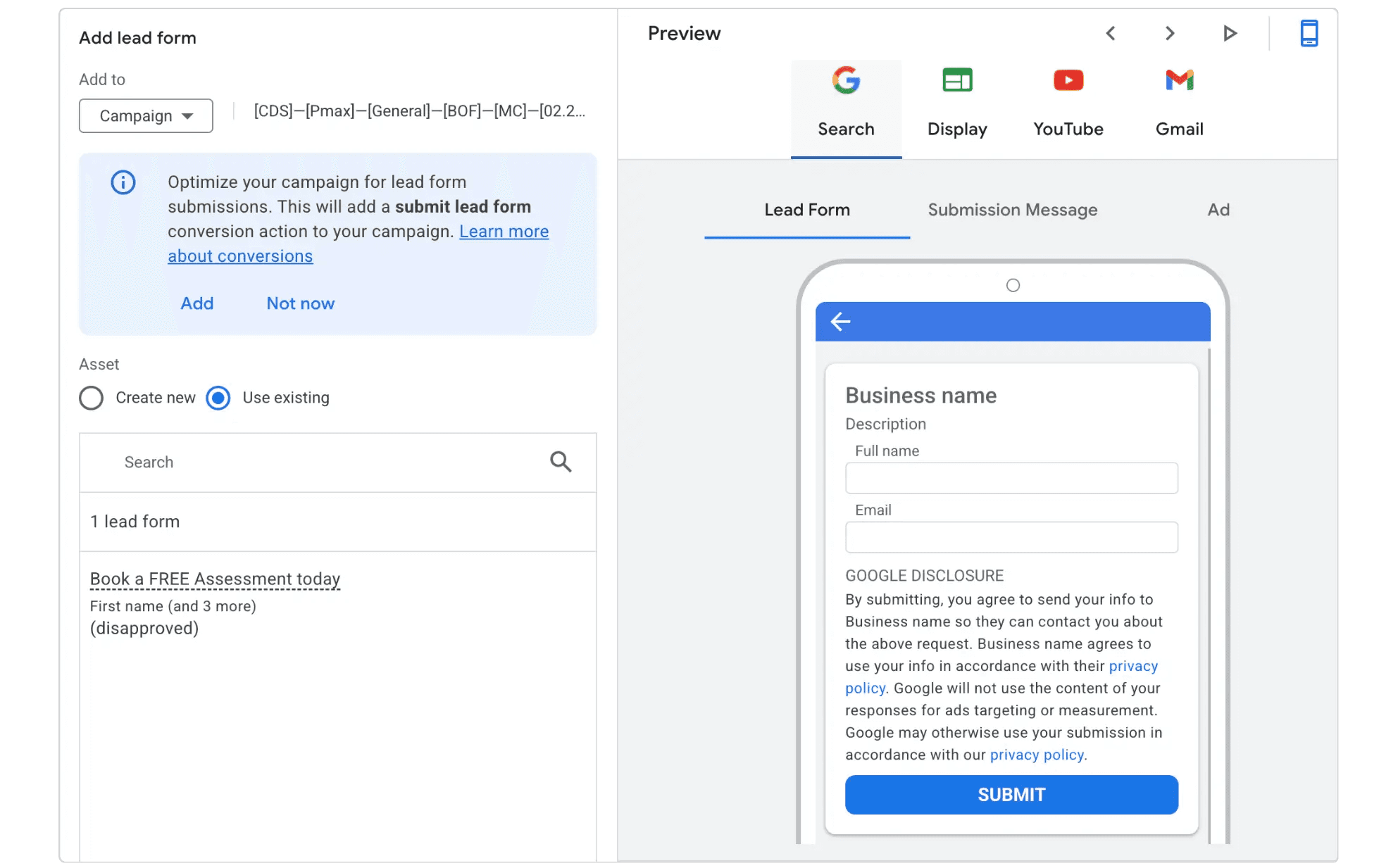
Lead Form Assets (formerly called lead form extensions) bake a contact form directly into your ad. When someone clicks, they see a Google-hosted form — often pre-populated with their name, email, and phone number from their Google account — and can submit their details without ever leaving the search results page. One tap, and they're a lead.
This matters because friction is the enemy of conversion. Every extra click, every slow-loading landing page, every CAPTCHA is an excuse for a potential customer to bounce. Lead form assets eliminate those excuses.
A few things to know before you set them up:
They're compatible with Search and Performance Max campaigns, and now also available in beta as Message Assets for mobile.
Your campaign must use a conversion-focused bidding strategy and be optimized for the lead form conversion goal.
You need a privacy policy URL — it's mandatory for collecting user information.
On the quality side, yes — the lower friction that makes lead forms powerful also makes them vulnerable to low-quality submissions.
The fix is simple: add a screening question. Ask about budget range, project timeline, or a specific need. It forces users to pause and self-qualify before hitting submit, which filters casual browsers from genuine prospects.
2. Add Call Assets — But Only When Someone Can Answer
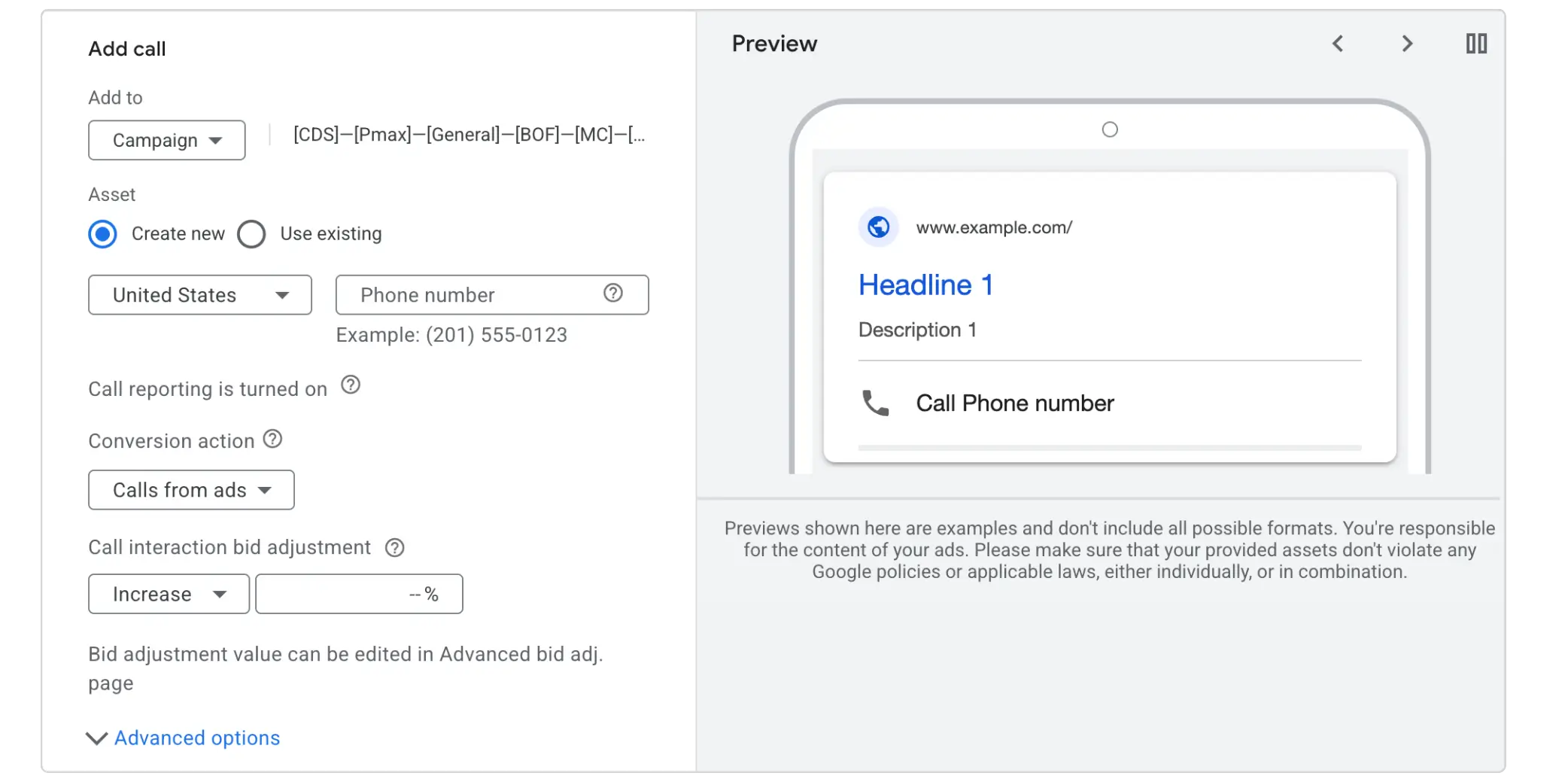
Calls are among the highest-converting lead actions available in Google Ads. A person who picks up the phone has already made a significant commitment. But a ringing phone that goes to voicemail is worse than no call at all — it burns your ad spend and damages trust.
Call Assets display your phone number directly in the ad, making it one tap to call on mobile. Here's how to make them work harder:
Use asset scheduling. If your business closes at 5 p.m., schedule your call asset to stop appearing at 4:55 p.m. There's no reason to pay for a call you can't answer.
Enable call tracking. Google uses a forwarding number to track calls, giving you data on call duration and which keywords triggered them. This is critical, you can't optimize what you don't measure. Once you know which keywords drive real conversations vs. hang-ups, you can refine your bidding and targeting accordingly.
The data that comes from tracked calls also feeds back into Smart Bidding, helping Google understand what a high-value interaction looks like for your business, which over time improves the quality of the traffic you're paying for.
3. Try Message Assets for Mobile Users
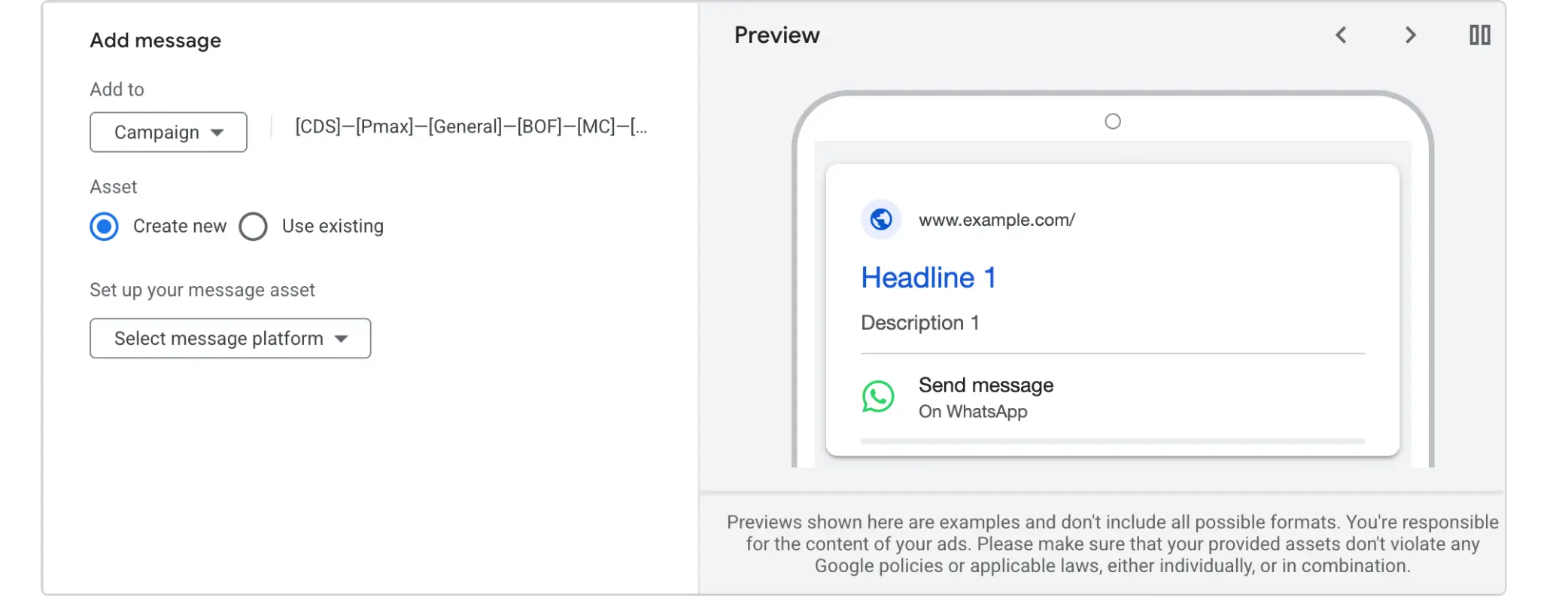
The newest addition to Google's contact asset lineup, Message Assets (currently in beta), let users initiate a WhatsApp or SMS conversation directly from a search ad. They only appear on mobile devices, which is where this kind of conversational interaction makes sense.
If your sales process works well over chat — quick consultations, appointment bookings, quotes — this is worth testing. Like lead forms, message assets keep the interaction within the ad experience, reducing the drop-off that happens when users are redirected elsewhere.
4. Close the Loop With Your CRM
Capturing a lead is only half the job. What happens next determines whether your Google Ads investment actually pays off.
The single most impactful thing most advertisers aren't doing: sending qualified lead data back into Google Ads. Here's why it matters.
When Google only sees that someone submitted a form, it optimizes for more form submissions. But not all form submissions are equal — some become customers, some are spam, some are window shoppers. If you connect your CRM and feed back data on which leads turned into actual sales opportunities (or better yet, closed deals), you're telling Google's Smart Bidding algorithm to find more people who look like your real customers.
Practically, this means:
Store the GCLID (Google Click Identifier) in a hidden field on every lead form, and save it to the lead record in your CRM.
Import offline conversions — tag lifecycle milestones like "Qualified Lead," "Demo Booked," and "Closed Won" with timestamps and send them back to Google.
Shift your optimization target from raw form submissions to qualified leads once you have enough volume. Smart Bidding will then attract fewer junk leads over time, reducing waste without touching your budget.
Speed of follow-up matters too. Leads cool fast. Set up a webhook or a tool like Zapier to push new lead form submissions directly into your CRM the moment they come in, triggering an automatic notification to your sales team.
5. Get Ruthless With Negative Keywords
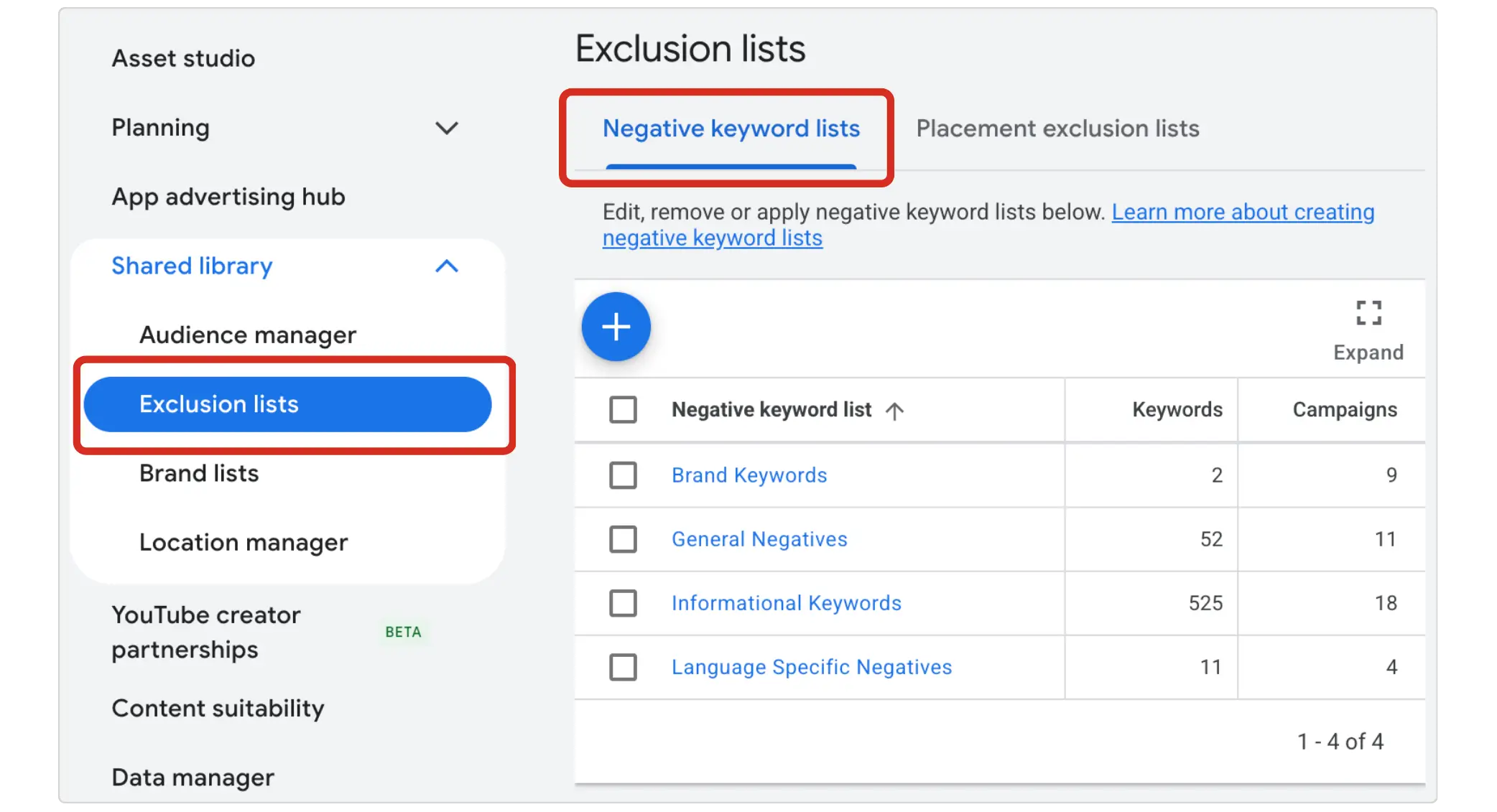
One of the fastest ways to get more leads from the same budget is to stop paying for clicks that were never going to convert. This is where negative keywords do the heavy lifting.
Review your Search Terms report regularly and ask: are there patterns in the searches triggering my ads that aren't relevant? Common culprits include:
Informational queries ("how to," "what is," "DIY")
Competitor brand names (unless that's a deliberate strategy)
Job seekers searching for roles in your industry
Queries from adjacent niches that don't match your offer
Every click you block from irrelevant searches is budget freed up for the searches that actually convert. Think of it as pruning — the more you cut the dead weight, the more energy goes to the branches that produce.
6. Write Ads That Pre-Qualify Clicks
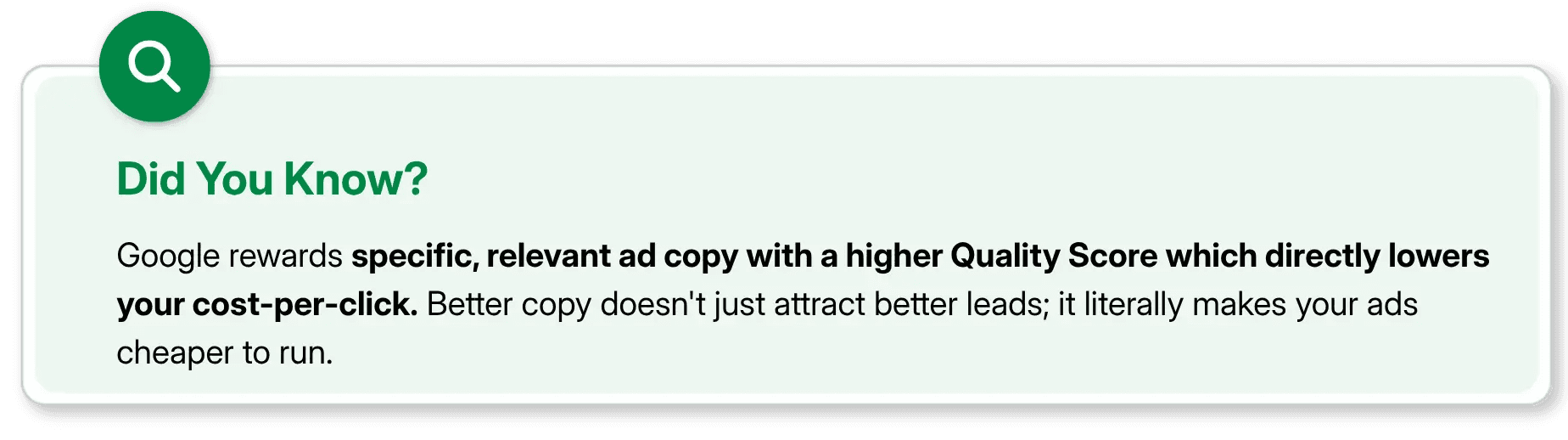
Your ad copy is your first filter. A vague, generic headline attracts generic traffic. Specific, benefit-driven copy that clearly signals who the ad is for — and who it isn't — naturally filters for higher-intent clicks.
For example, if you're a B2B software company targeting mid-market businesses, an ad that says "Enterprise CRM for Teams of 50+" will attract fewer but far more relevant clicks than one that says "Best CRM Software." You might see click volume drop, but your conversion rate will climb.
Include pricing signals where possible. Mentioning a starting price, a minimum project size, or a tier ("Plans from $500/month") repels budget-mismatched users before they click — saving you money and improving lead quality at the same time.
7. Focus on Long-Tail, High-Intent Keywords
Broad, competitive keywords are expensive and attract searchers at every stage of awareness — many of whom aren't close to making a decision. Long-tail keywords, by contrast, are cheaper to bid on and attract users who know exactly what they want.
Compare: "marketing software" vs. "B2B email marketing software for e-commerce." The latter is more specific, less competitive, and signals much clearer purchase intent. Someone searching that phrase has done their research and is closer to making a decision.
Building a keyword strategy around these longer, more specific queries lets you compete effectively even with a modest budget, because you're not fighting brand-heavy players for broad terms.
8. Use Audience Targeting to Sharpen Your Reach
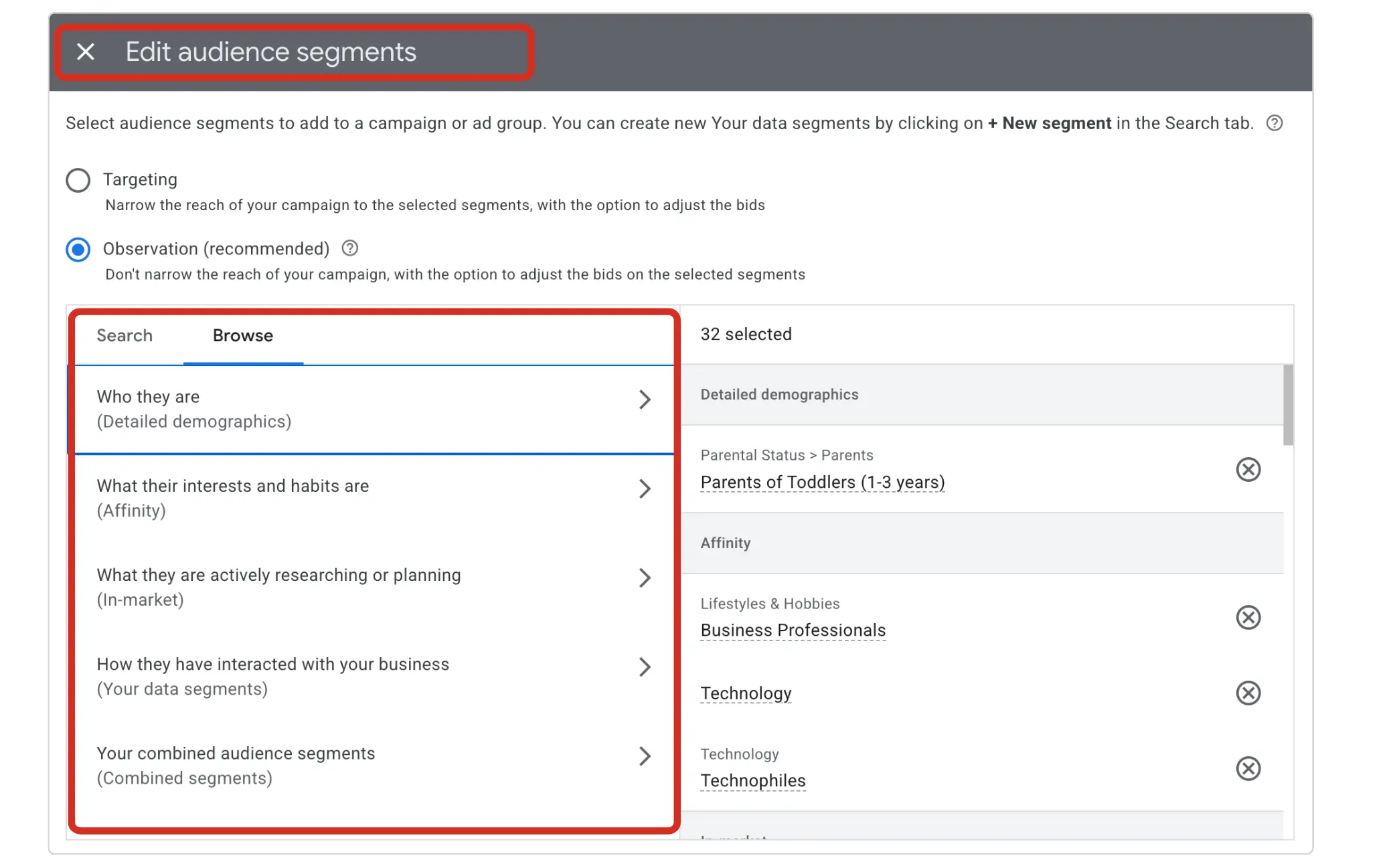
Google Ads lets you layer audience signals on top of keyword targeting, meaning you can prioritize bids for users who match your ideal customer profile while still catching broader traffic at lower bids.
Useful audiences to consider:
Remarketing lists: people who've visited your site before and didn't convert. These users already know you and convert at higher rates.
Customer match: upload a list of existing customers or high-value prospects. Google finds similar users and shows your ads to them preferentially.
In-market audiences: users Google has identified as actively researching a purchase in your category.
You don't need a bigger budget to reach better people. You just need to tell Google who "better" looks like.
Final Thoughts
Every $1 invested in Google Ads delivers $2 in direct return, and up to $8 when the additional organic search benefits are counted. Performance improves when advertisers focus on what they can control — relevance, signals, friction, and follow-up — rather than simply spending more.
Getting more leads from the same budget comes down to a clear sequence:
Reduce friction with Lead Form and Call Assets
Filter low-quality traffic with negative keywords and specific ad copy
Target high-intent long-tail keywords
Close the CRM loop so Smart Bidding finds better leads over time
Layer in audience signals to prioritize your best prospects
None of these require you to increase your daily spend by a single dollar. They require smarter setup, tighter optimization, and a little patience as Google's algorithm learns from better data.
The advertisers who win on Google Ads aren't always the ones with the biggest budgets. They're the ones who make every click count.
FAQs
How to get more leads from Google Ads?

Generating leads from Google Ads requires capturing users at the exact moment they are actively searching for your services. To do this profitably, you need to set up targeted search campaigns, create conversion-focused landing pages, and utilize AI bidding to scale your results.
How to create a lead form on Google Ads?
Creating a Google Ads lead form lets users submit their information directly from your ad without visiting your website. To set this up, navigate to the Campaigns menu > Assets > Lead form, select Create new, and customize your form fields, privacy policy, and submission message.
What's the benefit of negative keywords?
The primary benefit of negative keywords is that they prevent your ads from showing for irrelevant searches, which saves your advertising budget from wasted clicks.
How do long-tail keywords help lower Google Ads costs?
Long-tail keywords are longer, more specific search phrases that are cheaper to bid on and attract users who are closer to making a decision. A search like "B2B email marketing software for e-commerce" signals much stronger purchase intent than "marketing software" and because fewer advertisers are competing for it, your cost per click drops significantly.
What is smart bidding in Google Ads?
Smart Bidding is a subset of automated bidding strategies in Google Ads that uses Google’s AI to optimize your bids for conversions or conversion value in every single auction, a feature known as "auction-time bidding".
You don't need a bigger budget — you need a smarter strategy.
Most advertisers hit a plateau and instinctively reach for the same level: spend more. But here's the truth, throwing money at an underperforming Google Ads account doesn't fix the underlying inefficiencies, it just amplifies them.
The good news? There are proven, tactical ways to squeeze significantly more leads out of your existing spend. Here's how to put it all into practice.
1. Stop Making Customers Work — Use Lead Form Assets
If your Google Ads are still sending every click to a landing page and hoping people will fill out a form, you're losing leads at the door.
Lead Form Assets (formerly called lead form extensions) bake a contact form directly into your ad. When someone clicks, they see a Google-hosted form — often pre-populated with their name, email, and phone number from their Google account — and can submit their details without ever leaving the search results page. One tap, and they're a lead.
This matters because friction is the enemy of conversion. Every extra click, every slow-loading landing page, every CAPTCHA is an excuse for a potential customer to bounce. Lead form assets eliminate those excuses.
A few things to know before you set them up:
They're compatible with Search and Performance Max campaigns, and now also available in beta as Message Assets for mobile.
Your campaign must use a conversion-focused bidding strategy and be optimized for the lead form conversion goal.
You need a privacy policy URL — it's mandatory for collecting user information.
On the quality side, yes — the lower friction that makes lead forms powerful also makes them vulnerable to low-quality submissions.
The fix is simple: add a screening question. Ask about budget range, project timeline, or a specific need. It forces users to pause and self-qualify before hitting submit, which filters casual browsers from genuine prospects.
2. Add Call Assets — But Only When Someone Can Answer
Calls are among the highest-converting lead actions available in Google Ads. A person who picks up the phone has already made a significant commitment. But a ringing phone that goes to voicemail is worse than no call at all — it burns your ad spend and damages trust.
Call Assets display your phone number directly in the ad, making it one tap to call on mobile. Here's how to make them work harder:
Use asset scheduling. If your business closes at 5 p.m., schedule your call asset to stop appearing at 4:55 p.m. There's no reason to pay for a call you can't answer.
Enable call tracking. Google uses a forwarding number to track calls, giving you data on call duration and which keywords triggered them. This is critical, you can't optimize what you don't measure. Once you know which keywords drive real conversations vs. hang-ups, you can refine your bidding and targeting accordingly.
The data that comes from tracked calls also feeds back into Smart Bidding, helping Google understand what a high-value interaction looks like for your business, which over time improves the quality of the traffic you're paying for.
3. Try Message Assets for Mobile Users
The newest addition to Google's contact asset lineup, Message Assets (currently in beta), let users initiate a WhatsApp or SMS conversation directly from a search ad. They only appear on mobile devices, which is where this kind of conversational interaction makes sense.
If your sales process works well over chat — quick consultations, appointment bookings, quotes — this is worth testing. Like lead forms, message assets keep the interaction within the ad experience, reducing the drop-off that happens when users are redirected elsewhere.
4. Close the Loop With Your CRM
Capturing a lead is only half the job. What happens next determines whether your Google Ads investment actually pays off.
The single most impactful thing most advertisers aren't doing: sending qualified lead data back into Google Ads. Here's why it matters.
When Google only sees that someone submitted a form, it optimizes for more form submissions. But not all form submissions are equal — some become customers, some are spam, some are window shoppers. If you connect your CRM and feed back data on which leads turned into actual sales opportunities (or better yet, closed deals), you're telling Google's Smart Bidding algorithm to find more people who look like your real customers.
Practically, this means:
Store the GCLID (Google Click Identifier) in a hidden field on every lead form, and save it to the lead record in your CRM.
Import offline conversions — tag lifecycle milestones like "Qualified Lead," "Demo Booked," and "Closed Won" with timestamps and send them back to Google.
Shift your optimization target from raw form submissions to qualified leads once you have enough volume. Smart Bidding will then attract fewer junk leads over time, reducing waste without touching your budget.
Speed of follow-up matters too. Leads cool fast. Set up a webhook or a tool like Zapier to push new lead form submissions directly into your CRM the moment they come in, triggering an automatic notification to your sales team.
5. Get Ruthless With Negative Keywords
One of the fastest ways to get more leads from the same budget is to stop paying for clicks that were never going to convert. This is where negative keywords do the heavy lifting.
Review your Search Terms report regularly and ask: are there patterns in the searches triggering my ads that aren't relevant? Common culprits include:
Informational queries ("how to," "what is," "DIY")
Competitor brand names (unless that's a deliberate strategy)
Job seekers searching for roles in your industry
Queries from adjacent niches that don't match your offer
Every click you block from irrelevant searches is budget freed up for the searches that actually convert. Think of it as pruning — the more you cut the dead weight, the more energy goes to the branches that produce.
6. Write Ads That Pre-Qualify Clicks
Your ad copy is your first filter. A vague, generic headline attracts generic traffic. Specific, benefit-driven copy that clearly signals who the ad is for — and who it isn't — naturally filters for higher-intent clicks.
For example, if you're a B2B software company targeting mid-market businesses, an ad that says "Enterprise CRM for Teams of 50+" will attract fewer but far more relevant clicks than one that says "Best CRM Software." You might see click volume drop, but your conversion rate will climb.
Include pricing signals where possible. Mentioning a starting price, a minimum project size, or a tier ("Plans from $500/month") repels budget-mismatched users before they click — saving you money and improving lead quality at the same time.
7. Focus on Long-Tail, High-Intent Keywords
Broad, competitive keywords are expensive and attract searchers at every stage of awareness — many of whom aren't close to making a decision. Long-tail keywords, by contrast, are cheaper to bid on and attract users who know exactly what they want.
Compare: "marketing software" vs. "B2B email marketing software for e-commerce." The latter is more specific, less competitive, and signals much clearer purchase intent. Someone searching that phrase has done their research and is closer to making a decision.
Building a keyword strategy around these longer, more specific queries lets you compete effectively even with a modest budget, because you're not fighting brand-heavy players for broad terms.
8. Use Audience Targeting to Sharpen Your Reach
Google Ads lets you layer audience signals on top of keyword targeting, meaning you can prioritize bids for users who match your ideal customer profile while still catching broader traffic at lower bids.
Useful audiences to consider:
Remarketing lists: people who've visited your site before and didn't convert. These users already know you and convert at higher rates.
Customer match: upload a list of existing customers or high-value prospects. Google finds similar users and shows your ads to them preferentially.
In-market audiences: users Google has identified as actively researching a purchase in your category.
You don't need a bigger budget to reach better people. You just need to tell Google who "better" looks like.
Final Thoughts
Every $1 invested in Google Ads delivers $2 in direct return, and up to $8 when the additional organic search benefits are counted. Performance improves when advertisers focus on what they can control — relevance, signals, friction, and follow-up — rather than simply spending more.
Getting more leads from the same budget comes down to a clear sequence:
Reduce friction with Lead Form and Call Assets
Filter low-quality traffic with negative keywords and specific ad copy
Target high-intent long-tail keywords
Close the CRM loop so Smart Bidding finds better leads over time
Layer in audience signals to prioritize your best prospects
None of these require you to increase your daily spend by a single dollar. They require smarter setup, tighter optimization, and a little patience as Google's algorithm learns from better data.
The advertisers who win on Google Ads aren't always the ones with the biggest budgets. They're the ones who make every click count.
FAQs
How to get more leads from Google Ads?
Generating leads from Google Ads requires capturing users at the exact moment they are actively searching for your services. To do this profitably, you need to set up targeted search campaigns, create conversion-focused landing pages, and utilize AI bidding to scale your results.
How to create a lead form on Google Ads?
Creating a Google Ads lead form lets users submit their information directly from your ad without visiting your website. To set this up, navigate to the Campaigns menu > Assets > Lead form, select Create new, and customize your form fields, privacy policy, and submission message.
What's the benefit of negative keywords?
The primary benefit of negative keywords is that they prevent your ads from showing for irrelevant searches, which saves your advertising budget from wasted clicks.
How do long-tail keywords help lower Google Ads costs?
Long-tail keywords are longer, more specific search phrases that are cheaper to bid on and attract users who are closer to making a decision. A search like "B2B email marketing software for e-commerce" signals much stronger purchase intent than "marketing software" and because fewer advertisers are competing for it, your cost per click drops significantly.
What is smart bidding in Google Ads?
Smart Bidding is a subset of automated bidding strategies in Google Ads that uses Google’s AI to optimize your bids for conversions or conversion value in every single auction, a feature known as "auction-time bidding".



Summarize with AI



Have a Google Ads account?
Get a free audit Today!
Have a Google Ads account?
Get a free audit Today!



4.9/5 Ratings!
4.9/5 Ratings!


Don’t miss our revenue growth tips!
Get expert marketing tips—straight to your inbox, like thousands of happy clients.
Don’t miss our revenue growth tips!
Get expert marketing tips—straight to your inbox, like thousands of happy clients.
Don’t miss our revenue growth tips!
Get expert marketing tips—straight to your inbox, like thousands of happy clients.
Don’t miss our revenue growth tips!
Relevant Blogs on PPC Marketing
Relevant Blogs on PPC Marketing
Unlock data-driven insights in PPC marketing—explore our featured blogs and skyrocket your revenue before your competitors do.
Unlock data-driven insights in PPC marketing—explore our featured blogs and skyrocket your revenue before your competitors do.

PPC
Sep 1, 2026
8 Min Read
Google Is Removing Manual Language Targeting From Search Campaigns: What Advertisers Need to Know
PPC
Sep 1, 2026
8 Min Read
Google Is Removing Manual Language Targeting From Search Campaigns: What Advertisers Need to Know
PPC
Sep 1, 2026
8 Min Read
Google Is Removing Manual Language Targeting From Search Campaigns: What Advertisers Need to Know

PPC
Aug 6, 2026
10 Min Read
What Are Display Ads & How Do They Work?
PPC
Aug 6, 2026
10 Min Read
What Are Display Ads & How Do They Work?
PPC
Aug 6, 2026
10 Min Read
What Are Display Ads & How Do They Work?

PPC
Aug 2, 2026
10 Min Read
12 Best Practices to Improve Google Ads CTR
PPC
Aug 2, 2026
10 Min Read
12 Best Practices to Improve Google Ads CTR
PPC
Aug 2, 2026
10 Min Read
12 Best Practices to Improve Google Ads CTR
























Ready to speak with an expert?
Data-Driven Marketing Agency That Elevates ROI
1100+
Websites Designed & Optimized to Convert
$280M+
Client Revenue Driven & Growing Strong
Discover how to skyrocket
your revenue today!
Trusted by 1000+ Owners!
Ready to speak with an expert?
Data-Driven Marketing Agency That Elevates ROI
1100+
Websites Designed & Optimized to Convert
$280M+
Client Revenue Driven & Growing Strong
Discover how to skyrocket
your revenue today!
Trusted by 1000+ Owners!
Want to skyrocket revenue?
4.9/5 Ratings!
Ready to speak with an expert?
Data-Driven Marketing Agency That Elevates ROI
1100+
Websites Designed & Optimized to Convert
$280M+
Client Revenue Driven & Growing Strong
Discover how to skyrocket
your revenue today!
Trusted by 1000+ Owners!
Call
Meet