Google Ads YouTube Auto-Linking: What Advertisers Need to Know and How to Prepare
Google Ads YouTube Auto-Linking: What Advertisers Need to Know and How to Prepare
Last Updated:
Table of Content
Explore Free Tools


Lucky Soni
Lucky Soni
Lucky Soni
PPC
PPC
PPC
12 Min Read
12 Min Read
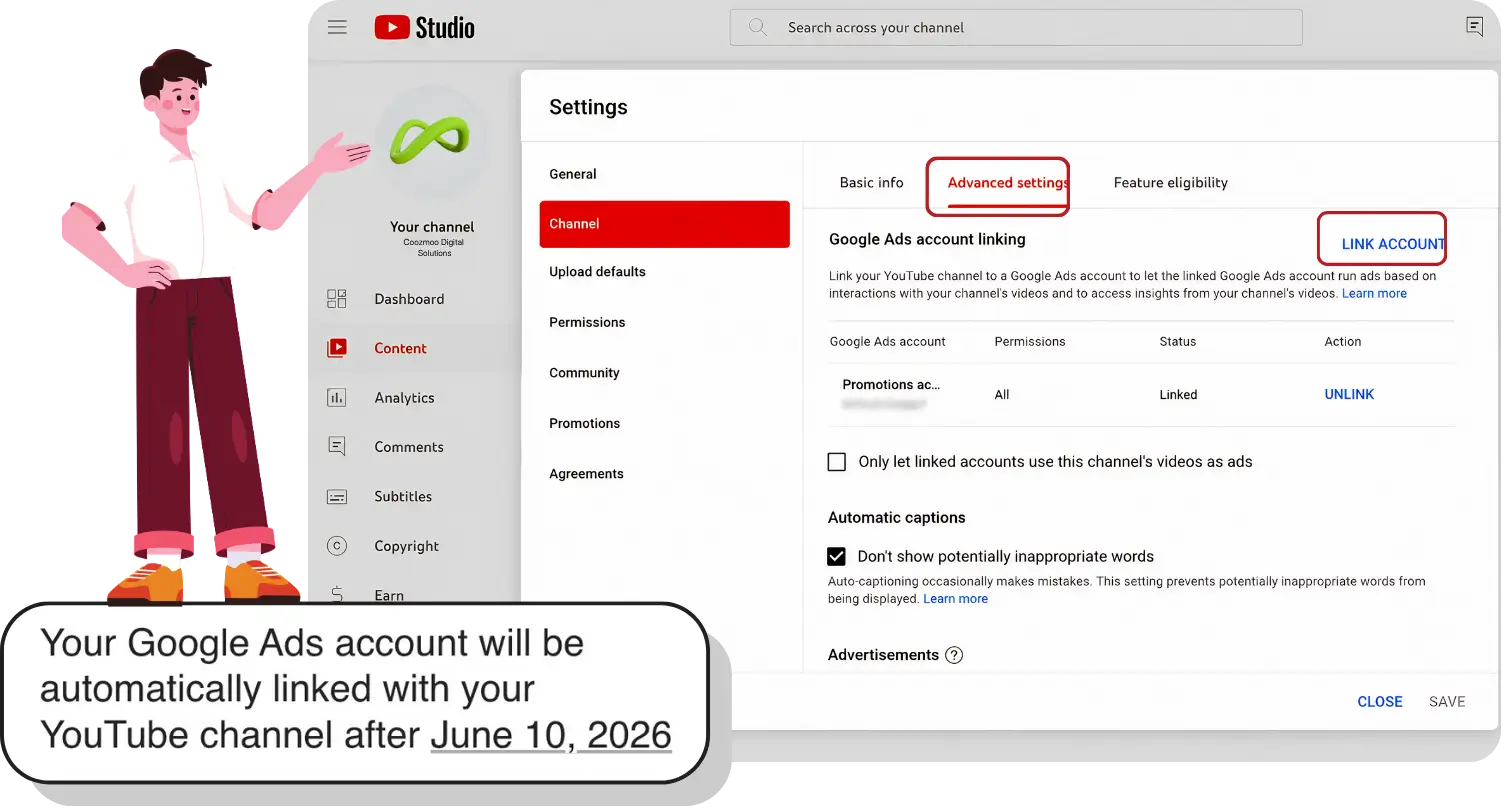
Google is making a major change to the way advertisers connect their YouTube presence with advertising accounts. Starting June 10, 2026, eligible Google Ads accounts may be automatically connected to associated YouTube channels, even if advertisers never manually initiated the link themselves.
For brands, agencies, creators, and performance marketers using google ads for youtube, this update could significantly impact audience targeting, campaign insights, remarketing capabilities, and account governance.
While Google frames this move as a way to simplify account management and improve advertising performance, many advertisers are now asking important questions:
What exactly is changing?
Why is Google introducing automatic linking?
What data becomes accessible after linking?
Can advertisers opt out?
How should businesses prepare before rollout?
In this guide, we’ll break down everything advertisers need to know about Google Ads Auto-Link YouTube Channels, how automatically linking Google Ads accounts to Youtube works, and what this means for the future of YouTube Google Ads account linking.
What Is Google Ads YouTube Auto-Linking?
Traditionally, advertisers had to manually connect their YouTube channel with a Google Ads account to unlock additional advertising features and audience insights.
That manual setup allowed businesses to:
Access YouTube engagement metrics inside Google Ads
Build remarketing audiences from channel viewers
Track earned actions such as subscriptions
Improve targeting for video campaigns
Optimize Demand Gen and Performance Max campaigns
Now, Google is changing that process.
According to multiple reports and advertiser notifications, Google will begin automatically connecting eligible Google Ads accounts with associated YouTube channels where the platform detects a “high-confidence ownership relationship.”
In simple terms, Google’s systems will decide when a Google Ads account and YouTube channel appear to belong to the same business or owner and then automatically create the connection.
This means advertisers may soon experience Automatically linking Google Ads accounts without taking manual action.
Why Is Google Introducing Automatic Linking?
Google’s broader advertising ecosystem has increasingly focused on automation, AI-driven optimization, and cross-platform integration.
The company wants advertisers using google ads youtube campaigns to access richer audience signals with fewer setup barriers.
This auto-linking initiative supports several of Google’s larger goals:
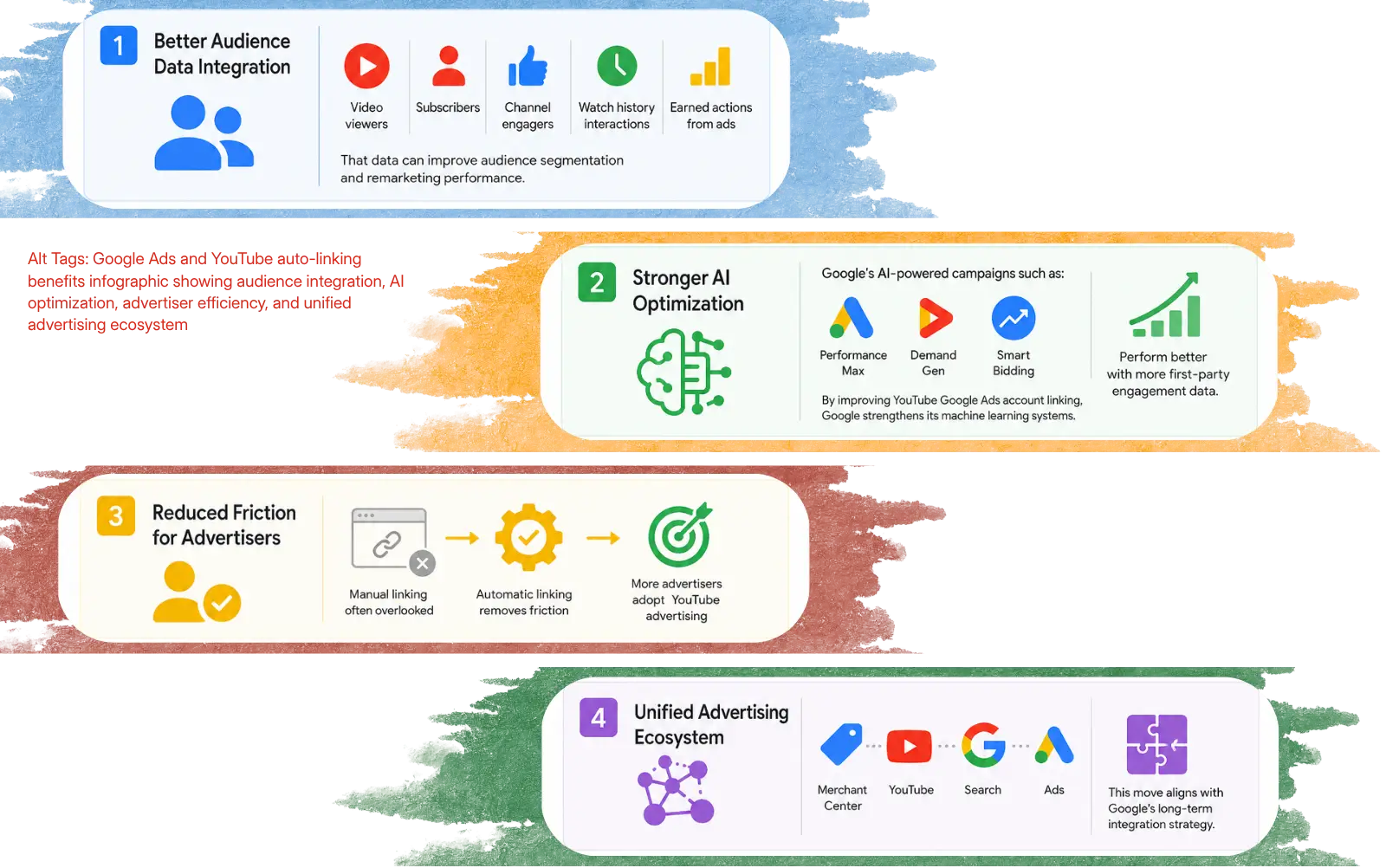
1. Better Audience Data Integration
When YouTube channels and Google Ads accounts are connected, advertisers gain access to valuable behavioral data.
This includes:
Video viewers
Subscribers
Channel engagers
Watch history interactions
Earned actions from ads
That data can improve audience segmentation and remarketing performance.
2. Stronger AI Optimization
Google’s AI-powered campaigns such as:
Performance Max
Demand Gen
Smart Bidding
perform better when more first-party engagement data is available.
By improving YouTube Google Ads account linking, Google strengthens its machine learning systems.
3. Reduced Friction for Advertisers
Many businesses never manually connected their accounts simply because they didn’t know the feature existed.
Automatic linking removes technical friction and encourages wider adoption of YouTube-focused advertising strategies.
4. Unified Advertising Ecosystem
Google has been steadily tightening integration across its ecosystem, including Merchant Center, YouTube Search, and Ads accounts.
This latest move aligns with that long-term strategy.
How Does Google Determine Which Accounts to Link?
Google states that the system uses “ownership signals” and “high-confidence relationships” to identify eligible account pairings.
Some likely signals include:
Shared admin email addresses
Cross-account management activity
Common business ownership indicators
Linked Google accounts
Similar login patterns
Shared verification methods
However, Google has not publicly disclosed every signal used in the process.
That uncertainty is one reason some advertisers are expressing concern about unintended or incorrect connections.
What Happens After Accounts Are Linked?
After the connection is made, advertisers can access more information about audiences and engagement on YouTube in Google Ads.
These are some of the greatest advantages :-
Access to Organic YouTube Metrics :
Non-paid YouTube performance metrics are now available for advertisers right inside of Google Ads.
This may include -
Watch engagement
Subscriber activity
Viewer interactions
Enhanced Audience Building :
The audience building feature is one of the best.
When creating audience segments, advertisers can use -
Users who viewed videos
Channel subscribers
Users who interacted with the content
Past channel interactions
These users can then be targeted in remarketing campaigns.
Improved Campaign Optimization :
More audience signals leads to better improvement of -
Demand Gen targeting
Video campaign performance
Better Attribution Insights
Advertisers might be able to better understand the performance of their paid campaigns on YouTube, by leveraging engagement from their organic videos.
This can offer enhanced attribution modelling and customer journey analysis for enterprises which invest heavily in google ads for youtube.
Here are some tips for advertisers to follow before Connecting :
Regardless if you are embracing the change or not, you will need to prepare.
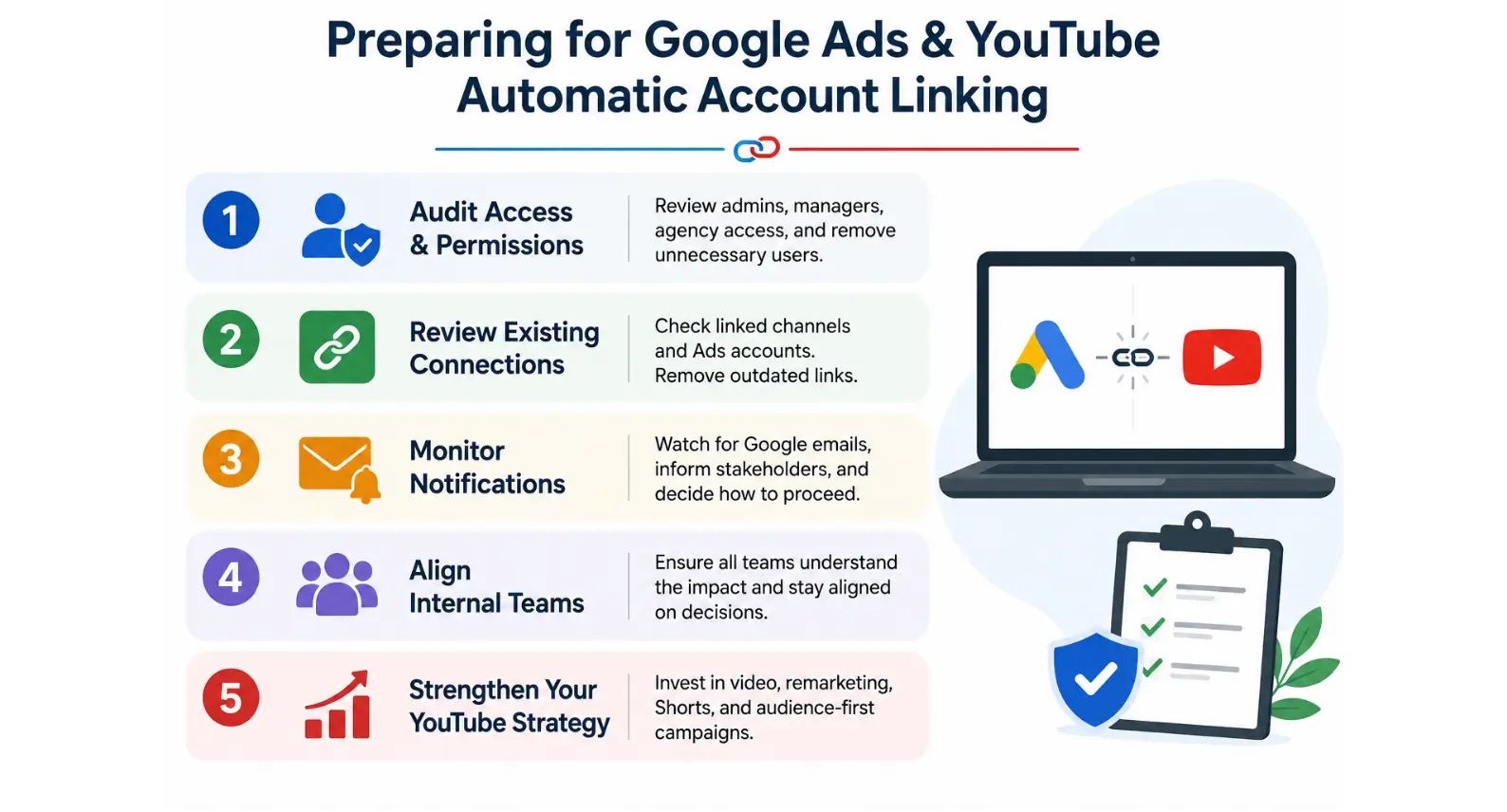
Here’s how advertisers should prepare for Google Ads Auto-Link YouTube Channels rollout.
1. Audit Account Access and Permissions
Start by reviewing:
Google Ads admins
YouTube channel managers
Agency access permissions
Former employee accounts
Shared logins
This is the most critical preparation procedure.
Be sure that only authorized people can have admin level access.
The integrations will be most beneficial for companies already blending inbound and outbound marketing with compelling YouTube videos.
2. Review Existing YouTube Channel Connections
Manual connections may be in place at some businesses.
Check:
Where are the channels connected
What is the name of the ads accounts that are linked
Does it still make sense to have ownership structures?
It might be too late to avoid confusion if you don't clean up old connections now.
3. Be sure to check Notification Emails Closely
Google is said to make a heads-up warning beforehand.
Marketing teams should:
Watch inboxes carefully
Inform stakeholders
Put in place internal review mechanisms
Don't be afraid to say no when it comes to connecting.Say no when it's time to say no.
If you do not respond to these e-mails, you may end up being linked to an unintended account.
4. Align Internal Teams
Many organizations separate:
Brand teams
Paid media teams
Video production teams
Agencies
This is the time to make sure everyone is aware of the implications of automatic linkage.
Inter-team communication is essential.
5. Strengthen Your YouTube Advertising Strategy
This update is also a sign of something larger:
Google is continuing to treat YouTube as a hub for advertising Platform/ When targeting brands with google ads youtube campaigns, it's important to think about:
Expanding video remarketing
Building creator-driven content
Testing Demand Gen campaigns
Harvesting YouTube Shorts advertising.
Taking an audience-first approach to campaign structures
Businesses that already combine strong YouTube content with paid advertising may benefit the most from these integrations.
What This Means for the Future of YouTube Advertising
This change is not occurring by itself.
Just recently, Google has rolled out several enhancements to improve the integration of YouTube, AI optimisation, shopping, and advertising automation.
Some of the trends that are emerging are:
Shoppable YouTube experiences
Creator partnerships inside Google Ads
Integrated audience targeting
Cross-platform attribution
Youtube ad services are becoming more and more data and automated.
For advertisers, it translates to two things:
Better ability to target and optimize for performance.
More governance, oversight and strategic account management required.
How Agencies and Brands Should Respond
This update brings opportunities and responsibilities for agencies providing youtube ad services.
Agencies should:
Explain to clients what automatic linking is
Check the company's account structures
Implement appropriate permissions management
Clarify governance policies
Develop more effective YouTube advertising campaigns
For brands, however, this offers an opportunity to further align organic content with paid content.
The companies that combine both well will have the strongest insights into their audiences and will be more efficient at advertising.
Final Thoughts
One such significant advancement in this direction is Google's announcement to connect Google Ads accounts with YouTube channels automatically. Another big change in this direction is when Google's has begun to automatically link Google Ads accounts with YouTube channels.
The update will help many advertisers with easier setups and also provide better audience insights in their google ads for youtube campaigns.
At the same time it poses pertinent questions on:
Data governance
Permission management
Transparency
Account oversight
“It's a simple lesson:
Don't wait until the implementation occurs.
Analyze your account structures now, pay attention to notifications, and plan in advance what to link and not link in your YouTube Google Ads.
YouTube's continued expansion as a commerce and advertising-focused platform means that businesses that are proactive in embracing change will be far better equipped to optimize campaign performance and audience engagement.
For brands serious about scaling video advertising, now is the time to refine your google ads Youtube strategy and ensure your systems are ready for the next phase of advertising automation.
FAQ
What is Google Ads YouTube auto-linking?

Google automatically links YouTube channels and Google Ads accounts when its systems detect a high-confidence connection between the two, such as shared admin logins or cross-account activity — giving advertisers access to richer audience signals without manual setup.
How will I know if my accounts are going to be linked?
Google sends an email to admins and channel owners 30 days before the link is created, giving them the option to opt out or approve the link early.
Can I stop the auto-link from happening?
Yes — if even one administrator or channel owner opts out during the 30-day window, the automatic link would not proceed.
Does linking give Google or my agency control over my YouTube channel?
The link doesn't grant control over the other account, and personalized-ads settings still limit available data.
Which campaigns benefit most from this linking?
Once linked, advertisers gain access to YouTube audience segments and organic video metrics that can be applied across Performance Max, Smart Bidding, and Demand Gen campaigns.
Google is making a major change to the way advertisers connect their YouTube presence with advertising accounts. Starting June 10, 2026, eligible Google Ads accounts may be automatically connected to associated YouTube channels, even if advertisers never manually initiated the link themselves.
For brands, agencies, creators, and performance marketers using google ads for youtube, this update could significantly impact audience targeting, campaign insights, remarketing capabilities, and account governance.
While Google frames this move as a way to simplify account management and improve advertising performance, many advertisers are now asking important questions:
What exactly is changing?
Why is Google introducing automatic linking?
What data becomes accessible after linking?
Can advertisers opt out?
How should businesses prepare before rollout?
In this guide, we’ll break down everything advertisers need to know about Google Ads Auto-Link YouTube Channels, how automatically linking Google Ads accounts to Youtube works, and what this means for the future of YouTube Google Ads account linking.
What Is Google Ads YouTube Auto-Linking?
Traditionally, advertisers had to manually connect their YouTube channel with a Google Ads account to unlock additional advertising features and audience insights.
That manual setup allowed businesses to:
Access YouTube engagement metrics inside Google Ads
Build remarketing audiences from channel viewers
Track earned actions such as subscriptions
Improve targeting for video campaigns
Optimize Demand Gen and Performance Max campaigns
Now, Google is changing that process.
According to multiple reports and advertiser notifications, Google will begin automatically connecting eligible Google Ads accounts with associated YouTube channels where the platform detects a “high-confidence ownership relationship.”
In simple terms, Google’s systems will decide when a Google Ads account and YouTube channel appear to belong to the same business or owner and then automatically create the connection.
This means advertisers may soon experience Automatically linking Google Ads accounts without taking manual action.
Why Is Google Introducing Automatic Linking?
Google’s broader advertising ecosystem has increasingly focused on automation, AI-driven optimization, and cross-platform integration.
The company wants advertisers using google ads youtube campaigns to access richer audience signals with fewer setup barriers.
This auto-linking initiative supports several of Google’s larger goals:
1. Better Audience Data Integration
When YouTube channels and Google Ads accounts are connected, advertisers gain access to valuable behavioral data.
This includes:
Video viewers
Subscribers
Channel engagers
Watch history interactions
Earned actions from ads
That data can improve audience segmentation and remarketing performance.
2. Stronger AI Optimization
Google’s AI-powered campaigns such as:
Performance Max
Demand Gen
Smart Bidding
perform better when more first-party engagement data is available.
By improving YouTube Google Ads account linking, Google strengthens its machine learning systems.
3. Reduced Friction for Advertisers
Many businesses never manually connected their accounts simply because they didn’t know the feature existed.
Automatic linking removes technical friction and encourages wider adoption of YouTube-focused advertising strategies.
4. Unified Advertising Ecosystem
Google has been steadily tightening integration across its ecosystem, including Merchant Center, YouTube Search, and Ads accounts.
This latest move aligns with that long-term strategy.
How Does Google Determine Which Accounts to Link?
Google states that the system uses “ownership signals” and “high-confidence relationships” to identify eligible account pairings.
Some likely signals include:
Shared admin email addresses
Cross-account management activity
Common business ownership indicators
Linked Google accounts
Similar login patterns
Shared verification methods
However, Google has not publicly disclosed every signal used in the process.
That uncertainty is one reason some advertisers are expressing concern about unintended or incorrect connections.
What Happens After Accounts Are Linked?
After the connection is made, advertisers can access more information about audiences and engagement on YouTube in Google Ads.
These are some of the greatest advantages :-
Access to Organic YouTube Metrics :
Non-paid YouTube performance metrics are now available for advertisers right inside of Google Ads.
This may include -
Watch engagement
Subscriber activity
Viewer interactions
Enhanced Audience Building :
The audience building feature is one of the best.
When creating audience segments, advertisers can use -
Users who viewed videos
Channel subscribers
Users who interacted with the content
Past channel interactions
These users can then be targeted in remarketing campaigns.
Improved Campaign Optimization :
More audience signals leads to better improvement of -
Demand Gen targeting
Video campaign performance
Better Attribution Insights
Advertisers might be able to better understand the performance of their paid campaigns on YouTube, by leveraging engagement from their organic videos.
This can offer enhanced attribution modelling and customer journey analysis for enterprises which invest heavily in google ads for youtube.
Here are some tips for advertisers to follow before Connecting :
Regardless if you are embracing the change or not, you will need to prepare.
Here’s how advertisers should prepare for Google Ads Auto-Link YouTube Channels rollout.
1. Audit Account Access and Permissions
Start by reviewing:
Google Ads admins
YouTube channel managers
Agency access permissions
Former employee accounts
Shared logins
This is the most critical preparation procedure.
Be sure that only authorized people can have admin level access.
The integrations will be most beneficial for companies already blending inbound and outbound marketing with compelling YouTube videos.
2. Review Existing YouTube Channel Connections
Manual connections may be in place at some businesses.
Check:
Where are the channels connected
What is the name of the ads accounts that are linked
Does it still make sense to have ownership structures?
It might be too late to avoid confusion if you don't clean up old connections now.
3. Be sure to check Notification Emails Closely
Google is said to make a heads-up warning beforehand.
Marketing teams should:
Watch inboxes carefully
Inform stakeholders
Put in place internal review mechanisms
Don't be afraid to say no when it comes to connecting.Say no when it's time to say no.
If you do not respond to these e-mails, you may end up being linked to an unintended account.
4. Align Internal Teams
Many organizations separate:
Brand teams
Paid media teams
Video production teams
Agencies
This is the time to make sure everyone is aware of the implications of automatic linkage.
Inter-team communication is essential.
5. Strengthen Your YouTube Advertising Strategy
This update is also a sign of something larger:
Google is continuing to treat YouTube as a hub for advertising Platform/ When targeting brands with google ads youtube campaigns, it's important to think about:
Expanding video remarketing
Building creator-driven content
Testing Demand Gen campaigns
Harvesting YouTube Shorts advertising.
Taking an audience-first approach to campaign structures
Businesses that already combine strong YouTube content with paid advertising may benefit the most from these integrations.
What This Means for the Future of YouTube Advertising
This change is not occurring by itself.
Just recently, Google has rolled out several enhancements to improve the integration of YouTube, AI optimisation, shopping, and advertising automation.
Some of the trends that are emerging are:
Shoppable YouTube experiences
Creator partnerships inside Google Ads
Integrated audience targeting
Cross-platform attribution
Youtube ad services are becoming more and more data and automated.
For advertisers, it translates to two things:
Better ability to target and optimize for performance.
More governance, oversight and strategic account management required.
How Agencies and Brands Should Respond
This update brings opportunities and responsibilities for agencies providing youtube ad services.
Agencies should:
Explain to clients what automatic linking is
Check the company's account structures
Implement appropriate permissions management
Clarify governance policies
Develop more effective YouTube advertising campaigns
For brands, however, this offers an opportunity to further align organic content with paid content.
The companies that combine both well will have the strongest insights into their audiences and will be more efficient at advertising.
Final Thoughts
One such significant advancement in this direction is Google's announcement to connect Google Ads accounts with YouTube channels automatically. Another big change in this direction is when Google's has begun to automatically link Google Ads accounts with YouTube channels.
The update will help many advertisers with easier setups and also provide better audience insights in their google ads for youtube campaigns.
At the same time it poses pertinent questions on:
Data governance
Permission management
Transparency
Account oversight
“It's a simple lesson:
Don't wait until the implementation occurs.
Analyze your account structures now, pay attention to notifications, and plan in advance what to link and not link in your YouTube Google Ads.
YouTube's continued expansion as a commerce and advertising-focused platform means that businesses that are proactive in embracing change will be far better equipped to optimize campaign performance and audience engagement.
For brands serious about scaling video advertising, now is the time to refine your google ads Youtube strategy and ensure your systems are ready for the next phase of advertising automation.
FAQ
What is Google Ads YouTube auto-linking?
Google automatically links YouTube channels and Google Ads accounts when its systems detect a high-confidence connection between the two, such as shared admin logins or cross-account activity — giving advertisers access to richer audience signals without manual setup.
How will I know if my accounts are going to be linked?
Google sends an email to admins and channel owners 30 days before the link is created, giving them the option to opt out or approve the link early.
Can I stop the auto-link from happening?
Yes — if even one administrator or channel owner opts out during the 30-day window, the automatic link would not proceed.
Does linking give Google or my agency control over my YouTube channel?
The link doesn't grant control over the other account, and personalized-ads settings still limit available data.
Which campaigns benefit most from this linking?
Once linked, advertisers gain access to YouTube audience segments and organic video metrics that can be applied across Performance Max, Smart Bidding, and Demand Gen campaigns.



Summarize with AI



Have a Google Ads account?
Get a free audit Today!
Have a Google Ads account?
Get a free audit Today!



4.9/5 Ratings!
4.9/5 Ratings!


Don’t miss our revenue growth tips!
Get expert marketing tips—straight to your inbox, like thousands of happy clients.
Don’t miss our revenue growth tips!
Get expert marketing tips—straight to your inbox, like thousands of happy clients.
Don’t miss our revenue growth tips!
Get expert marketing tips—straight to your inbox, like thousands of happy clients.
Don’t miss our revenue growth tips!
Relevant Blogs on PPC Marketing
Relevant Blogs on PPC Marketing
Unlock data-driven insights in PPC marketing—explore our featured blogs and skyrocket your revenue before your competitors do.
Unlock data-driven insights in PPC marketing—explore our featured blogs and skyrocket your revenue before your competitors do.
PPC
Sep 1, 2026
8 Min Read
Google Is Removing Manual Language Targeting From Search Campaigns: What Advertisers Need to Know
PPC
Sep 1, 2026
8 Min Read
Google Is Removing Manual Language Targeting From Search Campaigns: What Advertisers Need to Know
PPC
Sep 1, 2026
8 Min Read
Google Is Removing Manual Language Targeting From Search Campaigns: What Advertisers Need to Know

PPC
Aug 6, 2026
10 Min Read
What Are Display Ads & How Do They Work?
PPC
Aug 6, 2026
10 Min Read
What Are Display Ads & How Do They Work?
PPC
Aug 6, 2026
10 Min Read
What Are Display Ads & How Do They Work?

PPC
Aug 2, 2026
10 Min Read
12 Best Practices to Improve Google Ads CTR
PPC
Aug 2, 2026
10 Min Read
12 Best Practices to Improve Google Ads CTR
PPC
Aug 2, 2026
10 Min Read
12 Best Practices to Improve Google Ads CTR
























Ready to speak with an expert?
Data-Driven Marketing Agency That Elevates ROI
1100+
Websites Designed & Optimized to Convert
$280M+
Client Revenue Driven & Growing Strong
Discover how to skyrocket
your revenue today!
Trusted by 1000+ Owners!
Ready to speak with an expert?
Data-Driven Marketing Agency That Elevates ROI
1100+
Websites Designed & Optimized to Convert
$280M+
Client Revenue Driven & Growing Strong
Discover how to skyrocket
your revenue today!
Trusted by 1000+ Owners!
Want to skyrocket revenue?
4.9/5 Ratings!
Ready to speak with an expert?
Data-Driven Marketing Agency That Elevates ROI
1100+
Websites Designed & Optimized to Convert
$280M+
Client Revenue Driven & Growing Strong
Discover how to skyrocket
your revenue today!
Trusted by 1000+ Owners!
Call
Meet