Why Google Ads Shows Conversions but Your Revenue Isn't Growing
Why Google Ads Shows Conversions but Your Revenue Isn't Growing
Last Updated:
Table of Content
Explore Free Tools


Micaliah Farris
Micaliah Farris
Micaliah Farris
PPC
PPC
PPC
10 Min Read
10 Min Read
12 Min
To begin, you are seeing conversions listed in your Google Ads dashboard. These conversions appear to be positive, yet your actual sales are not increasing. Businesses often experience this frustration with paid search, and it typically stems from a misaligned setup in which the reported conversion metrics don't reflect the actions that actually drive revenue. In other words, you may see high volumes of conversions like website visits, but these actions may carry very little real value. Google Ads is working exactly as intended based on the parameters you provided. The problem is the parameters themselves. Here's what is likely occurring and how to address it.
What Constitutes a Conversion in Google Ads?
In order to determine whether your metrics are accurate, we first need to discuss what constitutes a conversion in Google Ads. A conversion represents any action you have deemed valuable and instructed Google to report. The types of actions that can count as a conversion include a form fill, a phone call, a website visit, a video view, a download, or a sale. However, not all actions are created equal, and unfortunately, Google's default configuration treats them as such.
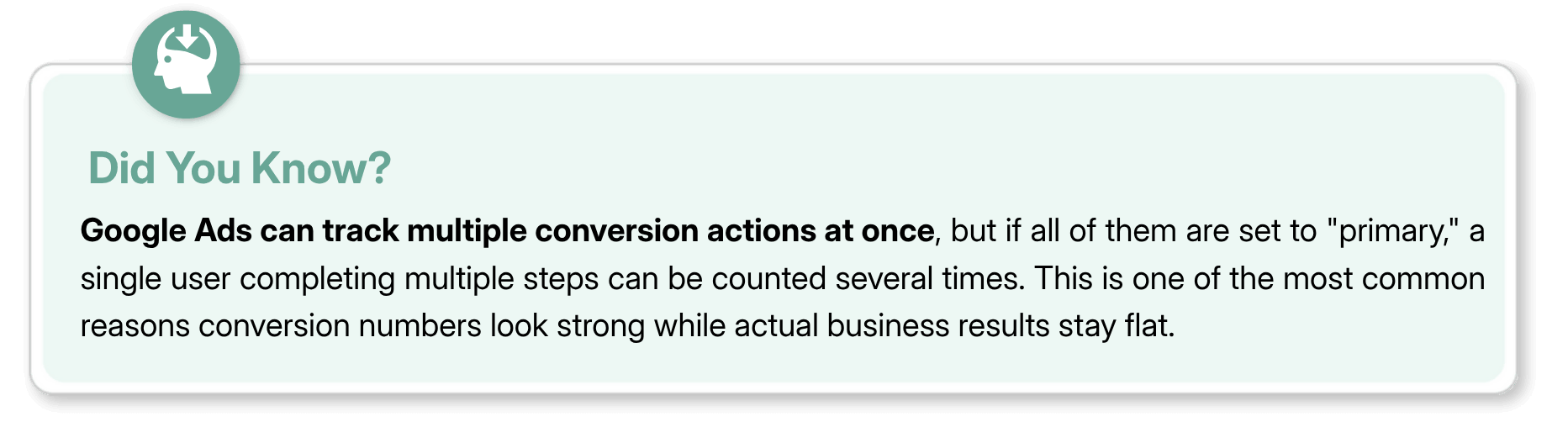
If you have more than one conversion action configured in your account and both are designated as primary, Google will report both. For example, if one individual completes a video view, downloads a resource, fills out a form, and generates a lead, their activity will show up in your reports as four separate conversions. The numbers appear strong. The revenue generation may not be.
Why Your Conversion Numbers May Be Misleading
There are a few specific ways Google Ads tracking can give you an inaccurate picture of performance.
Tracking too many actions as primary conversions. Once you add new conversion actions, such as MQLs (Marketing Qualified Leads), SQLs (Sales Qualified Leads), or opportunities, alongside your existing form fills and designate them all as primary, your total conversion count increases immediately. The same person may have completed all of those actions, meaning you are counting the same lead four times rather than reporting four new leads.
ROAS that looks stronger than it is. If you assign values to each conversion action, your platform-reported return on ad spend will also increase as you add more tracked actions. This creates the illusion that campaigns are performing better than they actually are because the math behind the ROAS number no longer accurately reflects reality.
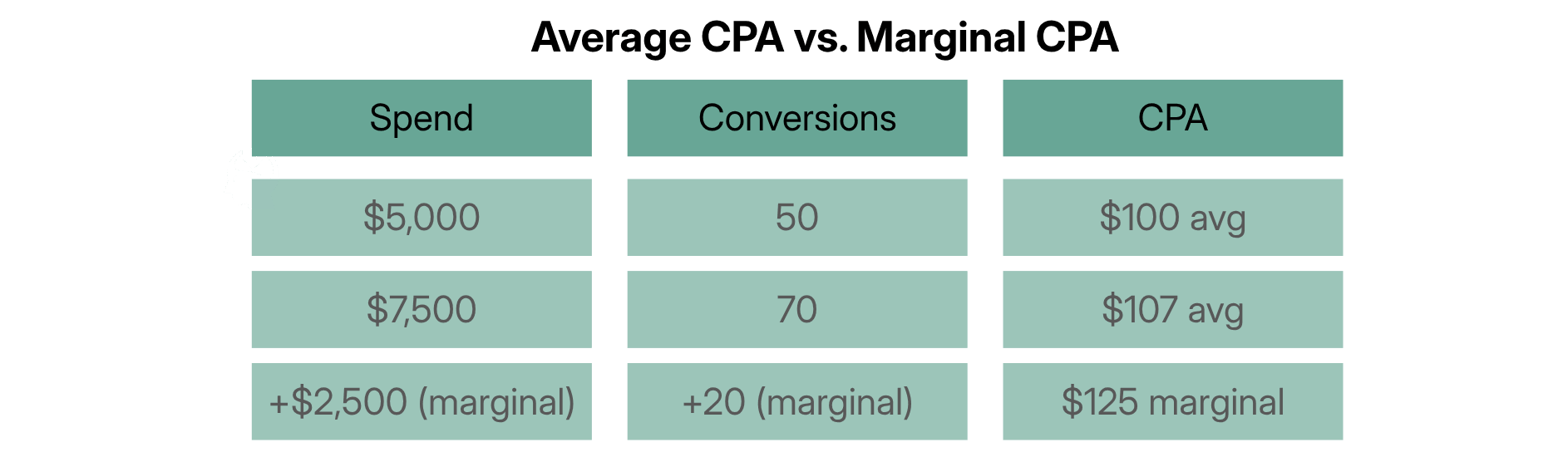
Average CPA hides your true costs. Average cost per acquisition is a useful metric, but it can hide the true cost of acquiring each additional conversion as you scale spend. Your average CPA may appear stable at $100, but if your marginal cost per additional conversion has climbed to $150 or $200, you are paying more for growth than you realize.
How Google Ads Smart Bidding Makes This Worse
Smart Bidding is extremely effective when used correctly. When it is not, it makes the problem worse.
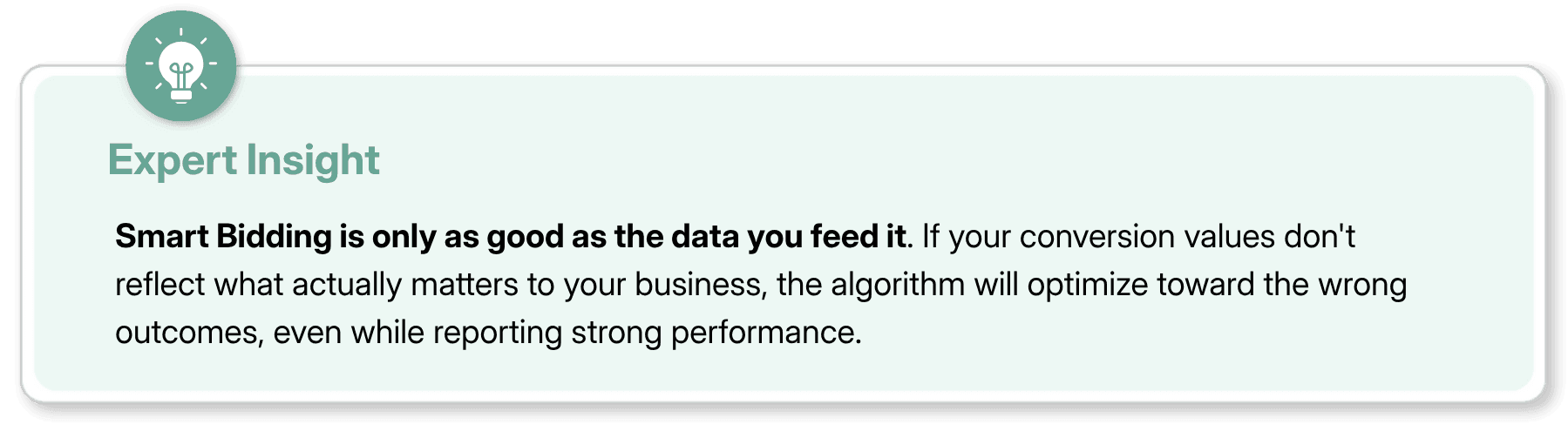
Smart Bidding is designed to learn from your conversion data and optimize toward the actions you have told it to value. If lower-funnel, higher-value actions like MQLs and SQLs have lower conversion values compared to easier-to-generate actions like form fills or page views, Smart Bidding will prioritize the low-hanging fruit. It is not doing anything wrong. It is doing exactly what you told it to do.
This is why setting up your conversion values correctly is so critical. If you cannot use exact revenue figures, use relative values. For example, if an MQL is worth ten times more to your business than a generic form fill, the conversion values in your account should reflect that ratio. Smart Bidding will then naturally favor actions with greater impact.
One real example: a client was generating a high volume of leads but very few MQLs or SQLs. After reducing the conversion value assigned to general leads by a factor of 10, thereby making MQLs and SQLs appear proportionally more valuable to the algorithm, MQL and SQL volume increased significantly within two weeks, while total lead volume remained flat. That is a good outcome. Higher-quality leads for the same budget.
How to Set Up Google Ads Conversion Tracking the Right Way
Getting this right does not have to be complicated. Here is what to focus on.
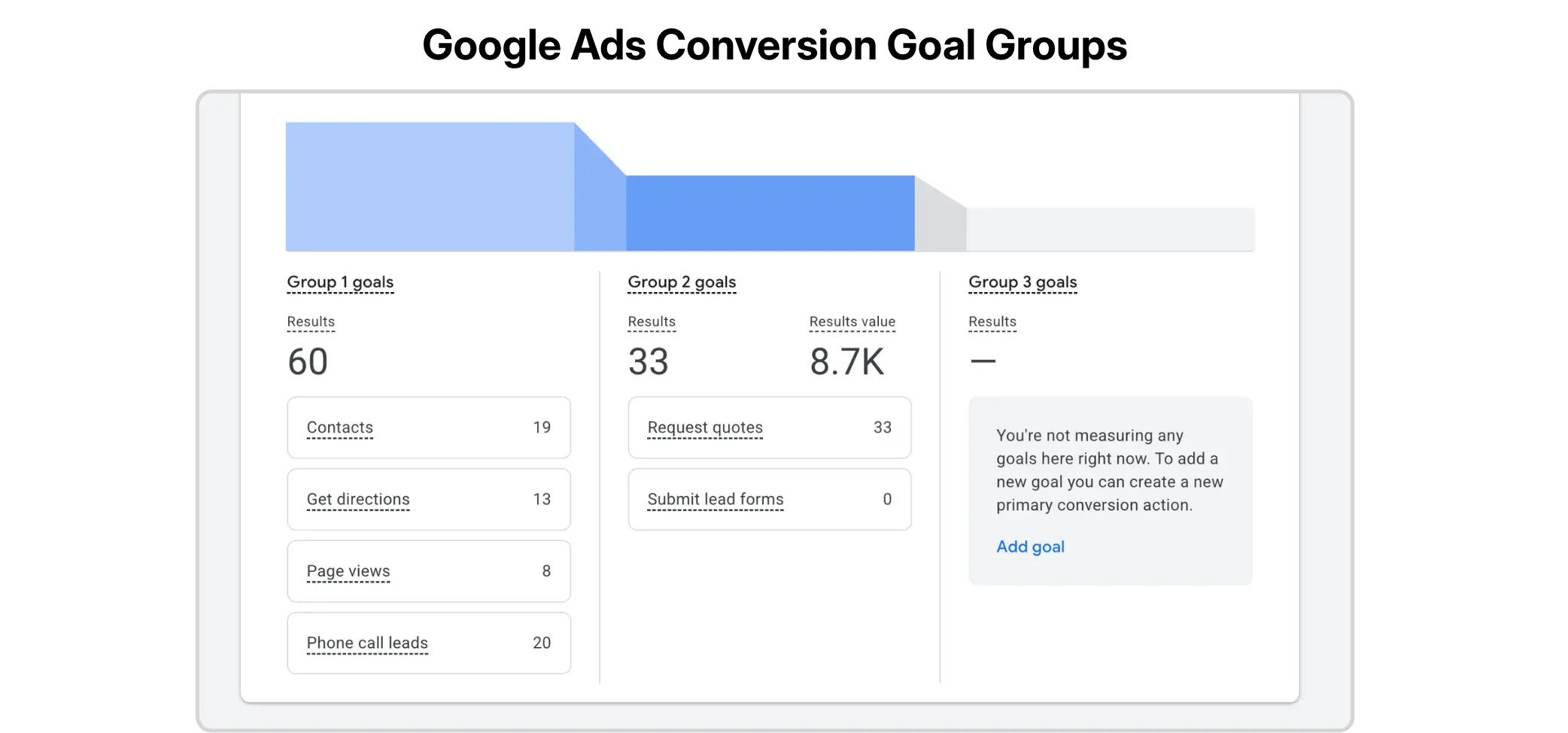
Step 1: Audit your current conversion actions. In your Google Ads account, go to your conversion actions and see which are set as primary vs. secondary. Primary conversions are what Smart Bidding optimizes toward. Secondary conversions are reported only and do not affect bids. Most accounts have too many actions set as primary.
Step 2: Assign relative conversion values. If you know the true dollar amount generated by a conversion, use it. If you don't, assign relative values based on how important each action is to your business. The ratio between values matters more than the specific numbers. An MQL should be worth significantly more than a top-of-funnel click or download.
Step 3: Use campaign-specific goals. Google Ads lets you assign conversion actions at the campaign level rather than across the entire account. This means you can have one campaign optimizing for form fills to drive awareness, and another focused solely on MQLs or SQLs. If a campaign is driving many leads but very few qualified ones, campaign-specific goals let you tell Smart Bidding to ignore those leads and optimize only toward what actually converts to pipeline.
Step 4: Connect your CRM data. The most powerful version of this setup is offline conversion tracking, where lead outcomes from your CRM are fed back into Google Ads. When Google can see which clicks resulted in closed deals, it becomes much smarter about where to invest your budget. More setup is required, but the payoff is significant.
The Metrics That Actually Tell You If Your Ads Are Working
If you want to know whether your Google Ads spend is producing real business results, here are the metrics to look at beyond conversion counts.
Cost per acquisition by funnel stage. Break down CPA not just overall, but by conversion type. What does it cost to generate a form fill vs. an MQL vs. a closed deal? Even if your overall CPA appears stable, a rising cost per MQL is a signal worth paying attention to.
Marginal CPA. As you scale spend, track the cost per incremental group of conversions rather than the average across all spend. This tells you where your point of diminishing returns is before you actually hit it.
Pipeline and revenue attribution. The only real measure of success is whether campaigns are contributing to revenue. Map your paid search campaigns back to your CRM data and assess how much pipeline value each campaign generates. Some campaigns may produce fewer leads but significantly higher pipeline value. Those should not be cut simply because lead volume looks low.
Incremental revenue. If you are increasing spend, track what additional revenue that spend is actually generating. Every channel eventually reaches a point where further investment no longer produces results at the same rate. Understanding where that point is will help guide smarter budget decisions.
If you want help building a conversion tracking setup that actually reflects your business goals, Coozmoo's Google Ads management services can audit your current setup and build a framework that gives you clean, trustworthy data.
Final Thoughts
If you are currently in this situation, here is a clear path forward.
Start with a conversion audit. Pull all active conversion actions in your account, check which are designated as primary, and evaluate whether the assigned values reasonably reflect their importance. Most problems trace back to this step.
Next, look at what happened downstream. Go into your CRM and cross-reference the leads generated by your Google Ads campaigns. Did they convert to opportunities? Did they close? If not, this indicates either that the wrong people are clicking your ads or that the wrong actions are being used as optimization targets.
From there, adjust your conversion values and primary designation settings, and give Smart Bidding at least two to four weeks to collect new signals before reviewing performance. Changes to bidding strategy take time to show their full effect, so give it room to breathe before drawing conclusions.
For a deeper look at getting more from your Google Ads account without necessarily increasing budget, this guide to getting more leads without spending more is a good next step.
FAQs
What causes Google Ads to report conversions yet show no growth in revenue?

The most frequent cause is that the conversion actions being monitored and optimized are not the same as the actions that directly lead to revenue. All forms of conversions such as form fills, page views, and downloads do not lead to sales. As long as Google Ads optimizes toward simpler actions rather than qualifying leads or closed deals, your reported conversions may look strong while actual revenue remains flat.
What is Google Ads conversion tracking?
Google Ads conversion tracking is a feature that allows advertisers to monitor user behavior after clicking an advertisement. Advertisers define what constitutes a conversion, and Google monitors when these events occur and reports them back to the advertiser. This data is also used by Smart Bidding to make real-time bid adjustments.
What is cost per acquisition in Google Ads?
Cost per acquisition is the average cost incurred to generate one conversion, calculated by dividing total ad spend by total conversions. A lower CPA generally indicates greater efficiency, but it can hide the real cost of acquiring each additional conversion as you scale spend.
How does Google Ads Smart Bidding work?
Smart Bidding is an automated bid adjustment process that uses machine learning to evaluate signals like device type, location, time of day, and user behavior to adjust bids in real time. It targets your desired CPA, ROAS, or other optimization goals, which is why having accurate conversion setup in place is so important to getting the most out of it.
How do I fix my Google Ads conversion tracking?
Start by reviewing which conversion actions are set to primary vs. secondary in your account. Assign meaningful values to each action that accurately reflect their importance to your business. Use campaign-specific goals to direct Smart Bidding toward down-funnel actions for key campaigns. For the most accurate data, enable offline conversion tracking to feed CRM results back into Google Ads.
To begin, you are seeing conversions listed in your Google Ads dashboard. These conversions appear to be positive, yet your actual sales are not increasing. Businesses often experience this frustration with paid search, and it typically stems from a misaligned setup in which the reported conversion metrics don't reflect the actions that actually drive revenue. In other words, you may see high volumes of conversions like website visits, but these actions may carry very little real value. Google Ads is working exactly as intended based on the parameters you provided. The problem is the parameters themselves. Here's what is likely occurring and how to address it.
What Constitutes a Conversion in Google Ads?
In order to determine whether your metrics are accurate, we first need to discuss what constitutes a conversion in Google Ads. A conversion represents any action you have deemed valuable and instructed Google to report. The types of actions that can count as a conversion include a form fill, a phone call, a website visit, a video view, a download, or a sale. However, not all actions are created equal, and unfortunately, Google's default configuration treats them as such.
If you have more than one conversion action configured in your account and both are designated as primary, Google will report both. For example, if one individual completes a video view, downloads a resource, fills out a form, and generates a lead, their activity will show up in your reports as four separate conversions. The numbers appear strong. The revenue generation may not be.
Why Your Conversion Numbers May Be Misleading
There are a few specific ways Google Ads tracking can give you an inaccurate picture of performance.
Tracking too many actions as primary conversions. Once you add new conversion actions, such as MQLs (Marketing Qualified Leads), SQLs (Sales Qualified Leads), or opportunities, alongside your existing form fills and designate them all as primary, your total conversion count increases immediately. The same person may have completed all of those actions, meaning you are counting the same lead four times rather than reporting four new leads.
ROAS that looks stronger than it is. If you assign values to each conversion action, your platform-reported return on ad spend will also increase as you add more tracked actions. This creates the illusion that campaigns are performing better than they actually are because the math behind the ROAS number no longer accurately reflects reality.
Average CPA hides your true costs. Average cost per acquisition is a useful metric, but it can hide the true cost of acquiring each additional conversion as you scale spend. Your average CPA may appear stable at $100, but if your marginal cost per additional conversion has climbed to $150 or $200, you are paying more for growth than you realize.
How Google Ads Smart Bidding Makes This Worse
Smart Bidding is extremely effective when used correctly. When it is not, it makes the problem worse.
Smart Bidding is designed to learn from your conversion data and optimize toward the actions you have told it to value. If lower-funnel, higher-value actions like MQLs and SQLs have lower conversion values compared to easier-to-generate actions like form fills or page views, Smart Bidding will prioritize the low-hanging fruit. It is not doing anything wrong. It is doing exactly what you told it to do.
This is why setting up your conversion values correctly is so critical. If you cannot use exact revenue figures, use relative values. For example, if an MQL is worth ten times more to your business than a generic form fill, the conversion values in your account should reflect that ratio. Smart Bidding will then naturally favor actions with greater impact.
One real example: a client was generating a high volume of leads but very few MQLs or SQLs. After reducing the conversion value assigned to general leads by a factor of 10, thereby making MQLs and SQLs appear proportionally more valuable to the algorithm, MQL and SQL volume increased significantly within two weeks, while total lead volume remained flat. That is a good outcome. Higher-quality leads for the same budget.
How to Set Up Google Ads Conversion Tracking the Right Way
Getting this right does not have to be complicated. Here is what to focus on.
Step 1: Audit your current conversion actions. In your Google Ads account, go to your conversion actions and see which are set as primary vs. secondary. Primary conversions are what Smart Bidding optimizes toward. Secondary conversions are reported only and do not affect bids. Most accounts have too many actions set as primary.
Step 2: Assign relative conversion values. If you know the true dollar amount generated by a conversion, use it. If you don't, assign relative values based on how important each action is to your business. The ratio between values matters more than the specific numbers. An MQL should be worth significantly more than a top-of-funnel click or download.
Step 3: Use campaign-specific goals. Google Ads lets you assign conversion actions at the campaign level rather than across the entire account. This means you can have one campaign optimizing for form fills to drive awareness, and another focused solely on MQLs or SQLs. If a campaign is driving many leads but very few qualified ones, campaign-specific goals let you tell Smart Bidding to ignore those leads and optimize only toward what actually converts to pipeline.
Step 4: Connect your CRM data. The most powerful version of this setup is offline conversion tracking, where lead outcomes from your CRM are fed back into Google Ads. When Google can see which clicks resulted in closed deals, it becomes much smarter about where to invest your budget. More setup is required, but the payoff is significant.
The Metrics That Actually Tell You If Your Ads Are Working
If you want to know whether your Google Ads spend is producing real business results, here are the metrics to look at beyond conversion counts.
Cost per acquisition by funnel stage. Break down CPA not just overall, but by conversion type. What does it cost to generate a form fill vs. an MQL vs. a closed deal? Even if your overall CPA appears stable, a rising cost per MQL is a signal worth paying attention to.
Marginal CPA. As you scale spend, track the cost per incremental group of conversions rather than the average across all spend. This tells you where your point of diminishing returns is before you actually hit it.
Pipeline and revenue attribution. The only real measure of success is whether campaigns are contributing to revenue. Map your paid search campaigns back to your CRM data and assess how much pipeline value each campaign generates. Some campaigns may produce fewer leads but significantly higher pipeline value. Those should not be cut simply because lead volume looks low.
Incremental revenue. If you are increasing spend, track what additional revenue that spend is actually generating. Every channel eventually reaches a point where further investment no longer produces results at the same rate. Understanding where that point is will help guide smarter budget decisions.
If you want help building a conversion tracking setup that actually reflects your business goals, Coozmoo's Google Ads management services can audit your current setup and build a framework that gives you clean, trustworthy data.
Final Thoughts
If you are currently in this situation, here is a clear path forward.
Start with a conversion audit. Pull all active conversion actions in your account, check which are designated as primary, and evaluate whether the assigned values reasonably reflect their importance. Most problems trace back to this step.
Next, look at what happened downstream. Go into your CRM and cross-reference the leads generated by your Google Ads campaigns. Did they convert to opportunities? Did they close? If not, this indicates either that the wrong people are clicking your ads or that the wrong actions are being used as optimization targets.
From there, adjust your conversion values and primary designation settings, and give Smart Bidding at least two to four weeks to collect new signals before reviewing performance. Changes to bidding strategy take time to show their full effect, so give it room to breathe before drawing conclusions.
For a deeper look at getting more from your Google Ads account without necessarily increasing budget, this guide to getting more leads without spending more is a good next step.
FAQs
What causes Google Ads to report conversions yet show no growth in revenue?
The most frequent cause is that the conversion actions being monitored and optimized are not the same as the actions that directly lead to revenue. All forms of conversions such as form fills, page views, and downloads do not lead to sales. As long as Google Ads optimizes toward simpler actions rather than qualifying leads or closed deals, your reported conversions may look strong while actual revenue remains flat.
What is Google Ads conversion tracking?
Google Ads conversion tracking is a feature that allows advertisers to monitor user behavior after clicking an advertisement. Advertisers define what constitutes a conversion, and Google monitors when these events occur and reports them back to the advertiser. This data is also used by Smart Bidding to make real-time bid adjustments.
What is cost per acquisition in Google Ads?
Cost per acquisition is the average cost incurred to generate one conversion, calculated by dividing total ad spend by total conversions. A lower CPA generally indicates greater efficiency, but it can hide the real cost of acquiring each additional conversion as you scale spend.
How does Google Ads Smart Bidding work?
Smart Bidding is an automated bid adjustment process that uses machine learning to evaluate signals like device type, location, time of day, and user behavior to adjust bids in real time. It targets your desired CPA, ROAS, or other optimization goals, which is why having accurate conversion setup in place is so important to getting the most out of it.
How do I fix my Google Ads conversion tracking?
Start by reviewing which conversion actions are set to primary vs. secondary in your account. Assign meaningful values to each action that accurately reflect their importance to your business. Use campaign-specific goals to direct Smart Bidding toward down-funnel actions for key campaigns. For the most accurate data, enable offline conversion tracking to feed CRM results back into Google Ads.



Summarize with AI



Have a Google Ads account?
Get a free audit Today!
Have a Google Ads account?
Get a free audit Today!



4.9/5 Ratings!
4.9/5 Ratings!


Don’t miss our revenue growth tips!
Get expert marketing tips—straight to your inbox, like thousands of happy clients.
Don’t miss our revenue growth tips!
Get expert marketing tips—straight to your inbox, like thousands of happy clients.
Don’t miss our revenue growth tips!
Get expert marketing tips—straight to your inbox, like thousands of happy clients.
Don’t miss our revenue growth tips!
Relevant Blogs on PPC Marketing
Relevant Blogs on PPC Marketing
Unlock data-driven insights in PPC marketing—explore our featured blogs and skyrocket your revenue before your competitors do.
Unlock data-driven insights in PPC marketing—explore our featured blogs and skyrocket your revenue before your competitors do.

PPC
Sep 1, 2026
8 Min Read
Google Is Removing Manual Language Targeting From Search Campaigns: What Advertisers Need to Know
PPC
Sep 1, 2026
8 Min Read
Google Is Removing Manual Language Targeting From Search Campaigns: What Advertisers Need to Know
PPC
Sep 1, 2026
8 Min Read
Google Is Removing Manual Language Targeting From Search Campaigns: What Advertisers Need to Know

PPC
Aug 6, 2026
10 Min Read
What Are Display Ads & How Do They Work?
PPC
Aug 6, 2026
10 Min Read
What Are Display Ads & How Do They Work?
PPC
Aug 6, 2026
10 Min Read
What Are Display Ads & How Do They Work?

PPC
Aug 2, 2026
10 Min Read
12 Best Practices to Improve Google Ads CTR
PPC
Aug 2, 2026
10 Min Read
12 Best Practices to Improve Google Ads CTR
PPC
Aug 2, 2026
10 Min Read
12 Best Practices to Improve Google Ads CTR




































Ready to speak with an expert?
Data-Driven Marketing Agency That Elevates ROI
1100+
Websites Designed & Optimized to Convert
$280M+
Client Revenue Driven & Growing Strong
Discover how to skyrocket
your revenue today!
Trusted by 1000+ Owners!
Ready to speak with an expert?
Data-Driven Marketing Agency That Elevates ROI
1100+
Websites Designed & Optimized to Convert
$280M+
Client Revenue Driven & Growing Strong
Discover how to skyrocket
your revenue today!
Trusted by 1000+ Owners!
Want to skyrocket revenue?
4.9/5 Ratings!
Ready to speak with an expert?
Data-Driven Marketing Agency That Elevates ROI
1100+
Websites Designed & Optimized to Convert
$280M+
Client Revenue Driven & Growing Strong
Discover how to skyrocket
your revenue today!
Trusted by 1000+ Owners!
Call
Meet