How to Get Your Google Ads Into Google AI Overviews in 2026
How to Get Your Google Ads Into Google AI Overviews in 2026
Last Updated:
Table of Content
Explore Free Tools

Deepak Prajapat
Deepak Prajapat
Deepak Prajapat
PPC
PPC
PPC
10 Min Read
10 Min Read
10 Min
If you've noticed that Google search results look very different than they did two years ago, you're not imagining things. AI Overviews have fundamentally changed what users see first & where your ads can appear.
This blog explains exactly how Google Ads in AI Overviews work, which campaign types are eligible, and the practical steps advertisers can take right now to maximize their chances of appearing in AI-generated search results. Whether you're running Performance Max, experimenting with AI Max, or working with a Google Ads management service, this covers what you need to know.
For advertisers, this shift raises an obvious question: can your ads show up inside those AI-generated answer boxes? The short answer is yes but not for every campaign, and not automatically. Google has been rolling out Google AI ads placement within AI Overviews in a controlled, selective way that rewards relevance and smart campaign structure over raw budget.
What Are Google AI Overviews, and Why Do They Matter for Advertisers?
Google AI Overviews are AI-generated summaries that appear at the top of search results for certain queries. Instead of showing a list of blue links, Google synthesizes information from multiple sources and presents a direct answer often with citations and links below.
They launched broadly in the US in mid-2024 and have expanded significantly since. By 2026, they appear across a wide range of query types: product research, how-to questions, comparison searches, and local service lookups all categories that advertisers care deeply about.
What makes this relevant beyond organic SEO is that Google has confirmed ads can appear inside and below AI Overview panels for eligible queries. This puts paid placements in a much more prominent position than traditional results — sometimes above everything else the user sees without scrolling.
Which Ad Types Are Eligible for Google AI Overviews Placement?
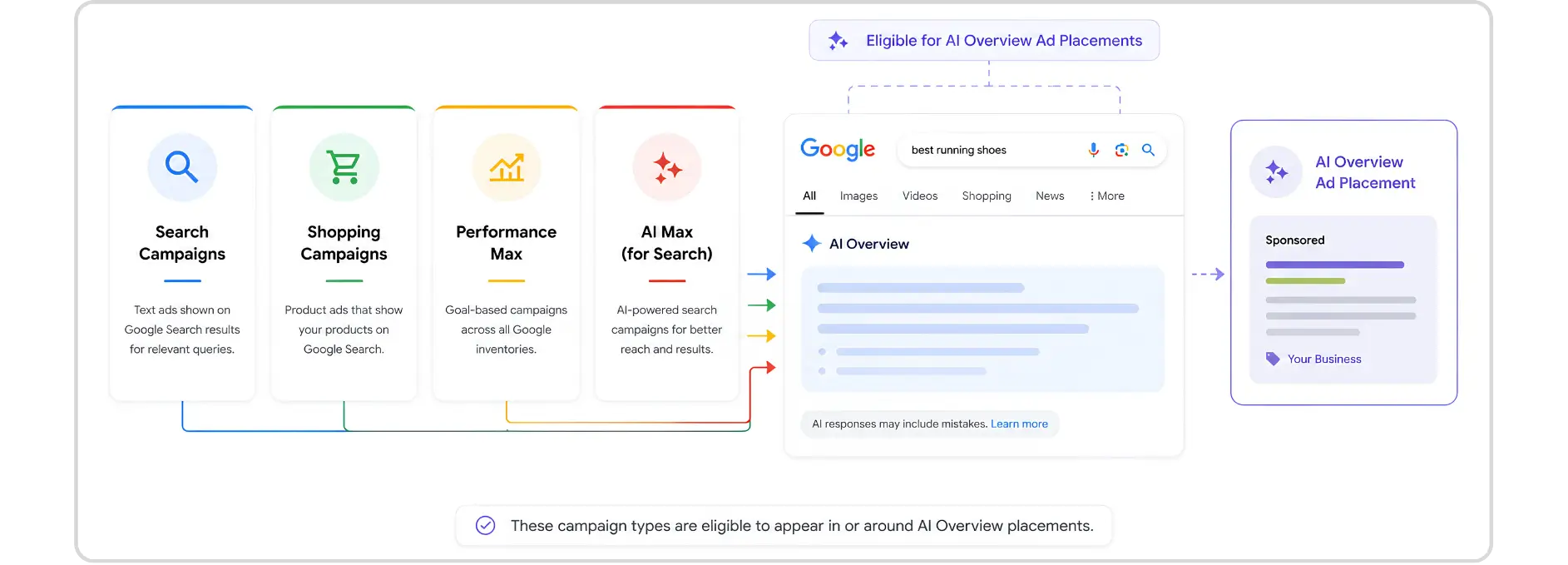
Not every campaign type qualifies. Google has been selective about which ad formats can appear within AI Overview panels, and as of 2026, the eligible set is still limited.
Shopping Ads
Product listing ads have been the most consistently visible format within AI Overviews for commercial queries. If someone searches "best running shoes under $150," they may see an AI-generated overview comparing options and Shopping Ads can appear as sponsored product cards within or adjacent to that panel.
Search Ads - Text Ads
Standard text-based Search Ads can appear below AI Overviews for relevant queries. Placement is determined by the usual Quality Score and Ad Rank signals, but Google has noted that relevance to the AI Overview topic increases visibility likelihood. The more directly your ad copy matches the intent of the AI-generated answer, the better.
Performance Max Google Ads
Performance Max is a campaign type that runs across all Google inventory — Search, Shopping, YouTube, Display, Gmail, Discover, and Maps — using AI to optimize toward your conversion goals. It's the most versatile path to AI Overview ad placement because it gives Google's systems the broadest signal set to work with.
Performance Max campaigns that include strong asset groups, clear audience signals, and product feeds are better positioned to appear in AI-driven placements, including Google AI Overviews.
AI Max Google Ads
AI Max for Search campaigns is Google's newest campaign enhancement feature, rolling out in 2025 and continuing into 2026. It extends the reach of Search campaigns by allowing Google's AI to match your ads to more relevant queries beyond your keyword list — using page-level context, audience signals, and behavioral data.
AI Max Google Ads significantly improves eligibility for AI Overview placements because it's built around the same query-understanding infrastructure that powers Google AI Overviews.
In simple terms: the AI behind your campaign is speaking the same language as the AI generating the overview.
Campaign Type | AI Overview Eligibility | Key Advantage |
|---|---|---|
Standard Search | Limited | Appears below AI Overview panel |
Shopping Ads | Strong | Product cards within AI Overview |
Performance Max | Strong | Broadest inventory reach, AI-optimized |
AI Max Google Ads | Strongest | Native alignment with AI query systems |
Display / Video only | Not eligible | N/A for AI Overview placement |
How to Structure Your Campaigns for AI Overview Visibility
There's no single on/off switch that places your ad inside an AI Overview. Placement depends on relevance signals, bid competitiveness, and how well your campaign structure speaks to Google's AI systems. Here's what actually moves the needle.
Enable AI Max on Your Search Campaigns: If you're running standard keyword-based Search campaigns, turn on AI Max to expand match coverage and align your campaigns with the same intent signals Google uses to generate AI Overviews. This is probably the most direct structural change you can make right now.
Build Strong Asset Groups in Performance Max: Performance Max relies on your creative assets to determine where and how to show ads. Provide high-quality headlines, descriptions, images, and videos in every asset group. Sparse asset groups limit Google's ability to match your ads to AI Overview placements.
Feed Your Campaigns Intent-Rich Audience Signals: Upload customer match lists, connect your website audiences, and provide in-market segment signals. The more Google understands your target customer, the more precisely it can align your ad with AI Overviews that match your buyer's search journey.
Connect a Complete Product Feed (For Retailers): Shopping Ads with well-structured Merchant Center feeds are the most reliably placed format in AI Overviews for product-focused queries. Keep titles, descriptions, GTINs, and pricing accurate and up-to-date. Google pulls this data directly into AI-generated product comparisons.
Write Ad Copy That Matches the Query's Intent Not Just the Keyword: AI Overviews are built around question answering and intent matching, not exact keyword strings. Your ad copy should reflect what the user is trying to accomplish, not just what they typed. Ads that sound like helpful answers rather than promotional pitches tend to perform better in AI-adjacent placements.
How to Monitor Whether Your Ads Are Appearing in AI Overviews?
Google doesn't offer a dedicated "AI Overview impression" column in Google Ads as of mid-2026 but there are ways to track performance in this space.
That is where many advertisers make the wrong call. They look only at clicks and ignore the bigger picture. But with google ai overviews, the path from impression to conversion can be less direct than in a standard search result. A user may see your ad, read the AI summary, browse a few options, and come back later through another query or brand search.
That means you should track a wider set of signals, not just last-click conversions.
Focus on the right metrics
A good reporting setup should look at:
impression share on core search terms
click-through rate by query theme
conversion rate by landing page
assisted conversions
branded search lift
engagement on the final URL
search term quality, not just volume
Watch Search Term Quality Closely
For Google Ads in AI Overviews, what matters is the quality of traffic, not just visibility. A strong Google Ads strategy focuses on identifying meaningful demand and filtering out low-intent searches. If your search terms become too broad, you may gain impressions without generating valuable traffic. The goal isn't to appear on more searches it's to appear on the right ones.
Regularly review search term reports, asset performance, and landing page relevance. If you start attracting loosely related queries, it's often a sign that your targeting, assets, or landing pages need refinement.
Common Mistakes That Reduce Visibility in Google AI Overview
Appearing in Google AI Overviews isn't just about using Performance Max or AI-powered campaigns. Google's systems look at relevance, intent, and content quality when deciding which ads to show. Even well-funded campaigns can miss opportunities if these fundamentals are overlooked.
1. Running campaigns with vague intent
If your ad groups are too broad, Google has less clarity about what the campaign is actually for. That makes it harder for google ai ads to align with the right query context.
2. Sending traffic to the wrong page
The landing page should match the query, not just the brand. A broad homepage can work in some cases, but for most service and product searches, a dedicated page performs better.
3. Ignoring feed quality
For shopping-driven results, product data quality matters a lot. If product titles, descriptions, prices, or availability are messy, your visibility can suffer. This is especially important when using Performance Max Google Ads for retail or catalog-based accounts.
4. Using too few assets
AI systems need material to work with. Sparse headlines, weak descriptions, and limited creative reduce flexibility. Both AI Max Google Ads and Performance Max Google Ads work better when the account has enough asset variety.
5. Treating automation like autopilot
Automation does not remove responsibility. A smart google ads management service still needs to test, monitor, and refine the campaign structure regularly.
Suggested Rollout Plan for Advertisers
If you are building this from scratch, do not launch everything at once. A controlled rollout is cleaner and easier to manage.
Step 1: Audit existing campaigns
Review your Search, Shopping, and Performance Max Google Ads campaigns. Look for strong intent themes, weak landing pages, and poor asset coverage.
Step 2: Group queries by intent
Separate high-intent searches from research-based queries. This gives AI Max Google Ads and Search campaigns a more precise structure.
Step 3: Build better landing pages
Create pages that answer the searcher quickly. Match the offer, the problem, and the CTA to the query.
Step 4: Test before scaling
Use AI Max experiments first. This helps you validate traffic quality before wider rollout.
Step 5: Monitor the account weekly
Check search term quality, asset performance, conversion behavior, and page engagement. A good google ads management service should be doing this consistently, not occasionally.
What Google AI Ads Actually Look Like in Practice
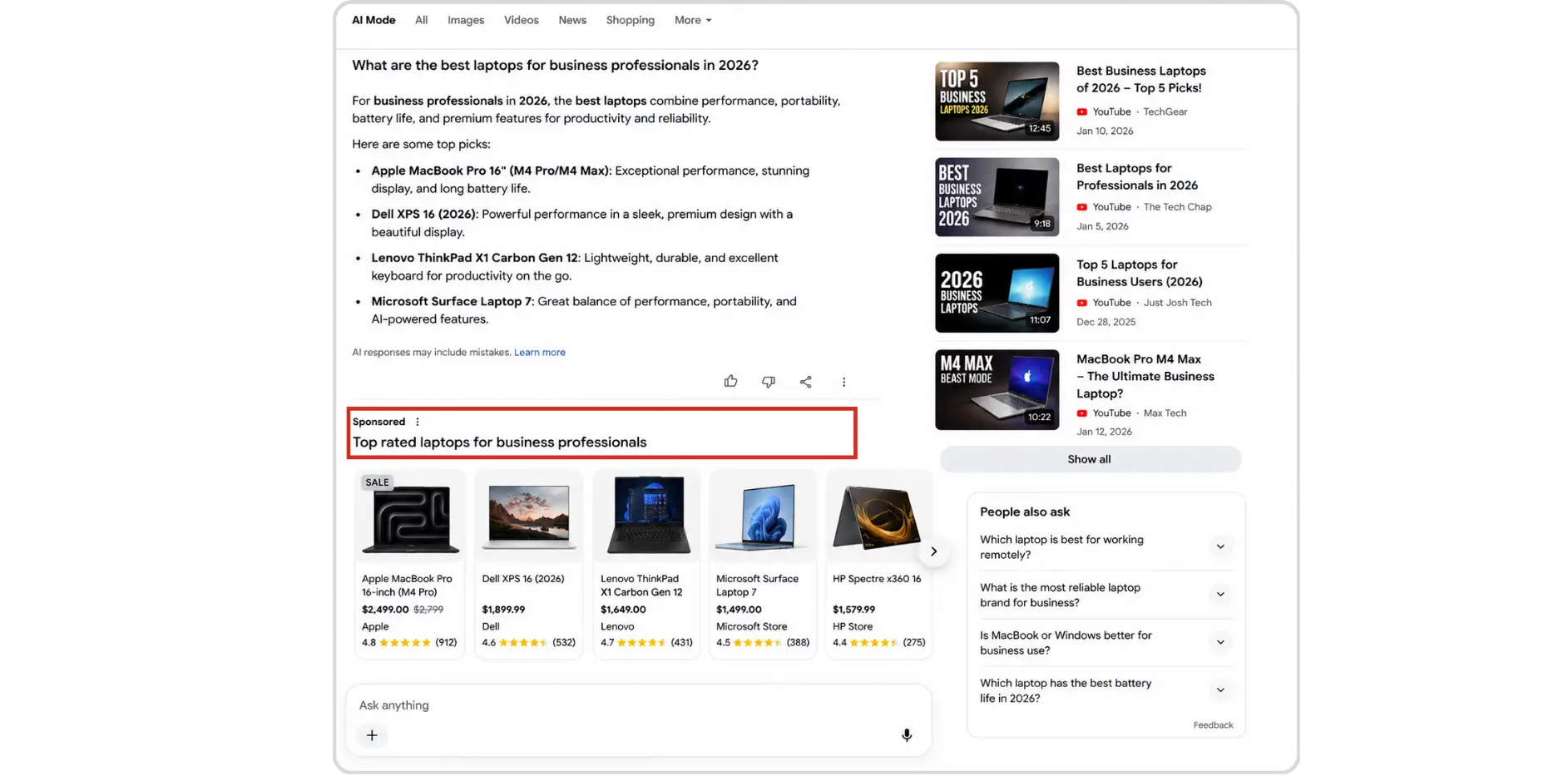
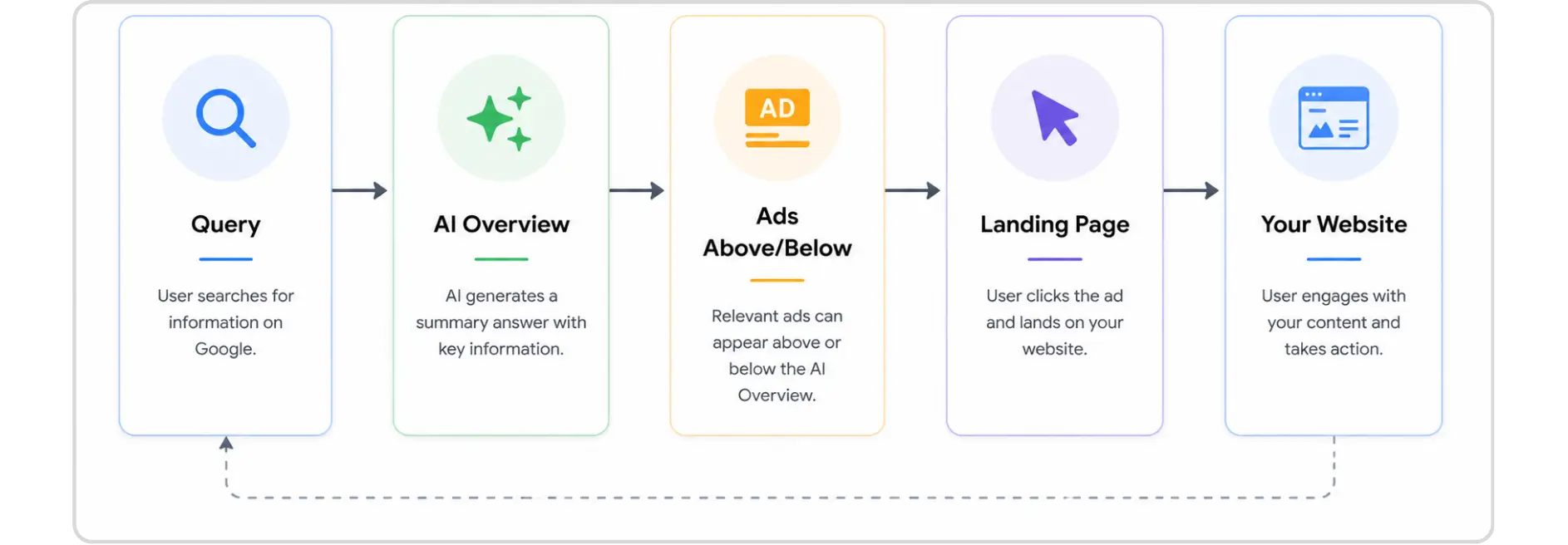
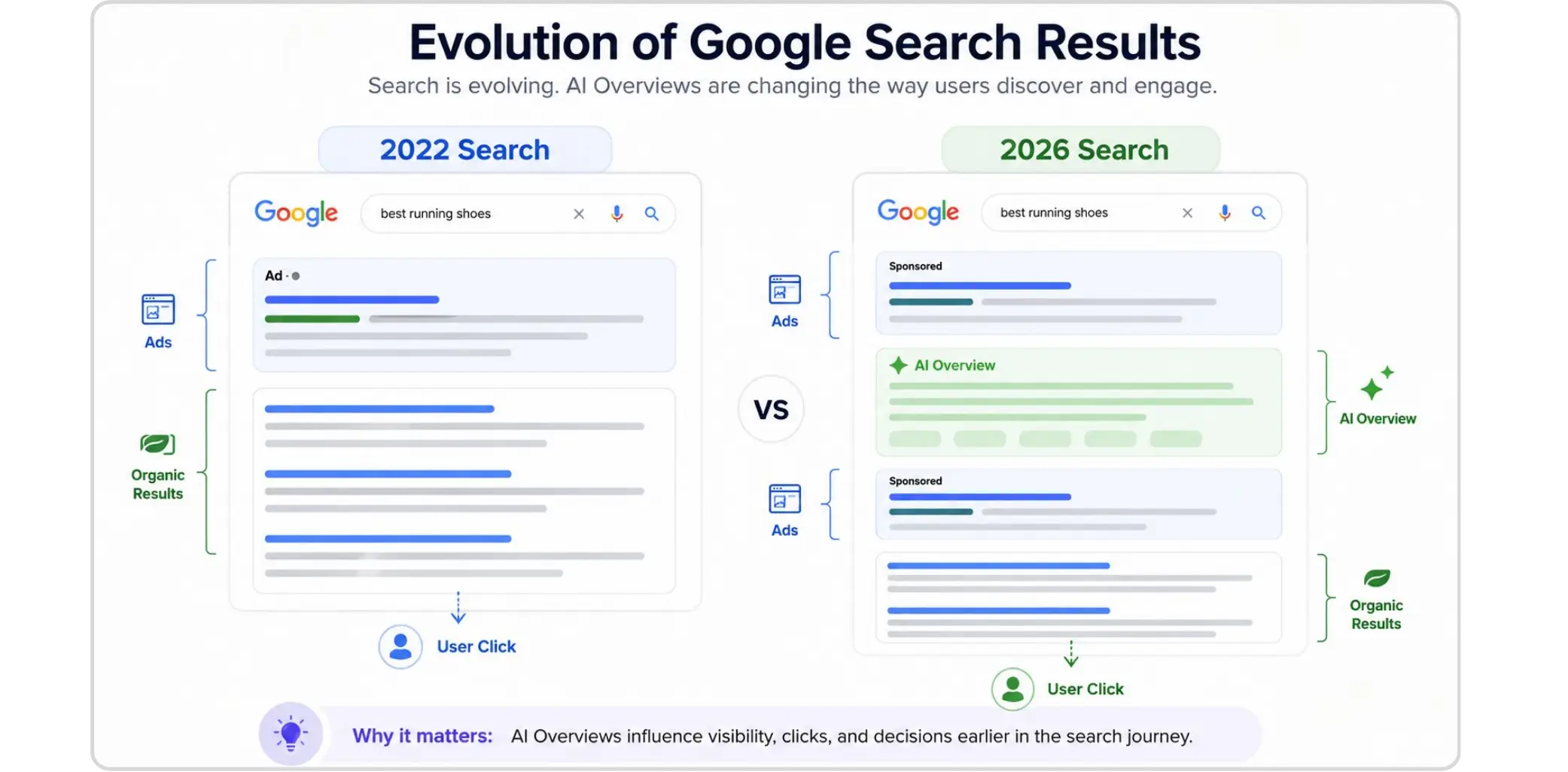
In a typical scenario, a user searching "best digital marketing services in Houston" might see an AI Overview at the top of the page. This overview synthesizes features, pricing, and review signals from across the web into a readable summary. Sponsored product cards or text ads can appear either embedded within this panel or directly below it clearly labeled as sponsored, but highly visible given their position before any organic listings.
The key difference from traditional ads: the user's attention is already primed by the AI-generated content. They're in learning mode, not scrolling mode. An ad that naturally extends the answer they're reading rather than interrupting it performs better. This is why intent alignment in your ad copy matters so much more now than it did in 2022.
Final Thoughts
Appearing in Google AI Overviews as an advertiser isn't about gaming a new system — it's about building campaigns that genuinely match what users are looking for in an AI-driven search environment. The businesses that will consistently earn these placements are the ones with well-structured Performance Max Google Ads, properly configured AI Max campaigns, strong landing page relevance, and actively managed brand reputations.
The good news: if your fundamentals are solid, Google's AI does a lot of the heavy lifting. The shift is really about giving its systems enough quality signal to make good decisions on your behalf.
If you're unsure where your account stands relative to AI Overview eligibility, the clearest next step is an honest audit of your campaign structure, asset quality, and search term coverage. That's exactly where a professional Google Ads management service earns its value — not by doing more, but by doing the right things in the right order.
FAQs
Is it possible to insert ads in Google AI Overviews of your content?

Nope. Google has not launched a manual placement option for AI Overviews yet. Ads qualify to show based on relevance, user intent, and campaign quality.
What kinds of campaigns should be visible in AI Overview?
Search, Shopping, AI Max Source and Performance Max campaigns are currently the very best choices. Both serve to align your ads up with AI-enabled search journeys on Google.
Does AI Max pair with standard Search campaigns?
No, AI Max is an optimization (not automation) applied only for Search campaigns which uses AI to improve matching, ad modifications, and landing page selection based on the content of the search string entered by a user.
Can I just run Performance Max and call it a day?
Not really, no. Performance Max is genuinely useful for finding new audiences you wouldn't have thought to target — but it shouldn't be the whole plan. Search campaigns and AI Max are still where you get clearer intent signals, plus more say over who you're actually going after.
Does my landing page affect whether I show up in AI Overviews?
Yeah, it does. Google's main thing is giving people the best possible experience when they search. So when your landing page actually delivers on what someone's looking for, you're not just helping your ad perform better — you're also boosting your odds of getting pulled into those AI-generated summaries.
If you've noticed that Google search results look very different than they did two years ago, you're not imagining things. AI Overviews have fundamentally changed what users see first & where your ads can appear.
This blog explains exactly how Google Ads in AI Overviews work, which campaign types are eligible, and the practical steps advertisers can take right now to maximize their chances of appearing in AI-generated search results. Whether you're running Performance Max, experimenting with AI Max, or working with a Google Ads management service, this covers what you need to know.
For advertisers, this shift raises an obvious question: can your ads show up inside those AI-generated answer boxes? The short answer is yes but not for every campaign, and not automatically. Google has been rolling out Google AI ads placement within AI Overviews in a controlled, selective way that rewards relevance and smart campaign structure over raw budget.
What Are Google AI Overviews, and Why Do They Matter for Advertisers?
Google AI Overviews are AI-generated summaries that appear at the top of search results for certain queries. Instead of showing a list of blue links, Google synthesizes information from multiple sources and presents a direct answer often with citations and links below.
They launched broadly in the US in mid-2024 and have expanded significantly since. By 2026, they appear across a wide range of query types: product research, how-to questions, comparison searches, and local service lookups all categories that advertisers care deeply about.
What makes this relevant beyond organic SEO is that Google has confirmed ads can appear inside and below AI Overview panels for eligible queries. This puts paid placements in a much more prominent position than traditional results — sometimes above everything else the user sees without scrolling.
Which Ad Types Are Eligible for Google AI Overviews Placement?
Not every campaign type qualifies. Google has been selective about which ad formats can appear within AI Overview panels, and as of 2026, the eligible set is still limited.
Shopping Ads
Product listing ads have been the most consistently visible format within AI Overviews for commercial queries. If someone searches "best running shoes under $150," they may see an AI-generated overview comparing options and Shopping Ads can appear as sponsored product cards within or adjacent to that panel.
Search Ads - Text Ads
Standard text-based Search Ads can appear below AI Overviews for relevant queries. Placement is determined by the usual Quality Score and Ad Rank signals, but Google has noted that relevance to the AI Overview topic increases visibility likelihood. The more directly your ad copy matches the intent of the AI-generated answer, the better.
Performance Max Google Ads
Performance Max is a campaign type that runs across all Google inventory — Search, Shopping, YouTube, Display, Gmail, Discover, and Maps — using AI to optimize toward your conversion goals. It's the most versatile path to AI Overview ad placement because it gives Google's systems the broadest signal set to work with.
Performance Max campaigns that include strong asset groups, clear audience signals, and product feeds are better positioned to appear in AI-driven placements, including Google AI Overviews.
AI Max Google Ads
AI Max for Search campaigns is Google's newest campaign enhancement feature, rolling out in 2025 and continuing into 2026. It extends the reach of Search campaigns by allowing Google's AI to match your ads to more relevant queries beyond your keyword list — using page-level context, audience signals, and behavioral data.
AI Max Google Ads significantly improves eligibility for AI Overview placements because it's built around the same query-understanding infrastructure that powers Google AI Overviews.
In simple terms: the AI behind your campaign is speaking the same language as the AI generating the overview.
Campaign Type | AI Overview Eligibility | Key Advantage |
|---|---|---|
Standard Search | Limited | Appears below AI Overview panel |
Shopping Ads | Strong | Product cards within AI Overview |
Performance Max | Strong | Broadest inventory reach, AI-optimized |
AI Max Google Ads | Strongest | Native alignment with AI query systems |
Display / Video only | Not eligible | N/A for AI Overview placement |
How to Structure Your Campaigns for AI Overview Visibility
There's no single on/off switch that places your ad inside an AI Overview. Placement depends on relevance signals, bid competitiveness, and how well your campaign structure speaks to Google's AI systems. Here's what actually moves the needle.
Enable AI Max on Your Search Campaigns: If you're running standard keyword-based Search campaigns, turn on AI Max to expand match coverage and align your campaigns with the same intent signals Google uses to generate AI Overviews. This is probably the most direct structural change you can make right now.
Build Strong Asset Groups in Performance Max: Performance Max relies on your creative assets to determine where and how to show ads. Provide high-quality headlines, descriptions, images, and videos in every asset group. Sparse asset groups limit Google's ability to match your ads to AI Overview placements.
Feed Your Campaigns Intent-Rich Audience Signals: Upload customer match lists, connect your website audiences, and provide in-market segment signals. The more Google understands your target customer, the more precisely it can align your ad with AI Overviews that match your buyer's search journey.
Connect a Complete Product Feed (For Retailers): Shopping Ads with well-structured Merchant Center feeds are the most reliably placed format in AI Overviews for product-focused queries. Keep titles, descriptions, GTINs, and pricing accurate and up-to-date. Google pulls this data directly into AI-generated product comparisons.
Write Ad Copy That Matches the Query's Intent Not Just the Keyword: AI Overviews are built around question answering and intent matching, not exact keyword strings. Your ad copy should reflect what the user is trying to accomplish, not just what they typed. Ads that sound like helpful answers rather than promotional pitches tend to perform better in AI-adjacent placements.
How to Monitor Whether Your Ads Are Appearing in AI Overviews?
Google doesn't offer a dedicated "AI Overview impression" column in Google Ads as of mid-2026 but there are ways to track performance in this space.
That is where many advertisers make the wrong call. They look only at clicks and ignore the bigger picture. But with google ai overviews, the path from impression to conversion can be less direct than in a standard search result. A user may see your ad, read the AI summary, browse a few options, and come back later through another query or brand search.
That means you should track a wider set of signals, not just last-click conversions.
Focus on the right metrics
A good reporting setup should look at:
impression share on core search terms
click-through rate by query theme
conversion rate by landing page
assisted conversions
branded search lift
engagement on the final URL
search term quality, not just volume
Watch Search Term Quality Closely
For Google Ads in AI Overviews, what matters is the quality of traffic, not just visibility. A strong Google Ads strategy focuses on identifying meaningful demand and filtering out low-intent searches. If your search terms become too broad, you may gain impressions without generating valuable traffic. The goal isn't to appear on more searches it's to appear on the right ones.
Regularly review search term reports, asset performance, and landing page relevance. If you start attracting loosely related queries, it's often a sign that your targeting, assets, or landing pages need refinement.
Common Mistakes That Reduce Visibility in Google AI Overview
Appearing in Google AI Overviews isn't just about using Performance Max or AI-powered campaigns. Google's systems look at relevance, intent, and content quality when deciding which ads to show. Even well-funded campaigns can miss opportunities if these fundamentals are overlooked.
1. Running campaigns with vague intent
If your ad groups are too broad, Google has less clarity about what the campaign is actually for. That makes it harder for google ai ads to align with the right query context.
2. Sending traffic to the wrong page
The landing page should match the query, not just the brand. A broad homepage can work in some cases, but for most service and product searches, a dedicated page performs better.
3. Ignoring feed quality
For shopping-driven results, product data quality matters a lot. If product titles, descriptions, prices, or availability are messy, your visibility can suffer. This is especially important when using Performance Max Google Ads for retail or catalog-based accounts.
4. Using too few assets
AI systems need material to work with. Sparse headlines, weak descriptions, and limited creative reduce flexibility. Both AI Max Google Ads and Performance Max Google Ads work better when the account has enough asset variety.
5. Treating automation like autopilot
Automation does not remove responsibility. A smart google ads management service still needs to test, monitor, and refine the campaign structure regularly.
Suggested Rollout Plan for Advertisers
If you are building this from scratch, do not launch everything at once. A controlled rollout is cleaner and easier to manage.
Step 1: Audit existing campaigns
Review your Search, Shopping, and Performance Max Google Ads campaigns. Look for strong intent themes, weak landing pages, and poor asset coverage.
Step 2: Group queries by intent
Separate high-intent searches from research-based queries. This gives AI Max Google Ads and Search campaigns a more precise structure.
Step 3: Build better landing pages
Create pages that answer the searcher quickly. Match the offer, the problem, and the CTA to the query.
Step 4: Test before scaling
Use AI Max experiments first. This helps you validate traffic quality before wider rollout.
Step 5: Monitor the account weekly
Check search term quality, asset performance, conversion behavior, and page engagement. A good google ads management service should be doing this consistently, not occasionally.
What Google AI Ads Actually Look Like in Practice
In a typical scenario, a user searching "best digital marketing services in Houston" might see an AI Overview at the top of the page. This overview synthesizes features, pricing, and review signals from across the web into a readable summary. Sponsored product cards or text ads can appear either embedded within this panel or directly below it clearly labeled as sponsored, but highly visible given their position before any organic listings.
The key difference from traditional ads: the user's attention is already primed by the AI-generated content. They're in learning mode, not scrolling mode. An ad that naturally extends the answer they're reading rather than interrupting it performs better. This is why intent alignment in your ad copy matters so much more now than it did in 2022.
Final Thoughts
Appearing in Google AI Overviews as an advertiser isn't about gaming a new system — it's about building campaigns that genuinely match what users are looking for in an AI-driven search environment. The businesses that will consistently earn these placements are the ones with well-structured Performance Max Google Ads, properly configured AI Max campaigns, strong landing page relevance, and actively managed brand reputations.
The good news: if your fundamentals are solid, Google's AI does a lot of the heavy lifting. The shift is really about giving its systems enough quality signal to make good decisions on your behalf.
If you're unsure where your account stands relative to AI Overview eligibility, the clearest next step is an honest audit of your campaign structure, asset quality, and search term coverage. That's exactly where a professional Google Ads management service earns its value — not by doing more, but by doing the right things in the right order.
FAQs
Is it possible to insert ads in Google AI Overviews of your content?
Nope. Google has not launched a manual placement option for AI Overviews yet. Ads qualify to show based on relevance, user intent, and campaign quality.
What kinds of campaigns should be visible in AI Overview?
Search, Shopping, AI Max Source and Performance Max campaigns are currently the very best choices. Both serve to align your ads up with AI-enabled search journeys on Google.
Does AI Max pair with standard Search campaigns?
No, AI Max is an optimization (not automation) applied only for Search campaigns which uses AI to improve matching, ad modifications, and landing page selection based on the content of the search string entered by a user.
Can I just run Performance Max and call it a day?
Not really, no. Performance Max is genuinely useful for finding new audiences you wouldn't have thought to target — but it shouldn't be the whole plan. Search campaigns and AI Max are still where you get clearer intent signals, plus more say over who you're actually going after.
Does my landing page affect whether I show up in AI Overviews?
Yeah, it does. Google's main thing is giving people the best possible experience when they search. So when your landing page actually delivers on what someone's looking for, you're not just helping your ad perform better — you're also boosting your odds of getting pulled into those AI-generated summaries.



Summarize with AI


Have a Google Ads account?
Get a free audit Today!
Have a Google Ads account?
Get a free audit Today!



4.9/5 Ratings!
4.9/5 Ratings!


Don’t miss our revenue growth tips!
Get expert marketing tips—straight to your inbox, like thousands of happy clients.
Don’t miss our revenue growth tips!
Get expert marketing tips—straight to your inbox, like thousands of happy clients.
Don’t miss our revenue growth tips!
Get expert marketing tips—straight to your inbox, like thousands of happy clients.
Don’t miss our revenue growth tips!
Relevant Blogs on PPC Marketing
Relevant Blogs on PPC Marketing
Unlock data-driven insights in PPC marketing—explore our featured blogs and skyrocket your revenue before your competitors do.
Unlock data-driven insights in PPC marketing—explore our featured blogs and skyrocket your revenue before your competitors do.
PPC
Sep 1, 2026
8 Min Read
Google Is Removing Manual Language Targeting From Search Campaigns: What Advertisers Need to Know
PPC
Sep 1, 2026
8 Min Read
Google Is Removing Manual Language Targeting From Search Campaigns: What Advertisers Need to Know
PPC
Sep 1, 2026
8 Min Read
Google Is Removing Manual Language Targeting From Search Campaigns: What Advertisers Need to Know
PPC
Aug 6, 2026
10 Min Read
What Are Display Ads & How Do They Work?
PPC
Aug 6, 2026
10 Min Read
What Are Display Ads & How Do They Work?
PPC
Aug 6, 2026
10 Min Read
What Are Display Ads & How Do They Work?

PPC
Aug 2, 2026
10 Min Read
12 Best Practices to Improve Google Ads CTR
PPC
Aug 2, 2026
10 Min Read
12 Best Practices to Improve Google Ads CTR
PPC
Aug 2, 2026
10 Min Read
12 Best Practices to Improve Google Ads CTR















Ready to speak with an expert?
Data-Driven Marketing Agency That Elevates ROI
1100+
Websites Designed & Optimized to Convert
$280M+
Client Revenue Driven & Growing Strong
Discover how to skyrocket
your revenue today!
Trusted by 1000+ Owners!
Ready to speak with an expert?
Data-Driven Marketing Agency That Elevates ROI
1100+
Websites Designed & Optimized to Convert
$280M+
Client Revenue Driven & Growing Strong
Discover how to skyrocket
your revenue today!
Trusted by 1000+ Owners!
Want to skyrocket revenue?
4.9/5 Ratings!
Ready to speak with an expert?
Data-Driven Marketing Agency That Elevates ROI
1100+
Websites Designed & Optimized to Convert
$280M+
Client Revenue Driven & Growing Strong
Discover how to skyrocket
your revenue today!
Trusted by 1000+ Owners!
Call
Meet