Why Google Wants Businesses to Build Websites for AI Agents — Not Just Humans
Why Google Wants Businesses to Build Websites for AI Agents — Not Just Humans
Last Updated:
Table of Content
Case Studies





Imagine asking your AI assistant to book you the cheapest flight to Austin next weekend, add the best one to your calendar and compare three hotel options — all without you touching a single website. This isn't science fiction. It's the reality unfolding across the web right now, and Google has officially taken notice.
In early 2026, Google's developer hub published a landmark guide titled "Build agent-friendly websites." The message was blunt: your website has a new type of visitor, and if you're not designing for it, you're already falling behind. That visitor isn't human.
This shift represents one of the most significant changes to web strategy since mobile-first design. And just like mobile, the businesses that adapt early will have a clear advantage over those that wait.
The New Type of Visitor Google Is Talking About
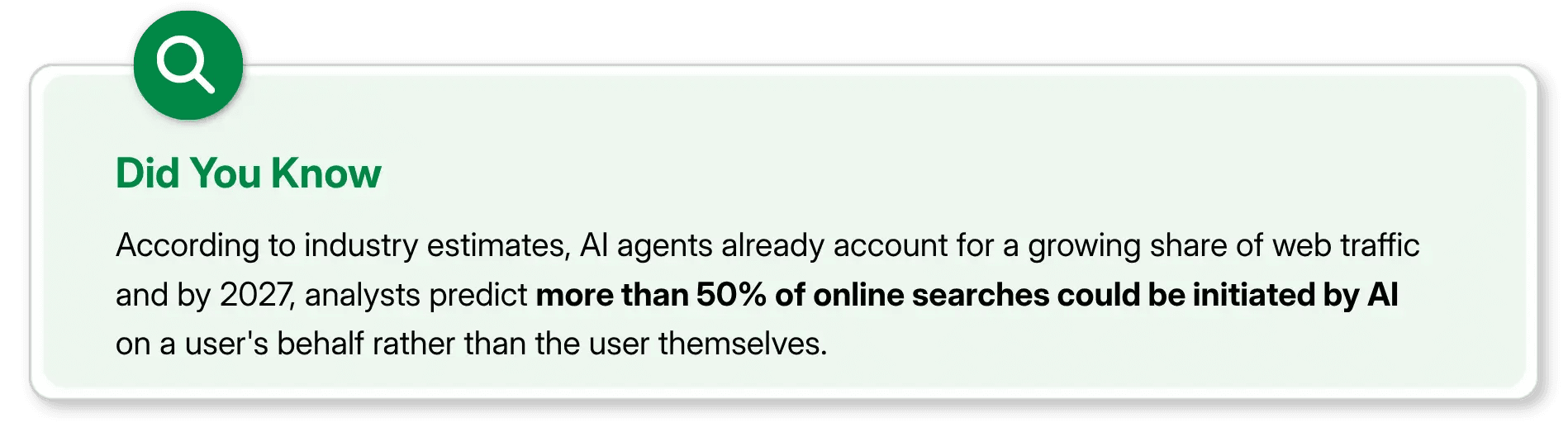
We are living in the age of the agentic web. AI agents, software systems that autonomously browse, compare, fill forms, and complete transactions on a user's behalf are no longer niche tools.
Platforms like Google's own Gemini, OpenAI's Operator, and dozens of enterprise solutions are actively sending agents to crawl, read, and interact with websites on behalf of real humans every single day.
Google's web.dev guide puts it plainly: "Some human users are pivoting from manual navigation to delegating goal-oriented journeys to AI agents." In other words, instead of a person visiting your hotel booking page and filling out a form, an AI agent does it for them — provided your website speaks its language.
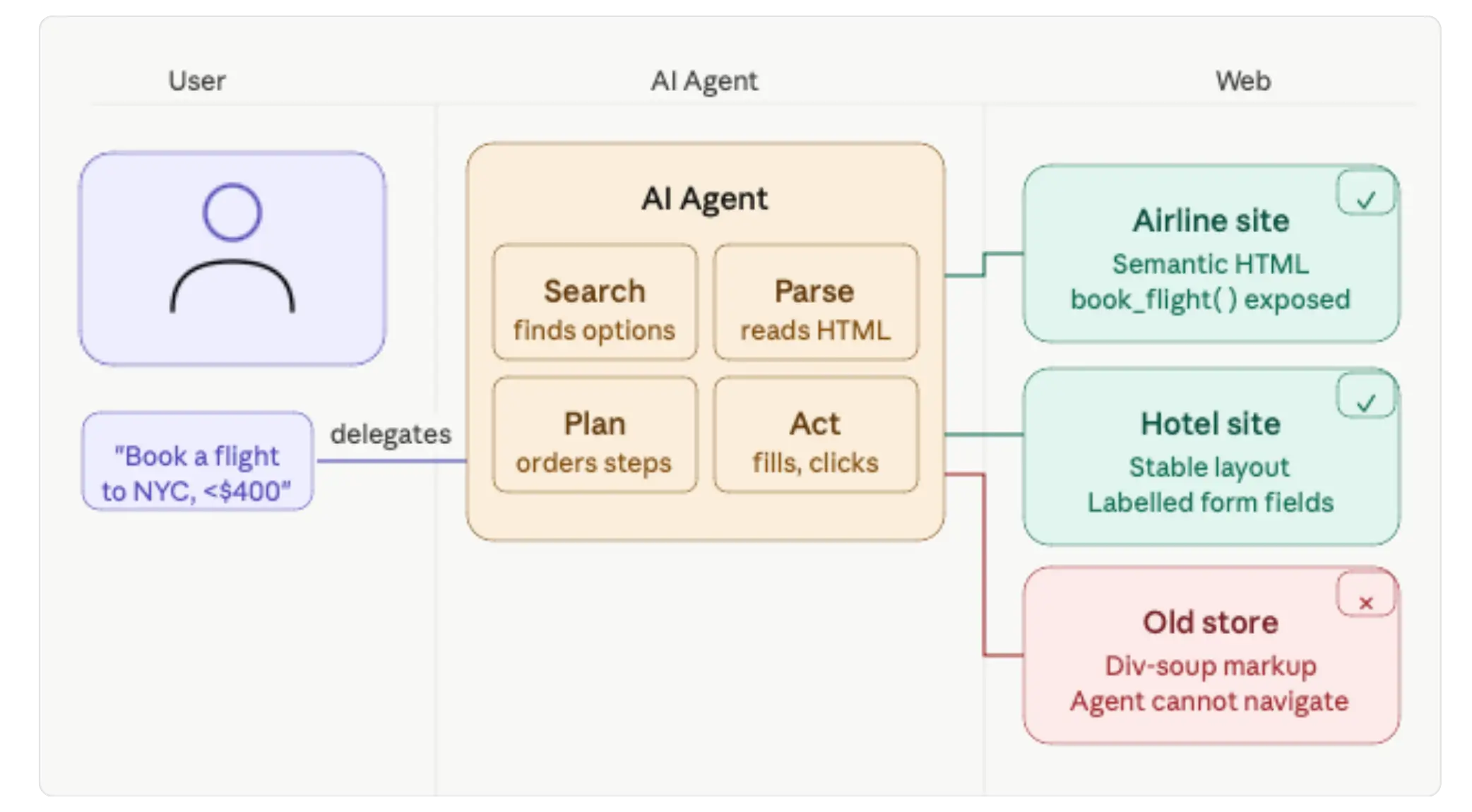
The problem? Most websites today are built entirely around human perception — flashy hover animations, image-heavy layouts, icon-only buttons. For a person with sharp eyes and intuition, these are fine. For an AI agent trying to parse your page algorithmically, they are a nightmare. As Google's guide puts it, such websites are "functionally broken for agents."
How AI Agents Actually "See" Your Website
To understand why this matters, it helps to understand the three ways AI agents currently interpret a webpage. Google's guide describes each of them:
1. Screenshots & Vision Models
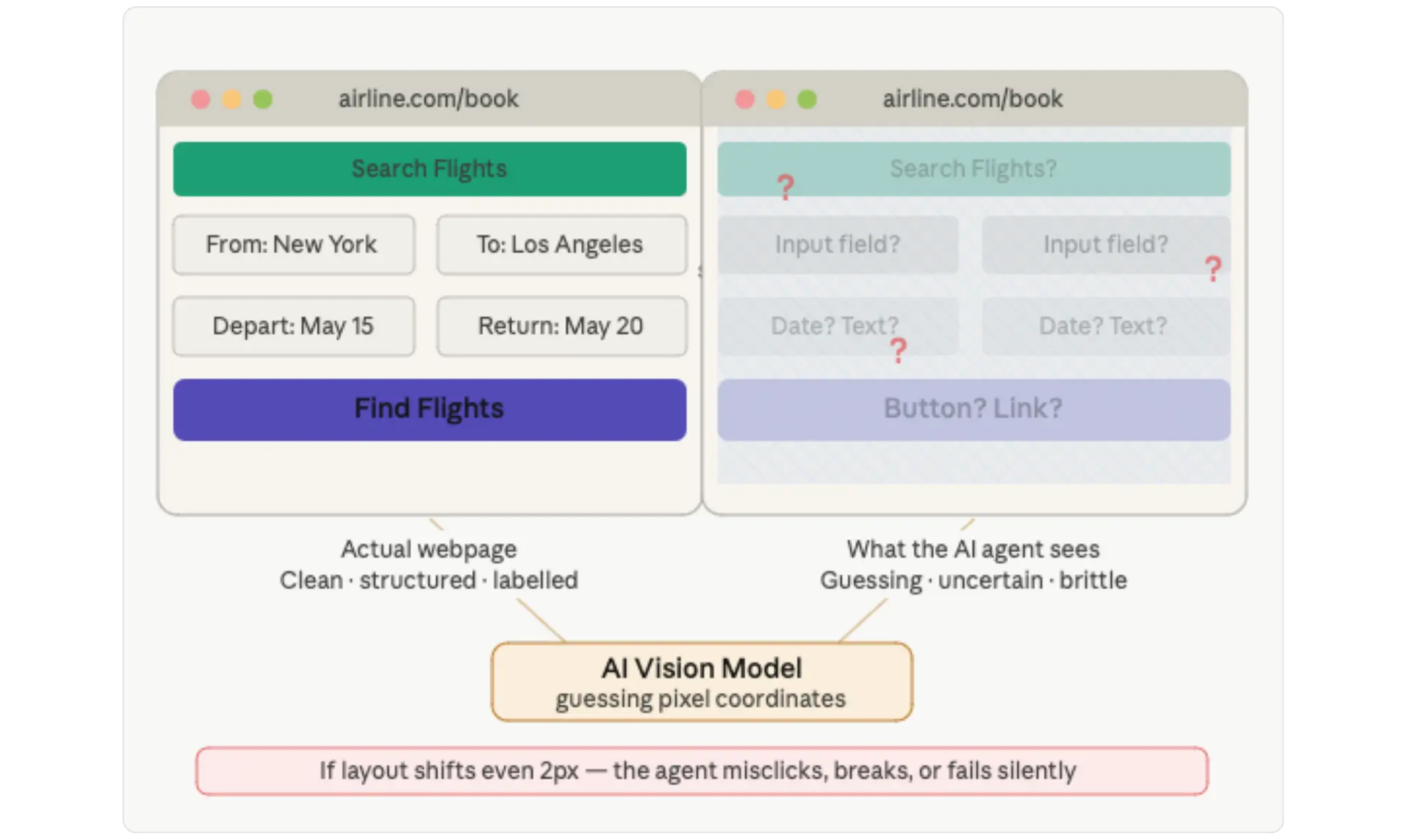
The most rudimentary approach: the agent takes a screenshot of your page and uses a vision model to visually identify elements — buttons, forms, links. This is slow, computationally expensive, and brittle. If your layout shifts or your button moves two pixels, the agent can get confused. Think of it as asking someone to read a book through a window.
2. Raw HTML & the DOM
The agent reads your page's source code directly, analysing the document structure and element hierarchy. This is more reliable than screenshots, but only if your HTML is cleanly written. A wall of nested <div> tags with no semantic meaning gives an agent almost no useful information about what your page actually does.
3. The Accessibility Tree
This is the gold standard for agent interaction. The accessibility tree is a structured, machine-readable map of your website's interactive elements, stripped of all visual noise. Google calls it a "high-fidelity map" and crucially, it's the same tree that screen readers use for visually impaired users. An agent navigating via the accessibility tree knows exactly where your buttons are, what they do, and how to interact with them.
What Google Is Telling Businesses to Do Differently
Google's recommendations aren't radical — but they are important, especially for businesses that have prioritised visual flair over structural clarity. Here's what the official guidance says:
Use semantic HTML elements like <button> and <a> instead of styled <div> tags for interactive elements
Keep layouts stable and consistent across pages, avoid elements that shift, load progressively without warning, or appear only on hover
Link <label> tags to their input fields using the for attribute so agents know what each field is for
Set cursor: pointer on all clickable elements so agents can reliably identify what is interactive
Audit your accessibility tree regularly using browser developer tools to ensure it is clean, machine-readable, and stable
For businesses already following web accessibility guidelines — WCAG compliance, for instance, most of this is already done.
The SEO and UX dividends from accessibility best practices now extend into a third dimension: AI agent discoverability.
Meet WebMCP: The Future Standard That Could Change Everything
Beyond the foundational guidance on HTML and accessibility, Google points to something far more ambitious: WebMCP, or the Web Model Context Protocol.
Announced by Chrome's team in February 2026, WebMCP is a proposed browser standard that allows websites to directly expose structured tools to AI agents instead of making those agents fumble through your User Interface like a confused visitor.
Think of the difference this way. Currently, when an AI agent wants to book a flight on your website, it has to take screenshots, parse your HTML, guess which field is for the departure date, try clicking things, and hope nothing breaks.
With WebMCP, your site would instead publish a clean contract: "Here is a tool called book_flight. It takes a departure city, destination, and date. Here is what it returns." The agent calls the function directly. No guessing. No fragile DOM scraping.
Developers already building with it describe the shift as transformative. Where previously an agent might get stuck in an infinite loop because a "Load More" button wasn't explicitly identified as clickable, WebMCP hands the agent a clear map — making the interaction faster, cheaper to compute, and far more reliable.
Why This Matters Enormously for Businesses
The business implications here are profound and relatively straightforward to understand, even if you're not a developer.
Consider how Google transformed commerce with mobile-first indexing around 2018. Businesses that had not built mobile-friendly websites saw their search rankings drop, their traffic decline, and their conversions suffer. The ones that adapted early thrived. We are at a similar inflection point now, except this time, the new "user" is an AI agent acting on behalf of a human.
If a user asks their AI assistant to "Find me a weekend plumber in Austin under $150" and your competitor's website is structured cleanly enough for the agent to extract their pricing, availability, and booking form — while yours isn't, that agent will recommend your competitor. You didn't lose the customer to a better price. You lost them because your website couldn't be read.
The stakes grow even higher as agents become more capable. "Book me a business-class ticket to Singapore next Thursday and send the confirmation to my inbox" is already a command people are issuing to AI systems. Travel sites, e-commerce platforms, appointment-booking services, SaaS tools — any business where users take structured actions are directly in the firing line of this transition.
What's Good for Agents Is Good for Humans
Perhaps the most reassuring aspect of this entire shift is its built-in symmetry. Every single improvement Google recommends for AI agent readiness makes your website better for human visitors too.
Semantic HTML improves screen reader support and speeds up page parsing.
Stable layouts reduce frustration for users on slow connections.
Properly labelled form fields help everyone — not just agents — understand what information is expected.
Explicit cursor indicators make clickable elements obvious to every user.
There is no tradeoff here. You are not building two websites — one for humans and one for machines. You are building one excellent website that serves both. That's the quiet genius of what Google is signalling: the future of the web isn't separate human and machine experiences. It's a single, well-structured web that both can navigate with equal ease.
What to Do Right Now
Run your site through an accessibility audit — tools like Google Lighthouse and axe DevTools will surface semantic HTML issues instantly
Review any interactive elements (buttons, forms, dropdowns) and ensure they use proper HTML tags — not just styled divs
Ensure all form fields have clear, linked labels — this is table stakes for both accessibility compliance and agent readability
Avoid hover-only interactions for any critical functionality — if it can only be triggered by hovering, an agent can't use it
Sign up for Google's WebMCP early preview program if you run a transactional website (booking, checkout, scheduling)
Watch Google I/O 2026 (May 19–20) for further announcements on agent-based web standards
Final Thoughts
The web has always evolved alongside the technology people use to access it. From dial-up to broadband, from desktop to mobile, from typed queries to voice search — each shift required businesses to rethink how they built their digital presence.
The agentic web is simply the next chapter. And Google is telling you that chapter has already begun.
The question isn't whether AI agents will be visiting your website. They already are. The question is whether your website is ready to talk back.
FAQs
What are AI agents and how do they work?

An AI agent is an autonomous software program powered by artificial intelligence. Unlike traditional chatbots that can only answer questions, an AI agent takes high-level goals and independently figures out the steps, gathers information, and executes actions to accomplish the task.
What are the problems with AI agents?
Building AI agents is really hard because small mistakes quickly snowball into major failures, and the systems often make things up when facing unpredictable real-world situations. On top of that, plugging new AI into old company software is highly complex. Because these projects are expensive and difficult to trust with autonomous decisions, they often get stuck and fail to launch.
Will my website lose customers if it's not optimised for AI agents?
What is the WebMCP?
WebMCP is a new browser tool being tested by Google and Microsoft that lets websites talk directly to AI agents. Instead of an AI guessing how to use a website or scraping its pages, the website gives the AI a clear list of specific actions it can take like instantly booking a flight or adding an item to a shopping cart.
What is an agent-friendly website?
An agent-friendly website is one that AI agents like Google Gemini or ChatGPT can read, navigate, and take action on without confusion. It uses clean semantic HTML, stable layouts, and properly labelled forms so an AI can extract information and complete tasks just as easily as a human visitor.
Imagine asking your AI assistant to book you the cheapest flight to Austin next weekend, add the best one to your calendar and compare three hotel options — all without you touching a single website. This isn't science fiction. It's the reality unfolding across the web right now, and Google has officially taken notice.
In early 2026, Google's developer hub published a landmark guide titled "Build agent-friendly websites." The message was blunt: your website has a new type of visitor, and if you're not designing for it, you're already falling behind. That visitor isn't human.
This shift represents one of the most significant changes to web strategy since mobile-first design. And just like mobile, the businesses that adapt early will have a clear advantage over those that wait.
The New Type of Visitor Google Is Talking About
We are living in the age of the agentic web. AI agents, software systems that autonomously browse, compare, fill forms, and complete transactions on a user's behalf are no longer niche tools.
Platforms like Google's own Gemini, OpenAI's Operator, and dozens of enterprise solutions are actively sending agents to crawl, read, and interact with websites on behalf of real humans every single day.
Google's web.dev guide puts it plainly: "Some human users are pivoting from manual navigation to delegating goal-oriented journeys to AI agents." In other words, instead of a person visiting your hotel booking page and filling out a form, an AI agent does it for them — provided your website speaks its language.
The problem? Most websites today are built entirely around human perception — flashy hover animations, image-heavy layouts, icon-only buttons. For a person with sharp eyes and intuition, these are fine. For an AI agent trying to parse your page algorithmically, they are a nightmare. As Google's guide puts it, such websites are "functionally broken for agents."
How AI Agents Actually "See" Your Website
To understand why this matters, it helps to understand the three ways AI agents currently interpret a webpage. Google's guide describes each of them:
1. Screenshots & Vision Models
The most rudimentary approach: the agent takes a screenshot of your page and uses a vision model to visually identify elements — buttons, forms, links. This is slow, computationally expensive, and brittle. If your layout shifts or your button moves two pixels, the agent can get confused. Think of it as asking someone to read a book through a window.
2. Raw HTML & the DOM
The agent reads your page's source code directly, analysing the document structure and element hierarchy. This is more reliable than screenshots, but only if your HTML is cleanly written. A wall of nested <div> tags with no semantic meaning gives an agent almost no useful information about what your page actually does.
3. The Accessibility Tree
This is the gold standard for agent interaction. The accessibility tree is a structured, machine-readable map of your website's interactive elements, stripped of all visual noise. Google calls it a "high-fidelity map" and crucially, it's the same tree that screen readers use for visually impaired users. An agent navigating via the accessibility tree knows exactly where your buttons are, what they do, and how to interact with them.
What Google Is Telling Businesses to Do Differently
Google's recommendations aren't radical — but they are important, especially for businesses that have prioritised visual flair over structural clarity. Here's what the official guidance says:
Use semantic HTML elements like <button> and <a> instead of styled <div> tags for interactive elements
Keep layouts stable and consistent across pages, avoid elements that shift, load progressively without warning, or appear only on hover
Link <label> tags to their input fields using the for attribute so agents know what each field is for
Set cursor: pointer on all clickable elements so agents can reliably identify what is interactive
Audit your accessibility tree regularly using browser developer tools to ensure it is clean, machine-readable, and stable
For businesses already following web accessibility guidelines — WCAG compliance, for instance, most of this is already done.
The SEO and UX dividends from accessibility best practices now extend into a third dimension: AI agent discoverability.
Meet WebMCP: The Future Standard That Could Change Everything
Beyond the foundational guidance on HTML and accessibility, Google points to something far more ambitious: WebMCP, or the Web Model Context Protocol.
Announced by Chrome's team in February 2026, WebMCP is a proposed browser standard that allows websites to directly expose structured tools to AI agents instead of making those agents fumble through your User Interface like a confused visitor.
Think of the difference this way. Currently, when an AI agent wants to book a flight on your website, it has to take screenshots, parse your HTML, guess which field is for the departure date, try clicking things, and hope nothing breaks.
With WebMCP, your site would instead publish a clean contract: "Here is a tool called book_flight. It takes a departure city, destination, and date. Here is what it returns." The agent calls the function directly. No guessing. No fragile DOM scraping.
Developers already building with it describe the shift as transformative. Where previously an agent might get stuck in an infinite loop because a "Load More" button wasn't explicitly identified as clickable, WebMCP hands the agent a clear map — making the interaction faster, cheaper to compute, and far more reliable.
Why This Matters Enormously for Businesses
The business implications here are profound and relatively straightforward to understand, even if you're not a developer.
Consider how Google transformed commerce with mobile-first indexing around 2018. Businesses that had not built mobile-friendly websites saw their search rankings drop, their traffic decline, and their conversions suffer. The ones that adapted early thrived. We are at a similar inflection point now, except this time, the new "user" is an AI agent acting on behalf of a human.
If a user asks their AI assistant to "Find me a weekend plumber in Austin under $150" and your competitor's website is structured cleanly enough for the agent to extract their pricing, availability, and booking form — while yours isn't, that agent will recommend your competitor. You didn't lose the customer to a better price. You lost them because your website couldn't be read.
The stakes grow even higher as agents become more capable. "Book me a business-class ticket to Singapore next Thursday and send the confirmation to my inbox" is already a command people are issuing to AI systems. Travel sites, e-commerce platforms, appointment-booking services, SaaS tools — any business where users take structured actions are directly in the firing line of this transition.
What's Good for Agents Is Good for Humans
Perhaps the most reassuring aspect of this entire shift is its built-in symmetry. Every single improvement Google recommends for AI agent readiness makes your website better for human visitors too.
Semantic HTML improves screen reader support and speeds up page parsing.
Stable layouts reduce frustration for users on slow connections.
Properly labelled form fields help everyone — not just agents — understand what information is expected.
Explicit cursor indicators make clickable elements obvious to every user.
There is no tradeoff here. You are not building two websites — one for humans and one for machines. You are building one excellent website that serves both. That's the quiet genius of what Google is signalling: the future of the web isn't separate human and machine experiences. It's a single, well-structured web that both can navigate with equal ease.
What to Do Right Now
Run your site through an accessibility audit — tools like Google Lighthouse and axe DevTools will surface semantic HTML issues instantly
Review any interactive elements (buttons, forms, dropdowns) and ensure they use proper HTML tags — not just styled divs
Ensure all form fields have clear, linked labels — this is table stakes for both accessibility compliance and agent readability
Avoid hover-only interactions for any critical functionality — if it can only be triggered by hovering, an agent can't use it
Sign up for Google's WebMCP early preview program if you run a transactional website (booking, checkout, scheduling)
Watch Google I/O 2026 (May 19–20) for further announcements on agent-based web standards
Final Thoughts
The web has always evolved alongside the technology people use to access it. From dial-up to broadband, from desktop to mobile, from typed queries to voice search — each shift required businesses to rethink how they built their digital presence.
The agentic web is simply the next chapter. And Google is telling you that chapter has already begun.
The question isn't whether AI agents will be visiting your website. They already are. The question is whether your website is ready to talk back.
FAQs
What are AI agents and how do they work?
An AI agent is an autonomous software program powered by artificial intelligence. Unlike traditional chatbots that can only answer questions, an AI agent takes high-level goals and independently figures out the steps, gathers information, and executes actions to accomplish the task.
What are the problems with AI agents?
Building AI agents is really hard because small mistakes quickly snowball into major failures, and the systems often make things up when facing unpredictable real-world situations. On top of that, plugging new AI into old company software is highly complex. Because these projects are expensive and difficult to trust with autonomous decisions, they often get stuck and fail to launch.
Will my website lose customers if it's not optimised for AI agents?
What is the WebMCP?
WebMCP is a new browser tool being tested by Google and Microsoft that lets websites talk directly to AI agents. Instead of an AI guessing how to use a website or scraping its pages, the website gives the AI a clear list of specific actions it can take like instantly booking a flight or adding an item to a shopping cart.
What is an agent-friendly website?
An agent-friendly website is one that AI agents like Google Gemini or ChatGPT can read, navigate, and take action on without confusion. It uses clean semantic HTML, stable layouts, and properly labelled forms so an AI can extract information and complete tasks just as easily as a human visitor.



Summarize with AI



Want to be seen everywhere?
Get a free AI-search audit Today!



4.9/5 Ratings!


Don’t miss our revenue growth tips!
Get expert marketing tips—straight to your inbox, like thousands of happy clients.
Don’t miss our revenue growth tips!
Get expert marketing tips—straight to your inbox, like thousands of happy clients.
Don’t miss our revenue growth tips!
Don’t miss our revenue growth tips!
Get expert marketing tips—straight to your inbox, like thousands of happy clients.
Relevant Blogs on Generative AI SEO
Relevant Blogs on Generative AI SEO
Unlock data-driven insights in AI-powered SEO—explore our featured blogs and skyrocket your revenue before your competitors do.
Unlock data-driven insights in AI-powered SEO—explore our featured blogs and skyrocket your revenue before your competitors do.

GEO
Sep 22, 2026
15 Min Read
AI Search Runs on More SEO Than You Think
GEO
Sep 22, 2026
15 Min Read
AI Search Runs on More SEO Than You Think
GEO
Sep 22, 2026
15 Min Read
AI Search Runs on More SEO Than You Think

GEO
Sep 7, 2026
8 Min Read
How to Optimize Content for AI Search Engines: Best Practices
GEO
Sep 7, 2026
8 Min Read
How to Optimize Content for AI Search Engines: Best Practices
GEO
Sep 7, 2026
8 Min Read
How to Optimize Content for AI Search Engines: Best Practices

GEO
Sep 4, 2026
12 Min Read
How Ecommerce Brands Can Advertise in Google AI Mode?
GEO
Sep 4, 2026
12 Min Read
How Ecommerce Brands Can Advertise in Google AI Mode?
GEO
Sep 4, 2026
12 Min Read
How Ecommerce Brands Can Advertise in Google AI Mode?
































Ready to speak with an expert?
Data-Driven Marketing Agency That Elevates ROI
1100+
Websites Designed & Optimized to Convert
$280M+
Client Revenue Driven & Growing Strong
Discover how to skyrocket
your revenue today!
Trusted by 1000+ Owners!
Ready to speak with an expert?
Data-Driven Marketing Agency That Elevates ROI
1100+
Websites Designed & Optimized to Convert
$280M+
Client Revenue Driven & Growing Strong
Discover how to skyrocket
your revenue today!
Trusted by 1000+ Owners!
Want to skyrocket revenue?
4.9/5 Ratings!
Ready to speak with an expert?
Data-Driven Marketing Agency That Elevates ROI
1100+
Websites Designed & Optimized to Convert
$280M+
Client Revenue Driven & Growing Strong
Discover how to skyrocket
your revenue today!
Trusted by 1000+ Owners!
Call
Meet