Google Search Console Adds Multimodal Search Performance Reporting
Last Updated:

Table of Content
Case Studies






Indra Singh
Indra Singh
Google Updates
Google Updates
3 Min Read
8 Min
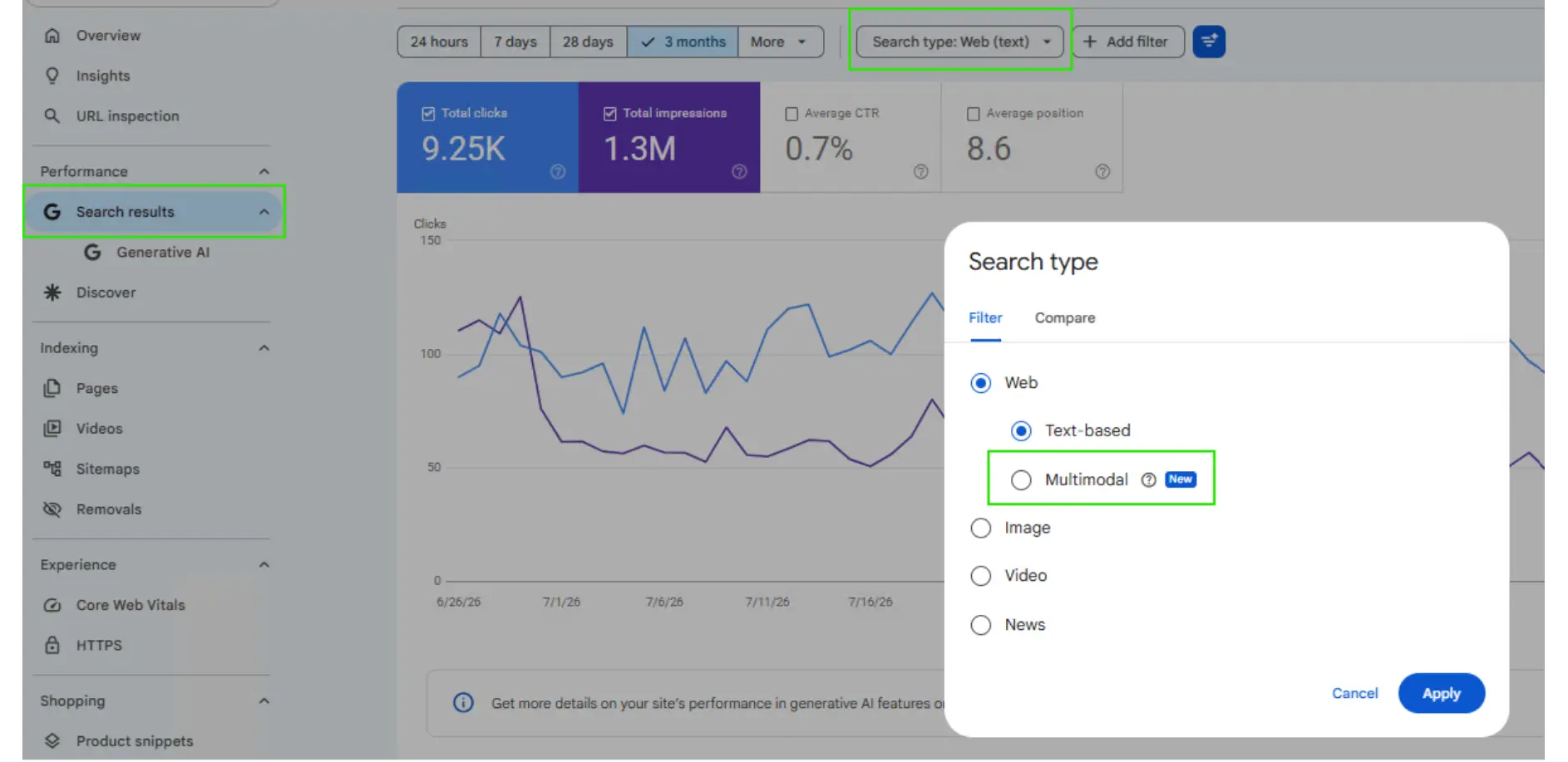
On September 24, 2026, Google began rolling out multimodal search reporting in Search Console. It tracks clicks and impressions from searches that start with an image, including Google Lens, Circle to Search on Android, image uploads to Google Search, and Chrome's right-click "Search this image." You'll find it under the new Multimodal option in the Search type filter.
Your Search Console data has had a blind spot. Someone points a phone camera at a product, taps Google Lens, and lands on your page, and the visit looks like any other search. That changes now.
What Multimodal Search Reporting Actually Tracks
Multimodal search means the query isn't only typed words. The person uses an image, often alongside text, to ask Google something. Search Console now groups four entry points into one bucket:
Google Lens searches started from a photo or camera
Circle to Search on Android
Image uploads directly into Google Search
Chrome's right-click "Search this image" option
One detail trips people up. This is not the same as the image search type. Image search covers people browsing Google Images. Multimodal search covers web results where an image was part of the search itself. Different behavior, different filter.
Where to Find the Multimodal Data
Open the performance report, then search results. Click the Search type filter. Under Web, you'll now see two options: Text-based and multimodal, the latter flagged with a "New" badge. Pick Multimodal and apply it.
The same search type also appears in the Generative AI features report. If you've already been watching how your pages show up in AI Overviews and AI Mode, the Generative AI performance reports walkthrough covers the basics. Multimodal now slices that data one level deeper.
Two catches worth knowing:
The Generative AI report shows impressions only. For clicks from multimodal search, use the Search results report.
Query data isn't available. Google's documentation says the queries dimension is off when this search type is selected, which makes sense. There's no typed keyword to report. You'll work with pages, countries, devices, and dates.
You can also export the data for analysis outside Search Console. Do that early. The rollout is global, but metrics only appear once your site actually receives multimodal traffic, so an empty view doesn't mean something's broken.
Why This Matters for SEO
Honestly, most of us have been guessing about visual search. We optimized images, wrote alt text, and hoped. Now there's a number attached.
Here's what I'd do with it in the first month.
Find which pages people reach by image.
Sort the Pages tab by clicks with the multimodal search filter on. Expect product, recipe, and location pages to lead, since those are things people photograph. If a page you'd never expect shows up, look at what image on it is doing the work.
Compare it against text-based search.
Set up a comparison between Text-based and Multimodal for the same date range. A page that ranks well for a typed keyword but barely registers in multimodal search has an image problem, not a content problem. The reverse is just as useful.
Check the mobile split.
Multimodal search likely skews toward phones, since Lens and Circle to Search are camera and touch features. If your device's view is heavily mobile, page speed and layout on small screens stop being a nice-to-have. Test how your top pages load with our page speed checker before you assume anything.

How to Improve Visibility in Multimodal Search
Nothing Google has published points to a separate ranking system here, so the work is mostly about doing image basics properly.
Use original, clear images. Stock photos have no edge when someone's matching a real object. A sharp shot of your actual product beats a generic render.
Write real alt text. Describe what's in the image the way you'd explain it to a person. Our alt text glossary entry covers what good looks like.
Compress without wrecking quality. Slow pages lose visual searchers fast. An image optimizer handles this in seconds.
Add structured data where it fits. Schema markup helps Google connect an image to a product, place, or recipe.
Put the image near the answer. Surrounding text gives Google context about what the picture shows.
If you want to see what a visual match looks like from the searcher's side, try your own product photos in the reverse image search tool.
What This Signals About Where Search Is Heading
Search Console added social and video platform reporting earlier this year, then generative AI reports, and now multimodal. Look at the pattern. Google is slowly admitting that a typed query is only one way people search, and it's giving site owners the data to prove it. We covered the earlier step in our post on Search Console platform properties.
For anyone working on AI visibility, that's the takeaway. Measurement is catching up with behavior. If you're building a strategy around ranking in AI search, multimodal is now one more surface you can track instead of guess at.
Final Thoughts
Multimodal search reporting won't rewrite your strategy overnight. What it does is remove an excuse. Visual search traffic was always there, and now you can see it, export it, and compare it with everything else.
Start simple. Pull 28 days of multimodal search data, note your top ten pages, and check whether their images deserve that attention. Then fix the weak ones. If you'd rather have a team look at how your site shows up across Google's newer search surfaces, our free AI search audit is a good place to begin.
FAQs
What is multimodal search in Google Search Console?

It's a search-type filter that shows clicks and impressions from web searches where an image was part of the search. That includes Google Lens, Circle to Search on Android, image uploads, and Chrome's "Search this image" option.
How do I see multimodal data in Search Console?
Open the Performance report, choose Search results, click Search type, select Web, then pick Multimodal. It's also available in the Generative AI features report.
Is multimodal search the same as Google Images traffic?
No. Google Images traffic comes from people browsing image results. Multimodal search covers web searches that use an image as part of the query, so it's tracked as its own search type.
Why can't I see any multimodal data for my site?
The rollout began September 24, 2026, and is still reaching accounts. Data also only appears if your site receives traffic from image-based searches, so a new or low-traffic site may see nothing yet.
Can I see which keywords bring multimodal traffic?
No. Because these searches start with an image, the queries dimension isn't available for this search type. You can analyze performance by page, country, device, and date instead.
On September 24, 2026, Google began rolling out multimodal search reporting in Search Console. It tracks clicks and impressions from searches that start with an image, including Google Lens, Circle to Search on Android, image uploads to Google Search, and Chrome's right-click "Search this image." You'll find it under the new Multimodal option in the Search type filter.
Your Search Console data has had a blind spot. Someone points a phone camera at a product, taps Google Lens, and lands on your page, and the visit looks like any other search. That changes now.
What Multimodal Search Reporting Actually Tracks
Multimodal search means the query isn't only typed words. The person uses an image, often alongside text, to ask Google something. Search Console now groups four entry points into one bucket:
Google Lens searches started from a photo or camera
Circle to Search on Android
Image uploads directly into Google Search
Chrome's right-click "Search this image" option
One detail trips people up. This is not the same as the image search type. Image search covers people browsing Google Images. Multimodal search covers web results where an image was part of the search itself. Different behavior, different filter.
Where to Find the Multimodal Data
Open the performance report, then search results. Click the Search type filter. Under Web, you'll now see two options: Text-based and multimodal, the latter flagged with a "New" badge. Pick Multimodal and apply it.
The same search type also appears in the Generative AI features report. If you've already been watching how your pages show up in AI Overviews and AI Mode, the Generative AI performance reports walkthrough covers the basics. Multimodal now slices that data one level deeper.
Two catches worth knowing:
The Generative AI report shows impressions only. For clicks from multimodal search, use the Search results report.
Query data isn't available. Google's documentation says the queries dimension is off when this search type is selected, which makes sense. There's no typed keyword to report. You'll work with pages, countries, devices, and dates.
You can also export the data for analysis outside Search Console. Do that early. The rollout is global, but metrics only appear once your site actually receives multimodal traffic, so an empty view doesn't mean something's broken.
Why This Matters for SEO
Honestly, most of us have been guessing about visual search. We optimized images, wrote alt text, and hoped. Now there's a number attached.
Here's what I'd do with it in the first month.
Find which pages people reach by image.
Sort the Pages tab by clicks with the multimodal search filter on. Expect product, recipe, and location pages to lead, since those are things people photograph. If a page you'd never expect shows up, look at what image on it is doing the work.
Compare it against text-based search.
Set up a comparison between Text-based and Multimodal for the same date range. A page that ranks well for a typed keyword but barely registers in multimodal search has an image problem, not a content problem. The reverse is just as useful.
Check the mobile split.
Multimodal search likely skews toward phones, since Lens and Circle to Search are camera and touch features. If your device's view is heavily mobile, page speed and layout on small screens stop being a nice-to-have. Test how your top pages load with our page speed checker before you assume anything.
How to Improve Visibility in Multimodal Search
Nothing Google has published points to a separate ranking system here, so the work is mostly about doing image basics properly.
Use original, clear images. Stock photos have no edge when someone's matching a real object. A sharp shot of your actual product beats a generic render.
Write real alt text. Describe what's in the image the way you'd explain it to a person. Our alt text glossary entry covers what good looks like.
Compress without wrecking quality. Slow pages lose visual searchers fast. An image optimizer handles this in seconds.
Add structured data where it fits. Schema markup helps Google connect an image to a product, place, or recipe.
Put the image near the answer. Surrounding text gives Google context about what the picture shows.
If you want to see what a visual match looks like from the searcher's side, try your own product photos in the reverse image search tool.
What This Signals About Where Search Is Heading
Search Console added social and video platform reporting earlier this year, then generative AI reports, and now multimodal. Look at the pattern. Google is slowly admitting that a typed query is only one way people search, and it's giving site owners the data to prove it. We covered the earlier step in our post on Search Console platform properties.
For anyone working on AI visibility, that's the takeaway. Measurement is catching up with behavior. If you're building a strategy around ranking in AI search, multimodal is now one more surface you can track instead of guess at.
Final Thoughts
Multimodal search reporting won't rewrite your strategy overnight. What it does is remove an excuse. Visual search traffic was always there, and now you can see it, export it, and compare it with everything else.
Start simple. Pull 28 days of multimodal search data, note your top ten pages, and check whether their images deserve that attention. Then fix the weak ones. If you'd rather have a team look at how your site shows up across Google's newer search surfaces, our free AI search audit is a good place to begin.
FAQs
What is multimodal search in Google Search Console?
It's a search-type filter that shows clicks and impressions from web searches where an image was part of the search. That includes Google Lens, Circle to Search on Android, image uploads, and Chrome's "Search this image" option.
How do I see multimodal data in Search Console?
Open the Performance report, choose Search results, click Search type, select Web, then pick Multimodal. It's also available in the Generative AI features report.
Is multimodal search the same as Google Images traffic?
No. Google Images traffic comes from people browsing image results. Multimodal search covers web searches that use an image as part of the query, so it's tracked as its own search type.
Why can't I see any multimodal data for my site?
The rollout began September 24, 2026, and is still reaching accounts. Data also only appears if your site receives traffic from image-based searches, so a new or low-traffic site may see nothing yet.
Can I see which keywords bring multimodal traffic?
No. Because these searches start with an image, the queries dimension isn't available for this search type. You can analyze performance by page, country, device, and date instead.


Summarize with AI

Latest Blogs





Want to be seen everywhere?
Get a free AI-search audit Today!



4.9/5 Ratings!


Don’t miss our revenue growth tips!
Get expert marketing tips—straight to your inbox, like thousands of happy clients.
Don’t miss our revenue growth tips!
Get expert marketing tips—straight to your inbox, like thousands of happy clients.
Don’t miss our revenue growth tips!
Don’t miss our revenue growth tips!
Get expert marketing tips—straight to your inbox, like thousands of happy clients.
Explore News, Updates & Strategies
Explore News, Updates & Strategies
Explore the latest industry updates, marketing trends, Google changes, expert insights, success stories, eCommerce strategies, AEO innovations, and lead generation techniques — all in one place.
Explore the latest industry updates, marketing trends, Google changes, expert insights, success stories, eCommerce strategies, AEO innovations, and lead generation techniques — all in one place.
Google Updates
Sep 2, 2026
5 Min Read
Google Search Console's Generative AI Performance Report Goes Fully Global
Google Updates
Sep 2, 2026
5 Min Read
Google Search Console's Generative AI Performance Report Goes Fully Global
Google Updates
Sep 2, 2026
5 Min Read
Google Search Console's Generative AI Performance Report Goes Fully Global
Google Updates
Aug 18, 2026
5 Min Read
Google’s August 2026 Spam Update: Who Won, Who Lost & Why?
Google Updates
Aug 18, 2026
5 Min Read
Google’s August 2026 Spam Update: Who Won, Who Lost & Why?
Google Updates
Aug 18, 2026
5 Min Read
Google’s August 2026 Spam Update: Who Won, Who Lost & Why?

Marketing Trends
Aug 14, 2026
5 Min Read
Google Gemini Reaches 1 Billion Users, With 63% Using Voice
Marketing Trends
Aug 14, 2026
5 Min Read
Google Gemini Reaches 1 Billion Users, With 63% Using Voice
Marketing Trends
Aug 14, 2026
5 Min Read
Google Gemini Reaches 1 Billion Users, With 63% Using Voice






























Ready to speak with an expert?
Data-Driven Marketing Agency That Elevates ROI
1100+
Websites Designed & Optimized to Convert
$280M+
Client Revenue Driven & Growing Strong
Discover how to skyrocket
your revenue today!
Trusted by 1000+ Owners!
Ready to speak with an expert?
Data-Driven Marketing Agency That Elevates ROI
1100+
Websites Designed & Optimized to Convert
$280M+
Client Revenue Driven & Growing Strong
Discover how to skyrocket
your revenue today!
Trusted by 1000+ Owners!
Want to skyrocket revenue?
4.9/5 Ratings!
Ready to speak with an expert?
Data-Driven Marketing Agency That Elevates ROI
1100+
Websites Designed & Optimized to Convert
$280M+
Client Revenue Driven & Growing Strong
Discover how to skyrocket
your revenue today!
Trusted by 1000+ Owners!
Call
Meet