Google Search Console Just Dropped Generative AI Performance Reports (Here’s the Tea)
Last Updated:

Table of Content
Case Studies









Indra Singh
Indra Singh
Google Updates
Google Updates
10 Min Read
8 Min
If you've been wondering whether your site is actually showing up inside Google's AI Overviews or AI Mode, you now have a direct answer straight from Search Console.
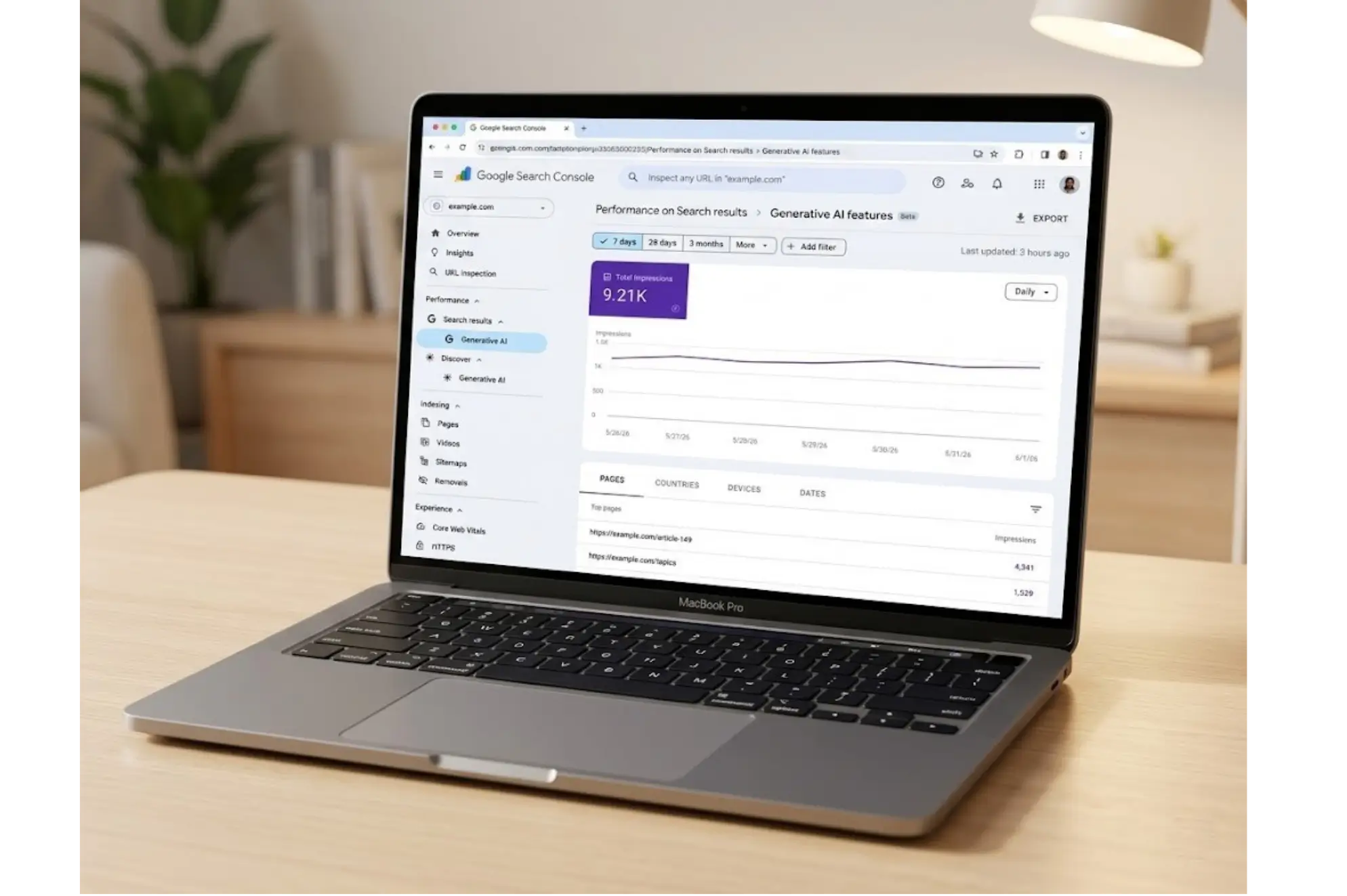
On June 3, 2026, Google officially launched the Generative AI Performance Reports in Search Console. There are two of them: one for Search and one for Discover. Both give you impression data from Google's generative AI features for the first time.
This is a big deal. Until now, you had no way to separate AI-driven visibility from regular organic performance. That changes today.
Here's everything you need to know.
What Are the Generative AI Performance Reports?
Simply put, these are dedicated dashboards inside Search Console that show you how often your pages appear within Google's AI-powered features.
Think of it this way: when someone searches on Google and sees an AI Overview at the top of the results page, your site might be one of the sources cited in that response. Previously, that impression would just blend into your overall performance data. Now you can see it separately.
The two reports cover different surfaces:
The Generative AI performance Search report tracks impressions from AI Overviews and AI Mode in Google Search.
The Generative AI performance Discover report tracks impressions from generative AI features within Google Discover (the content feed on Android and the Google app).
Both reports are part of a gradual rollout, so not every site owner has access yet. But Google is actively expanding availability as they test and gather feedback.
Search Report vs. Discover Report: What's the Difference?
They measure the same type of event (AI-driven impressions) but across two completely separate platforms.
Feature | Generative AI performance report (Search) | Generative AI performance report (Discover) |
|---|---|---|
Platform covered | Google Search (AI Overviews, AI Mode) | Google Discover feed |
Device dimension | Yes | No |
Impression counting | Per appearance in results | One per session per result |
Page URL used | Canonical URL | Canonical URL of source page |
Data from Search Labs? | No | No |
One subtle but important difference: in the Discover report, impressions are counted per session. If a user scrolls past your card, scrolls back, and sees it again, that still counts as one impression. The Search report works more like traditional impressions.
Also worth noting: the Discover report tracks the page that sourced the information, not necessarily the page a user would land on if they clicked. That matters when you're doing canonical URL mapping.
How to Access These Reports in Search Console
Getting to the reports is straightforward once access has been rolled out to your property.
For the Search report:
Log into Google Search Console
Navigate to Performance > Search Analytics > AI
Or use this direct path: search.google.com/search-console/performance/search-analytics/ai
For the Discover report:
Same starting point: Search Console
Navigate to Performance > Discover > AI
Direct path: search.google.com/search-console/performance/discover/ai
If you don't see these options yet, your property may not have been included in the current rollout wave. More on that below.
Understanding the Data: What Each Dimension Tells You
Both reports use impressions as the primary metric. An impression is recorded when a link to your site is shown to a user within a generative AI feature. It doesn't require a click.
Here's how to read each dimension:
Pages
This groups your data by the individual URLs that appeared in AI features. This is arguably the most useful view for content strategists. You can quickly spot which of your pages are getting AI visibility and which aren't.
The URL shown is typically the canonical URL, even if a different version of the page is the one that gets traffic. Keep that in mind when cross-referencing with your regular performance data.
Countries
This tells you which countries are generating AI impressions for your site. If you're seeing strong impressions from a country you didn't expect, that's worth investigating. Your content might be resonating in that market through AI features before it even shows up in traditional rankings.
Devices
Available only in the Search report, not Discover. This shows the device type (desktop, tablet, or mobile) people were using when they saw your site in an AI feature.
Dates
You can view performance over time with hourly, daily, weekly, or monthly granularity. This is useful for spotting trends, particularly around content updates, Google algorithm changes, or seasonality.
Chart vs. Table: A Key Aggregation Difference
In the Search report, the chart aggregates by property. So if two of your pages appear in the same AI result, that's counted as one impression in the chart. But in the table (when you're looking at the Pages dimension), each URL is counted individually.
This can create apparent discrepancies between the chart total and table totals. That's expected behavior, not a data error.
Why This Data Actually Matters for Your SEO Strategy
Here's the honest truth: most SEOs have been flying blind when it comes to AI Overviews performance. You could optimize for it, but you couldn't measure it cleanly.
That ends now.
With this data, you can start answering questions like the following:
Which pages are driving AI impressions? Use this to understand what type of content Google's AI features prefer from your site.
Is AI visibility growing or shrinking over time? Watch your impression trends alongside any content changes you make.
Are your AI impressions concentrated in specific countries? This might inform localization or geo-targeted content decisions.
Mobile vs. desktop? If your AI impressions are heavily mobile, make sure your pages load fast and look sharp on smaller screens.
This data also helps you build a baseline. Right now, for most sites, these numbers are new and unfamiliar. Track them weekly. In a few months, you'll have enough history to spot meaningful patterns.
How to Get Your Site Featured in AI Overviews and AI Mode
The reports tell you what's happening. But how do you actually improve your presence in AI features? A few principles have emerged based on how Google's AI systems work.
Write clear, direct answers.
AI Overviews tend to pull from content that directly answers a question without burying the answer in paragraphs of context. Lead with your answer.
Build topical authority.
A site that covers a topic deeply and comprehensively is more likely to be cited by AI systems than a site with a single blog post. Build clusters of related content around your core topics.
Make your content structurally easy to parse.
Use proper heading hierarchies (H1, H2, H3). Use bullet points for lists. Write short, scannable paragraphs. AI models process structure, not just text.
Keep content fresh and accurate.
AI Overviews are sensitive to outdated information. Update your articles regularly, especially for fast-moving topics.
Earn trust signals. Links from reputable sites, author credentials, and citations of credible sources: these all contribute to whether Google's AI systems treat your site as a reliable source.
Getting featured in AI results isn't a separate strategy from good SEO. It's an extension of it.
Final Thoughts
The launch of Generative AI Performance Reports is one of the more meaningful Search Console updates in years. It's not just a new dashboard. It's Google acknowledging that AI-driven search is now a measurable, trackable channel in its own right.
For site owners and SEOs, the work now is to build a baseline, watch the trends, and start connecting your content strategy decisions to what the data shows. Which pages earn AI impressions? Which don't? What changes improve your visibility?
We're in the early days of AI search analytics. The data is limited right now, but the direction is clear: understanding how your site performs inside AI features is going to be just as important as tracking traditional rankings and clicks.
Get into Search Console, find your reports, and start paying attention.
FAQs
What is the Generative AI Performance Report in Search Console?

It's a new dedicated report launched in June 2026 that shows how many times your site's pages appeared in Google's generative AI features, specifically AI Overviews and AI Mode in Search, and generative AI features in Discover. The main metric is impressions.
Are AI impressions included in the regular Performance report?
Yes. The overall Performance report still includes AI impressions as part of your total site visibility. The new Generative AI reports just give you a separate, dedicated view so you can analyze AI traffic on its own.
Why can't I see the Generative AI Performance Reports for my site?
Either your property hasn't been added to the rollout yet, your site has been excluded from generative AI features, or you don't have enough impressions to trigger the report. Check your generative AI inclusion settings in Search Console first.
How are impressions counted differently for Discover vs. Search?
In the Discover report, one impression is recorded per result per session, even if a user scrolls past and returns to a card. In the Search report, impressions work similarly to the standard performance report, counting each time a link appears on screen.
How do I make my site eligible for generative AI features?
Make sure your site hasn't been excluded via meta tags or robots settings, and use the inclusion settings in Search Console. Following general SEO best practices (quality content, good structure, strong E-E-A-T signals) also increases your chances of being cited in AI features.
If you've been wondering whether your site is actually showing up inside Google's AI Overviews or AI Mode, you now have a direct answer straight from Search Console.
On June 3, 2026, Google officially launched the Generative AI Performance Reports in Search Console. There are two of them: one for Search and one for Discover. Both give you impression data from Google's generative AI features for the first time.
This is a big deal. Until now, you had no way to separate AI-driven visibility from regular organic performance. That changes today.
Here's everything you need to know.
What Are the Generative AI Performance Reports?
Simply put, these are dedicated dashboards inside Search Console that show you how often your pages appear within Google's AI-powered features.
Think of it this way: when someone searches on Google and sees an AI Overview at the top of the results page, your site might be one of the sources cited in that response. Previously, that impression would just blend into your overall performance data. Now you can see it separately.
The two reports cover different surfaces:
The Generative AI performance Search report tracks impressions from AI Overviews and AI Mode in Google Search.
The Generative AI performance Discover report tracks impressions from generative AI features within Google Discover (the content feed on Android and the Google app).
Both reports are part of a gradual rollout, so not every site owner has access yet. But Google is actively expanding availability as they test and gather feedback.
Search Report vs. Discover Report: What's the Difference?
They measure the same type of event (AI-driven impressions) but across two completely separate platforms.
Feature | Generative AI performance report (Search) | Generative AI performance report (Discover) |
|---|---|---|
Platform covered | Google Search (AI Overviews, AI Mode) | Google Discover feed |
Device dimension | Yes | No |
Impression counting | Per appearance in results | One per session per result |
Page URL used | Canonical URL | Canonical URL of source page |
Data from Search Labs? | No | No |
One subtle but important difference: in the Discover report, impressions are counted per session. If a user scrolls past your card, scrolls back, and sees it again, that still counts as one impression. The Search report works more like traditional impressions.
Also worth noting: the Discover report tracks the page that sourced the information, not necessarily the page a user would land on if they clicked. That matters when you're doing canonical URL mapping.
How to Access These Reports in Search Console
Getting to the reports is straightforward once access has been rolled out to your property.
For the Search report:
Log into Google Search Console
Navigate to Performance > Search Analytics > AI
Or use this direct path: search.google.com/search-console/performance/search-analytics/ai
For the Discover report:
Same starting point: Search Console
Navigate to Performance > Discover > AI
Direct path: search.google.com/search-console/performance/discover/ai
If you don't see these options yet, your property may not have been included in the current rollout wave. More on that below.
Understanding the Data: What Each Dimension Tells You
Both reports use impressions as the primary metric. An impression is recorded when a link to your site is shown to a user within a generative AI feature. It doesn't require a click.
Here's how to read each dimension:
Pages
This groups your data by the individual URLs that appeared in AI features. This is arguably the most useful view for content strategists. You can quickly spot which of your pages are getting AI visibility and which aren't.
The URL shown is typically the canonical URL, even if a different version of the page is the one that gets traffic. Keep that in mind when cross-referencing with your regular performance data.
Countries
This tells you which countries are generating AI impressions for your site. If you're seeing strong impressions from a country you didn't expect, that's worth investigating. Your content might be resonating in that market through AI features before it even shows up in traditional rankings.
Devices
Available only in the Search report, not Discover. This shows the device type (desktop, tablet, or mobile) people were using when they saw your site in an AI feature.
Dates
You can view performance over time with hourly, daily, weekly, or monthly granularity. This is useful for spotting trends, particularly around content updates, Google algorithm changes, or seasonality.
Chart vs. Table: A Key Aggregation Difference
In the Search report, the chart aggregates by property. So if two of your pages appear in the same AI result, that's counted as one impression in the chart. But in the table (when you're looking at the Pages dimension), each URL is counted individually.
This can create apparent discrepancies between the chart total and table totals. That's expected behavior, not a data error.
Why This Data Actually Matters for Your SEO Strategy
Here's the honest truth: most SEOs have been flying blind when it comes to AI Overviews performance. You could optimize for it, but you couldn't measure it cleanly.
That ends now.
With this data, you can start answering questions like the following:
Which pages are driving AI impressions? Use this to understand what type of content Google's AI features prefer from your site.
Is AI visibility growing or shrinking over time? Watch your impression trends alongside any content changes you make.
Are your AI impressions concentrated in specific countries? This might inform localization or geo-targeted content decisions.
Mobile vs. desktop? If your AI impressions are heavily mobile, make sure your pages load fast and look sharp on smaller screens.
This data also helps you build a baseline. Right now, for most sites, these numbers are new and unfamiliar. Track them weekly. In a few months, you'll have enough history to spot meaningful patterns.
How to Get Your Site Featured in AI Overviews and AI Mode
The reports tell you what's happening. But how do you actually improve your presence in AI features? A few principles have emerged based on how Google's AI systems work.
Write clear, direct answers.
AI Overviews tend to pull from content that directly answers a question without burying the answer in paragraphs of context. Lead with your answer.
Build topical authority.
A site that covers a topic deeply and comprehensively is more likely to be cited by AI systems than a site with a single blog post. Build clusters of related content around your core topics.
Make your content structurally easy to parse.
Use proper heading hierarchies (H1, H2, H3). Use bullet points for lists. Write short, scannable paragraphs. AI models process structure, not just text.
Keep content fresh and accurate.
AI Overviews are sensitive to outdated information. Update your articles regularly, especially for fast-moving topics.
Earn trust signals. Links from reputable sites, author credentials, and citations of credible sources: these all contribute to whether Google's AI systems treat your site as a reliable source.
Getting featured in AI results isn't a separate strategy from good SEO. It's an extension of it.
Final Thoughts
The launch of Generative AI Performance Reports is one of the more meaningful Search Console updates in years. It's not just a new dashboard. It's Google acknowledging that AI-driven search is now a measurable, trackable channel in its own right.
For site owners and SEOs, the work now is to build a baseline, watch the trends, and start connecting your content strategy decisions to what the data shows. Which pages earn AI impressions? Which don't? What changes improve your visibility?
We're in the early days of AI search analytics. The data is limited right now, but the direction is clear: understanding how your site performs inside AI features is going to be just as important as tracking traditional rankings and clicks.
Get into Search Console, find your reports, and start paying attention.
FAQs
What is the Generative AI Performance Report in Search Console?
It's a new dedicated report launched in June 2026 that shows how many times your site's pages appeared in Google's generative AI features, specifically AI Overviews and AI Mode in Search, and generative AI features in Discover. The main metric is impressions.
Are AI impressions included in the regular Performance report?
Yes. The overall Performance report still includes AI impressions as part of your total site visibility. The new Generative AI reports just give you a separate, dedicated view so you can analyze AI traffic on its own.
Why can't I see the Generative AI Performance Reports for my site?
Either your property hasn't been added to the rollout yet, your site has been excluded from generative AI features, or you don't have enough impressions to trigger the report. Check your generative AI inclusion settings in Search Console first.
How are impressions counted differently for Discover vs. Search?
In the Discover report, one impression is recorded per result per session, even if a user scrolls past and returns to a card. In the Search report, impressions work similarly to the standard performance report, counting each time a link appears on screen.
How do I make my site eligible for generative AI features?
Make sure your site hasn't been excluded via meta tags or robots settings, and use the inclusion settings in Search Console. Following general SEO best practices (quality content, good structure, strong E-E-A-T signals) also increases your chances of being cited in AI features.



Summarize with AI

Latest Blogs







Want to be seen everywhere?
Get a free AI-search audit Today!



4.9/5 Ratings!


Don’t miss our revenue growth tips!
Get expert marketing tips—straight to your inbox, like thousands of happy clients.
Don’t miss our revenue growth tips!
Get expert marketing tips—straight to your inbox, like thousands of happy clients.
Don’t miss our revenue growth tips!
Don’t miss our revenue growth tips!
Get expert marketing tips—straight to your inbox, like thousands of happy clients.
Explore News, Updates & Strategies
Explore News, Updates & Strategies
Explore the latest industry updates, marketing trends, Google changes, expert insights, success stories, eCommerce strategies, AEO innovations, and lead generation techniques — all in one place.
Explore the latest industry updates, marketing trends, Google changes, expert insights, success stories, eCommerce strategies, AEO innovations, and lead generation techniques — all in one place.

Google Updates
Sep 26, 2026
3 Min Read
Google Search Console Adds Multimodal Search Performance Reporting
Google Updates
Sep 26, 2026
3 Min Read
Google Search Console Adds Multimodal Search Performance Reporting
Google Updates
Sep 26, 2026
3 Min Read
Google Search Console Adds Multimodal Search Performance Reporting

Google Updates
Sep 2, 2026
5 Min Read
Google Search Console's Generative AI Performance Report Goes Fully Global
Google Updates
Sep 2, 2026
5 Min Read
Google Search Console's Generative AI Performance Report Goes Fully Global
Google Updates
Sep 2, 2026
5 Min Read
Google Search Console's Generative AI Performance Report Goes Fully Global

Google Updates
Aug 18, 2026
5 Min Read
Google’s August 2026 Spam Update: Who Won, Who Lost & Why?
Google Updates
Aug 18, 2026
5 Min Read
Google’s August 2026 Spam Update: Who Won, Who Lost & Why?
Google Updates
Aug 18, 2026
5 Min Read
Google’s August 2026 Spam Update: Who Won, Who Lost & Why?




































Ready to speak with an expert?
Data-Driven Marketing Agency That Elevates ROI
1100+
Websites Designed & Optimized to Convert
$280M+
Client Revenue Driven & Growing Strong
Discover how to skyrocket
your revenue today!
Trusted by 1000+ Owners!
Ready to speak with an expert?
Data-Driven Marketing Agency That Elevates ROI
1100+
Websites Designed & Optimized to Convert
$280M+
Client Revenue Driven & Growing Strong
Discover how to skyrocket
your revenue today!
Trusted by 1000+ Owners!
Want to skyrocket revenue?
4.9/5 Ratings!
Ready to speak with an expert?
Data-Driven Marketing Agency That Elevates ROI
1100+
Websites Designed & Optimized to Convert
$280M+
Client Revenue Driven & Growing Strong
Discover how to skyrocket
your revenue today!
Trusted by 1000+ Owners!
Call
Meet