Orphan Pages: The Hidden SEO Problem Costing Your Website Visibility
Orphan Pages: The Hidden SEO Problem Costing Your Website Visibility
Last Updated:
Table of Content
Case Studies









Indra Singh
Indra Singh
Indra Singh
SEO
SEO
SEO
8 Min Read
8 Min
8 Min Read
You published a page. It's live, it's indexed-worthy, and it might even be genuinely good. And it's getting zero traffic. Not low traffic. Zero.
Nine times out of ten, that's an orphan page problem. And most site owners never find out, because nothing about an orphan page looks broken. It loads fine. It renders fine. It just doesn't exist anywhere else on your site.
Orphan pages are live web pages with no internal links pointing to them. Search engines rely on links to crawl and discover content, so a page with zero inbound internal links is difficult to find, rarely indexed properly, and almost never ranks. Fixing orphan pages usually means adding internal links from relevant, already-indexed pages back to the isolated one.
If you manage a site with more than a couple hundred URLs, you almost certainly have some. The bigger the site, the more of them hide in plain sight.
What Are Orphan Pages, Exactly?
An orphan page is any page that's technically live on your domain but structurally cut off from the rest of your site. No navigation menu links to it. No blog post references it. No footer, no sidebar, no related-content module points a user or a crawler in its direction.
The only way anyone finds it is by knowing the exact URL. Type it in directly, or click a link from somewhere off-site, and it loads just fine. But ask "what are orphan pages" from a crawler's perspective, and the answer is simple: they're invisible.
That distinction matters. A page can have flawless on-page SEO, perfect keyword targeting, and fast load times and still underperform badly if it's orphaned. Content quality doesn't compensate for a lack of internal links. Discovery has to happen first.
A quick way to think about it: search engines don't browse your site menu the way a person does. They follow links, page to page, the same way you'd follow a trail of breadcrumbs. No breadcrumb, no trail, no visit.
Why Orphan Pages SEO Problems Are So Easy to Miss
Here's the thing that trips people up: orphan pages don't throw errors. There's no red flag in your CMS, no broken-link warning, and no 404. The page works perfectly for anyone who happens to land on it directly.
That's exactly why orphan pages SEO issues pile up quietly on larger sites. A few common culprits:
Site redesigns that rebuild navigation without auditing, which old pages lost their links in the process
Content migrations where URLs move but the internal linking structure doesn't get updated to match
Seasonal or campaign pages built for a launch, then abandoned once the campaign ends, with no one ever linking back to them
Category or filter pages generated automatically by a CMS or e-commerce platform, sitting outside the normal navigation
Old blog posts buried once newer content pushes them off paginated archive pages, with nothing else linking in
None of these look like mistakes when they happen. They're just normal parts of running a website. The orphaning is a side effect nobody notices until organic traffic on a page flatlines and stays there.
Do Orphan Pages Actually Hurt Rankings?
Yes, and the damage compounds in a few specific ways.
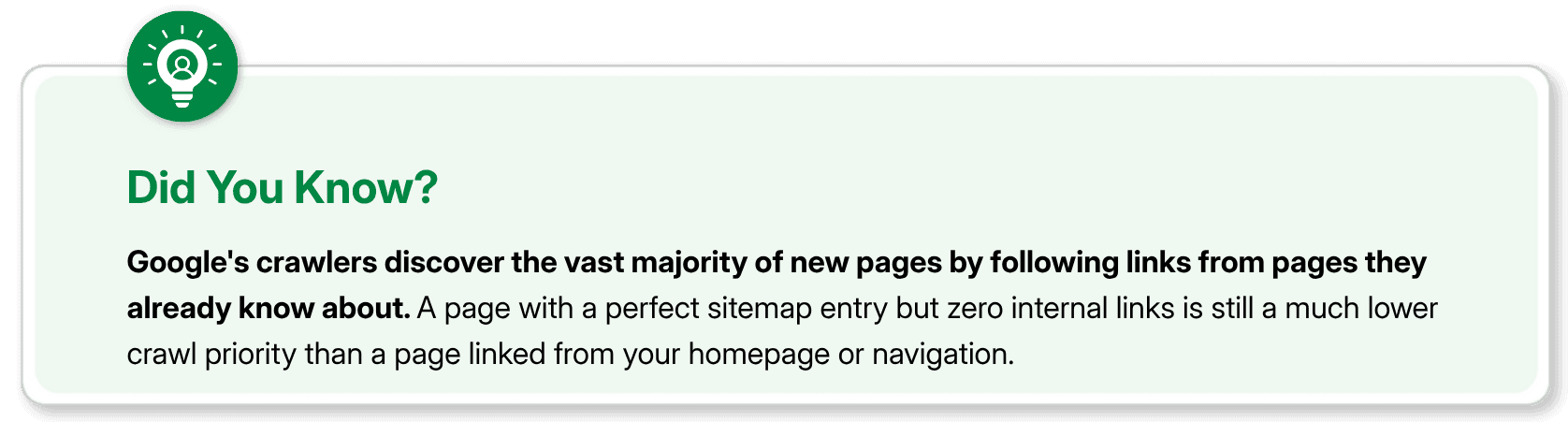
Indexing gets unreliable. Google can still stumble onto an orphan page through your XML sitemap or an external backlink, but that's a much weaker discovery signal than internal links. Pages found this way get crawled less often and re-crawled less consistently, which means updates to that page take longer to register.
Authority never flows in. Internal links pass relevance and authority between pages, the same logic that makes backlinks valuable, just within your own domain. A page with no internal links pointing to it gets none of that transferred equity, no matter how strong your homepage or top pages are.
The crawl budget gets wasted elsewhere. Search engines allocate a limited amount of crawling time to every site. When that budget goes toward pages with no clear path in the site structure, or when valuable pages sit unreachable, you're not making efficient use of the crawl activity you do get.
User experience quietly suffers too. If a page isn't linked internally, real visitors can't stumble onto it through browsing either. It only reaches people who already know the exact URL, which usually means only direct and referral traffic, with no organic traffic.
Put those together and you get pages that took real time to create, sitting there generating essentially nothing.
How to Find Orphan Pages on a Website
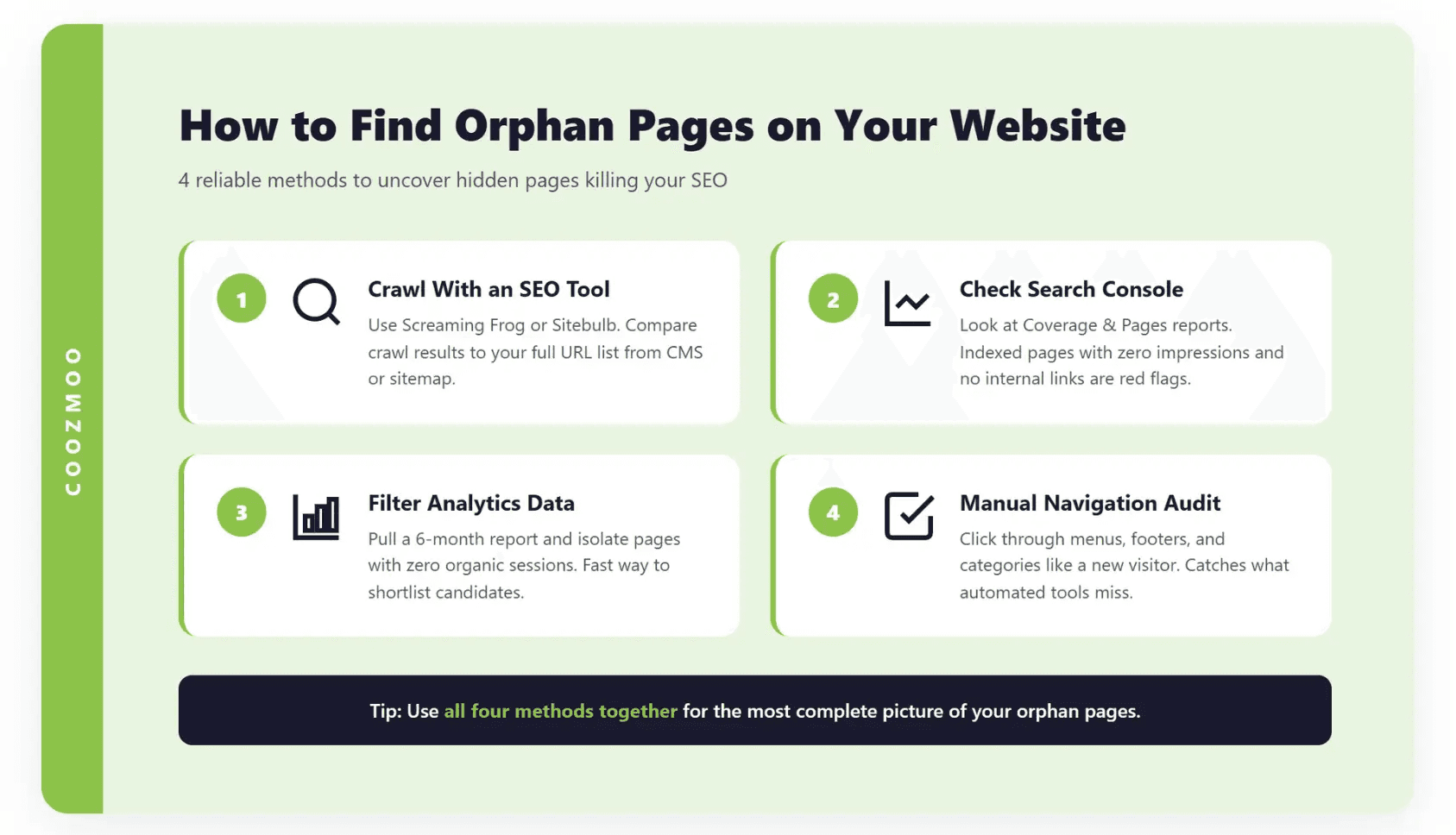
You can't fix what you can't see, and orphan pages by definition don't show up through normal browsing. You need to actively go looking. A few reliable methods, usually best used together:
1. Crawl your site with an SEO Crawler
Tools like Screaming Frog, Sitebulb, or a comparable crawler will map every page it can reach by following links, starting from your homepage outward. Then compare that crawl against a full list of your indexed or published URLs, pulled from your CMS or your XML sitemap.
Any URL that shows up on the second list but not the first is a strong orphan candidate. It exists, but nothing led the crawler to it.
2. Cross-check Google Search Console
The Coverage and Pages reports in Search Console show you what Google has actually indexed, along with pages it's aware of but hasn't crawled recently. Pages that are indexed but get almost no impressions, paired with low or no internal link counts in the Links report, are worth a manual check.
3. Pull your analytics and filter for zero-organic pages
Run a report across a meaningful time window, six months or so, and isolate pages with real content but no organic sessions. Not every result is orphaned. Some are just genuinely low-value pages. But it's a fast way to shortlist candidates before you dig into link structure page by page.
4. Do a manual navigation audit on larger, older sites
If your site has been live for years and been through more than one redesign, set aside time to click through your main navigation, footer, and category pages the way a new visitor would. Pages that never surface through that process, and that don't get linked from any blog content either, are almost always orphaned.
Honestly, most teams skip this step because it's tedious. It's also the step that catches what tools miss, especially pages that technically have one stray link buried somewhere but nothing intentional.
How to Fix Orphan Pages
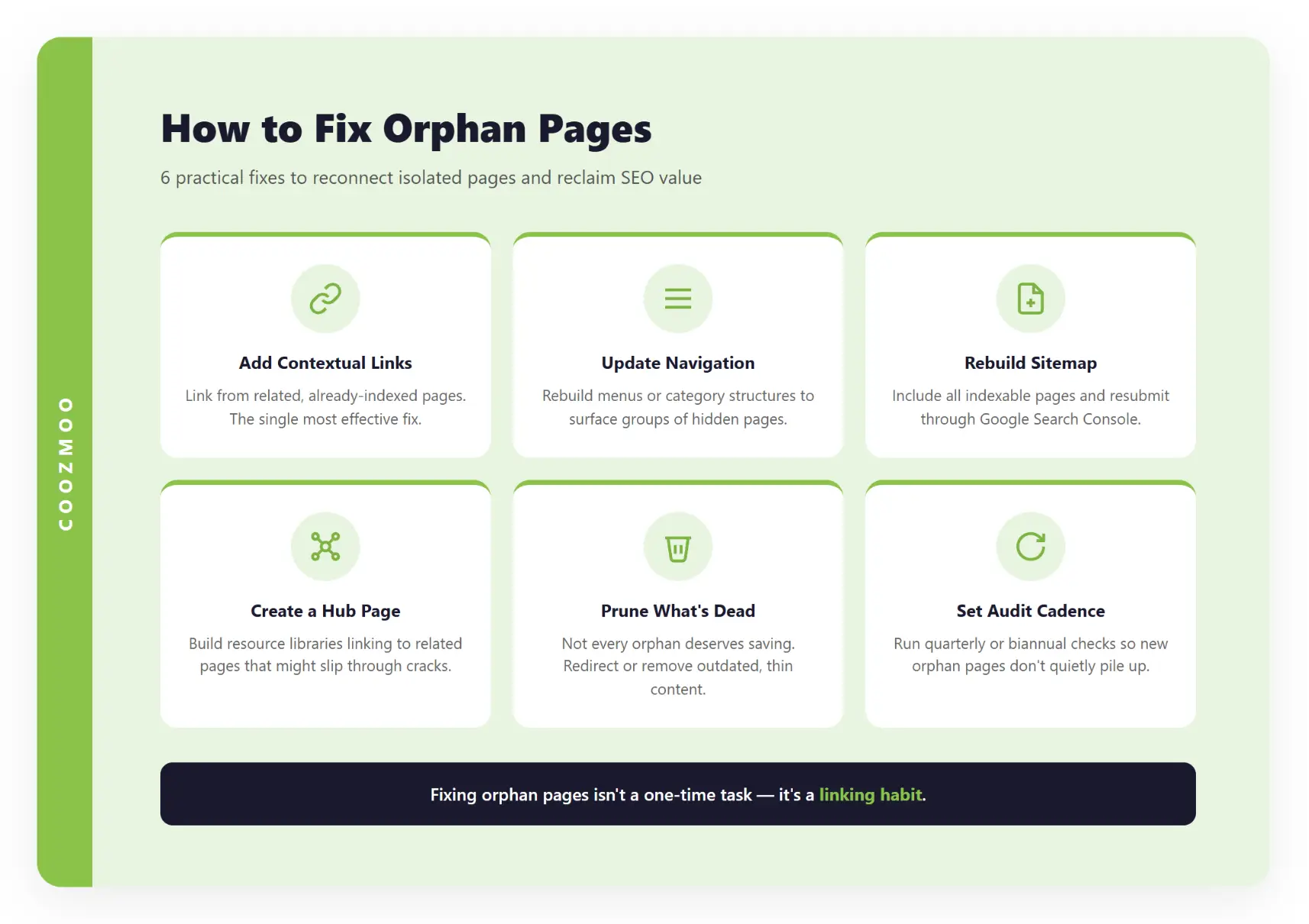
Once you've got your list, fixing orphan pages is mostly about deliberate internal linking, not a technical overhaul.
Add contextual internal links from relevant, already-linked pages. Find existing pages that are topically related and already receiving crawl traffic and organic visits, then add a natural link to the orphaned page from within the body content. This is usually the single most effective fix, and it costs nothing but a few minutes of editing.
Update your navigation or category structure. If a whole group of pages is orphaned because a menu or filtering system doesn't surface them, the fix might need to happen at the structural level rather than one page at a time.
Rebuild your sitemap, and submit it again. Your XML sitemap should include every page you actually want indexed. This won't solve the internal linking problem, sitemaps are a weaker signal than links, but they give search engines another path to discovery while you work through link fixes.
Create a hub or resource page that links out to related content. For sites with a lot of thematically connected pages, a well-organized hub page, like a resource library or a topic overview, naturally becomes a linking source for pages that might otherwise fall through the cracks.
Decide what's actually worth saving. Not every orphan page deserves to be rescued. If a page is genuinely outdated, thin, or no longer relevant to your business, redirecting it or letting it go is a legitimate call. Fixing orphan pages isn't about linking to everything you've ever published, it's about making sure your valuable content is reachable.
Set a recurring audit cadence. This isn't a one-time cleanup. New pages get created, old ones get restructured, and navigation changes over time. A quarterly or biannual check keeps orphan pages SEO issues from quietly building up.
The Real Fix Is a Linking Habit, Not a One-Time Cleanup
Orphan pages aren't a sign that your content is lacking. They're a sign that your internal linking hasn't kept pace with how much content you've published. That's an easy problem to create and, thankfully, a relatively easy one to fix once you know where to look.
Start with a crawl, cross-reference it against your published URLs, and work through the list one linking opportunity at a time. Your existing content is often the fastest fix you have sitting right in front of you.
Final Thoughts
Orphan pages cost you visibility not because your content is weak, but because nothing points to it. The fix rarely requires a redesign, just a deliberate internal linking pass, a sitemap that's actually current, and a recurring check so new orphans don't pile up unnoticed. Find them, link them, and let your existing content start earning the traffic it was built for.
FAQs
What are orphan pages in simple terms?

Orphan pages are live pages on a website that have no internal links pointing to them from any other page on the site, making them hard for both search engines and users to discover.
How many orphan pages is normal for a website to have?
There's no universal number, but larger sites with hundreds or thousands of URLs, especially ones that have gone through redesigns or migrations, tend to accumulate more. Even a handful of orphaned high-value pages is worth fixing.
Can orphan pages still rank in Google if they're in the sitemap?
Sometimes, but inconsistently. A sitemap can help a page get discovered and indexed, but without internal links passing authority to it, that page usually ranks weaker than a properly linked equivalent.
How often should I check for orphan pages on my website?
A quarterly or biannual audit is a reasonable baseline for most sites, with more frequent checks after any major redesign, migration, or content restructuring.
Do orphan pages hurt my whole site's SEO, or just that one page?
The direct impact is on the orphaned page itself, but a large volume of orphan pages can waste your crawl budget and signal a disorganized site structure, which can have a broader effect on how efficiently search engines crawl your site overall.
You published a page. It's live, it's indexed-worthy, and it might even be genuinely good. And it's getting zero traffic. Not low traffic. Zero.
Nine times out of ten, that's an orphan page problem. And most site owners never find out, because nothing about an orphan page looks broken. It loads fine. It renders fine. It just doesn't exist anywhere else on your site.
Orphan pages are live web pages with no internal links pointing to them. Search engines rely on links to crawl and discover content, so a page with zero inbound internal links is difficult to find, rarely indexed properly, and almost never ranks. Fixing orphan pages usually means adding internal links from relevant, already-indexed pages back to the isolated one.
If you manage a site with more than a couple hundred URLs, you almost certainly have some. The bigger the site, the more of them hide in plain sight.
What Are Orphan Pages, Exactly?
An orphan page is any page that's technically live on your domain but structurally cut off from the rest of your site. No navigation menu links to it. No blog post references it. No footer, no sidebar, no related-content module points a user or a crawler in its direction.
The only way anyone finds it is by knowing the exact URL. Type it in directly, or click a link from somewhere off-site, and it loads just fine. But ask "what are orphan pages" from a crawler's perspective, and the answer is simple: they're invisible.
That distinction matters. A page can have flawless on-page SEO, perfect keyword targeting, and fast load times and still underperform badly if it's orphaned. Content quality doesn't compensate for a lack of internal links. Discovery has to happen first.
A quick way to think about it: search engines don't browse your site menu the way a person does. They follow links, page to page, the same way you'd follow a trail of breadcrumbs. No breadcrumb, no trail, no visit.
Why Orphan Pages SEO Problems Are So Easy to Miss
Here's the thing that trips people up: orphan pages don't throw errors. There's no red flag in your CMS, no broken-link warning, and no 404. The page works perfectly for anyone who happens to land on it directly.
That's exactly why orphan pages SEO issues pile up quietly on larger sites. A few common culprits:
Site redesigns that rebuild navigation without auditing, which old pages lost their links in the process
Content migrations where URLs move but the internal linking structure doesn't get updated to match
Seasonal or campaign pages built for a launch, then abandoned once the campaign ends, with no one ever linking back to them
Category or filter pages generated automatically by a CMS or e-commerce platform, sitting outside the normal navigation
Old blog posts buried once newer content pushes them off paginated archive pages, with nothing else linking in
None of these look like mistakes when they happen. They're just normal parts of running a website. The orphaning is a side effect nobody notices until organic traffic on a page flatlines and stays there.
Do Orphan Pages Actually Hurt Rankings?
Yes, and the damage compounds in a few specific ways.
Indexing gets unreliable. Google can still stumble onto an orphan page through your XML sitemap or an external backlink, but that's a much weaker discovery signal than internal links. Pages found this way get crawled less often and re-crawled less consistently, which means updates to that page take longer to register.
Authority never flows in. Internal links pass relevance and authority between pages, the same logic that makes backlinks valuable, just within your own domain. A page with no internal links pointing to it gets none of that transferred equity, no matter how strong your homepage or top pages are.
The crawl budget gets wasted elsewhere. Search engines allocate a limited amount of crawling time to every site. When that budget goes toward pages with no clear path in the site structure, or when valuable pages sit unreachable, you're not making efficient use of the crawl activity you do get.
User experience quietly suffers too. If a page isn't linked internally, real visitors can't stumble onto it through browsing either. It only reaches people who already know the exact URL, which usually means only direct and referral traffic, with no organic traffic.
Put those together and you get pages that took real time to create, sitting there generating essentially nothing.
How to Find Orphan Pages on a Website
You can't fix what you can't see, and orphan pages by definition don't show up through normal browsing. You need to actively go looking. A few reliable methods, usually best used together:
1. Crawl your site with an SEO Crawler
Tools like Screaming Frog, Sitebulb, or a comparable crawler will map every page it can reach by following links, starting from your homepage outward. Then compare that crawl against a full list of your indexed or published URLs, pulled from your CMS or your XML sitemap.
Any URL that shows up on the second list but not the first is a strong orphan candidate. It exists, but nothing led the crawler to it.
2. Cross-check Google Search Console
The Coverage and Pages reports in Search Console show you what Google has actually indexed, along with pages it's aware of but hasn't crawled recently. Pages that are indexed but get almost no impressions, paired with low or no internal link counts in the Links report, are worth a manual check.
3. Pull your analytics and filter for zero-organic pages
Run a report across a meaningful time window, six months or so, and isolate pages with real content but no organic sessions. Not every result is orphaned. Some are just genuinely low-value pages. But it's a fast way to shortlist candidates before you dig into link structure page by page.
4. Do a manual navigation audit on larger, older sites
If your site has been live for years and been through more than one redesign, set aside time to click through your main navigation, footer, and category pages the way a new visitor would. Pages that never surface through that process, and that don't get linked from any blog content either, are almost always orphaned.
Honestly, most teams skip this step because it's tedious. It's also the step that catches what tools miss, especially pages that technically have one stray link buried somewhere but nothing intentional.
How to Fix Orphan Pages
Once you've got your list, fixing orphan pages is mostly about deliberate internal linking, not a technical overhaul.
Add contextual internal links from relevant, already-linked pages. Find existing pages that are topically related and already receiving crawl traffic and organic visits, then add a natural link to the orphaned page from within the body content. This is usually the single most effective fix, and it costs nothing but a few minutes of editing.
Update your navigation or category structure. If a whole group of pages is orphaned because a menu or filtering system doesn't surface them, the fix might need to happen at the structural level rather than one page at a time.
Rebuild your sitemap, and submit it again. Your XML sitemap should include every page you actually want indexed. This won't solve the internal linking problem, sitemaps are a weaker signal than links, but they give search engines another path to discovery while you work through link fixes.
Create a hub or resource page that links out to related content. For sites with a lot of thematically connected pages, a well-organized hub page, like a resource library or a topic overview, naturally becomes a linking source for pages that might otherwise fall through the cracks.
Decide what's actually worth saving. Not every orphan page deserves to be rescued. If a page is genuinely outdated, thin, or no longer relevant to your business, redirecting it or letting it go is a legitimate call. Fixing orphan pages isn't about linking to everything you've ever published, it's about making sure your valuable content is reachable.
Set a recurring audit cadence. This isn't a one-time cleanup. New pages get created, old ones get restructured, and navigation changes over time. A quarterly or biannual check keeps orphan pages SEO issues from quietly building up.
The Real Fix Is a Linking Habit, Not a One-Time Cleanup
Orphan pages aren't a sign that your content is lacking. They're a sign that your internal linking hasn't kept pace with how much content you've published. That's an easy problem to create and, thankfully, a relatively easy one to fix once you know where to look.
Start with a crawl, cross-reference it against your published URLs, and work through the list one linking opportunity at a time. Your existing content is often the fastest fix you have sitting right in front of you.
Final Thoughts
Orphan pages cost you visibility not because your content is weak, but because nothing points to it. The fix rarely requires a redesign, just a deliberate internal linking pass, a sitemap that's actually current, and a recurring check so new orphans don't pile up unnoticed. Find them, link them, and let your existing content start earning the traffic it was built for.
FAQs
What are orphan pages in simple terms?
Orphan pages are live pages on a website that have no internal links pointing to them from any other page on the site, making them hard for both search engines and users to discover.
How many orphan pages is normal for a website to have?
There's no universal number, but larger sites with hundreds or thousands of URLs, especially ones that have gone through redesigns or migrations, tend to accumulate more. Even a handful of orphaned high-value pages is worth fixing.
Can orphan pages still rank in Google if they're in the sitemap?
Sometimes, but inconsistently. A sitemap can help a page get discovered and indexed, but without internal links passing authority to it, that page usually ranks weaker than a properly linked equivalent.
How often should I check for orphan pages on my website?
A quarterly or biannual audit is a reasonable baseline for most sites, with more frequent checks after any major redesign, migration, or content restructuring.
Do orphan pages hurt my whole site's SEO, or just that one page?
The direct impact is on the orphaned page itself, but a large volume of orphan pages can waste your crawl budget and signal a disorganized site structure, which can have a broader effect on how efficiently search engines crawl your site overall.



Summarize with AI



Want to Skyrocket Revenue? Get a Free Audit Today!
Want to Skyrocket Revenue? Get a Free Audit Today!



4.9/5 Ratings!


Don’t miss our revenue growth tips!
Get expert marketing tips—straight to your inbox, like thousands of happy clients.
Don’t miss our revenue growth tips!
Get expert marketing tips—straight to your inbox, like thousands of happy clients.
Don’t miss our revenue growth tips!
Don’t miss our revenue growth tips!
Get expert marketing tips—straight to your inbox, like thousands of happy clients.
Relevant Blogs on Organic SEO
Relevant Blogs on Organic SEO
Unlock data-driven insights in Organic SEO—explore our featured blogs and skyrocket your revenue before your competitors do.
Unlock data-driven insights in Organic SEO—explore our featured blogs and skyrocket your revenue before your competitors do.

SEO
Sep 21, 2026
5 Min Read
Audience-First SEO: How to Rank by Putting Readers First
SEO
Sep 21, 2026
5 Min Read
Audience-First SEO: How to Rank by Putting Readers First
SEO
Sep 21, 2026
5 Min Read
Audience-First SEO: How to Rank by Putting Readers First

SEO
Sep 19, 2026
5 Min Read
How to Add SEO Keywords to Your Website: Where and How
SEO
Sep 19, 2026
5 Min Read
How to Add SEO Keywords to Your Website: Where and How
SEO
Sep 19, 2026
5 Min Read
How to Add SEO Keywords to Your Website: Where and How

SEO
Sep 18, 2026
5 Min Read
How XML Sitemaps Help Search Engines Discover New Pages
SEO
Sep 18, 2026
5 Min Read
How XML Sitemaps Help Search Engines Discover New Pages
SEO
Sep 18, 2026
5 Min Read
How XML Sitemaps Help Search Engines Discover New Pages



































Ready to speak with an expert?
Data-Driven Marketing Agency That Elevates ROI
1100+
Websites Designed & Optimized to Convert
$280M+
Client Revenue Driven & Growing Strong
Discover how to skyrocket
your revenue today!
Trusted by 1000+ Owners!
Ready to speak with an expert?
Data-Driven Marketing Agency That Elevates ROI
1100+
Websites Designed & Optimized to Convert
$280M+
Client Revenue Driven & Growing Strong
Discover how to skyrocket
your revenue today!
Trusted by 1000+ Owners!
Want to skyrocket revenue?
4.9/5 Ratings!
Ready to speak with an expert?
Data-Driven Marketing Agency That Elevates ROI
1100+
Websites Designed & Optimized to Convert
$280M+
Client Revenue Driven & Growing Strong
Discover how to skyrocket
your revenue today!
Trusted by 1000+ Owners!
Call
Meet