Google Search Profiles: What They Are and How to Get One
Google Search Profiles: What They Are and How to Get One
Last Updated:
Table of Content
Case Studies


Aashi Katariya
Aashi Katariya
Aashi Katariya
SEO
SEO
SEO
12 Min Read
10 Min
12 Min Read
If you've been building an audience across YouTube, Instagram, or Twitter, Google just handed you a powerful new tool. Google Search Profiles, officially launched in June 2026, give eligible creators, publishers, and brands a dedicated, customizable page on Google that pulls together everything they publish in one place. Here's everything you need to know about what they are, who qualifies, and how to claim yours.
What Is a Google Search Profile?
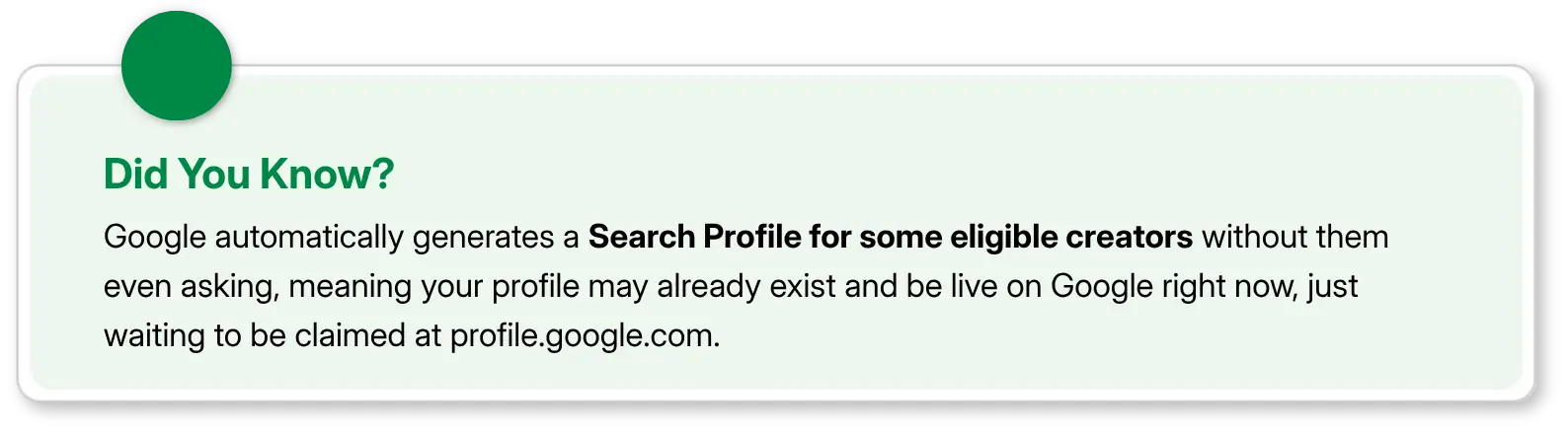
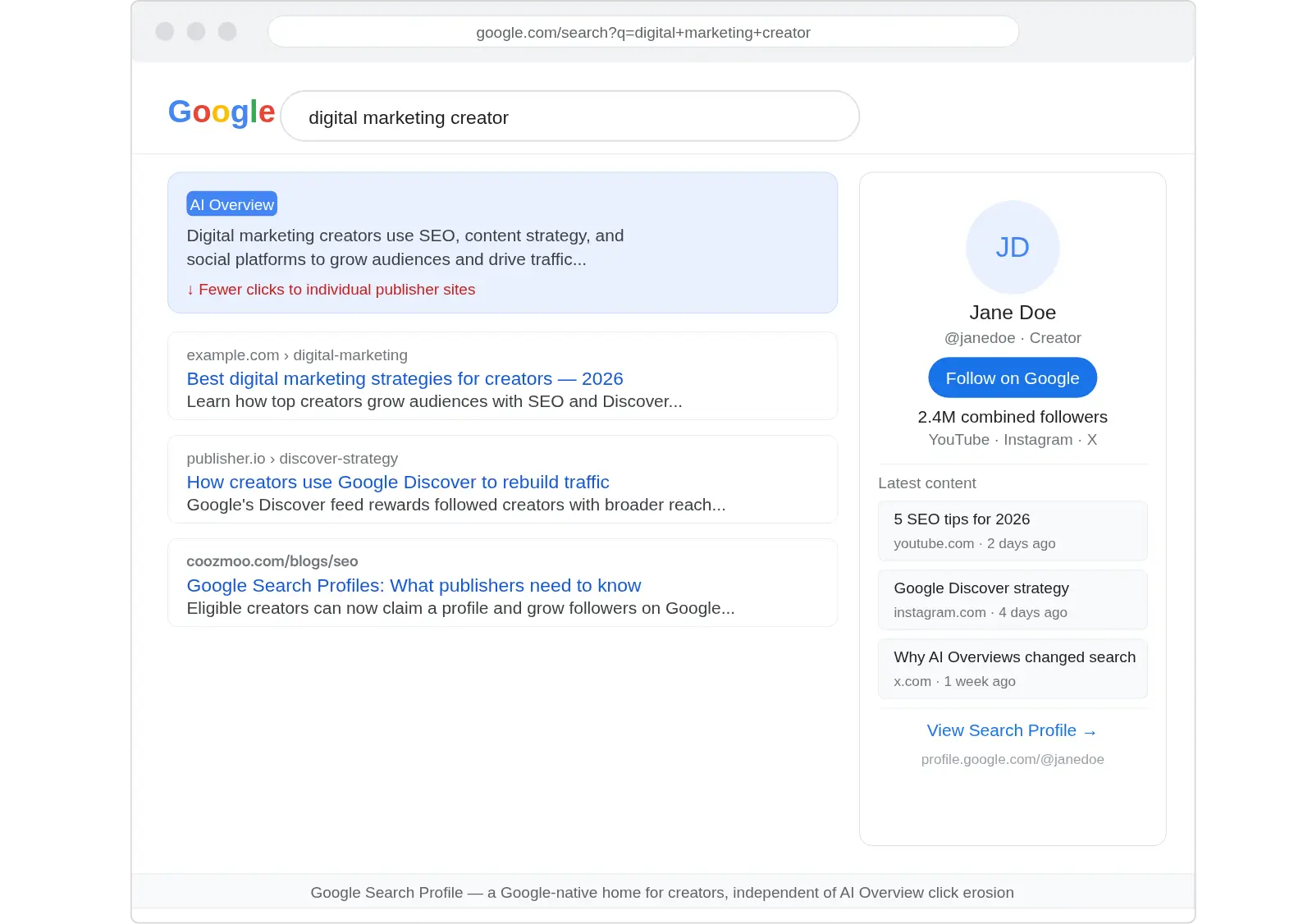
A Google Search Profile is a shareable, Google-hosted page that consolidates a creator's or publisher's content from multiple platforms, articles, videos, and social posts, into a single, searchable hub. Think of it as your official presence on Google, separate from (but connected to) your website or social accounts.
Google describes it as "a dedicated, shareable space to highlight content across platforms, and help audiences find accurate, up-to-date information about sources on Search."
Each profile can be customized with:
A profile avatar and header image
A bio and website link
Linked social media and video platform accounts (YouTube, Instagram, X, TikTok)
Pinned content, including links to merchandise stores or featured work
A "Follow on Google" button so audiences can follow you directly from Search
New content from linked platforms typically populates the profile within 24 hours of being published.
Where Do Google Search Profiles Appear?
On mobile, Search profiles surface in three distinct places:
On Google Search: At the bottom of your Google Knowledge Panel, users can tap "View Search Profile" to access your full profile page.
On Google Discover: When a user sees your content on their Discover feed, they can tap your name in the content header to reach your profile directly.
Via a direct URL: Every profile gets a unique, shareable link in the format profile.google.com/@handle, which you can share anywhere, just like a social media profile link.
Google Search Profile Eligibility: Who Qualifies?
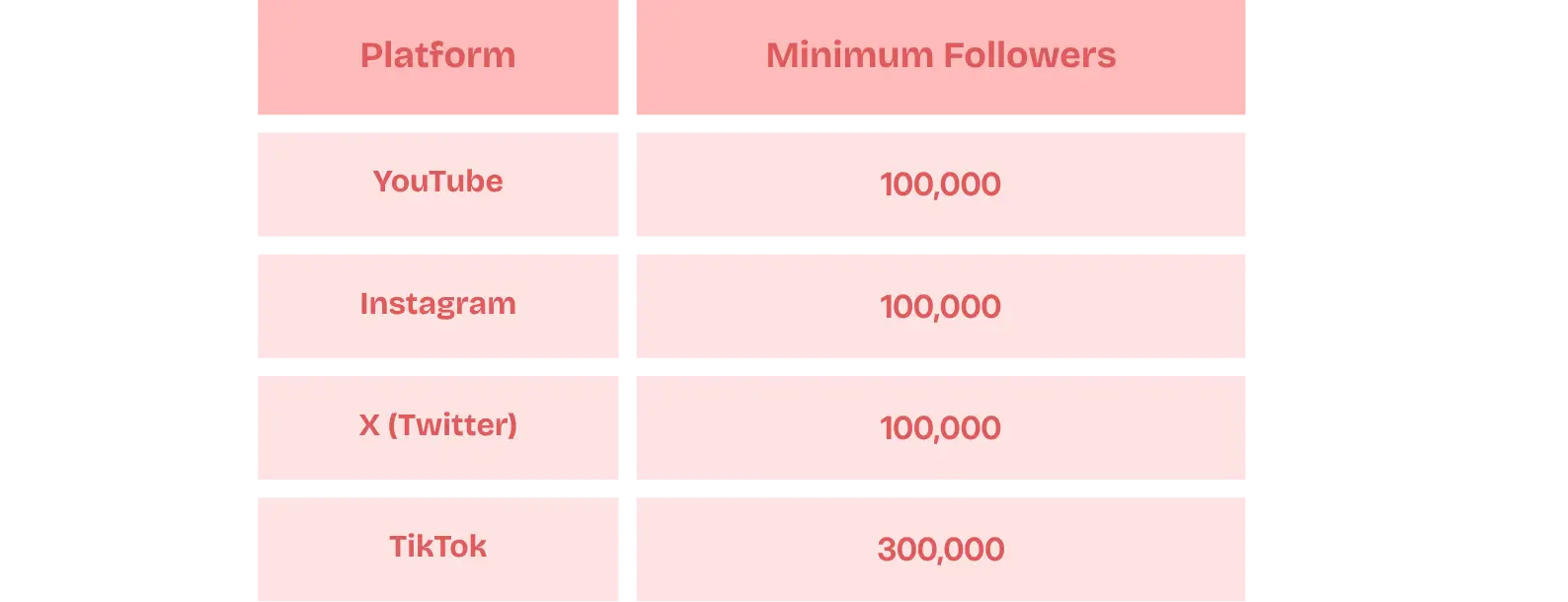
Not every creator or publisher can set one up at launch. Google Search Profile eligibility is currently tied to follower thresholds on at least one qualifying platform. Here's what's required:
Additional Requirements:
You must be at least 18 years old (though someone 18+ can create and manage a profile on behalf of a minor)
Your content must comply with Google's community guidelines for user-generated content
Currently, Search profiles are available in the United States only, though Google has confirmed plans to expand globally
It's worth noting that you only need to meet the threshold on one platform. If you're strong on YouTube but smaller on Instagram, you still qualify.
The Google Knowledge Panel Connection
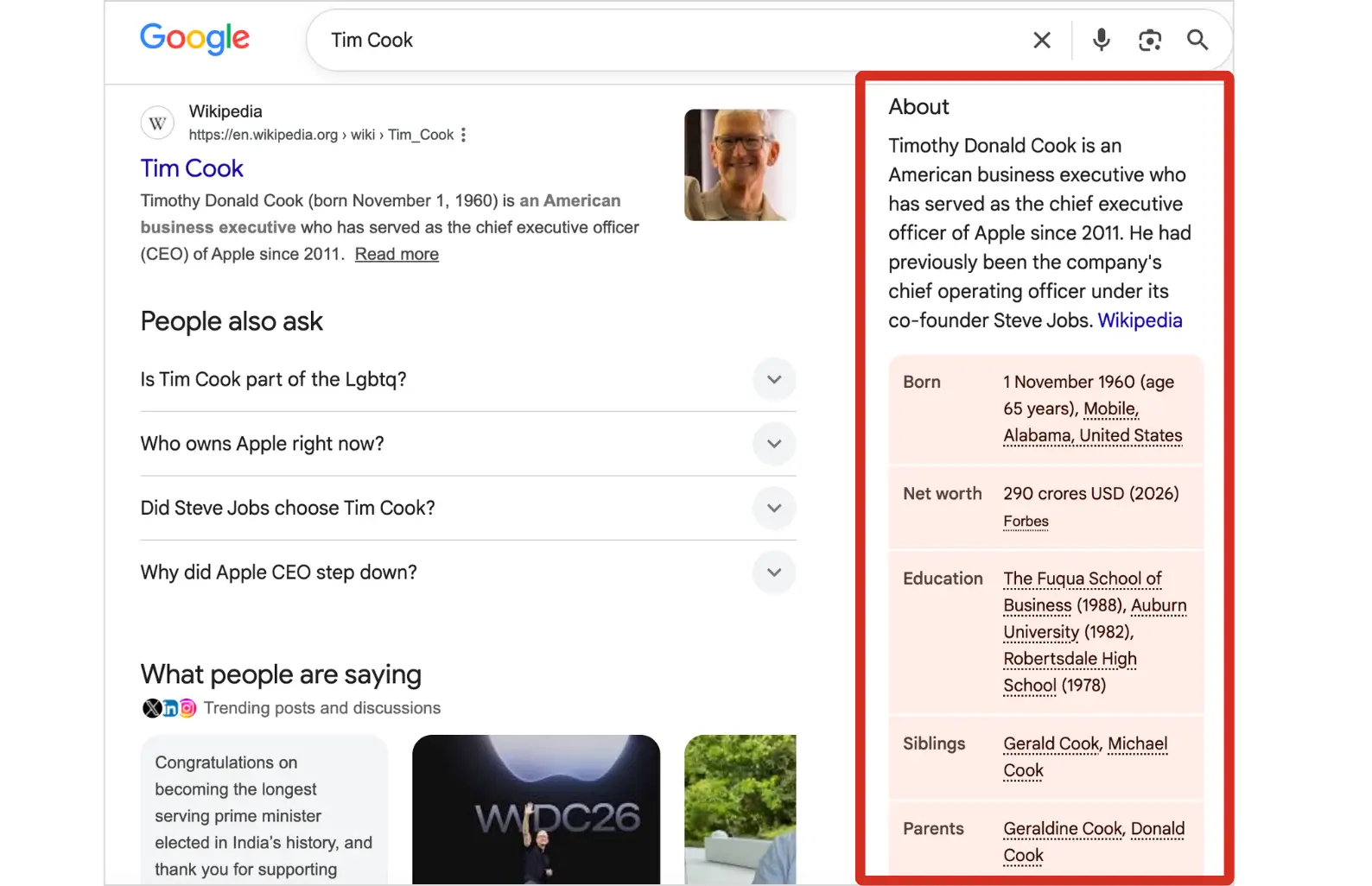
One of the most significant benefits of Google Search Profiles for publishers is the direct link to the Google Knowledge Panel. A Knowledge Panel is the information box that appears in search results for notable people, brands, and entities, and it's historically been difficult for creators to obtain or enhance.
Claiming a Search profile can trigger the creation of a Knowledge Panel for eligible publishers and creators who don't already have one. If you already have a Knowledge Panel, claiming your profile upgrades it automatically, adding your latest content, updated avatar, and a direct link to your profile.
This is a meaningful change. Previously, getting a Knowledge Panel required navigating Google's separate and often opaque verification process. Now, qualifying creators have a clearer, more direct path.
Google Knowledge Panel
Google for Creators has made the process straightforward. Here's how it works:
Step 1 - Check if a profile already exists. Google may have automatically generated a profile based on your online presence, especially if you already have a Knowledge Panel. Search your name or handle on Google, or go to profile.google.com while signed into your Google Account.
Step 2 - Go to the claim page. Visit profile.google.com/claim and sign in with the Google Account linked to your creator activities. If you have a YouTube channel, use that same account.
Step 3 - Connect a qualifying social account. Link at least one platform that meets the follower threshold. When you connect an account, Google will notify you if an existing unclaimed profile is already associated with it.
Step 4 - Set your handle. Your profile handle is automatically assigned based on your most-followed linked account. If that handle is taken, the next most-followed platform's handle is used.
Step 5 - Click "Create Profile." You can add more social links, update your bio, and manage your content after setup.
Important: Changes to your name, social links, or bio require Google's approval and will remain in "Pending" status until reviewed. This ensures the accuracy of factual information tied to your profile.
You can also begin the process through Google for Creators at creators.google/profile, which walks you through claiming your profile and connects you to a Discord community of creators for ongoing tips and insights.
Benefits of Google Search Profiles for Publishers
Beyond the novelty, there are concrete strategic reasons to claim your profile.
Unified cross-platform visibility. Rather than having your YouTube videos, Instagram posts, and articles scattered across the web, your profile centralizes them. Audiences and new potential followers, can see your full body of work in one view.
Stronger presence in Google Discover. The "Follow on Google" button is arguably the most impactful feature. When a user follows your profile, they're more likely to see your content surface in their Google Discover feed, the personalized content stream on the Google app's home screen. This creates an ongoing relationship with your audience inside Google's ecosystem, independent of algorithm-driven social feeds.
Knowledge Panel enhancement. As covered above, a claimed profile can create or meaningfully upgrade your Google Knowledge Panel, one of the most visible trust signals in Search.
A direct URL you control. Your profile.google.com/@handle link is a shareable, Google-hosted page you can use in bios, email signatures, and anywhere you want audiences to find your full digital footprint.
Built-in analytics (in beta). Google is already testing an Insights section within Search profiles, which would show creators their top-performing posts by clicks, total impressions, clicks from Google, and top countries driving traffic. This positions the profile not just as a visibility tool but as an audience intelligence platform.
Multiple identities, one account. If you manage several brands, a personal blog, a podcast, a business, you can create separate Search profiles for each, and even link the same social account to multiple profiles.
Does a Google Search Profile Affect Search Rankings?
No, and Google is explicit about this. Creating or claiming a Search profile does not directly influence how your content ranks in Google Search results. The visibility benefit is primarily in Google Discover, where followed profiles receive elevated distribution in followers' feeds.
This distinction matters. Search profiles are an audience-building tool, not an SEO shortcut.
Why Google Launched This Now?
The launch of Search profiles isn't happening in a vacuum. It comes at a time when Google's AI Overviews have drawn significant criticism from content creators and publishers who report declining referral traffic from Search.
By giving creators a dedicated page and a Follow mechanism inside Google's ecosystem, the company is offering publishers a new channel to maintain audience relationships even as traditional click-through behavior evolves.
Google has also been steadily building out publisher tools over the past year, rolling out Follow buttons for websites on Discover, expanding its Preferred Sources feature globally, and issuing a Discover core update in early 2026. Search profiles are the latest layer of that infrastructure, giving creators a Google-native home they can point audiences to directly.
Final Thoughts
Google Search Profiles represent a meaningful shift in how Google treats creators and publishers within its ecosystem. For eligible creators, those with 100,000+ followers on YouTube, Instagram, or X, or 300,000+ on TikTok, claiming a profile is a straightforward win: better Knowledge Panel presence, a new Discover audience channel, and a central hub for everything you publish.
If you haven't checked whether your profile already exists, the first step is simple: search your name on Google or head to profile.google.com. You may already have one waiting to be claimed.
FAQs
Why isn't my Google Search Profile showing up in search?

If your name is shared by many people, your Search profile may not appear right away when someone searches for it. Search profiles are primarily shown when users are looking specifically for you.
For the best results, try searching using your social media or YouTube handle (for example, @username), as these are more unique and can help your profile appear more easily.
Does having a Google Search Profile improve my search rankings?
No. Google's help documentation is explicit: creating a Search profile does not directly affect your content's ranking on Google Search.
The primary visibility benefit is in Google Discover, not Search. When someone follows your profile, they are more likely to see your content in their Discover feed, the personalized content stream on the Google app's home screen. Think of it as an audience retention tool, not an SEO ranking signal.
Can I manage multiple brands or identities under one Google Search Profile?
Not exactly, but Google does support this use case. If you manage several identities such as a personal brand, a podcast, or a business persona, you can create a separate Search profile for each one. Each requires a separate Google Account, but you can link the same social platform account to multiple profiles.
This makes the feature workable for creators who operate across different niches or brand names, as long as each identity meets the follower threshold independently.
Will my Google Search Profile show analytics or insights?
Yes, and this capability is already in testing. Google appears to be testing an Insights section for Search profiles that shows creators their top five posts ranked by most clicks, total clicks from Google, impressions (the number of times your content appeared on Google), and top countries driving traffic to your profile.
Does Google Search Profile show your total followers across all platforms?
Yes. When you link multiple social accounts, Google displays a combined follower count across all connected platforms, YouTube, Instagram, X, TikTok, and more, in one cumulative number. This means your Google Search Profile could show a higher follower figure than any of your individual social accounts, making it the single most powerful social proof number you can display anywhere online.
If you've been building an audience across YouTube, Instagram, or Twitter, Google just handed you a powerful new tool. Google Search Profiles, officially launched in June 2026, give eligible creators, publishers, and brands a dedicated, customizable page on Google that pulls together everything they publish in one place. Here's everything you need to know about what they are, who qualifies, and how to claim yours.
What Is a Google Search Profile?
A Google Search Profile is a shareable, Google-hosted page that consolidates a creator's or publisher's content from multiple platforms, articles, videos, and social posts, into a single, searchable hub. Think of it as your official presence on Google, separate from (but connected to) your website or social accounts.
Google describes it as "a dedicated, shareable space to highlight content across platforms, and help audiences find accurate, up-to-date information about sources on Search."
Each profile can be customized with:
A profile avatar and header image
A bio and website link
Linked social media and video platform accounts (YouTube, Instagram, X, TikTok)
Pinned content, including links to merchandise stores or featured work
A "Follow on Google" button so audiences can follow you directly from Search
New content from linked platforms typically populates the profile within 24 hours of being published.
Where Do Google Search Profiles Appear?
On mobile, Search profiles surface in three distinct places:
On Google Search: At the bottom of your Google Knowledge Panel, users can tap "View Search Profile" to access your full profile page.
On Google Discover: When a user sees your content on their Discover feed, they can tap your name in the content header to reach your profile directly.
Via a direct URL: Every profile gets a unique, shareable link in the format profile.google.com/@handle, which you can share anywhere, just like a social media profile link.
Google Search Profile Eligibility: Who Qualifies?
Not every creator or publisher can set one up at launch. Google Search Profile eligibility is currently tied to follower thresholds on at least one qualifying platform. Here's what's required:
Additional Requirements:
You must be at least 18 years old (though someone 18+ can create and manage a profile on behalf of a minor)
Your content must comply with Google's community guidelines for user-generated content
Currently, Search profiles are available in the United States only, though Google has confirmed plans to expand globally
It's worth noting that you only need to meet the threshold on one platform. If you're strong on YouTube but smaller on Instagram, you still qualify.
The Google Knowledge Panel Connection
One of the most significant benefits of Google Search Profiles for publishers is the direct link to the Google Knowledge Panel. A Knowledge Panel is the information box that appears in search results for notable people, brands, and entities, and it's historically been difficult for creators to obtain or enhance.
Claiming a Search profile can trigger the creation of a Knowledge Panel for eligible publishers and creators who don't already have one. If you already have a Knowledge Panel, claiming your profile upgrades it automatically, adding your latest content, updated avatar, and a direct link to your profile.
This is a meaningful change. Previously, getting a Knowledge Panel required navigating Google's separate and often opaque verification process. Now, qualifying creators have a clearer, more direct path.
Google Knowledge Panel
Google for Creators has made the process straightforward. Here's how it works:
Step 1 - Check if a profile already exists. Google may have automatically generated a profile based on your online presence, especially if you already have a Knowledge Panel. Search your name or handle on Google, or go to profile.google.com while signed into your Google Account.
Step 2 - Go to the claim page. Visit profile.google.com/claim and sign in with the Google Account linked to your creator activities. If you have a YouTube channel, use that same account.
Step 3 - Connect a qualifying social account. Link at least one platform that meets the follower threshold. When you connect an account, Google will notify you if an existing unclaimed profile is already associated with it.
Step 4 - Set your handle. Your profile handle is automatically assigned based on your most-followed linked account. If that handle is taken, the next most-followed platform's handle is used.
Step 5 - Click "Create Profile." You can add more social links, update your bio, and manage your content after setup.
Important: Changes to your name, social links, or bio require Google's approval and will remain in "Pending" status until reviewed. This ensures the accuracy of factual information tied to your profile.
You can also begin the process through Google for Creators at creators.google/profile, which walks you through claiming your profile and connects you to a Discord community of creators for ongoing tips and insights.
Benefits of Google Search Profiles for Publishers
Beyond the novelty, there are concrete strategic reasons to claim your profile.
Unified cross-platform visibility. Rather than having your YouTube videos, Instagram posts, and articles scattered across the web, your profile centralizes them. Audiences and new potential followers, can see your full body of work in one view.
Stronger presence in Google Discover. The "Follow on Google" button is arguably the most impactful feature. When a user follows your profile, they're more likely to see your content surface in their Google Discover feed, the personalized content stream on the Google app's home screen. This creates an ongoing relationship with your audience inside Google's ecosystem, independent of algorithm-driven social feeds.
Knowledge Panel enhancement. As covered above, a claimed profile can create or meaningfully upgrade your Google Knowledge Panel, one of the most visible trust signals in Search.
A direct URL you control. Your profile.google.com/@handle link is a shareable, Google-hosted page you can use in bios, email signatures, and anywhere you want audiences to find your full digital footprint.
Built-in analytics (in beta). Google is already testing an Insights section within Search profiles, which would show creators their top-performing posts by clicks, total impressions, clicks from Google, and top countries driving traffic. This positions the profile not just as a visibility tool but as an audience intelligence platform.
Multiple identities, one account. If you manage several brands, a personal blog, a podcast, a business, you can create separate Search profiles for each, and even link the same social account to multiple profiles.
Does a Google Search Profile Affect Search Rankings?
No, and Google is explicit about this. Creating or claiming a Search profile does not directly influence how your content ranks in Google Search results. The visibility benefit is primarily in Google Discover, where followed profiles receive elevated distribution in followers' feeds.
This distinction matters. Search profiles are an audience-building tool, not an SEO shortcut.
Why Google Launched This Now?
The launch of Search profiles isn't happening in a vacuum. It comes at a time when Google's AI Overviews have drawn significant criticism from content creators and publishers who report declining referral traffic from Search.
By giving creators a dedicated page and a Follow mechanism inside Google's ecosystem, the company is offering publishers a new channel to maintain audience relationships even as traditional click-through behavior evolves.
Google has also been steadily building out publisher tools over the past year, rolling out Follow buttons for websites on Discover, expanding its Preferred Sources feature globally, and issuing a Discover core update in early 2026. Search profiles are the latest layer of that infrastructure, giving creators a Google-native home they can point audiences to directly.
Final Thoughts
Google Search Profiles represent a meaningful shift in how Google treats creators and publishers within its ecosystem. For eligible creators, those with 100,000+ followers on YouTube, Instagram, or X, or 300,000+ on TikTok, claiming a profile is a straightforward win: better Knowledge Panel presence, a new Discover audience channel, and a central hub for everything you publish.
If you haven't checked whether your profile already exists, the first step is simple: search your name on Google or head to profile.google.com. You may already have one waiting to be claimed.
FAQs
Why isn't my Google Search Profile showing up in search?
If your name is shared by many people, your Search profile may not appear right away when someone searches for it. Search profiles are primarily shown when users are looking specifically for you.
For the best results, try searching using your social media or YouTube handle (for example, @username), as these are more unique and can help your profile appear more easily.
Does having a Google Search Profile improve my search rankings?
No. Google's help documentation is explicit: creating a Search profile does not directly affect your content's ranking on Google Search.
The primary visibility benefit is in Google Discover, not Search. When someone follows your profile, they are more likely to see your content in their Discover feed, the personalized content stream on the Google app's home screen. Think of it as an audience retention tool, not an SEO ranking signal.
Can I manage multiple brands or identities under one Google Search Profile?
Not exactly, but Google does support this use case. If you manage several identities such as a personal brand, a podcast, or a business persona, you can create a separate Search profile for each one. Each requires a separate Google Account, but you can link the same social platform account to multiple profiles.
This makes the feature workable for creators who operate across different niches or brand names, as long as each identity meets the follower threshold independently.
Will my Google Search Profile show analytics or insights?
Yes, and this capability is already in testing. Google appears to be testing an Insights section for Search profiles that shows creators their top five posts ranked by most clicks, total clicks from Google, impressions (the number of times your content appeared on Google), and top countries driving traffic to your profile.
Does Google Search Profile show your total followers across all platforms?
Yes. When you link multiple social accounts, Google displays a combined follower count across all connected platforms, YouTube, Instagram, X, TikTok, and more, in one cumulative number. This means your Google Search Profile could show a higher follower figure than any of your individual social accounts, making it the single most powerful social proof number you can display anywhere online.



Summarize with AI


Want to Skyrocket Revenue? Get a Free Audit Today!
Want to Skyrocket Revenue? Get a Free Audit Today!



4.9/5 Ratings!


Don’t miss our revenue growth tips!
Get expert marketing tips—straight to your inbox, like thousands of happy clients.
Don’t miss our revenue growth tips!
Get expert marketing tips—straight to your inbox, like thousands of happy clients.
Don’t miss our revenue growth tips!
Don’t miss our revenue growth tips!
Get expert marketing tips—straight to your inbox, like thousands of happy clients.
Relevant Blogs on Organic SEO
Relevant Blogs on Organic SEO
Unlock data-driven insights in Organic SEO—explore our featured blogs and skyrocket your revenue before your competitors do.
Unlock data-driven insights in Organic SEO—explore our featured blogs and skyrocket your revenue before your competitors do.

SEO
Sep 21, 2026
5 Min Read
Audience-First SEO: How to Rank by Putting Readers First
SEO
Sep 21, 2026
5 Min Read
Audience-First SEO: How to Rank by Putting Readers First
SEO
Sep 21, 2026
5 Min Read
Audience-First SEO: How to Rank by Putting Readers First

SEO
Sep 19, 2026
5 Min Read
How to Add SEO Keywords to Your Website: Where and How
SEO
Sep 19, 2026
5 Min Read
How to Add SEO Keywords to Your Website: Where and How
SEO
Sep 19, 2026
5 Min Read
How to Add SEO Keywords to Your Website: Where and How

SEO
Sep 18, 2026
5 Min Read
How XML Sitemaps Help Search Engines Discover New Pages
SEO
Sep 18, 2026
5 Min Read
How XML Sitemaps Help Search Engines Discover New Pages
SEO
Sep 18, 2026
5 Min Read
How XML Sitemaps Help Search Engines Discover New Pages








Ready to speak with an expert?
Data-Driven Marketing Agency That Elevates ROI
1100+
Websites Designed & Optimized to Convert
$280M+
Client Revenue Driven & Growing Strong
Discover how to skyrocket
your revenue today!
Trusted by 1000+ Owners!
Ready to speak with an expert?
Data-Driven Marketing Agency That Elevates ROI
1100+
Websites Designed & Optimized to Convert
$280M+
Client Revenue Driven & Growing Strong
Discover how to skyrocket
your revenue today!
Trusted by 1000+ Owners!
Want to skyrocket revenue?
4.9/5 Ratings!
Ready to speak with an expert?
Data-Driven Marketing Agency That Elevates ROI
1100+
Websites Designed & Optimized to Convert
$280M+
Client Revenue Driven & Growing Strong
Discover how to skyrocket
your revenue today!
Trusted by 1000+ Owners!
Call
Meet