WordPress Malware Attacks Surge in 2026: Thousands of Websites at Risk
Last Updated:

Table of Content
Case Studies








Tanya Singh
Tanya Singh
Marketing Trends
Marketing Trends
10 Min Read
8 Min
If you own a website, 2026 might feel a bit like wild-west territory. The internet has become significantly more hostile lately. If your virtual storefront, business hub, or blog runs on WordPress, you could be sitting right in the crosshairs without even knowing it.
A massive, coordinated surge in WordPress malware attacks is currently sweeping through the web ecosystem. Tens of thousands of websites have already been broken into. This has left business owners stressed out, cleaning up messy code, watching their hard-earned search rankings plummet, and trying desperately to win back customer trust.
But this isn’t just a story about boring statistics. The way hackers are getting into websites has completely changed this year. If you are still relying on security advice from a few years ago, your site might be wide open. Let’s look at what is actually happening behind the scenes, how to tell if you've been hit, and what you can do to lock down your digital asset.
Why Are WordPress Security Threats and Malicious Injections Rising in 2026?
Let’s clear something up first: WordPress itself isn’t broken. In fact, the core team does an incredible job. Less than 2% of documented security bugs come from the core WordPress system. The real issue lies in the massive jungle of third-party plugins and themes we use to customize our sites.
Hackers aren't sitting at keyboards manually guessing your passwords anymore. Instead, they deploy highly sophisticated, automated AI bots. These bots crawl millions of websites simultaneously, hunting for specific, known bugs in popular add-ons.
Major Trends Driving This Current 2026 Surge
Two major trends are driving this current 2026 surge;
1. The Rise of "Vibe Coding" Security Gaps
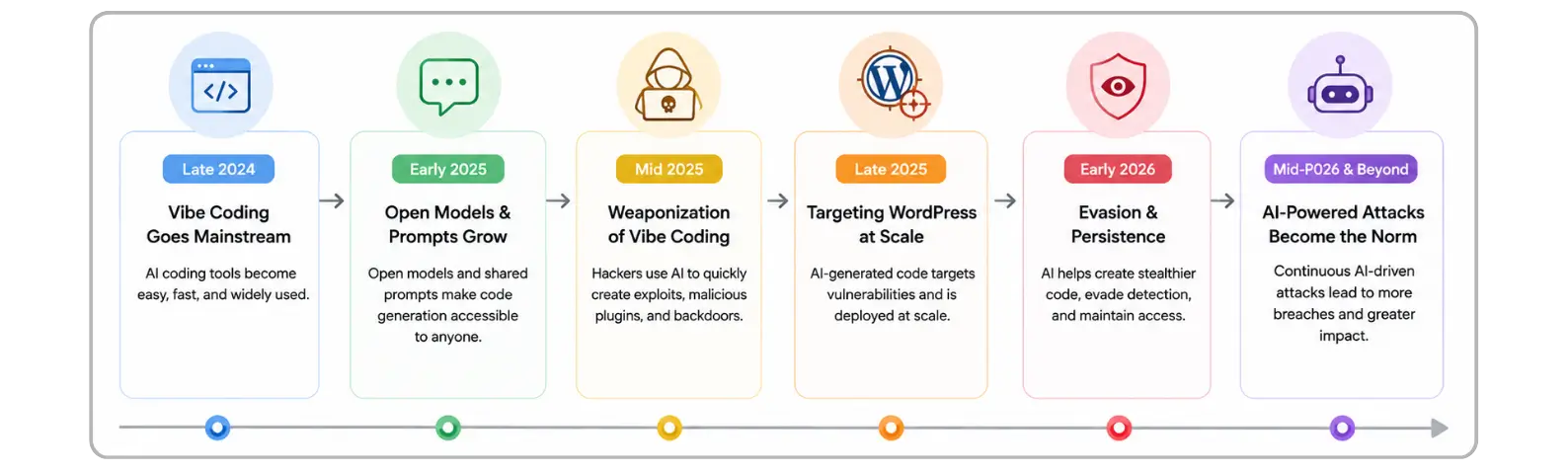
With the absolute explosion of artificial intelligence, a lot of software developers are turning to AI models to generate plugin code fast, a trend the tech community calls "vibe coding." While AI can spit out functional code in seconds, it frequently leaves behind subtle, dangerous security gaps. When developers push these tools live without a proper security review, it hands bad actors a skeleton key.
2. Quiet Marketplace Takeovers
One of the most alarming tactics this year involves supply-chain attacks. Instead of breaking into a site from the outside, malicious actors are literally buying popular, established plugins from independent developers on marketplaces. Once they legally own the plugin, they push out a seemingly normal, "trusted" update that secretly contains a dormant backdoor.
WordPress Security: How to Check If Your Site Is Compromised?
In the old days, a hacked website was completely obvious. Your homepage would change to a weird message, or the site would crash. Today, hackers want to remain invisible for as long as possible so they can borrow your server’s power and steal your traffic.
If your site falls victim to the current wave of WordPress cyber threats, you need to look out for these specific warning signs:
The Fake Content and SEO Spam Trap
Take a close look at your blog or article dashboard. Are there new posts publishing that you never wrote? Even worse, is your site publishing weird articles completely unrelated to your business like online casino promotions, illegal gambling links, or pharmaceutical ads? This is a definitive sign of an automated database injection. Hackers use your site’s established reputation with search engines to rank their shady links.

Conditional Malicious Redirects
Bad actors have gotten incredibly smart with their code. They will write scripts that check who is viewing the site. If you visit your website while logged into your admin dashboard, everything looks completely normal. But if a brand-new customer clicks your link from a mobile Google search, they are quietly redirected to a dangerous phishing page.
Sudden Drops in Traffic and Weird Admin Users
If your organic traffic suddenly nose-dives off a cliff, it usually means Google has caught on to the hidden spam and penalized your site. Go check your Users tab in WordPress right now. Look for unfamiliar accounts with administrator privileges using names like superadmin or wp-support-official.

A Step-by-Step Defense Guide: Securing Your Site
The old advice of "just log in and update things once a month" is officially dead. Because the window between an exploit being discovered and used is down to hours, you need a proactive, automated defense system.
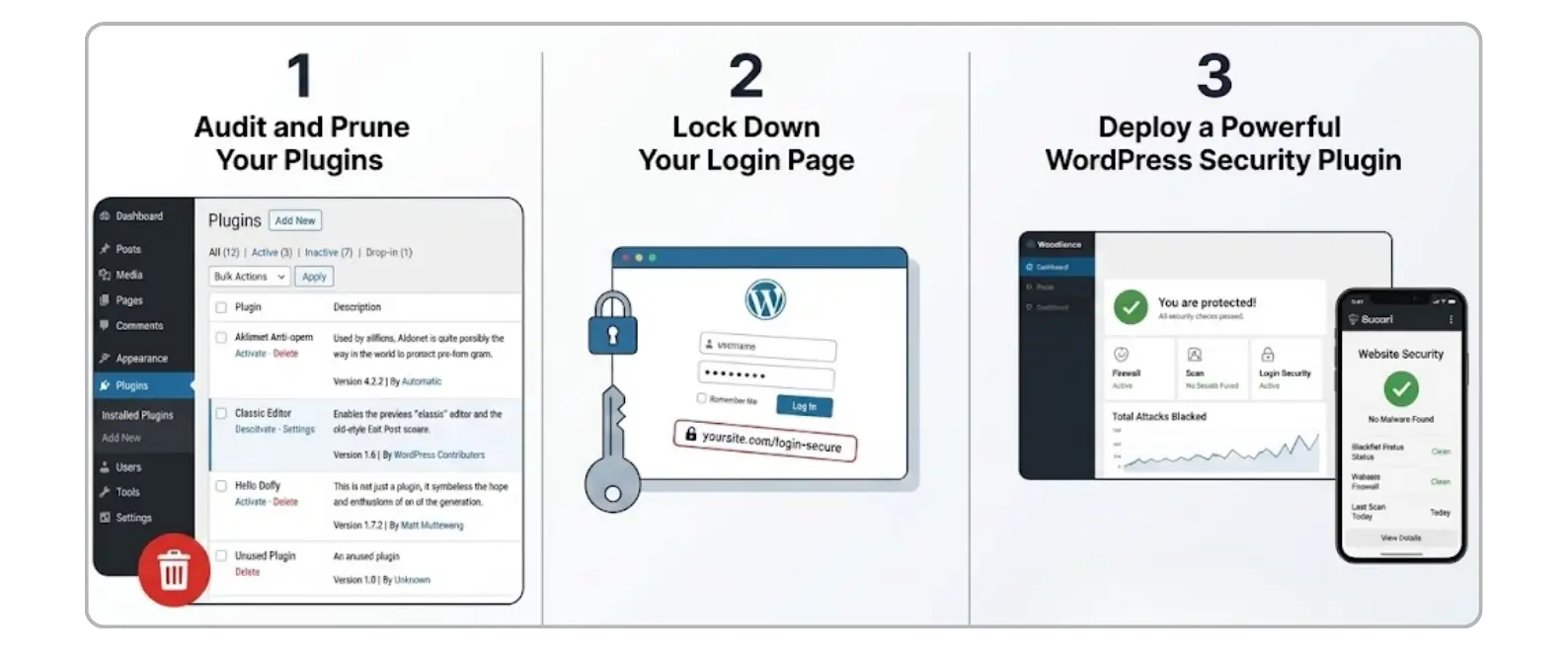
1. Audit and Prune Your Plugins
Every single plugin you leave sitting on your site is an open window into your house. Review your plugin list today. If something hasn't been updated by its developer in six months, or if the team lacks a real security background, replace it. Completely delete don't just deactivate any themes or tools you aren't using.
2. Lock Down Your Login Page
Enforce two-factor authentication (2FA) for every single user account on your site. If a hacker manages to steal or guess your password, 2FA stops them dead in their tracks by requiring a temporary code from your phone.
3. Deploy a Powerful WordPress Security Plugin
You shouldn't have to monitor this manually twenty-four hours a day. Installing a dedicated security plugin gives you an automated firewall that blocks bad traffic before it ever touches your content. Two of the absolute best industry-standard options to prevent attacks include:
Wordfence Security: This is one of the most widely trusted options available. It features an excellent endpoint web application firewall (WAF) and an intense malware scanner that actively compares your core WordPress files against official repositories to look for code alterations.
Sucuri Security: A fantastic cloud-based security tool. Sucuri can route your website traffic through its own cloud proxy firewall first. This means malicious bots and hackers are completely blocked at the door before they can even attempt to load your actual website.
Final Thought
At the end of the day, securing your website isn't just a technical chore; it is an investment in your business's reputation. Hackers don't care how big or small your company is, they only care if your digital door is left unlocked. By staying proactive, auditing your plugins, and deploying dedicated tools like Wordfence or Sucuri, you can ensure your site remains a safe space for your audience rather than a billboard for casino spam.
Don't wait for a sudden drop in traffic or a strange blog post to tell you there's a problem. Take twenty minutes today to audit your WordPress dashboard, update your defenses, and give yourself the peace of mind you deserve.
Your Website is Your Digital Storefront - Lock the Door.
FAQ
Why do hackers target WordPress sites so much more than other platforms?

It is simply a game of numbers. WordPress powers over 40% of the entire internet. Because it is so popular, a hacker can write one automated script to exploit a single plugin bug and instantly gain access to thousands of potential victim websites. It isn't because WordPress core is weak; it's because the target is huge.
Will a free security plugin protect me from these 2026 attacks?
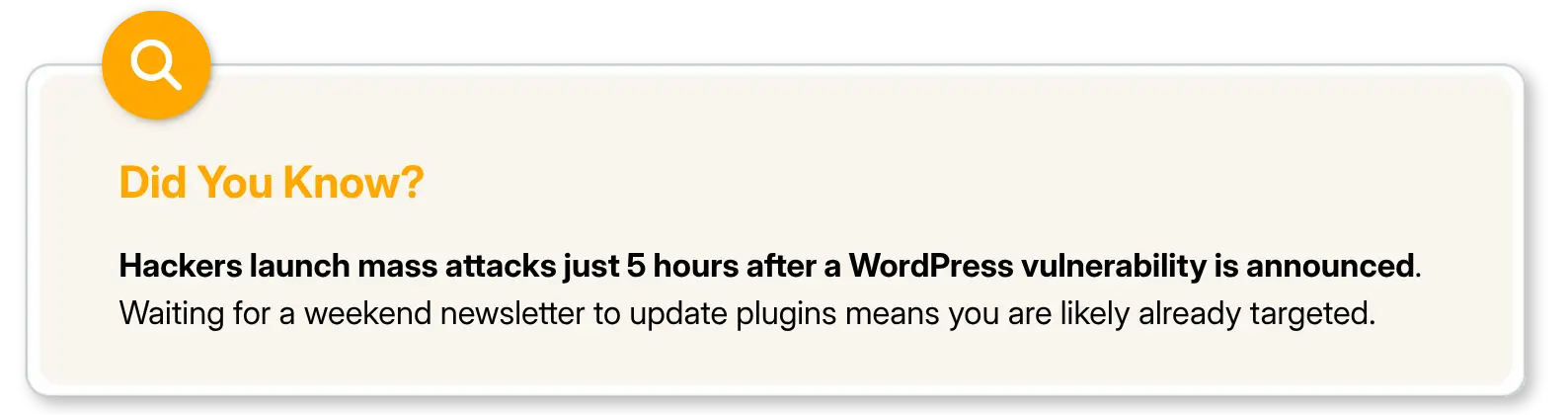
Free plugins offer great basic protection against older, well-known threats. However, free tiers usually operate on a 30-day delay for new firewall rules. In 2026, where threats are weaponized in 5 hours, relying on a delayed firewall leaves your site exposed to brand-new "zero-day" attacks.
What should I do first if I find casino spam or weird blogs on my site?
Do not panic, and do not just start deleting things randomly. First, take a full backup of your site so you don't lose your actual business data. Next, change your primary hosting and WordPress passwords. Finally, run a deep scan using a tool like Wordfence to find where the malicious script is hiding inside your files or database.
Can turning on automatic updates break my website?
Occasionally, a minor conflict between two plugins might cause a temporary visual glitch. However, the risk of a minor layout issue is completely microscopic compared to the absolute devastation of losing your entire business reputation to a ransomware or malware injection. Turn on auto-updates for your vital plugins.
What is a "backdoor" and why is it so dangerous?
A backdoor is a tiny piece of malicious code a hacker hides inside a legitimate, safe-looking system file. Even if you use a scanner to delete the main malware files or get rid of the fake blog posts, that hidden backdoor allows the hacker to instantly walk back into your site whenever they want. Complete removal requires deep, professional file cleaning.
If you own a website, 2026 might feel a bit like wild-west territory. The internet has become significantly more hostile lately. If your virtual storefront, business hub, or blog runs on WordPress, you could be sitting right in the crosshairs without even knowing it.
A massive, coordinated surge in WordPress malware attacks is currently sweeping through the web ecosystem. Tens of thousands of websites have already been broken into. This has left business owners stressed out, cleaning up messy code, watching their hard-earned search rankings plummet, and trying desperately to win back customer trust.
But this isn’t just a story about boring statistics. The way hackers are getting into websites has completely changed this year. If you are still relying on security advice from a few years ago, your site might be wide open. Let’s look at what is actually happening behind the scenes, how to tell if you've been hit, and what you can do to lock down your digital asset.
Why Are WordPress Security Threats and Malicious Injections Rising in 2026?
Let’s clear something up first: WordPress itself isn’t broken. In fact, the core team does an incredible job. Less than 2% of documented security bugs come from the core WordPress system. The real issue lies in the massive jungle of third-party plugins and themes we use to customize our sites.
Hackers aren't sitting at keyboards manually guessing your passwords anymore. Instead, they deploy highly sophisticated, automated AI bots. These bots crawl millions of websites simultaneously, hunting for specific, known bugs in popular add-ons.
Major Trends Driving This Current 2026 Surge
Two major trends are driving this current 2026 surge;
1. The Rise of "Vibe Coding" Security Gaps
With the absolute explosion of artificial intelligence, a lot of software developers are turning to AI models to generate plugin code fast, a trend the tech community calls "vibe coding." While AI can spit out functional code in seconds, it frequently leaves behind subtle, dangerous security gaps. When developers push these tools live without a proper security review, it hands bad actors a skeleton key.
2. Quiet Marketplace Takeovers
One of the most alarming tactics this year involves supply-chain attacks. Instead of breaking into a site from the outside, malicious actors are literally buying popular, established plugins from independent developers on marketplaces. Once they legally own the plugin, they push out a seemingly normal, "trusted" update that secretly contains a dormant backdoor.
WordPress Security: How to Check If Your Site Is Compromised?
In the old days, a hacked website was completely obvious. Your homepage would change to a weird message, or the site would crash. Today, hackers want to remain invisible for as long as possible so they can borrow your server’s power and steal your traffic.
If your site falls victim to the current wave of WordPress cyber threats, you need to look out for these specific warning signs:
The Fake Content and SEO Spam Trap
Take a close look at your blog or article dashboard. Are there new posts publishing that you never wrote? Even worse, is your site publishing weird articles completely unrelated to your business like online casino promotions, illegal gambling links, or pharmaceutical ads? This is a definitive sign of an automated database injection. Hackers use your site’s established reputation with search engines to rank their shady links.
Conditional Malicious Redirects
Bad actors have gotten incredibly smart with their code. They will write scripts that check who is viewing the site. If you visit your website while logged into your admin dashboard, everything looks completely normal. But if a brand-new customer clicks your link from a mobile Google search, they are quietly redirected to a dangerous phishing page.
Sudden Drops in Traffic and Weird Admin Users
If your organic traffic suddenly nose-dives off a cliff, it usually means Google has caught on to the hidden spam and penalized your site. Go check your Users tab in WordPress right now. Look for unfamiliar accounts with administrator privileges using names like superadmin or wp-support-official.
A Step-by-Step Defense Guide: Securing Your Site
The old advice of "just log in and update things once a month" is officially dead. Because the window between an exploit being discovered and used is down to hours, you need a proactive, automated defense system.
1. Audit and Prune Your Plugins
Every single plugin you leave sitting on your site is an open window into your house. Review your plugin list today. If something hasn't been updated by its developer in six months, or if the team lacks a real security background, replace it. Completely delete don't just deactivate any themes or tools you aren't using.
2. Lock Down Your Login Page
Enforce two-factor authentication (2FA) for every single user account on your site. If a hacker manages to steal or guess your password, 2FA stops them dead in their tracks by requiring a temporary code from your phone.
3. Deploy a Powerful WordPress Security Plugin
You shouldn't have to monitor this manually twenty-four hours a day. Installing a dedicated security plugin gives you an automated firewall that blocks bad traffic before it ever touches your content. Two of the absolute best industry-standard options to prevent attacks include:
Wordfence Security: This is one of the most widely trusted options available. It features an excellent endpoint web application firewall (WAF) and an intense malware scanner that actively compares your core WordPress files against official repositories to look for code alterations.
Sucuri Security: A fantastic cloud-based security tool. Sucuri can route your website traffic through its own cloud proxy firewall first. This means malicious bots and hackers are completely blocked at the door before they can even attempt to load your actual website.
Final Thought
At the end of the day, securing your website isn't just a technical chore; it is an investment in your business's reputation. Hackers don't care how big or small your company is, they only care if your digital door is left unlocked. By staying proactive, auditing your plugins, and deploying dedicated tools like Wordfence or Sucuri, you can ensure your site remains a safe space for your audience rather than a billboard for casino spam.
Don't wait for a sudden drop in traffic or a strange blog post to tell you there's a problem. Take twenty minutes today to audit your WordPress dashboard, update your defenses, and give yourself the peace of mind you deserve.
Your Website is Your Digital Storefront - Lock the Door.
FAQ
Why do hackers target WordPress sites so much more than other platforms?
It is simply a game of numbers. WordPress powers over 40% of the entire internet. Because it is so popular, a hacker can write one automated script to exploit a single plugin bug and instantly gain access to thousands of potential victim websites. It isn't because WordPress core is weak; it's because the target is huge.
Will a free security plugin protect me from these 2026 attacks?
Free plugins offer great basic protection against older, well-known threats. However, free tiers usually operate on a 30-day delay for new firewall rules. In 2026, where threats are weaponized in 5 hours, relying on a delayed firewall leaves your site exposed to brand-new "zero-day" attacks.
What should I do first if I find casino spam or weird blogs on my site?
Do not panic, and do not just start deleting things randomly. First, take a full backup of your site so you don't lose your actual business data. Next, change your primary hosting and WordPress passwords. Finally, run a deep scan using a tool like Wordfence to find where the malicious script is hiding inside your files or database.
Can turning on automatic updates break my website?
Occasionally, a minor conflict between two plugins might cause a temporary visual glitch. However, the risk of a minor layout issue is completely microscopic compared to the absolute devastation of losing your entire business reputation to a ransomware or malware injection. Turn on auto-updates for your vital plugins.
What is a "backdoor" and why is it so dangerous?
A backdoor is a tiny piece of malicious code a hacker hides inside a legitimate, safe-looking system file. Even if you use a scanner to delete the main malware files or get rid of the fake blog posts, that hidden backdoor allows the hacker to instantly walk back into your site whenever they want. Complete removal requires deep, professional file cleaning.



Summarize with AI

Latest Blogs







Want to be seen everywhere?
Get a free AI-search audit Today!



4.9/5 Ratings!


Don’t miss our revenue growth tips!
Get expert marketing tips—straight to your inbox, like thousands of happy clients.
Don’t miss our revenue growth tips!
Get expert marketing tips—straight to your inbox, like thousands of happy clients.
Don’t miss our revenue growth tips!
Don’t miss our revenue growth tips!
Get expert marketing tips—straight to your inbox, like thousands of happy clients.
Explore News, Updates & Strategies
Explore News, Updates & Strategies
Explore the latest industry updates, marketing trends, Google changes, expert insights, success stories, eCommerce strategies, AEO innovations, and lead generation techniques — all in one place.
Explore the latest industry updates, marketing trends, Google changes, expert insights, success stories, eCommerce strategies, AEO innovations, and lead generation techniques — all in one place.

Google Updates
Sep 26, 2026
3 Min Read
Google Search Console Adds Multimodal Search Performance Reporting
Google Updates
Sep 26, 2026
3 Min Read
Google Search Console Adds Multimodal Search Performance Reporting
Google Updates
Sep 26, 2026
3 Min Read
Google Search Console Adds Multimodal Search Performance Reporting

Google Updates
Sep 2, 2026
5 Min Read
Google Search Console's Generative AI Performance Report Goes Fully Global
Google Updates
Sep 2, 2026
5 Min Read
Google Search Console's Generative AI Performance Report Goes Fully Global
Google Updates
Sep 2, 2026
5 Min Read
Google Search Console's Generative AI Performance Report Goes Fully Global

Google Updates
Aug 18, 2026
5 Min Read
Google’s August 2026 Spam Update: Who Won, Who Lost & Why?
Google Updates
Aug 18, 2026
5 Min Read
Google’s August 2026 Spam Update: Who Won, Who Lost & Why?
Google Updates
Aug 18, 2026
5 Min Read
Google’s August 2026 Spam Update: Who Won, Who Lost & Why?




































Ready to speak with an expert?
Data-Driven Marketing Agency That Elevates ROI
1100+
Websites Designed & Optimized to Convert
$280M+
Client Revenue Driven & Growing Strong
Discover how to skyrocket
your revenue today!
Trusted by 1000+ Owners!
Ready to speak with an expert?
Data-Driven Marketing Agency That Elevates ROI
1100+
Websites Designed & Optimized to Convert
$280M+
Client Revenue Driven & Growing Strong
Discover how to skyrocket
your revenue today!
Trusted by 1000+ Owners!
Want to skyrocket revenue?
4.9/5 Ratings!
Ready to speak with an expert?
Data-Driven Marketing Agency That Elevates ROI
1100+
Websites Designed & Optimized to Convert
$280M+
Client Revenue Driven & Growing Strong
Discover how to skyrocket
your revenue today!
Trusted by 1000+ Owners!
Call
Meet