Google Display Ads Is Moving to Demand Gen — Here's What Every Advertiser Needs to Know
Last Updated:
Table of Content
Case Studies







Tanya Singh
Tanya Singh
Google Updates
Google Updates
8 Min Read
8 Min
If you've been running Google Display campaigns, pay attention, something significant just changed. On May 26, 2026, Google officially announced that standalone Display campaigns are going away. The Google Display Network (GDN) itself isn't being shut down your ads will still reach those 2 million+ sites, videos, and apps. But the campaign type you've been using to manage all of it? That's being retired, and everything is moving into Demand Gen.
Here's everything you need to understand before this hits your account.
What Is Google Demand Gen and Why Is Google Replacing Display Ads With It?
Google Demand Gen is an AI-powered campaign type that runs ads across YouTube, Discover, Gmail, Google Maps, and the Display Network — all from a single campaign, designed to reach people before they start searching. Think of it as Google's equivalent of social media campaign: visually rich, AI optimized, and built to reach people before they're actively searching.
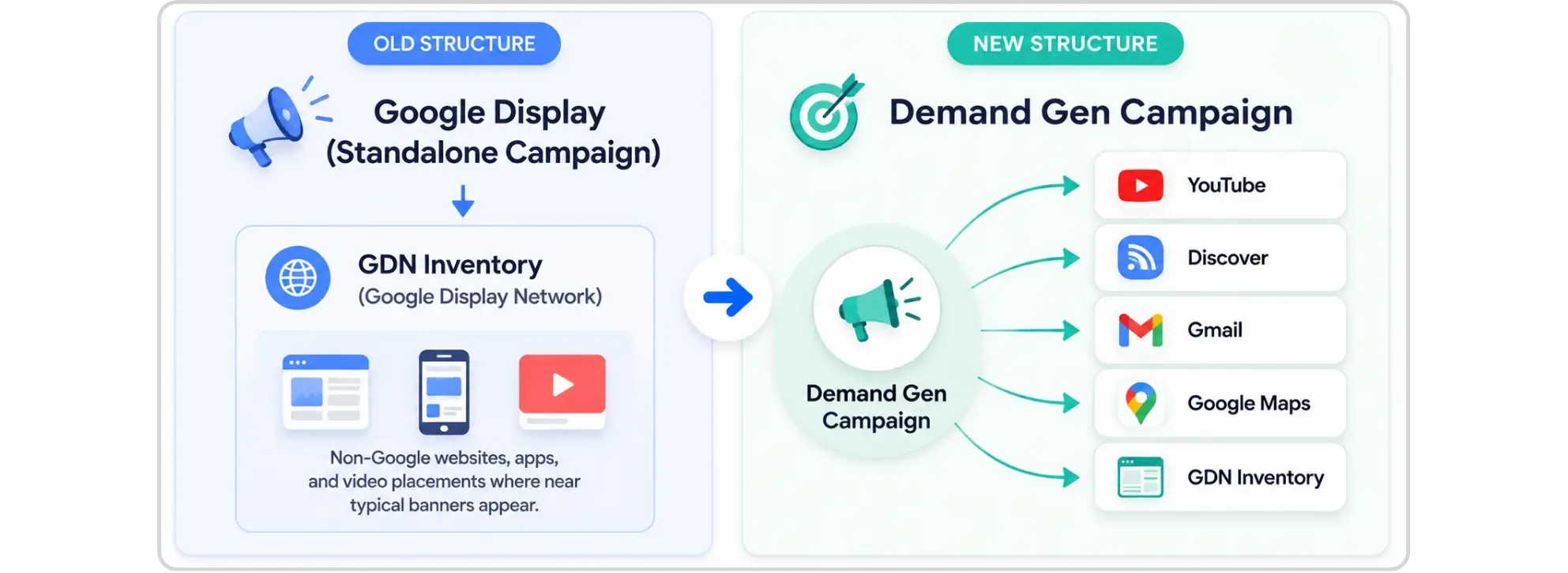
So why is Google doing this? Because managing separate campaigns for Display, YouTube, Discover, and Gmail — all targeting similar upper-funnel audiences doesn't make sense anymore. Demand Gen brings it all under one roof, with Google's AI handling optimization across every surface.
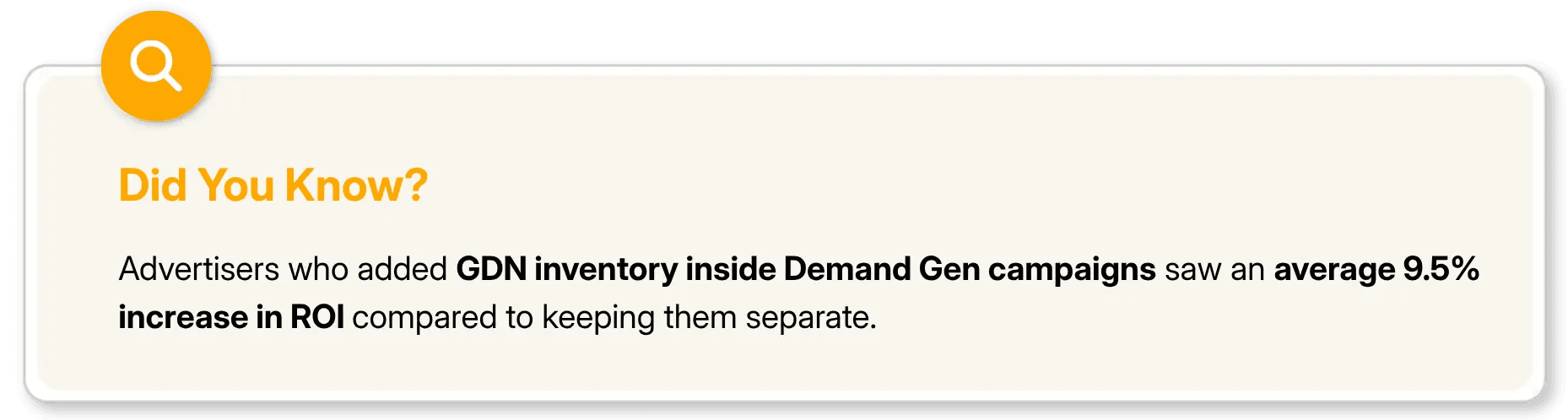
This isn't the first time Google has done this either. Video Action Campaigns were folded into Demand Gen not long ago. The pattern is clear: fewer campaign types, more AI, more consolidation. Display is just the latest.
What Is the Difference Between Google Display Ads and Demand Gen Campaigns?
The Display Network isn't going away but almost everything else about how you run ads on it is changing. Here's a quick comparison:
Feature | Standalone Display | Demand Gen |
|---|---|---|
Google Display Network | ✅ Yes | ✅ Yes (GDN-only available) |
YouTube Inventory | ❌ No | ✅ Yes |
Discover & Gmail | ❌ No | ✅ Yes |
Google Maps (Beta) | ❌ No | ✅ Yes |
Carousel Ads | ❌ No | ✅ Yes |
Lookalike Segments | ❌ No | ✅ Yes |
Generative AI Image Tools | ❌ No | ✅ Yes |
Channel-Level Reporting | ❌ No | ✅ Yes |
Target CPC Bidding | ❌ No | ✅ Yes |
When Will Google Display Ads Be Discontinued?
Google is retiring the standalone Display campaign type in Google Ads. However, the underlying ad inventory is not going away; it is being transitioned and folded into Demand Gen campaigns. This is a phased rollout, not a hard cutoff. Here's how it plays out:
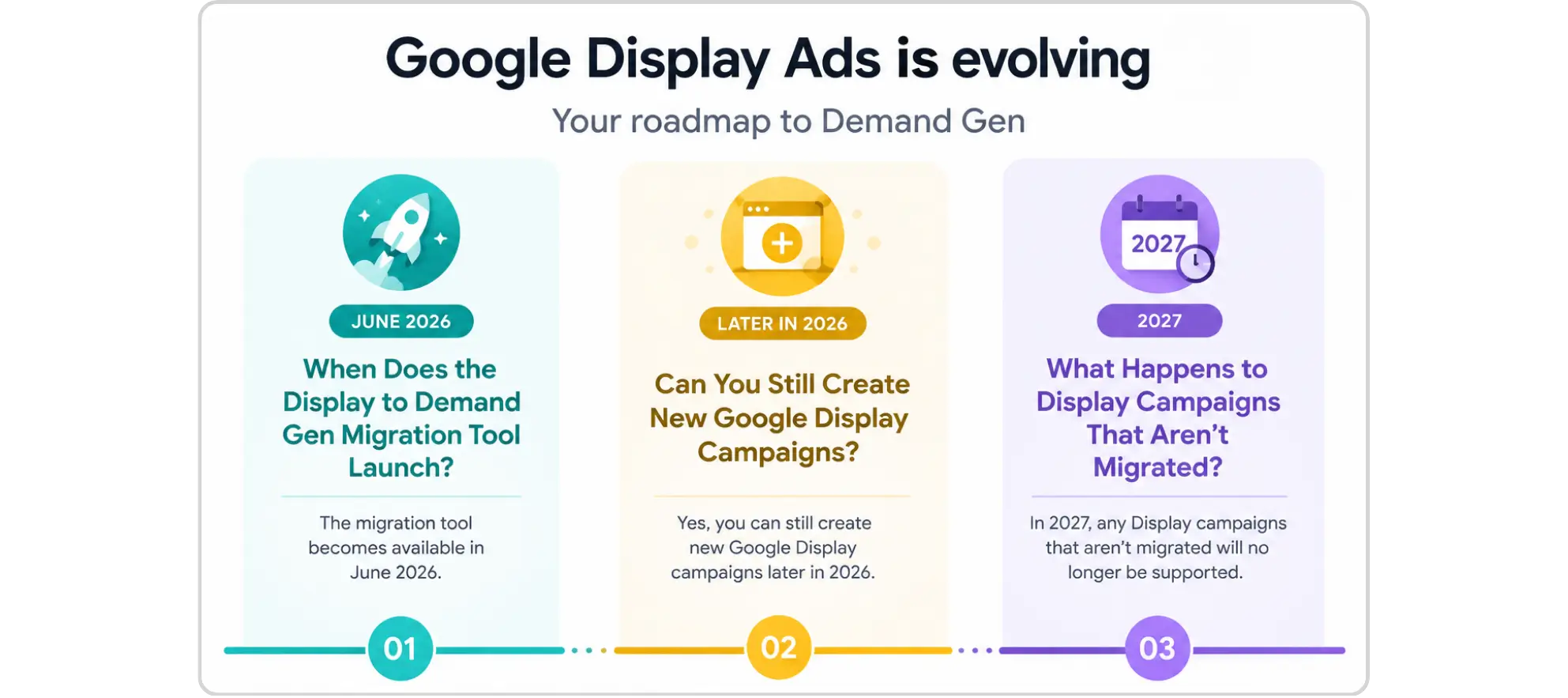
June 2026: When Does the Display to Demand Gen Migration Tool Launch?
Starting this month, eligible advertisers will see a migration tool appear inside Google Ads. It walks you through moving existing Display campaigns into Demand Gen. This is the window where you have the most control — use it.
Later in 2026: Can You Still Create New Google Display Campaigns?
No, at some point after the migration tool goes live, Google will stop letting you create new standalone Display campaigns from scratch. Existing ones stay editable, but the format is effectively frozen for new builds.
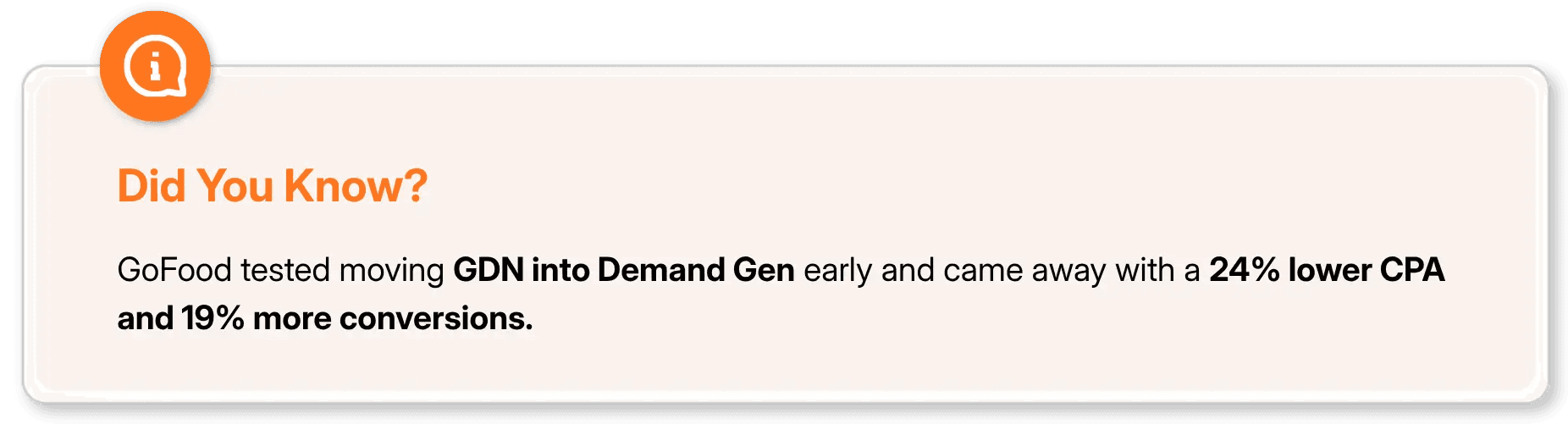
2027: What Happens to Display Campaigns That Aren't Migrated?
Google will auto-migrate whatever is left. And here's the thing — if you've spent years building out placement exclusions, audience layers, and brand safety controls, an automatic migration won't preserve all of that the way you'd want. More on this below
Will Google Display Ads Still Work After Moving to Demand Gen?
Yes, but "still work" looks a little different depending on how you've been running Display. If you've been running fairly standard GDN campaigns without heavy customization, this transition might actually feel like an upgrade. You get access to better creative formats, broader audience tools, and smarter optimization — without having to manage everything across separate campaign types.
If you've been running tightly managed Display campaigns with carefully curated placement exclusions, app blocklists, and specific brand safety controls — that's where you need to be more deliberate. Those settings don't automatically carry over perfectly, and the controls work a bit differently inside Demand Gen. You'll need to rebuild and verify them yourself.

Four things worth monitoring closely after the migration:
Audience expansion: Demand Gen leans on AI to broaden audiences. If your Display strategy depended on tight targeting, double-check how that translates.
Placement visibility: Make sure the placement-level transparency you relied on in Display is still accessible in Demand Gen's reporting.
Budget pacing: With multiple surfaces in play, budget tends to shift toward what's performing. Keep an eye on where your spend is actually going.
Brand safety and exclusions: This is the big one. Placement exclusions, app exclusions, managed placements, audit everything and rebuild proactively. Don't assume they migrate cleanly.
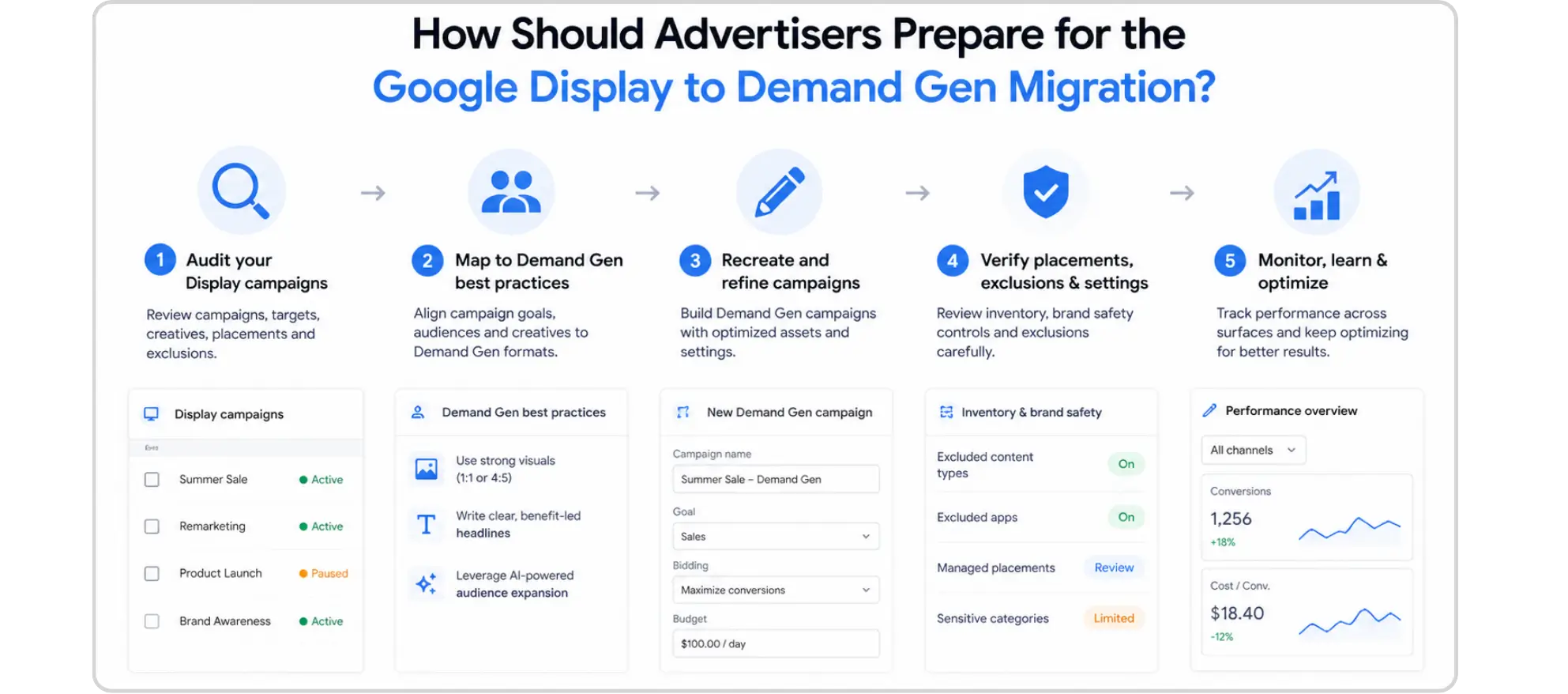
How Should Advertisers Prepare for the Google Display to Demand Gen Migration?
The best move right now is to get ahead of it — not wait for the auto-migration in 2027. Here's how to approach it:
Audit Your Current Display Campaign Setup First
Pull a full record of everything: placement exclusions, app exclusions, audience lists, bid strategies, device targeting, managed placements. You want this documented before you start rebuilding anything inside Demand Gen.
Test Demand Gen in Parallel Before Migrating
If you've never run a Demand Gen campaign, now's a good time to start one alongside your existing Display setup. Run both for a few weeks. Watch how performance, reporting, and budget behavior differ. It's far better to figure this out on a test budget than after a full migration.
Rebuild Exclusions and Controls Inside Demand Gen
Don't assume your exclusion lists carry over intact. Rebuild them from scratch and verify. The inventory pool in Demand Gen is broader, so placement hygiene matters even more here.
Expand Your Creative for What Demand Gen Actually Supports
Static display banners will still work, but you'd be leaving features on the table. Demand Gen supports carousels, video formats, and AI-generated image variations. If this migration is forcing a re-evaluation anyway, it's a decent moment to upgrade your creative assets.
Final Thoughts
Google Display Ads moving to Demand Gen isn't the end of the Display Network, it's the end of managing it separately.
The migration tool is rolling out in June 2026. That's your window to move campaigns on your own terms, with your own configurations intact. The advertisers who'll feel this most are the ones who wait for Google's auto-migration in 2027 and discover their carefully maintained exclusions didn't survive the transfer.
Get your current setups documented. Test Demand Gen now. Rebuild your controls before the deadline. That's it straightforward, but it has to actually happen.
Know the change. Own the transition. Stay ahead of your competition.
FAQs
Is Google shutting down the Google Display Network completely?

No. The Google Display Network (GDN) is not being shut down, only the standalone Display campaign type is being retired. You can still run ads exclusively on GDN, just managed through Demand Gen campaigns going forward.
Do I need to migrate my Display campaigns manually or will Google do it automatically?
Google will auto-migrate any remaining campaigns in 2027, but it's strongly recommended to migrate manually before that especially if you have placement exclusions, audience lists, or brand safety controls in place, as those may not transfer cleanly in an automatic migration.
Will my existing Display ad creatives work in Demand Gen campaigns?
Yes, existing static display creatives will still work. However, Demand Gen also supports carousel ads, video formats, and AI-generated image variations, so it's worth expanding your creative assets to take full advantage of the new campaign environment.
When can I access the migration tool in Google Ads?
Google is rolling out the migration tool to eligible advertisers starting June 2026. You'll see it appear directly inside your Google Ads account when it becomes available for your campaigns.
Does moving to Demand Gen mean my ads will show on YouTube too even if I don't want that?
Not necessarily. Demand Gen does give you channel controls, and you can restrict your inventory to run exclusively on the Google Display Network if preferred, so you won't be forced onto YouTube or other surfaces against your campaign goals.
If you've been running Google Display campaigns, pay attention, something significant just changed. On May 26, 2026, Google officially announced that standalone Display campaigns are going away. The Google Display Network (GDN) itself isn't being shut down your ads will still reach those 2 million+ sites, videos, and apps. But the campaign type you've been using to manage all of it? That's being retired, and everything is moving into Demand Gen.
Here's everything you need to understand before this hits your account.
What Is Google Demand Gen and Why Is Google Replacing Display Ads With It?
Google Demand Gen is an AI-powered campaign type that runs ads across YouTube, Discover, Gmail, Google Maps, and the Display Network — all from a single campaign, designed to reach people before they start searching. Think of it as Google's equivalent of social media campaign: visually rich, AI optimized, and built to reach people before they're actively searching.
So why is Google doing this? Because managing separate campaigns for Display, YouTube, Discover, and Gmail — all targeting similar upper-funnel audiences doesn't make sense anymore. Demand Gen brings it all under one roof, with Google's AI handling optimization across every surface.
This isn't the first time Google has done this either. Video Action Campaigns were folded into Demand Gen not long ago. The pattern is clear: fewer campaign types, more AI, more consolidation. Display is just the latest.
What Is the Difference Between Google Display Ads and Demand Gen Campaigns?
The Display Network isn't going away but almost everything else about how you run ads on it is changing. Here's a quick comparison:
Feature | Standalone Display | Demand Gen |
|---|---|---|
Google Display Network | ✅ Yes | ✅ Yes (GDN-only available) |
YouTube Inventory | ❌ No | ✅ Yes |
Discover & Gmail | ❌ No | ✅ Yes |
Google Maps (Beta) | ❌ No | ✅ Yes |
Carousel Ads | ❌ No | ✅ Yes |
Lookalike Segments | ❌ No | ✅ Yes |
Generative AI Image Tools | ❌ No | ✅ Yes |
Channel-Level Reporting | ❌ No | ✅ Yes |
Target CPC Bidding | ❌ No | ✅ Yes |
When Will Google Display Ads Be Discontinued?
Google is retiring the standalone Display campaign type in Google Ads. However, the underlying ad inventory is not going away; it is being transitioned and folded into Demand Gen campaigns. This is a phased rollout, not a hard cutoff. Here's how it plays out:
June 2026: When Does the Display to Demand Gen Migration Tool Launch?
Starting this month, eligible advertisers will see a migration tool appear inside Google Ads. It walks you through moving existing Display campaigns into Demand Gen. This is the window where you have the most control — use it.
Later in 2026: Can You Still Create New Google Display Campaigns?
No, at some point after the migration tool goes live, Google will stop letting you create new standalone Display campaigns from scratch. Existing ones stay editable, but the format is effectively frozen for new builds.
2027: What Happens to Display Campaigns That Aren't Migrated?
Google will auto-migrate whatever is left. And here's the thing — if you've spent years building out placement exclusions, audience layers, and brand safety controls, an automatic migration won't preserve all of that the way you'd want. More on this below
Will Google Display Ads Still Work After Moving to Demand Gen?
Yes, but "still work" looks a little different depending on how you've been running Display. If you've been running fairly standard GDN campaigns without heavy customization, this transition might actually feel like an upgrade. You get access to better creative formats, broader audience tools, and smarter optimization — without having to manage everything across separate campaign types.
If you've been running tightly managed Display campaigns with carefully curated placement exclusions, app blocklists, and specific brand safety controls — that's where you need to be more deliberate. Those settings don't automatically carry over perfectly, and the controls work a bit differently inside Demand Gen. You'll need to rebuild and verify them yourself.
Four things worth monitoring closely after the migration:
Audience expansion: Demand Gen leans on AI to broaden audiences. If your Display strategy depended on tight targeting, double-check how that translates.
Placement visibility: Make sure the placement-level transparency you relied on in Display is still accessible in Demand Gen's reporting.
Budget pacing: With multiple surfaces in play, budget tends to shift toward what's performing. Keep an eye on where your spend is actually going.
Brand safety and exclusions: This is the big one. Placement exclusions, app exclusions, managed placements, audit everything and rebuild proactively. Don't assume they migrate cleanly.
How Should Advertisers Prepare for the Google Display to Demand Gen Migration?
The best move right now is to get ahead of it — not wait for the auto-migration in 2027. Here's how to approach it:
Audit Your Current Display Campaign Setup First
Pull a full record of everything: placement exclusions, app exclusions, audience lists, bid strategies, device targeting, managed placements. You want this documented before you start rebuilding anything inside Demand Gen.
Test Demand Gen in Parallel Before Migrating
If you've never run a Demand Gen campaign, now's a good time to start one alongside your existing Display setup. Run both for a few weeks. Watch how performance, reporting, and budget behavior differ. It's far better to figure this out on a test budget than after a full migration.
Rebuild Exclusions and Controls Inside Demand Gen
Don't assume your exclusion lists carry over intact. Rebuild them from scratch and verify. The inventory pool in Demand Gen is broader, so placement hygiene matters even more here.
Expand Your Creative for What Demand Gen Actually Supports
Static display banners will still work, but you'd be leaving features on the table. Demand Gen supports carousels, video formats, and AI-generated image variations. If this migration is forcing a re-evaluation anyway, it's a decent moment to upgrade your creative assets.
Final Thoughts
Google Display Ads moving to Demand Gen isn't the end of the Display Network, it's the end of managing it separately.
The migration tool is rolling out in June 2026. That's your window to move campaigns on your own terms, with your own configurations intact. The advertisers who'll feel this most are the ones who wait for Google's auto-migration in 2027 and discover their carefully maintained exclusions didn't survive the transfer.
Get your current setups documented. Test Demand Gen now. Rebuild your controls before the deadline. That's it straightforward, but it has to actually happen.
Know the change. Own the transition. Stay ahead of your competition.
FAQs
Is Google shutting down the Google Display Network completely?
No. The Google Display Network (GDN) is not being shut down, only the standalone Display campaign type is being retired. You can still run ads exclusively on GDN, just managed through Demand Gen campaigns going forward.
Do I need to migrate my Display campaigns manually or will Google do it automatically?
Google will auto-migrate any remaining campaigns in 2027, but it's strongly recommended to migrate manually before that especially if you have placement exclusions, audience lists, or brand safety controls in place, as those may not transfer cleanly in an automatic migration.
Will my existing Display ad creatives work in Demand Gen campaigns?
Yes, existing static display creatives will still work. However, Demand Gen also supports carousel ads, video formats, and AI-generated image variations, so it's worth expanding your creative assets to take full advantage of the new campaign environment.
When can I access the migration tool in Google Ads?
Google is rolling out the migration tool to eligible advertisers starting June 2026. You'll see it appear directly inside your Google Ads account when it becomes available for your campaigns.
Does moving to Demand Gen mean my ads will show on YouTube too even if I don't want that?
Not necessarily. Demand Gen does give you channel controls, and you can restrict your inventory to run exclusively on the Google Display Network if preferred, so you won't be forced onto YouTube or other surfaces against your campaign goals.



Summarize with AI
Latest Blogs






Want to be seen everywhere?
Get a free AI-search audit Today!



4.9/5 Ratings!


Don’t miss our revenue growth tips!
Get expert marketing tips—straight to your inbox, like thousands of happy clients.
Don’t miss our revenue growth tips!
Get expert marketing tips—straight to your inbox, like thousands of happy clients.
Don’t miss our revenue growth tips!
Don’t miss our revenue growth tips!
Get expert marketing tips—straight to your inbox, like thousands of happy clients.
Explore News, Updates & Strategies
Explore News, Updates & Strategies
Explore the latest industry updates, marketing trends, Google changes, expert insights, success stories, eCommerce strategies, AEO innovations, and lead generation techniques — all in one place.
Explore the latest industry updates, marketing trends, Google changes, expert insights, success stories, eCommerce strategies, AEO innovations, and lead generation techniques — all in one place.

Google Updates
Sep 26, 2026
3 Min Read
Google Search Console Adds Multimodal Search Performance Reporting
Google Updates
Sep 26, 2026
3 Min Read
Google Search Console Adds Multimodal Search Performance Reporting
Google Updates
Sep 26, 2026
3 Min Read
Google Search Console Adds Multimodal Search Performance Reporting
Google Updates
Sep 2, 2026
5 Min Read
Google Search Console's Generative AI Performance Report Goes Fully Global
Google Updates
Sep 2, 2026
5 Min Read
Google Search Console's Generative AI Performance Report Goes Fully Global
Google Updates
Sep 2, 2026
5 Min Read
Google Search Console's Generative AI Performance Report Goes Fully Global
Google Updates
Aug 18, 2026
5 Min Read
Google’s August 2026 Spam Update: Who Won, Who Lost & Why?
Google Updates
Aug 18, 2026
5 Min Read
Google’s August 2026 Spam Update: Who Won, Who Lost & Why?
Google Updates
Aug 18, 2026
5 Min Read
Google’s August 2026 Spam Update: Who Won, Who Lost & Why?



































Ready to speak with an expert?
Data-Driven Marketing Agency That Elevates ROI
1100+
Websites Designed & Optimized to Convert
$280M+
Client Revenue Driven & Growing Strong
Discover how to skyrocket
your revenue today!
Trusted by 1000+ Owners!
Ready to speak with an expert?
Data-Driven Marketing Agency That Elevates ROI
1100+
Websites Designed & Optimized to Convert
$280M+
Client Revenue Driven & Growing Strong
Discover how to skyrocket
your revenue today!
Trusted by 1000+ Owners!
Want to skyrocket revenue?
4.9/5 Ratings!
Ready to speak with an expert?
Data-Driven Marketing Agency That Elevates ROI
1100+
Websites Designed & Optimized to Convert
$280M+
Client Revenue Driven & Growing Strong
Discover how to skyrocket
your revenue today!
Trusted by 1000+ Owners!
Call
Meet