
Wireframe - The Blueprint of Digital Design
Wireframe - The Blueprint of Digital Design
Wireframe
Wireframe
Wireframe
A wireframe is a blueprint of a user interface. It shows how a digital platform is structured and laid out without including the colors or images that define its final look.
A wireframe is a blueprint of a user interface. It shows how a digital platform is structured and laid out without including the colors or images that define its final look.


Table of Content

Design a High-Converting Website That Starts with the Right Structure



4.9/5 Ratings!

Prateek V.
Prateek V.
5 Min Read
5 Min
Oct 13, 2025
Oct 13, 2025
What is a Wireframe?
A wireframe is a simple sketch that shows the basic outline of a webpage or app screen. It is low detail and is often just black and white. A wireframe shows:
• Layout of pages
• Placement of navigation, buttons, and forms
• Order of content and the way information moves
• Things you can use, like search bars or sliders
Wireframes do not show what the page looks like. The wireframe helps you see how the page works. It shows where things will be. For example, you can find where the call-to-action button is. You also see how people get from one page to another.
A wireframe is a simple sketch that shows the basic outline of a webpage or app screen. It is low detail and is often just black and white. A wireframe shows:
• Layout of pages
• Placement of navigation, buttons, and forms
• Order of content and the way information moves
• Things you can use, like search bars or sliders
Wireframes do not show what the page looks like. The wireframe helps you see how the page works. It shows where things will be. For example, you can find where the call-to-action button is. You also see how people get from one page to another.
Why are Wireframes Important?
Wireframes are a big part of the Web design process for many reasons:
Wireframes are a big part of the Web design process for many reasons:
Benefit
Benefit
Benefit
Benefit
Description
Description
Description
Description
Clarity of Vision
Clarity of Vision
Clarity of Vision
They help everyone, like the people in charge, designers, and developers, understand the way the project should go.
They help everyone, like the people in charge, designers, and developers, understand the way the project should go.
They help everyone, like the people in charge, designers, and developers, understand the way the project should go.
User Experience First
User Experience First
User Experience First
When you take away extra looks, wireframes help you keep the focus on how easy it is to use.
When you take away extra looks, wireframes help you keep the focus on how easy it is to use.
When you take away extra looks, wireframes help you keep the focus on how easy it is to use.
Cost and Time Savings
Cost and Time Savings
Cost and Time Savings
You can make changes fast on a wireframe, and it does not cost much.
You can make changes fast on a wireframe, and it does not cost much.
You can make changes fast on a wireframe, and it does not cost much.
Strong Collaboration Tool
Strong Collaboration Tool
Strong Collaboration Tool
Wireframes help teams talk to each other and start working together.
Wireframes help teams talk to each other and start working together.
Wireframes help teams talk to each other and start working together.
Types of Wireframes
•
•
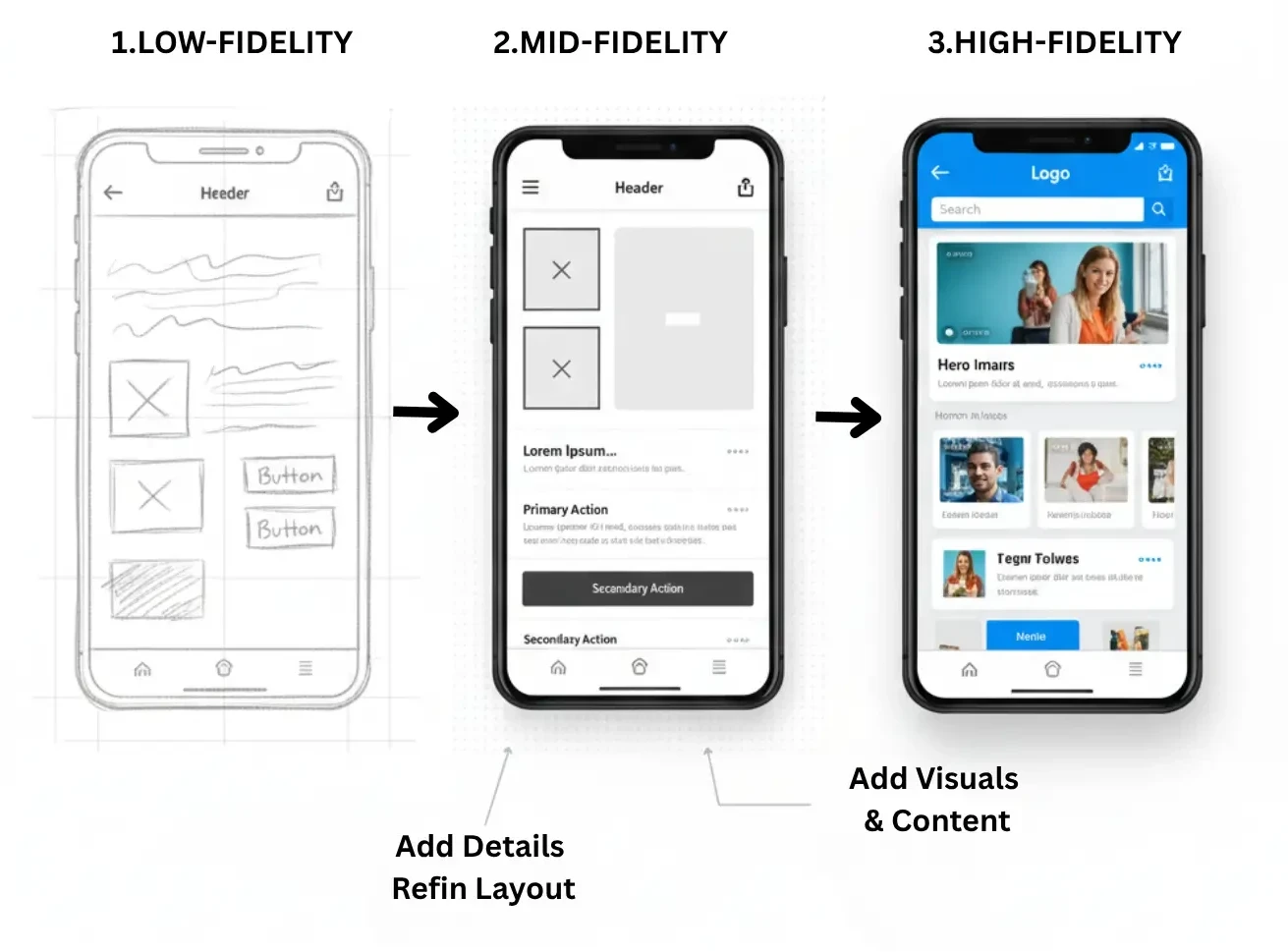
Low-Fidelity Wireframes: These be simple drawings or digital outlines.
Low-Fidelity Wireframes: These be simple drawings or digital outlines.
•
•
Mid-Fidelity Wireframes: These show more detail, like spacing and how things be organized on the page.
Mid-Fidelity Wireframes: These show more detail, like spacing and how things be organized on the page.
•
•
High-Fidelity Wireframes: These look almost the same as a finished product, with real content and exact parts in place.
High-Fidelity Wireframes: These look almost the same as a finished product, with real content and exact parts in place.
How to Create a Wireframe?
Do research and know what the user wants.
Write down how the user will move through the design.
Draw some simple layout ideas.
Pick a wireframing tool like Figma, Sketch, or Adobe XD.
Test it out and get feedback from people.
Do research and know what the user wants.
Write down how the user will move through the design.
Draw some simple layout ideas.
Pick a wireframing tool like Figma, Sketch, or Adobe XD.
Test it out and get feedback from people.
Common Wireframe Mistakes to Avoid
Putting in too many design details at the start
Not thinking about what users need
Making the page setup harder than it has to be
Not getting feedback and going straight to making the design
Putting in too many design details at the start
Not thinking about what users need
Making the page setup harder than it has to be
Not getting feedback and going straight to making the design
What tools are best for creating wireframes?
Popular wireframing tools include Figma, Sketch, and Adobe XD. These tools allow you to create and collaborate on wireframes with ease. Figma is cloud-based for team collaboration, Sketch is great for macOS users, and Adobe XD offers powerful design features with seamless integration across platforms.
Popular wireframing tools include Figma, Sketch, and Adobe XD. These tools allow you to create and collaborate on wireframes with ease. Figma is cloud-based for team collaboration, Sketch is great for macOS users, and Adobe XD offers powerful design features with seamless integration across platforms.
Why Wireframes are Essential for Digital Design Success?
Wireframes are crucial to the success of digital projects, whether you're designing a website, mobile app, or software interface. By focusing on user flow and layout, wireframes help you create functional designs that are both effective and user-friendly. Whether you're a business owner or a designer, using wireframes at the start of your project can save time, reduce costs, and ensure a better user experience.
Wireframes are crucial to the success of digital projects, whether you're designing a website, mobile app, or software interface. By focusing on user flow and layout, wireframes help you create functional designs that are both effective and user-friendly. Whether you're a business owner or a designer, using wireframes at the start of your project can save time, reduce costs, and ensure a better user experience.
Example of a Wireframe
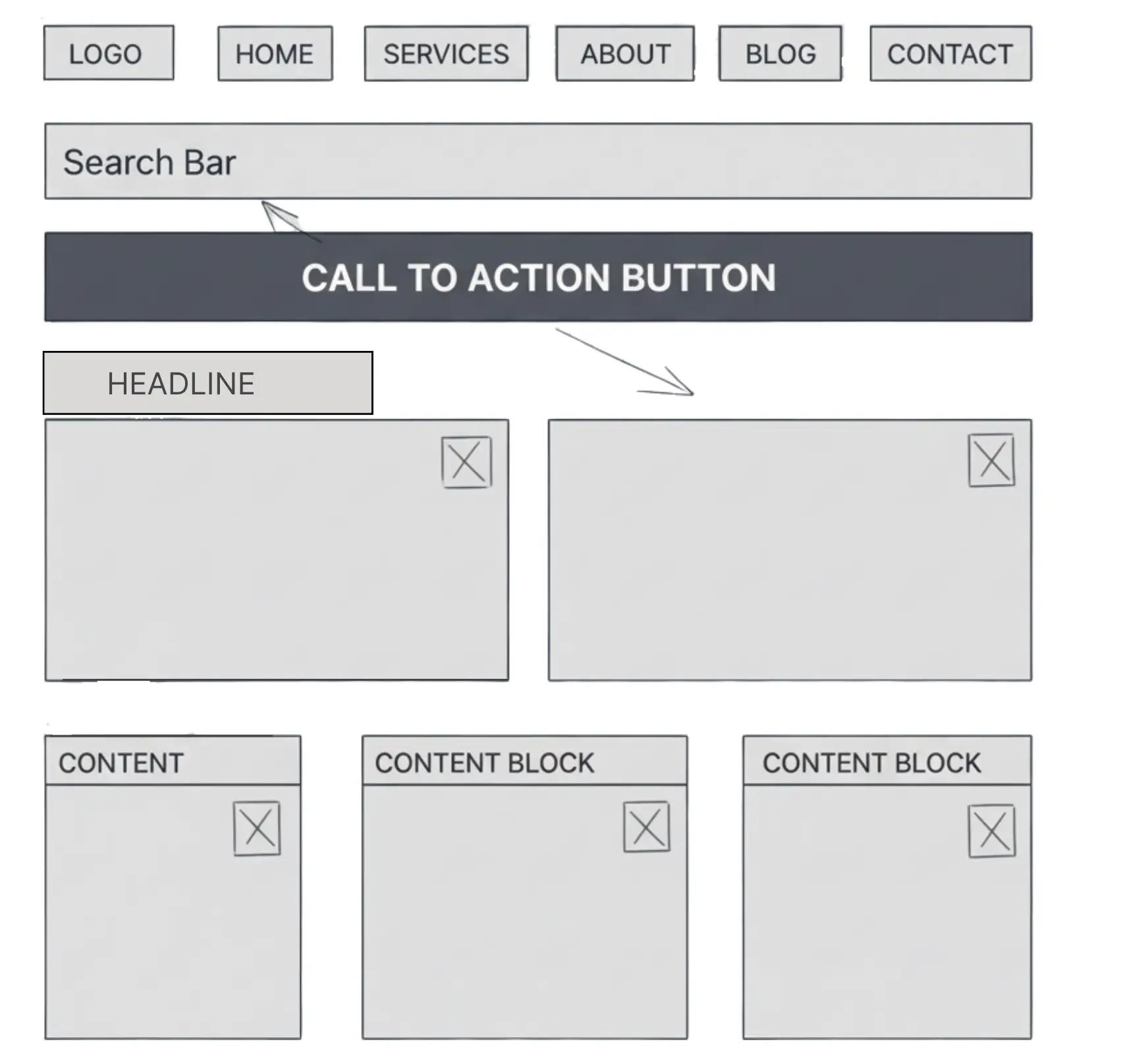
Think about a homepage wireframe. The logo sits at the top left. You will see the navigation links going across the header. A big search bar is right in the center. A call to action button is under the search bar. This wireframe does not have any colors or images. It only shows boxes and text as placeholders.
Think about a homepage wireframe. The logo sits at the top left. You will see the navigation links going across the header. A big search bar is right in the center. A call to action button is under the search bar. This wireframe does not have any colors or images. It only shows boxes and text as placeholders.
Final Thoughts
Wireframes are not used just by designers. They help people talk about ideas, fix problems, and save time. By leaving out extra details, wireframes help teams look at what is important. The goal is to make things easy and good for people to use.
No matter if you are a business owner who works with designers or a developer who makes ideas happen, knowing about wireframes helps you see the big picture. This way, you get a feel for everything before you get into all the little details.
Wireframes are not used just by designers. They help people talk about ideas, fix problems, and save time. By leaving out extra details, wireframes help teams look at what is important. The goal is to make things easy and good for people to use.
No matter if you are a business owner who works with designers or a developer who makes ideas happen, knowing about wireframes helps you see the big picture. This way, you get a feel for everything before you get into all the little details.
Frequently Asked Questions (FAQs)
Frequently Asked Questions
What is the difference between a wireframe, mockup, and prototype?

Wireframes outline basic structure and layout without visuals. Mockups add colors, fonts, and images for style preview. Prototypes create interactive versions for clicks and user testing before development.
Should I hand-draw wireframes or use digital tools first?
Hand-drawing paper for rapid brainstorming and rough layouts during ideation. Switch to digital tools like Figma once concepts solidify for precise sharing and team collaboration.
When should you use a wireframe, is it always necessary?
Use wireframes early for complex projects needing clear user flows and team alignment. Simpler single-page sites can proceed directly to mockups without this planning step.
What are common mistakes that hurt wireframe usability?
Overloading with visual details too soon, neglecting mobile responsiveness, poor navigation planning, and skipping stakeholder feedback led to usability issues and expensive redesigns.
Can wireframes be used for mobile apps too?
Yes, wireframes excel for mobile apps by mapping touch targets, screen transitions, and gesture flows tailored to smaller devices and user behaviors.
How does wireframing improve SEO performance?
Wireframes plan content hierarchy with proper headings, internal linking structures, and crawl-friendly layouts that enhance search engine indexing and user engagement signals.
How long does wireframing typically take?
Simple wireframes take 1-3 hours. Multi-page projects require 1-2 days including research, iterations, and feedback rounds to ensure structure meets project goals.
What is the difference between a wireframe, mockup, and prototype?
Wireframes outline basic structure and layout without visuals. Mockups add colors, fonts, and images for style preview. Prototypes create interactive versions for clicks and user testing before development.
Should I hand-draw wireframes or use digital tools first?
Hand-drawing paper for rapid brainstorming and rough layouts during ideation. Switch to digital tools like Figma once concepts solidify for precise sharing and team collaboration.
When should you use a wireframe, is it always necessary?
Use wireframes early for complex projects needing clear user flows and team alignment. Simpler single-page sites can proceed directly to mockups without this planning step.
What are common mistakes that hurt wireframe usability?
Overloading with visual details too soon, neglecting mobile responsiveness, poor navigation planning, and skipping stakeholder feedback led to usability issues and expensive redesigns.
Can wireframes be used for mobile apps too?
Yes, wireframes excel for mobile apps by mapping touch targets, screen transitions, and gesture flows tailored to smaller devices and user behaviors.
How does wireframing improve SEO performance?
Wireframes plan content hierarchy with proper headings, internal linking structures, and crawl-friendly layouts that enhance search engine indexing and user engagement signals.
How long does wireframing typically take?
Simple wireframes take 1-3 hours. Multi-page projects require 1-2 days including research, iterations, and feedback rounds to ensure structure meets project goals.
Design a High-Converting Website That Starts with the Right Structure
Design a High-Converting Website That Starts with the Right Structure
Use wireframes to structure content, improve flow, and enhance user experience.
Use wireframes to structure content, improve flow, and enhance user experience.
Use wireframes to structure content, improve flow, and enhance user experience.
4.9/5 Ratings!
Share this article
Share this article

Related Resources
Latest Blogs






Don’t miss our revenue growth tips!
Don’t miss our revenue growth tips!
Get expert marketing tips—straight to your inbox, like thousands of happy clients.
Get expert marketing tips—straight to your inbox, like thousands of happy clients.
Latest Blogs




































Ready to speak with an expert?
Data-Driven Marketing Agency That Elevates ROI
1100+
Websites Designed & Optimized to Convert
$280M+
Client Revenue Driven & Growing Strong
Discover how to skyrocket
your revenue today!
Trusted by 1000+ Owners!
Ready to speak with an expert?
Data-Driven Marketing Agency That Elevates ROI
1100+
Websites Designed & Optimized to Convert
$280M+
Client Revenue Driven & Growing Strong
Discover how to skyrocket
your revenue today!
Trusted by 1000+ Owners!
Want to skyrocket revenue?
4.9/5 Ratings!
Ready to speak with an expert?
Data-Driven Marketing Agency That Elevates ROI
1100+
Websites Designed & Optimized to Convert
$280M+
Client Revenue Driven & Growing Strong
Discover how to skyrocket
your revenue today!
Trusted by 1000+ Owners!
Call
Meet