What is Title Tag in SEO? A Complete Guide.
What is Title Tag in SEO? A Complete Guide.
Title Tag
Title Tag
Title Tag
A title tag is an HTML element that defines a webpage’s title and plays a crucial role in SEO. It appears as the clickable headline in search engine results, as well as in browser tabs and social media previews.
A title tag is an HTML element that defines a webpage’s title and plays a crucial role in SEO. It appears as the clickable headline in search engine results, as well as in browser tabs and social media previews.

Table of Content
Case Studies








Craft Title Tags That Rank Higher and Attract More Clicks


4.9/5 Ratings!

Bhawana V.
Bhawana V.
6 Min Read
6 Min Read
Oct 9, 2025
Oct 9, 2025
What is Title Tag?
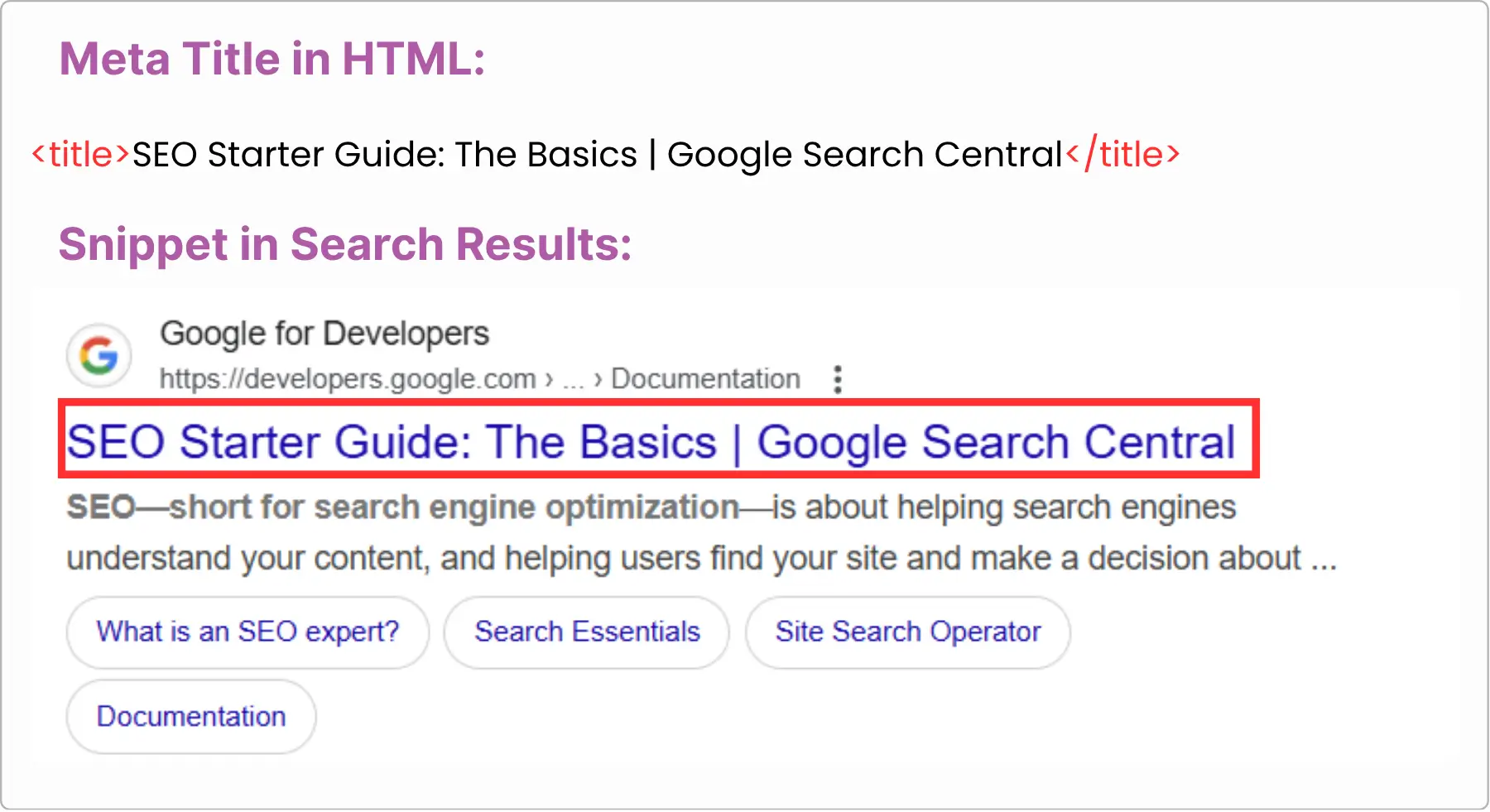
A meta title tag (often just called the “title tag”) is an HTML element that defines the title of a webpage. It’s one of the most important on-page SEO elements because it tells both users and search engines what the page is about.
Title tags are crucial because they:
Inform Google what your page is about
Enable your page to appear when people search for similar words
Encourage clicks by having your page appear in search results
A good title tag is brief, understandable, and contains words that users might use when searching.
A meta title tag (often just called the “title tag”) is an HTML element that defines the title of a webpage. It’s one of the most important on-page SEO elements because it tells both users and search engines what the page is about.
Title tags are crucial because they:
Inform Google what your page is about
Enable your page to appear when people search for similar words
Encourage clicks by having your page appear in search results
A good title tag is brief, understandable, and contains words that users might use when searching.
Why is the Title Tag Important?
Although it's just a small piece of text, the title tag is crucial for a few significant reasons:
Although it's just a small piece of text, the title tag is crucial for a few significant reasons:
• It Helps Search Engines Understand Your Page
Search engines (such as Google) refer to the title tag to determine what your page is about. So, if your title tag contains words such as "chocolate cake recipe", Google has an idea that your page is about that subject. It makes your page appear in the correct search results.
Search engines (such as Google) refer to the title tag to determine what your page is about. So, if your title tag contains words such as "chocolate cake recipe", Google has an idea that your page is about that subject. It makes your page appear in the correct search results.
• It's the First Impression in Search Results
When somebody searches for something on Google, the title tag is the very first thing they notice. A good, catchy, and relevant title tag can make people click your link over somebody else's link. More clicks = more visitors to your site.
When somebody searches for something on Google, the title tag is the very first thing they notice. A good, catchy, and relevant title tag can make people click your link over somebody else's link. More clicks = more visitors to your site.
• It Impacts Your Click-Through Rate (CTR)
CTR stands for how many individuals click on your site once they've looked at it in search results. A good title tag will enhance your CTR, which Google picks up on, and that will make your page rank even better.
CTR stands for how many individuals click on your site once they've looked at it in search results. A good title tag will enhance your CTR, which Google picks up on, and that will make your page rank even better.
• It Sets the Expectation for the Page
Your title tag provides individuals with a preview of what they'll get when they're on your page. If your title tag is confusing or misleading, folks may leave your site in a hurry, and that can damage your SEO.
Your title tag provides individuals with a preview of what they'll get when they're on your page. If your title tag is confusing or misleading, folks may leave your site in a hurry, and that can damage your SEO.
How to Write a Good Title Tag?
Tip
Tip
Tip
Tip
Description
Description
Description
Description
Example
Example
Example
Example
Keep it under 60 characters
Keep it under 60 characters
Keep it under 60 characters
Search engines typically display only the first 50–60 characters, so make it concise.
Search engines typically display only the first 50–60 characters, so make it concise.
Search engines typically display only the first 50–60 characters, so make it concise.
"10 Tips for Healthy Morning Habits"
"10 Tips for Healthy Morning Habits"
"10 Tips for Healthy Morning Habits"
Include primary keyword
Include primary keyword
Include primary keyword
Place your main keyword near the beginning for SEO relevance.
Place your main keyword near the beginning for SEO relevance.
Place your main keyword near the beginning for SEO relevance.
"Healthy Breakfast Recipes for Weight Loss"
"Healthy Breakfast Recipes for Weight Loss"
"Healthy Breakfast Recipes for Weight Loss"
Be descriptive & specific
Be descriptive & specific
Be descriptive & specific
Clearly describe the page content to attract clicks.
Clearly describe the page content to attract clicks.
Clearly describe the page content to attract clicks.
"Step-by-Step Guide to Yoga for Beginners"
"Step-by-Step Guide to Yoga for Beginners"
"Step-by-Step Guide to Yoga for Beginners"
Use action words
Use action words
Use action words
Encourage user engagement with verbs or compelling phrases.
Encourage user engagement with verbs or compelling phrases.
Encourage user engagement with verbs or compelling phrases.
"Learn How to Improve Your SEO Today"
"Learn How to Improve Your SEO Today"
"Learn How to Improve Your SEO Today"
Avoid keyword stuffing
Avoid keyword stuffing
Avoid keyword stuffing
Overusing keywords can harm rankings and readability.
Overusing keywords can harm rankings and readability.
Overusing keywords can harm rankings and readability.
"Travel Tips for Europe" (not "Europe Travel Tips Europe Travel")
"Travel Tips for Europe" (not "Europe Travel Tips Europe Travel")
"Travel Tips for Europe" (not "Europe Travel Tips Europe Travel")
Make it unique
Make it unique
Make it unique
Each page should have a distinct title tag to avoid duplicate content issues.
Each page should have a distinct title tag to avoid duplicate content issues.
Each page should have a distinct title tag to avoid duplicate content issues.
"Best Hiking Trails in Colorado"
"Best Hiking Trails in Colorado"
"Best Hiking Trails in Colorado"
Include brand name (optional)
Include brand name (optional)
Include brand name (optional)
Adding your brand at the end can boost recognition.
Adding your brand at the end can boost recognition.
Adding your brand at the end can boost recognition.
"Ultimate Guide to Digital Marketing – BrandName"
"Ultimate Guide to Digital Marketing – BrandName"
"Ultimate Guide to Digital Marketing – BrandName"
Crafting an effective title tag helps search engines understand your page and improves click-through rates. Follow these best practices to make your titles both SEO-friendly and engaging for users.
Crafting an effective title tag helps search engines understand your page and improves click-through rates. Follow these best practices to make your titles both SEO-friendly and engaging for users.
Final Thoughts
Title tags might be a minor detail on your website, but they contribute a lot to how search engines and people see your content. Your visibility on Google will be enhanced, clicks increased, and traffic to your website will be boosted by a well-crafted title tag.
By knowing what a title tag is, why it's important, and how to write one the right way, you're already better off than most website owners. Just be sure to make it brief, add your main keyword, and make it useful for real people and not just search engines. It's an easy step that can bring real SEO results.
Title tags might be a minor detail on your website, but they contribute a lot to how search engines and people see your content. Your visibility on Google will be enhanced, clicks increased, and traffic to your website will be boosted by a well-crafted title tag.
By knowing what a title tag is, why it's important, and how to write one the right way, you're already better off than most website owners. Just be sure to make it brief, add your main keyword, and make it useful for real people and not just search engines. It's an easy step that can bring real SEO results.
Frequently Asked Questions (FAQs)
Frequently Asked Questions
Why is Google changing my title tag?

Google rewrites your title tag when it thinks your original title is not clear, too long, too short, stuffed with keywords, or doesn’t match the page content. Google’s goal is to show a title that helps users understand your page better.
If you want Google to stop rewriting your title, keep it accurate, relevant, and user-friendly.
Why is my title getting cut off or not showing fully in Google’s search results?
Your title is getting cut off because it’s too long for Google’s display limit. Google usually shows only 50–60 characters, and anything beyond that gets trimmed. Sometimes Google also shortens titles that contain too many keywords, symbols, or unnecessary words. Keeping your title simple, short, and direct helps it show completely in search results.
Why is Google showing an old title tag instead of my updated one?
Google may take days or weeks to recrawl your page. You can speed it up by requesting indexing in Google Search Console.
Is it okay to have the same title tag on multiple pages?
No. Each page should have a unique title tag reflecting its specific topic. Duplicate titles can confuse search engines and reduce ranking potential.
Can I use my brand name in the title tag?
Including your brand name at the end of the title tag can increase brand recognition and trust, especially for well-known brands.
Does updating my title tag improve my rankings?
Yes, updating your title tag can improve your rankings if the new title is clearer, more relevant, and matches search intent better. Google prefers titles that accurately describe the page.
However, changing it too often won’t boost SEO — only meaningful improvements help.
Can a title tag include special characters or emojis?
Occasionally, but use sparingly. Overuse may look spammy or be truncated in search results.
Why is Google changing my title tag?
Google rewrites your title tag when it thinks your original title is not clear, too long, too short, stuffed with keywords, or doesn’t match the page content. Google’s goal is to show a title that helps users understand your page better.
If you want Google to stop rewriting your title, keep it accurate, relevant, and user-friendly.
Why is my title getting cut off or not showing fully in Google’s search results?
Your title is getting cut off because it’s too long for Google’s display limit. Google usually shows only 50–60 characters, and anything beyond that gets trimmed. Sometimes Google also shortens titles that contain too many keywords, symbols, or unnecessary words. Keeping your title simple, short, and direct helps it show completely in search results.
Why is Google showing an old title tag instead of my updated one?
Google may take days or weeks to recrawl your page. You can speed it up by requesting indexing in Google Search Console.
Is it okay to have the same title tag on multiple pages?
No. Each page should have a unique title tag reflecting its specific topic. Duplicate titles can confuse search engines and reduce ranking potential.
Can I use my brand name in the title tag?
Including your brand name at the end of the title tag can increase brand recognition and trust, especially for well-known brands.
Does updating my title tag improve my rankings?
Yes, updating your title tag can improve your rankings if the new title is clearer, more relevant, and matches search intent better. Google prefers titles that accurately describe the page.
However, changing it too often won’t boost SEO — only meaningful improvements help.
Can a title tag include special characters or emojis?
Occasionally, but use sparingly. Overuse may look spammy or be truncated in search results.



Craft Title Tags That Rank Higher and Attract More Clicks
Craft Title Tags That Rank Higher and Attract More Clicks
Create clear, compelling title tags to help search engines understand your pages and attract more user clicks.
Create clear, compelling title tags to help search engines understand your pages and attract more user clicks.
4.9/5 Ratings!
Share this article
Share this article

Related Resources
Latest Blogs






Don’t miss our revenue growth tips!
Don’t miss our revenue growth tips!
Get expert marketing tips—straight to your inbox, like thousands of happy clients.
Get expert marketing tips—straight to your inbox, like thousands of happy clients.
Latest Blogs


































Ready to speak with an expert?
Data-Driven Marketing Agency That Elevates ROI
1100+
Websites Designed & Optimized to Convert
$280M+
Client Revenue Driven & Growing Strong
Discover how to skyrocket
your revenue today!



Trusted by 1000+ Owners!
Ready to speak with an expert?
Data-Driven Marketing Agency That Elevates ROI
1100+
Websites Designed & Optimized to Convert
$280M+
Client Revenue Driven & Growing Strong
Discover how to skyrocket
your revenue today!
Trusted by 1000+ Owners!
Want to skyrocket revenue?
4.9/5 Ratings!
Ready to speak with an expert?
Data-Driven Marketing Agency That Elevates ROI
1100+
Websites Designed & Optimized to Convert
$280M+
Client Revenue Driven & Growing Strong
Discover how to skyrocket
your revenue today!
Trusted by 1000+ Owners!
Call
Meet