Website Security & Protection: How to Secure a Website
Website Security & Protection: How to Secure a Website
Last Updated:
Table of Content
Client Testimonials

















Kuldeep Singh
Kuldeep Singh
Kuldeep Singh
Web Design
Web Design
Web Design
10 Min Read
10 Min
10 Min Read
In today’s digital landscape, your website isn’t just a marketing asset. It’s a living, breathing extension of your business. It hosts your credibility, carries your reputation, and often supports critical operations. Yet it also sits on the front line of one of the fastest-evolving battlegrounds: cybersecurity.
For many organizations, the conversation begins and ends with “Do we have SSL?” or “Are our plugins up to date?” Unfortunately, that’s not what modern website security looks like anymore. Security is no longer a checklist — it’s an ongoing discipline backed by structure, awareness, and consistent maintenance.
This guide breaks down website security and maintenance the way professionals think about it: strategically, proactively, and comprehensively.
What Website Security Really Means
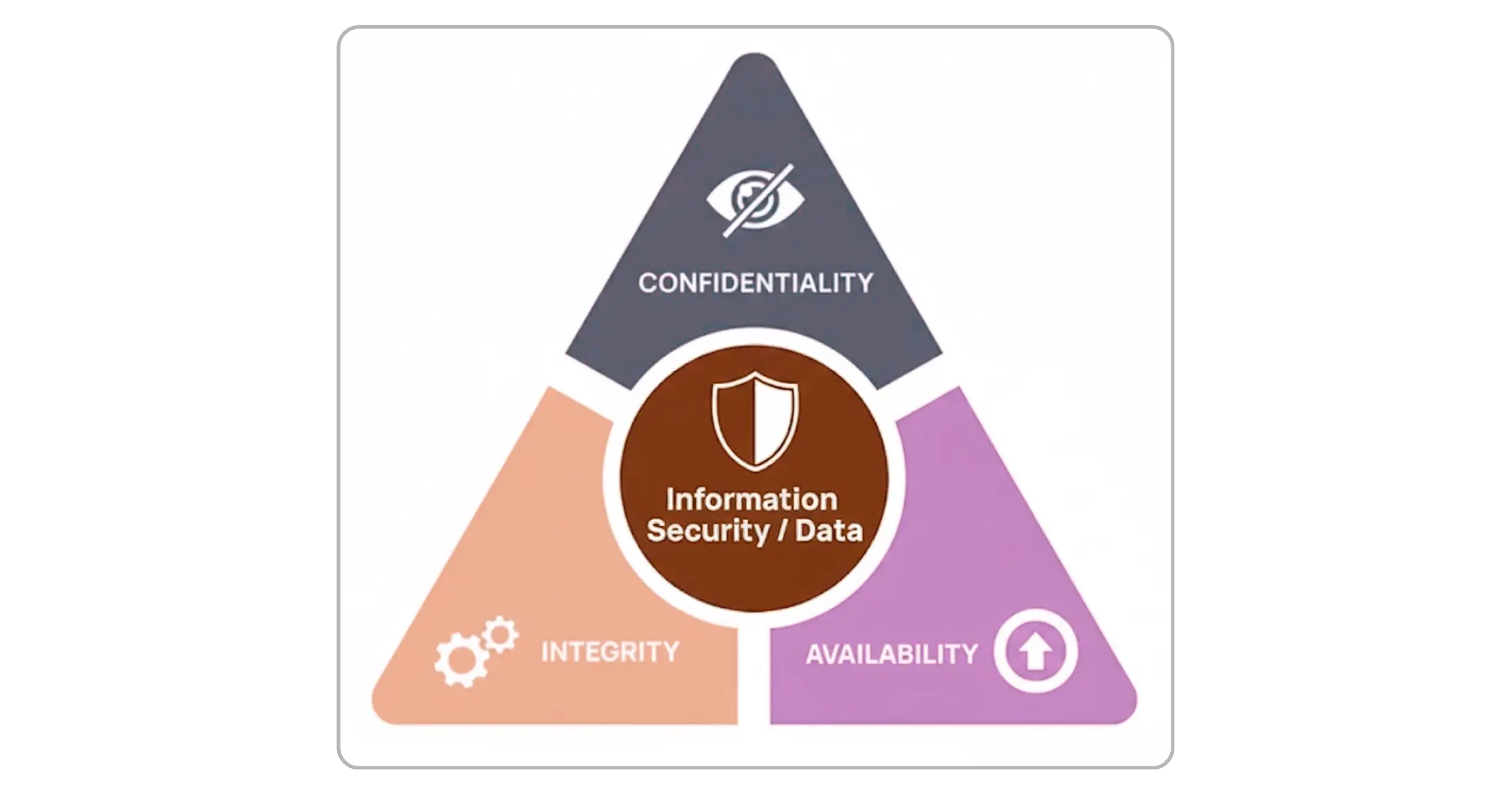
Website security isn’t just about preventing hacks. It’s about ensuring three fundamental pillars
Confidentiality: Sensitive information stays protected.
Integrity: Your content and data maintain accuracy and authenticity.
Availability: Your website stays online, stable, and accessible when users need it.
When any of these pillars fail, trust is lost—and trust is harder to rebuild than any website.
Why Website Security Deserves Priority
Cyberattacks no longer target only large brands. Most attacks today are automated, sweeping the internet for weaknesses. If your site isn’t maintained or monitored, it becomes an easy entry point.
The consequences are far more expensive than prevention:
Customer data exposure
Website defacement
SEO blacklisting
Downtime and revenue loss
Legal liability
The reality is simple: Security is cheaper than recovery.
Common Threats Every Website Faces
Whether you’re running a small portfolio site or a large eCommerce platform, the risks are similar — only the scale changes
Malware & Backdoor Injections: Malicious code designed to steal data, hijack pages, or take over servers.
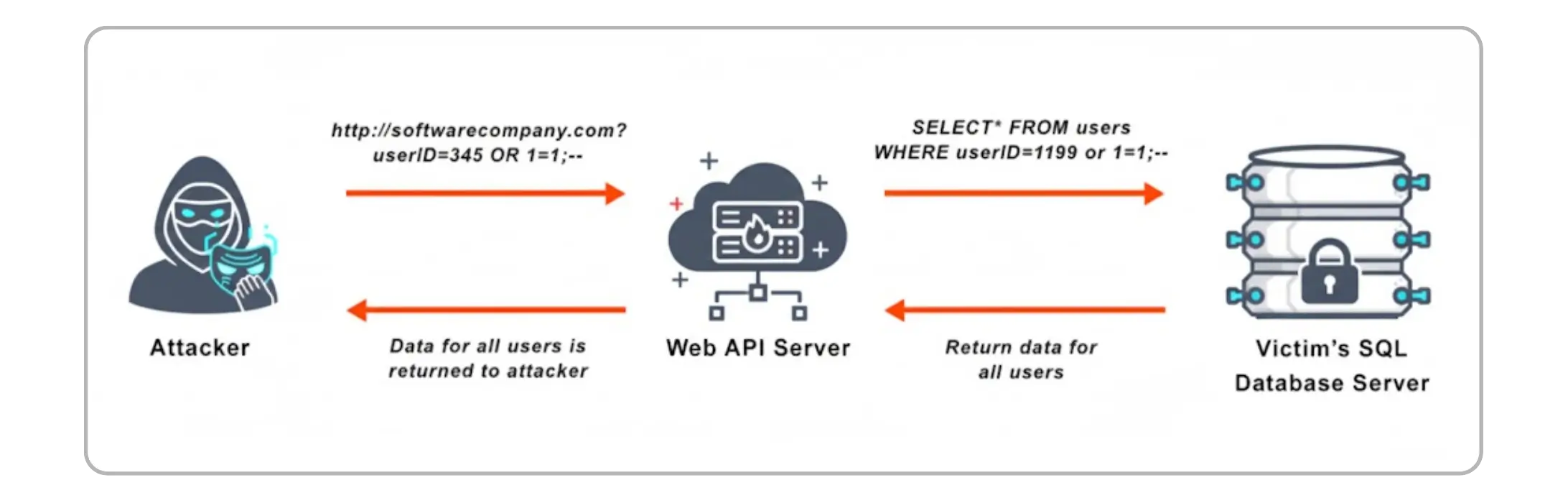
SQL Injection Attacks: Exploiting database weaknesses to extract or manipulate information.
Cross-Site Scripting (XSS): Injecting harmful scripts through unsanitized input fields.
Brute Force Logins: Automated bots attempting credentials repeatedly until access is gained.
Distributed Denial of Service (DDoS): Traffic floods that overwhelm servers and knock sites offline.
Phishing & Credential Theft: Stolen login details granting attackers full control — often unnoticed.
10 Essential Ways to Protect Your Website
These are practical, proven protections that actually prevent incidents.
Enforce HTTPS with a Valid SSL/TLS Certificate: Encrypts data and prevents browser trust warnings.
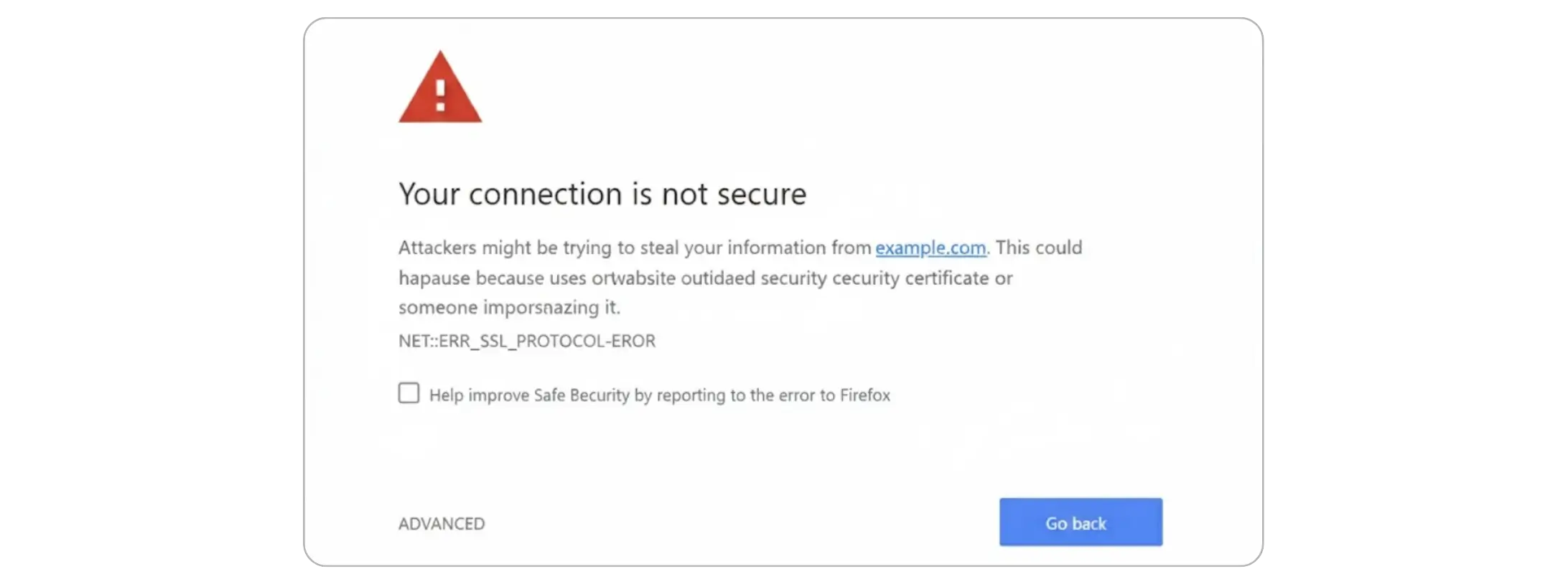
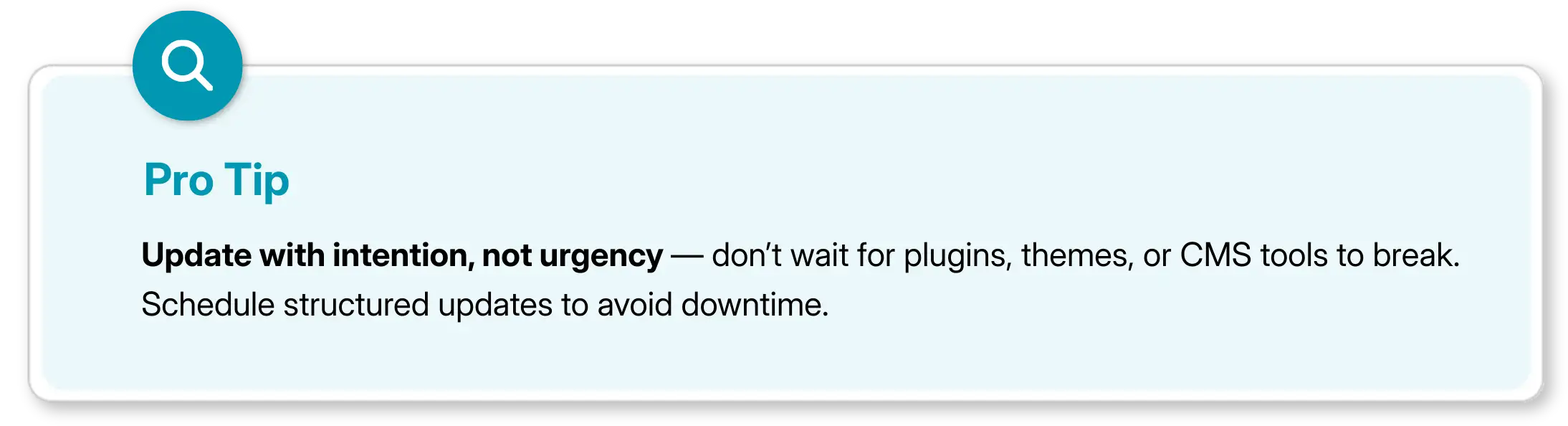
Keep Platforms, Themes, and Plugins Updated: Updates are security patches — not optional upgrades.
Use Strong Passwords and Multi-Factor Authentication (MFA): Stops credential-based attacks before they succeed.
Apply Least-Privilege Access Controls: Grant only necessary permissions and remove unused accounts.
Deploy a Web Application Firewall (WAF): Blocks SQL injection, XSS, bots, and DDoS attempts before impact.
Maintain Reliable Off-Site Backups: Clean backups turn disasters into inconveniences.
Enable Continuous Monitoring & Malware Scanning: Detects unusual activity early—before damage spreads.
Minimize and Encrypt Stored Data: Less data equals less risk. Encrypt what you must keep.
Prepare an Incident Response Plan: Define roles, isolation steps, recovery flow, and communication.
Implement Security Headers: CSP, HSTS, and X-Frame-Options provide browser-level protection.
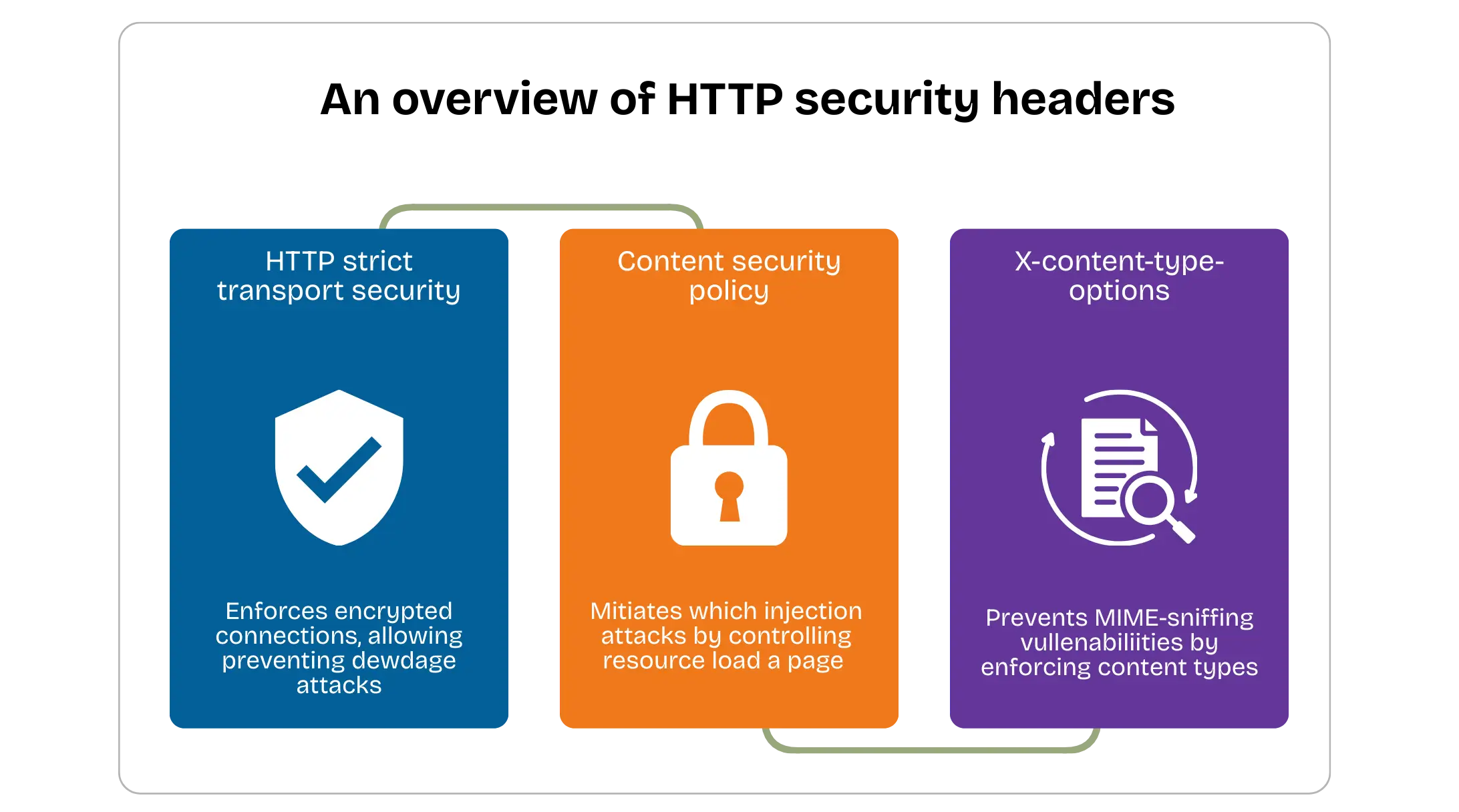
These ten measures form a strong foundation—but protection alone isn’t enough.
What Does Website Maintenance Really Involve?
Maintenance is often misunderstood as “updates and backups.” In reality, it is preventative and systematic.
True maintenance includes:
Software and plugin updates
Database optimization
Uptime monitoring
Performance tuning
Error log review
Removing unused code and plugins
Testing critical features (forms, checkout, logins)
Renewing SSL certificates and domain settings
Think of maintenance as routine health checks that keep your site fast and resilient.
Why Is Maintenance Closely Linked to Security?
Most security failures come from neglect, not targeted attacks:
Outdated software → vulnerabilities
Unmonitored logs → unnoticed intrusions
Expired SSL → user trust warnings
Heavy media → slow performance
Old backups → useless recovery
The strongest websites aren’t just secure—they’re consistently maintained.
Recommended Maintenance Schedule
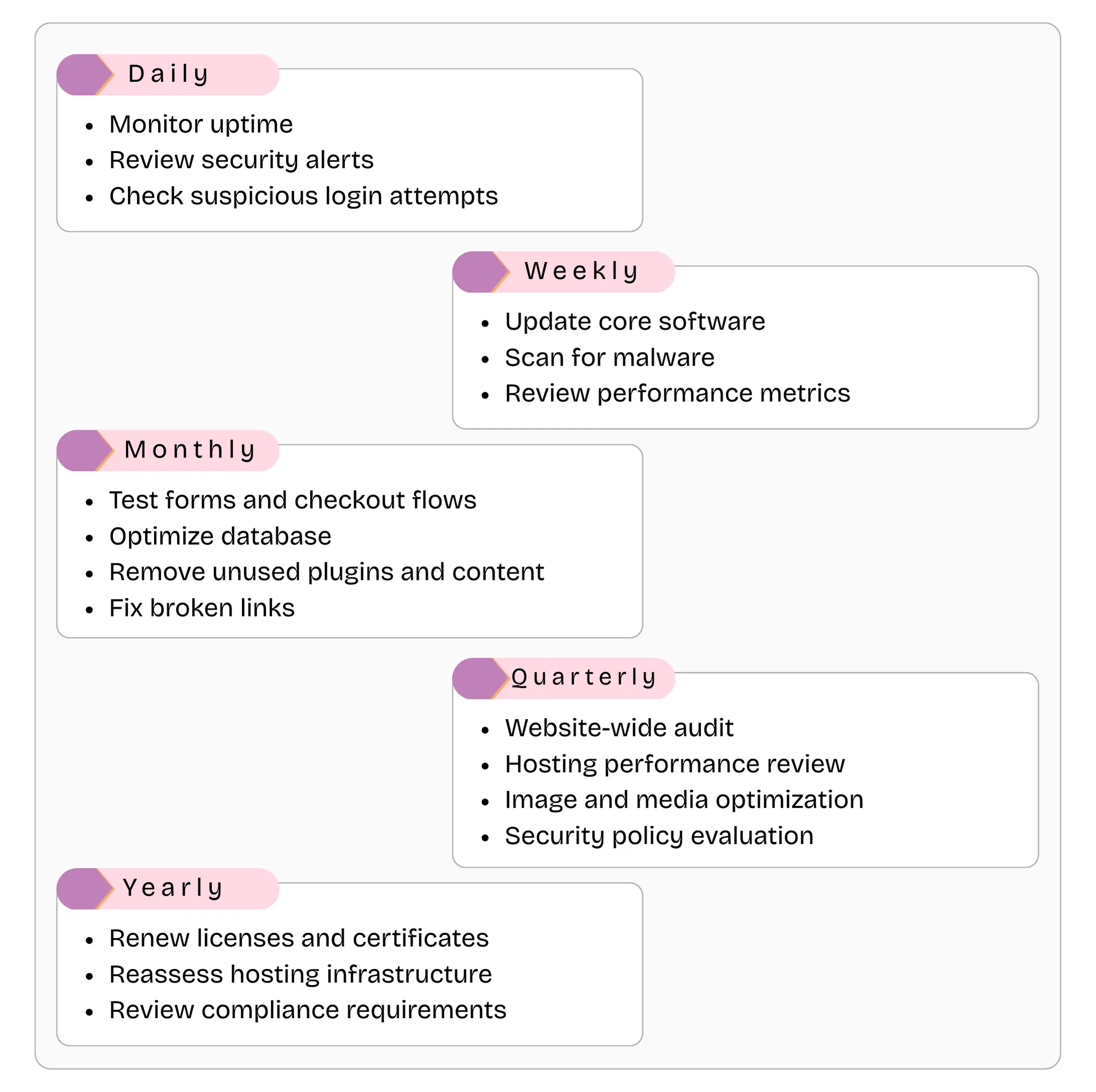
This is the standard professionals follow to prevent emergencies before they happen.
Why Do Professional Maintenance and Security Matter?
DIY can work for small sites, but professional support delivers:
Advanced threat detection
Faster incident response
Proper firewall and scanner configuration
Expert performance optimization
Routine audits and proactive fixes
Long-term risk reduction
It’s the difference between guessing and knowing.

Final Thoughts
Website security and maintenance aren’t side tasks — they’re core operational responsibilities.
A secure website doesn’t happen by accident. It’s built through deliberate effort, continuous maintenance, and proactive protection.
Whether managed internally or by professionals, the goal remains the same: Keep your website fast, reliable, secure, and ready for what’s next.
FAQs
Do I really need website security if my site is small?

Yes. Most attacks are automated and don’t target specific brands. Small websites are often attacked more frequently because they’re less likely to be monitored or properly maintained.
Isn’t having an SSL certificate enough for security?
No. SSL only encrypts data in transit. It does not protect against malware, hacks, server vulnerabilities, or compromised logins. It’s just one layer of a full security strategy.
What happens if my website gets hacked?
A proper response includes isolating the attack, removing malicious code, restoring from a clean backup, securing vulnerable entry points, and verifying site integrity before going live again.
Can backups fully restore a hacked site?
Yes — if the backups are recent and clean. Old or compromised backups are ineffective, which is why regular off-site backups are essential.
Is website security a one-time setup?
No. Security is ongoing. Attack methods evolve constantly, which means protection must be updated and monitored continuously.
In today’s digital landscape, your website isn’t just a marketing asset. It’s a living, breathing extension of your business. It hosts your credibility, carries your reputation, and often supports critical operations. Yet it also sits on the front line of one of the fastest-evolving battlegrounds: cybersecurity.
For many organizations, the conversation begins and ends with “Do we have SSL?” or “Are our plugins up to date?” Unfortunately, that’s not what modern website security looks like anymore. Security is no longer a checklist — it’s an ongoing discipline backed by structure, awareness, and consistent maintenance.
This guide breaks down website security and maintenance the way professionals think about it: strategically, proactively, and comprehensively.
What Website Security Really Means
Website security isn’t just about preventing hacks. It’s about ensuring three fundamental pillars
Confidentiality: Sensitive information stays protected.
Integrity: Your content and data maintain accuracy and authenticity.
Availability: Your website stays online, stable, and accessible when users need it.
When any of these pillars fail, trust is lost—and trust is harder to rebuild than any website.
Why Website Security Deserves Priority
Cyberattacks no longer target only large brands. Most attacks today are automated, sweeping the internet for weaknesses. If your site isn’t maintained or monitored, it becomes an easy entry point.
The consequences are far more expensive than prevention:
Customer data exposure
Website defacement
SEO blacklisting
Downtime and revenue loss
Legal liability
The reality is simple: Security is cheaper than recovery.
Common Threats Every Website Faces
Whether you’re running a small portfolio site or a large eCommerce platform, the risks are similar — only the scale changes
Malware & Backdoor Injections: Malicious code designed to steal data, hijack pages, or take over servers.
SQL Injection Attacks: Exploiting database weaknesses to extract or manipulate information.
Cross-Site Scripting (XSS): Injecting harmful scripts through unsanitized input fields.
Brute Force Logins: Automated bots attempting credentials repeatedly until access is gained.
Distributed Denial of Service (DDoS): Traffic floods that overwhelm servers and knock sites offline.
Phishing & Credential Theft: Stolen login details granting attackers full control — often unnoticed.
10 Essential Ways to Protect Your Website
These are practical, proven protections that actually prevent incidents.
Enforce HTTPS with a Valid SSL/TLS Certificate: Encrypts data and prevents browser trust warnings.
Keep Platforms, Themes, and Plugins Updated: Updates are security patches — not optional upgrades.
Use Strong Passwords and Multi-Factor Authentication (MFA): Stops credential-based attacks before they succeed.
Apply Least-Privilege Access Controls: Grant only necessary permissions and remove unused accounts.
Deploy a Web Application Firewall (WAF): Blocks SQL injection, XSS, bots, and DDoS attempts before impact.
Maintain Reliable Off-Site Backups: Clean backups turn disasters into inconveniences.
Enable Continuous Monitoring & Malware Scanning: Detects unusual activity early—before damage spreads.
Minimize and Encrypt Stored Data: Less data equals less risk. Encrypt what you must keep.
Prepare an Incident Response Plan: Define roles, isolation steps, recovery flow, and communication.
Implement Security Headers: CSP, HSTS, and X-Frame-Options provide browser-level protection.
These ten measures form a strong foundation—but protection alone isn’t enough.
What Does Website Maintenance Really Involve?
Maintenance is often misunderstood as “updates and backups.” In reality, it is preventative and systematic.
True maintenance includes:
Software and plugin updates
Database optimization
Uptime monitoring
Performance tuning
Error log review
Removing unused code and plugins
Testing critical features (forms, checkout, logins)
Renewing SSL certificates and domain settings
Think of maintenance as routine health checks that keep your site fast and resilient.
Why Is Maintenance Closely Linked to Security?
Most security failures come from neglect, not targeted attacks:
Outdated software → vulnerabilities
Unmonitored logs → unnoticed intrusions
Expired SSL → user trust warnings
Heavy media → slow performance
Old backups → useless recovery
The strongest websites aren’t just secure—they’re consistently maintained.
Recommended Maintenance Schedule
This is the standard professionals follow to prevent emergencies before they happen.
Why Do Professional Maintenance and Security Matter?
DIY can work for small sites, but professional support delivers:
Advanced threat detection
Faster incident response
Proper firewall and scanner configuration
Expert performance optimization
Routine audits and proactive fixes
Long-term risk reduction
It’s the difference between guessing and knowing.
Final Thoughts
Website security and maintenance aren’t side tasks — they’re core operational responsibilities.
A secure website doesn’t happen by accident. It’s built through deliberate effort, continuous maintenance, and proactive protection.
Whether managed internally or by professionals, the goal remains the same: Keep your website fast, reliable, secure, and ready for what’s next.
FAQs
Do I really need website security if my site is small?
Yes. Most attacks are automated and don’t target specific brands. Small websites are often attacked more frequently because they’re less likely to be monitored or properly maintained.
Isn’t having an SSL certificate enough for security?
No. SSL only encrypts data in transit. It does not protect against malware, hacks, server vulnerabilities, or compromised logins. It’s just one layer of a full security strategy.
What happens if my website gets hacked?
A proper response includes isolating the attack, removing malicious code, restoring from a clean backup, securing vulnerable entry points, and verifying site integrity before going live again.
Can backups fully restore a hacked site?
Yes — if the backups are recent and clean. Old or compromised backups are ineffective, which is why regular off-site backups are essential.
Is website security a one-time setup?
No. Security is ongoing. Attack methods evolve constantly, which means protection must be updated and monitored continuously.

Kuldeep Singh
, Senior Project Manager
Kuldeep is a web design and website security specialist focused on building stable, secure, and performance-driven digital platforms. He works across design, optimization, and protection layers to ensure websites are visually consistent, resilient, and trustworthy. His approach blends clean design practices with robust technical foundations to deliver reliable digital experiences that support long-term growth and user confidence.


Summarize with AI










Don’t miss our revenue growth tips!
Get expert marketing tips—straight to your inbox, like thousands of happy clients.
Don’t miss our revenue growth tips!
Don’t miss our revenue growth tips!
Get expert marketing tips—straight to your inbox, like thousands of happy clients.
Don’t miss our revenue growth tips!
Get expert marketing tips—straight to your inbox, like thousands of happy clients.
Relevant Blogs on Web Design
Relevant Blogs on Web Design
Unlock data-driven insights in Web Design—explore our featured blogs and skyrocket your revenue before your competitors do.
Unlock data-driven insights in Web Design—explore our featured blogs and skyrocket your revenue before your competitors do.

Web Design
Sep 9, 2026
10 Min Read
Is Your Website Too Slow? Here's How to Fix It
Web Design
Sep 9, 2026
10 Min Read
Is Your Website Too Slow? Here's How to Fix It
Web Design
Sep 9, 2026
10 Min Read
Is Your Website Too Slow? Here's How to Fix It

Web Design
Jul 23, 2026
8 Min Read
Top 5 AI Web Design Agencies for High-Converting Websites in Houston
Web Design
Jul 23, 2026
8 Min Read
Top 5 AI Web Design Agencies for High-Converting Websites in Houston
Web Design
Jul 23, 2026
8 Min Read
Top 5 AI Web Design Agencies for High-Converting Websites in Houston

Web Design
Jul 21, 2026
10 Min Read
Shopify's New AI Marketing Tool: Should Small Businesses Use It?
Web Design
Jul 21, 2026
10 Min Read
Shopify's New AI Marketing Tool: Should Small Businesses Use It?
Web Design
Jul 21, 2026
10 Min Read
Shopify's New AI Marketing Tool: Should Small Businesses Use It?




































Ready to speak with an expert?
Data-Driven Marketing Agency That Elevates ROI
1100+
Websites Designed & Optimized to Convert
$280M+
Client Revenue Driven & Growing Strong
Discover how to skyrocket
your revenue today!



Trusted by 1000+ Owners!
Ready to speak with an expert?
Data-Driven Marketing Agency That Elevates ROI
1100+
Websites Designed & Optimized to Convert
$280M+
Client Revenue Driven & Growing Strong
Discover how to skyrocket
your revenue today!
Trusted by 1000+ Owners!
Want to skyrocket revenue?
4.9/5 Ratings!
Ready to speak with an expert?
Data-Driven Marketing Agency That Elevates ROI
1100+
Websites Designed & Optimized to Convert
$280M+
Client Revenue Driven & Growing Strong
Discover how to skyrocket
your revenue today!
Trusted by 1000+ Owners!
Call
Meet