What is Noindex Tag in SEO? A Complete Guide to When & How to Use it?
What is Noindex Tag in SEO? A Complete Guide to When & How to Use it?
What is Noindex Tag in SEO? A Complete Guide to When & How to Use it?
What is Noindex Tag in SEO? A Complete Guide to When & How to Use it?
Noindex
Noindex
Noindex
A noindex tells search engines not to show a page in search results. It’s added in the page’s HTML or in the HTTP header to keep the page from being indexed.
A noindex tells search engines not to show a page in search results. It’s added in the page’s HTML or in the HTTP header to keep the page from being indexed.


Table of Content
Case Studies







Take Control of What Search Engines See and Index on Your Site







4.9/5 Ratings!

Nimisha G.
Nimisha G.
5 Min Read
5 Min
Oct 31, 2025
Oct 31, 2025
What Does "Noindex" Mean?
What Does "Noindex" Mean?
The noindex directive tells search engine crawlers not to add a certain page to their index. A page with a noindex tag won't show up in search engine results pages (SERPs), even if it has links to other pages.
There are many ways to use noindex, such as:
HTML meta tags
Headers for HTTP
Robots.txt (with some limits)
The most common way to do this is to put a meta tag in the <head> section of an HTML page:
<meta name="robots" content="noindex" />
The noindex directive tells search engine crawlers not to add a certain page to their index. A page with a noindex tag won't show up in search engine results pages (SERPs), even if it has links to other pages.
There are many ways to use noindex, such as:
HTML meta tags
Headers for HTTP
Robots.txt (with some limits)
The most common way to do this is to put a meta tag in the <head> section of an HTML page:
<meta name="robots" content="noindex" />
HTML
<html>
<head>
<meta charset="utf-8">
<title>Internal Search Results</title>
<meta name="robots" content="noindex">
<link rel="stylesheet" href="styles.css">
</head>
<body>
<h1>Search Results for "query"</h1>
<p>This page should not show up in Google or other search engines.</p>
</body>
</html>
Why Should You Use Noindex?
Why Should You Use Noindex?
•
•
Avoid Duplicate Content Issues: If your site has more than one page with the same or similar content (like printer-friendly versions or session IDs), noindex stops these pages from fighting for search rankings.
Avoid Duplicate Content Issues: If your site has more than one page with the same or similar content (like printer-friendly versions or session IDs), noindex stops these pages from fighting for search rankings.
•
•
Keep Low-Quality or Thin Content Out of Search: Terms and conditions, privacy policies, and thank-you pages are examples of pages with little content that don't usually help search users. Noindex stops these from weakening your site's SEO.
Keep Low-Quality or Thin Content Out of Search: Terms and conditions, privacy policies, and thank-you pages are examples of pages with little content that don't usually help search users. Noindex stops these from weakening your site's SEO.
•
•
Keep an eye on private or sensitive information: You shouldn't be able to search for some pages, like internal admin pages or content that only members can see. Noindex helps keep Google from indexing these pages.
Keep an eye on private or sensitive information: You shouldn't be able to search for some pages, like internal admin pages or content that only members can see. Noindex helps keep Google from indexing these pages.
•
•
Manage Crawl Budget: If you have a big website, not indexing pages that aren't important can help search engines focus their crawl budget on your most important content, which will improve the site's SEO as a whole.
Manage Crawl Budget: If you have a big website, not indexing pages that aren't important can help search engines focus their crawl budget on your most important content, which will improve the site's SEO as a whole.
How to Implement Noindex Correctly?
How to Implement Noindex Correctly?
•
•
Using Meta Tags: Put this line in the <head> section of your page's HTML:
<meta name="robots" content="noindex, nofollow"/>
Noindex: Stops the page from being added to search engine results.
Nofollow: stops search engines from following links on that page. Only use this if you want to stop both indexing and link crawling.
Using Meta Tags: Put this line in the <head> section of your page's HTML:
<meta name="robots" content="noindex, nofollow"/>
Noindex: Stops the page from being added to search engine results.
Nofollow: stops search engines from following links on that page. Only use this if you want to stop both indexing and link crawling.
•
•
HTTP Header Response: You can add an X-Robots-Tag to the HTTP header for files that aren't HTML, like PDFs, or if you want to add noindex at the server level:
X-Robots-Tag: noindex, nofollow
HTTP Header Response: You can add an X-Robots-Tag to the HTTP header for files that aren't HTML, like PDFs, or if you want to add noindex at the server level:
X-Robots-Tag: noindex, nofollow
•
•
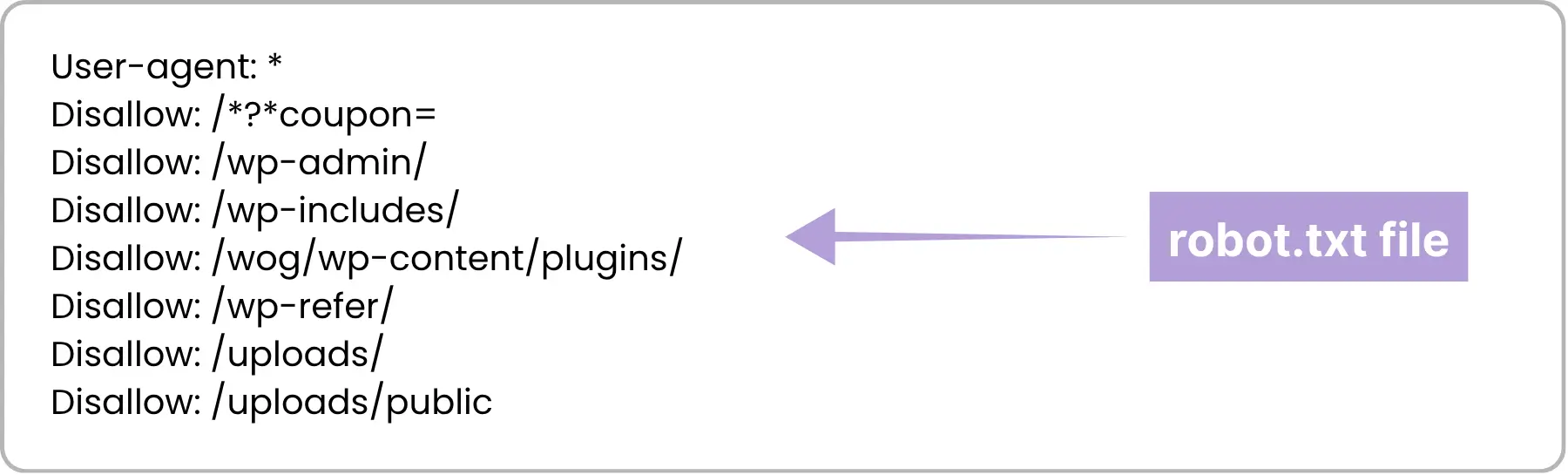
The Robots.txt File: Robots.txt can stop crawlers from getting to a page, but it doesn't guarantee that it won't be indexed. If search engines find links to a URL they can't crawl, they might still index it. Use noindex instead for full exclusion.
The Robots.txt File: Robots.txt can stop crawlers from getting to a page, but it doesn't guarantee that it won't be indexed. If search engines find links to a URL they can't crawl, they might still index it. Use noindex instead for full exclusion.
When You Shouldn't Use Noindex?
When You Shouldn't Use Noindex?
Don't noindex your main landing pages or homepage that get a lot of traffic.
Don't use noindex on pages that you want to rank or get organic traffic to.
If you want people to find your pages, don't use noindex on them. They just need better SEO.
Don't noindex your main landing pages or homepage that get a lot of traffic.
Don't use noindex on pages that you want to rank or get organic traffic to.
If you want people to find your pages, don't use noindex on them. They just need better SEO.
How to Check if Noindex is Working?
How to Check if Noindex is Working?
Use Google Search Console to see which pages are not indexed in the Coverage report.
Use SEO audit tools like Screaming Frog to look through your site and find pages that have noindex tags.
Check the page source by hand and look for the meta robots tag.
Check the URL Inspection tool in Search Console to see if Google has added or removed a URL.
Use Google Search Console to see which pages are not indexed in the Coverage report.
Use SEO audit tools like Screaming Frog to look through your site and find pages that have noindex tags.
Check the page source by hand and look for the meta robots tag.
Check the URL Inspection tool in Search Console to see if Google has added or removed a URL.
Common Noindex Mistakes to Avoid
Common Noindex Mistakes to Avoid
Tip
Tip
Tip
Tip
Description
Description
Description
Description
Accidentally Noindexing Important Pages
Accidentally Noindexing Important Pages
Accidentally Noindexing Important Pages
Key pages like product pages, blogs, or category pages mistakenly tagged as noindex, blocking visibility.
Key pages like product pages, blogs, or category pages mistakenly tagged as noindex, blocking visibility.
Key pages like product pages, blogs, or category pages mistakenly tagged as noindex, blocking visibility.
Leaving Noindex After Launch
Leaving Noindex After Launch
Leaving Noindex After Launch
Forgetting to remove noindex after a site redesign or staging launch, preventing indexing.
Forgetting to remove noindex after a site redesign or staging launch, preventing indexing.
Forgetting to remove noindex after a site redesign or staging launch, preventing indexing.
Using Noindex Instead of Robots.txt
Using Noindex Instead of Robots.txt
Using Noindex Instead of Robots.txt
Confusing noindex with disallow rules; noindex stops indexing, robots.txt only blocks crawling.
Confusing noindex with disallow rules; noindex stops indexing, robots.txt only blocks crawling.
Confusing noindex with disallow rules; noindex stops indexing, robots.txt only blocks crawling.
Noindex on Pagination Pages
Noindex on Pagination Pages
Noindex on Pagination Pages
Adding noindex to paginated content can disrupt crawl flow and internal linking.
Adding noindex to paginated content can disrupt crawl flow and internal linking.
Adding noindex to paginated content can disrupt crawl flow and internal linking.
Noindexing Canonical Pages
Noindexing Canonical Pages
Noindexing Canonical Pages
Tagging canonical pages as noindex creates conflicting signals for search engines.
Tagging canonical pages as noindex creates conflicting signals for search engines.
Tagging canonical pages as noindex creates conflicting signals for search engines.
Noindex on Sitemap URLs
Noindex on Sitemap URLs
Noindex on Sitemap URLs
Pages listed in a sitemap shouldn’t be noindexed — it confuses search engines.
Pages listed in a sitemap shouldn’t be noindexed — it confuses search engines.
Pages listed in a sitemap shouldn’t be noindexed — it confuses search engines.
Overusing Noindex on Thin Content
Overusing Noindex on Thin Content
Overusing Noindex on Thin Content
Overusing noindex instead of improving content reduces visibility and authority.
Overusing noindex instead of improving content reduces visibility and authority.
Overusing noindex instead of improving content reduces visibility and authority.
Noindex on Login/Landing Pages Incorrectly
Noindex on Login/Landing Pages Incorrectly
Noindex on Login/Landing Pages Incorrectly
Sensitive pages need other protection methods; noindex alone isn’t security.
Sensitive pages need other protection methods; noindex alone isn’t security.
Sensitive pages need other protection methods; noindex alone isn’t security.
What's the Difference Between Noindex and Nofollow?
What's the Difference Between Noindex and Nofollow?
Noindex: This tells search engines not to add the page to their index. You won't be able to find the page in search results.
Nofollow: This tells search engines not to follow links on the page. This means that the page won't pass link equity to pages that are linked to it.
If you want to stop both indexing and link crawling, you can use both "noindex" and "nofollow."
Noindex: This tells search engines not to add the page to their index. You won't be able to find the page in search results.
Nofollow: This tells search engines not to follow links on the page. This means that the page won't pass link equity to pages that are linked to it.
If you want to stop both indexing and link crawling, you can use both "noindex" and "nofollow."
How to Use Noindex in Your SEO Plan?
How to Use Noindex in Your SEO Plan?
Using noindex in the right way can:
By focusing indexing on pages that are useful, you can make your site's SEO better overall.
Keep sensitive or duplicate content from being seen by the public.
Help large sites manage their crawl budget, which makes crawling faster and better for their rankings.
But if you use noindex too much, it can make your site less visible, so be careful how you use it.
Using noindex in the right way can:
By focusing indexing on pages that are useful, you can make your site's SEO better overall.
Keep sensitive or duplicate content from being seen by the public.
Help large sites manage their crawl budget, which makes crawling faster and better for their rankings.
But if you use noindex too much, it can make your site less visible, so be careful how you use it.

Alternative Ways to Hide Pages from Search Engines
Alternative Ways to Hide Pages from Search Engines
Password protection: Only let people in who have a login.
Canonical tags: Instead of noindexing all versions, use canonical URLs to combine duplicate content.
Robots.txt: To stop crawling but not indexing (not as reliable for full exclusion).
Password protection: Only let people in who have a login.
Canonical tags: Instead of noindexing all versions, use canonical URLs to combine duplicate content.
Robots.txt: To stop crawling but not indexing (not as reliable for full exclusion).
Final Thoughts
Final Thoughts
The noindex tag is a very useful SEO tool that lets you choose what search engines index. When used correctly, it helps your site be better, stops problems with duplicate content, and keeps private pages from showing up in public search results.
But you have to be careful with it, just like with any tool. To avoid SEO problems that you didn't mean to happen, always check which pages have noindex tags and keep an eye on your site's indexing status.
The noindex tag is a very useful SEO tool that lets you choose what search engines index. When used correctly, it helps your site be better, stops problems with duplicate content, and keeps private pages from showing up in public search results.
But you have to be careful with it, just like with any tool. To avoid SEO problems that you didn't mean to happen, always check which pages have noindex tags and keep an eye on your site's indexing status.
Frequently Asked Questions (FAQs)
Frequently Asked Questions
What are the different types of backlinks, and how does each impact SEO?

A page with a noindex tag is excluded from search engine results, so it cannot rank or drive organic traffic. However, if the page has links pointing to other pages and no “nofollow” is applied, link equity can still pass, helping other pages rank better.
What’s the difference between noindex and robots.txt?
You should expect a structured process that includes onboarding, goal setting, strategy development, regular communication, execution of campaigns, and performance reporting. A good agency will act as a partner collaborating with you to understand your business, crafting a custom plan, and keeping you informed about progress and results.
Is noindex effective for staging or development sites?
Vanity metrics are data points that look impressive but don’t directly impact your bottom line, such as social media likes, page views, or email open rates. While they can indicate visibility, they’re not strong indicators of business success. What’s more important are actionable metrics like lead quality, conversion rate, and return on investment (ROI). Looking for more details? Contact us today before your competitors do.
Can excessive use of noindex hurt SEO?
High traffic without conversions often points to deeper issues such as: Poor targeting (the wrong audience is visiting), weak calls-to-action or unclear messaging, website usability issues or slow load times, lack of trust signals (like reviews or security).
Your marketing should not just drive visits; it should drive the right visitors and guide them to act.
Are there tools to manage noindex at scale?
You’ll know it’s working when you see measurable progress toward your business goals, more qualified leads, better engagement, increased sales, or stronger ROI. Regular reports, clear KPIs, and consistent communication from your agency are key to evaluating success.
How long does it take for a noindex page to disappear from search results?
Organic marketing (like SEO, blogging, and social media engagement) often takes 3 to 6 months to start showing results and may take 6–12 months for significant impact. It builds trust and authority over time, and while slower than paid marketing, it often yields more sustainable growth.
How do I remove a noindex tag from a page?
A good marketing report should cover: Key performance indicators (KPIs) tied to your goals, traffic and conversion data, campaign performance summaries, ROI or cost-per-lead/acquisition, insights and recommendations for improvement, clear next steps or action items.
It should be easy to understand, jargon-free, and focus on outcomes. Learn more—how we drive revenue?
What are the different types of backlinks, and how does each impact SEO?
A page with a noindex tag is excluded from search engine results, so it cannot rank or drive organic traffic. However, if the page has links pointing to other pages and no “nofollow” is applied, link equity can still pass, helping other pages rank better.
What’s the difference between noindex and robots.txt?
You should expect a structured process that includes onboarding, goal setting, strategy development, regular communication, execution of campaigns, and performance reporting. A good agency will act as a partner collaborating with you to understand your business, crafting a custom plan, and keeping you informed about progress and results.
Is noindex effective for staging or development sites?
Vanity metrics are data points that look impressive but don’t directly impact your bottom line, such as social media likes, page views, or email open rates. While they can indicate visibility, they’re not strong indicators of business success. What’s more important are actionable metrics like lead quality, conversion rate, and return on investment (ROI). Looking for more details? Contact us today before your competitors do.
Can excessive use of noindex hurt SEO?
High traffic without conversions often points to deeper issues such as: Poor targeting (the wrong audience is visiting), weak calls-to-action or unclear messaging, website usability issues or slow load times, lack of trust signals (like reviews or security).
Your marketing should not just drive visits; it should drive the right visitors and guide them to act.
Are there tools to manage noindex at scale?
You’ll know it’s working when you see measurable progress toward your business goals, more qualified leads, better engagement, increased sales, or stronger ROI. Regular reports, clear KPIs, and consistent communication from your agency are key to evaluating success.
How long does it take for a noindex page to disappear from search results?
Organic marketing (like SEO, blogging, and social media engagement) often takes 3 to 6 months to start showing results and may take 6–12 months for significant impact. It builds trust and authority over time, and while slower than paid marketing, it often yields more sustainable growth.
How do I remove a noindex tag from a page?
A good marketing report should cover: Key performance indicators (KPIs) tied to your goals, traffic and conversion data, campaign performance summaries, ROI or cost-per-lead/acquisition, insights and recommendations for improvement, clear next steps or action items.
It should be easy to understand, jargon-free, and focus on outcomes. Learn more—how we drive revenue?
No-index Tags Control Which Pages Appear in Search Engines.
No-index Tags Control Which Pages Appear in Search Engines.
Use no-index settings to control visibility, protect sensitive pages, & keep your site’s SEO clean & focused.
Use no-index settings to control visibility, protect sensitive pages, & keep your site’s SEO clean & focused.
4.9/5 Ratings!
4.9/5 Ratings!
Share this article

Related Resources






Don’t miss our revenue growth tips!
Don’t miss our revenue growth tips!
Get expert marketing tips—straight to your inbox, like thousands of happy clients.
Get expert marketing tips—straight to your inbox, like thousands of happy clients.






























Ready to speak with an expert?
Data-Driven Marketing Agency That Elevates ROI
1100+
Websites Designed & Optimized to Convert
$280M+
Client Revenue Driven & Growing Strong
Discover how to skyrocket
your revenue today!


Trusted by 1000+ Owners!
Ready to speak with an expert?
Data-Driven Marketing Agency That Elevates ROI
1100+
Websites Designed & Optimized to Convert
$280M+
Client Revenue Driven & Growing Strong
Discover how to skyrocket
your revenue today!
Trusted by 1000+ Owners!
Want to skyrocket revenue?
4.9/5 Ratings!
Ready to speak with an expert?
Data-Driven Marketing Agency That Elevates ROI
1100+
Websites Designed & Optimized to Convert
$280M+
Client Revenue Driven & Growing Strong
Want to skyrocket
revenue?
Trusted by 1000+ Owners!
Call
Meet