
Google Tag Manager (GTM): Easier Tracking for Your Website
Google Tag Manager (GTM): Easier Tracking for Your Website
Google Tag Manager (GTM): Easier Tracking for Your Website
Google Tag Manager (GTM): Easier Tracking for Your Website
Google Tag Manager (GTM): Easier Tracking for Your Website
Google Tag Manager
Google Tag Manager
Google Tag Manager
Google Tag Manager
Google Tag Manager (GTM) is a tool for managing all tracking and marketing tags on a website, without using website’s code.
Google Tag Manager (GTM) is a tool for managing all tracking and marketing tags on a website, without using website’s code.
Google Tag Manager (GTM) is a tool for managing all tracking and marketing tags on a website, without using website’s code.
Google Tag Manager (GTM) is a tool for managing all tracking and marketing tags on a website, without using website’s code.


Table of Content


GTM Simplifies Tracking & Analytics Setup Across Your Website.
GTM Simplifies Tracking & Analytics Setup Across Your Website.







4.9/5 Ratings!
4.9/5 Ratings!

Aashi Katariya
Aashi Katariya
Aashi Katariya
6 Min Read
6 Min Read
6 Min Read
Oct 31, 2025
Oct 31, 2025
Oct 31, 2025
What is Google Tag Manager?
What is Google Tag Manager?
What is Google Tag Manager?
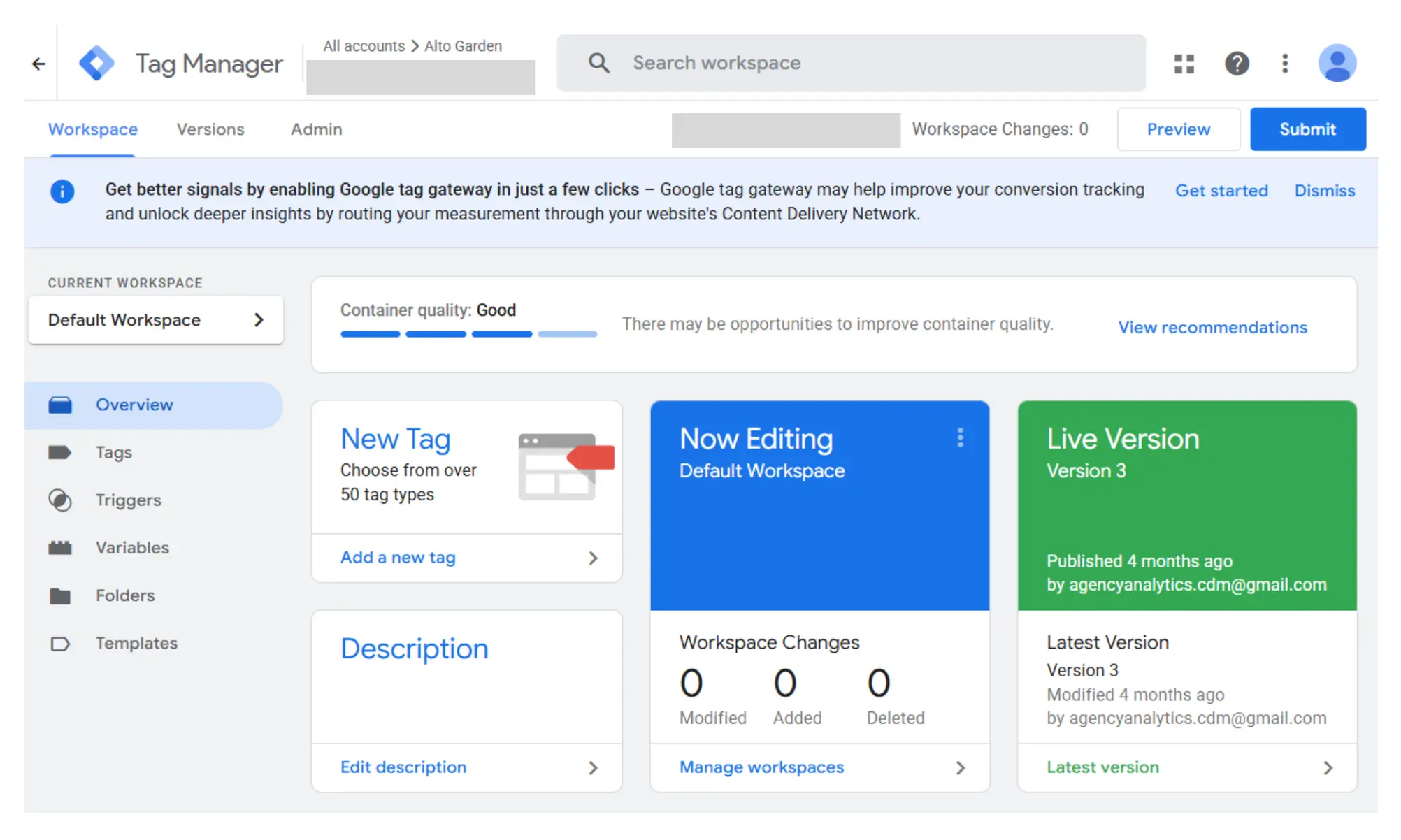
You can think of Google Tag Manager as a digital tool that helps you keep track of your website. GTM lets you handle everything yourself from one dashboard, so you don't have to ask a developer to add or update small pieces of code (tags) every time you want to track something new. No need to dig through code or panic on launch day, your tags are all in one place on a clean interface.
Tags themselves are bits of code, like little messengers that report on things like site activity, conversions, and user behavior. With GTM, you add, tweak, or remove these tags using a browser. You don’t have to be a tech whiz.
You can think of Google Tag Manager as a digital tool that helps you keep track of your website. GTM lets you handle everything yourself from one dashboard, so you don't have to ask a developer to add or update small pieces of code (tags) every time you want to track something new. No need to dig through code or panic on launch day, your tags are all in one place on a clean interface.
Tags themselves are bits of code, like little messengers that report on things like site activity, conversions, and user behavior. With GTM, you add, tweak, or remove these tags using a browser. You don’t have to be a tech whiz.
You can think of Google Tag Manager as a digital tool that helps you keep track of your website. GTM lets you handle everything yourself from one dashboard, so you don't have to ask a developer to add or update small pieces of code (tags) every time you want to track something new. No need to dig through code or panic on launch day, your tags are all in one place on a clean interface.
Tags themselves are bits of code, like little messengers that report on things like site activity, conversions, and user behavior. With GTM, you add, tweak, or remove these tags using a browser. You don’t have to be a tech whiz.
Why Google Tag Manager is Useful?
Why Google Tag Manager is Useful?
Why Google Tag Manager is Useful?
Before Google Tag Manager (GTM), marketers and analysts had to rely on developers every time they wanted to launch a new campaign, add a tracking pixel, or measure something new. It slowed things down and made even small changes feel like big projects.
With GTM, everything moves faster and smoother. You can:
Add new tags in minutes instead of waiting days for code updates.
Preview and test changes safely before publishing — so nothing breaks on your live site.
View and manage all tracking tags in one place, eliminating confusion or messy code scattered across pages.
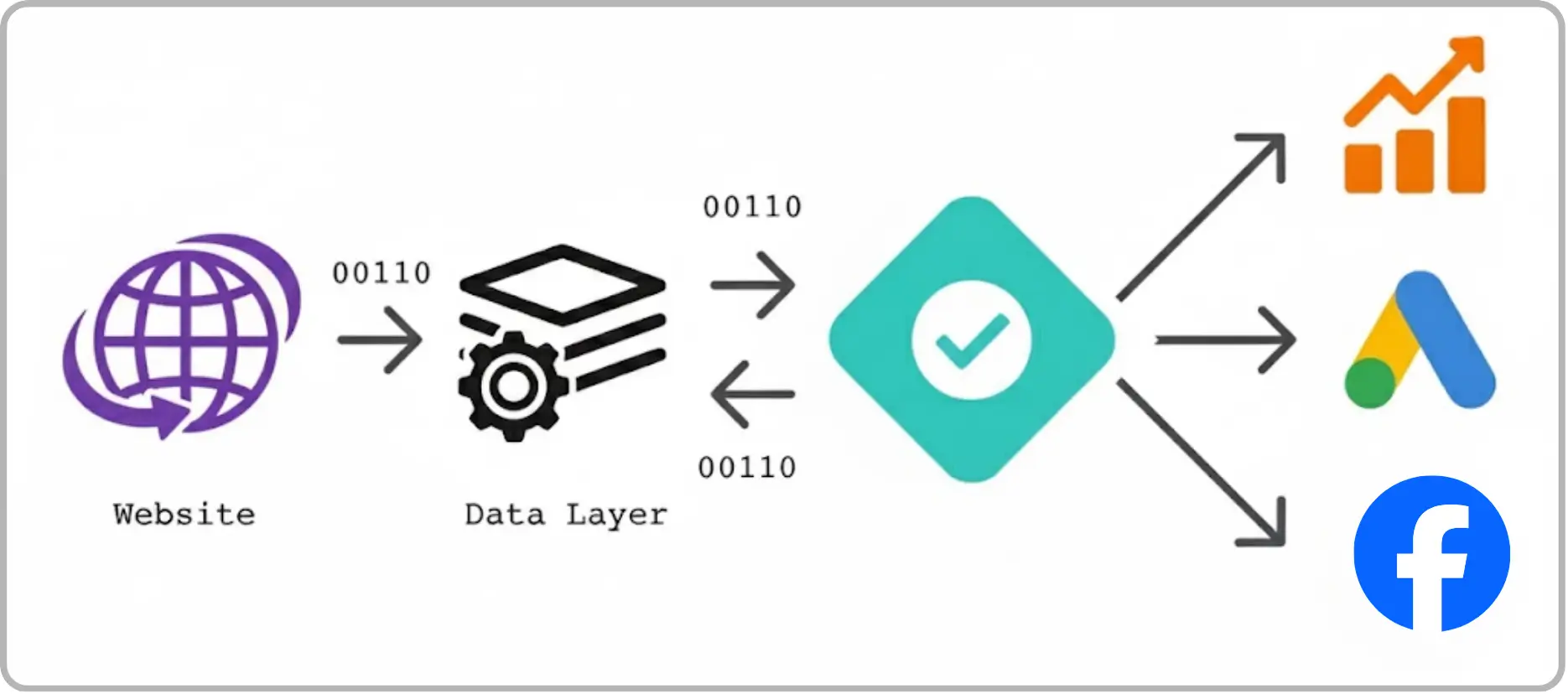
Easily integrate tools like Google Analytics, Facebook Pixel, LinkedIn Insights, and more without rebuilding your setup from scratch each time.
In short, GTM gives marketers more control, speeds up tracking implementation, and keeps your website cleaner and more reliable.
Before Google Tag Manager (GTM), marketers and analysts had to rely on developers every time they wanted to launch a new campaign, add a tracking pixel, or measure something new. It slowed things down and made even small changes feel like big projects.
With GTM, everything moves faster and smoother. You can:
Add new tags in minutes instead of waiting days for code updates.
Preview and test changes safely before publishing — so nothing breaks on your live site.
View and manage all tracking tags in one place, eliminating confusion or messy code scattered across pages.
Easily integrate tools like Google Analytics, Facebook Pixel, LinkedIn Insights, and more without rebuilding your setup from scratch each time.
In short, GTM gives marketers more control, speeds up tracking implementation, and keeps your website cleaner and more reliable.
Before Google Tag Manager (GTM), marketers and analysts had to rely on developers every time they wanted to launch a new campaign, add a tracking pixel, or measure something new. It slowed things down and made even small changes feel like big projects.
With GTM, everything moves faster and smoother. You can:
Add new tags in minutes instead of waiting days for code updates.
Preview and test changes safely before publishing — so nothing breaks on your live site.
View and manage all tracking tags in one place, eliminating confusion or messy code scattered across pages.
Easily integrate tools like Google Analytics, Facebook Pixel, LinkedIn Insights, and more without rebuilding your setup from scratch each time.
In short, GTM gives marketers more control, speeds up tracking implementation, and keeps your website cleaner and more reliable.
How Does GTM Work?
How Does GTM Work?
How Does GTM Work?
First, you’ll need to set things up just once. You paste the GTM container code right into your site (both in the header and body). After that, you pop into the GTM dashboard to:
Create tags (mini scripts that do the tracking or marketing work).
Set up triggers (basically, instructions for when a tag should fire: a page load, button click, or some other action).
Use variables (to pass changing info, like “the purchase amount” or “which page was viewed”).
Test it all with Preview Mode, see your tags working before anyone else does.
When you’re ready, just hit publish, and GTM handles the rest.
First, you’ll need to set things up just once. You paste the GTM container code right into your site (both in the header and body). After that, you pop into the GTM dashboard to:
Create tags (mini scripts that do the tracking or marketing work).
Set up triggers (basically, instructions for when a tag should fire: a page load, button click, or some other action).
Use variables (to pass changing info, like “the purchase amount” or “which page was viewed”).
Test it all with Preview Mode, see your tags working before anyone else does.
When you’re ready, just hit publish, and GTM handles the rest.
First, you’ll need to set things up just once. You paste the GTM container code right into your site (both in the header and body). After that, you pop into the GTM dashboard to:
Create tags (mini scripts that do the tracking or marketing work).
Set up triggers (basically, instructions for when a tag should fire: a page load, button click, or some other action).
Use variables (to pass changing info, like “the purchase amount” or “which page was viewed”).
Test it all with Preview Mode, see your tags working before anyone else does.
When you’re ready, just hit publish, and GTM handles the rest.

What Does Google Tag Manager Tracks?
What Does Google Tag Manager Tracks?
What Does Google Tag Manager Tracks?
Pretty much anything you like, including:
Pretty much anything you like, including:
Pretty much anything you like, including:
•
•
•
Google Analytics: For pageviews, deeper user journeys, or custom event tracking.
Google Analytics: For pageviews, deeper user journeys, or custom event tracking.
Google Analytics: For pageviews, deeper user journeys, or custom event tracking.
•
•
•
Google Ads: So you know when ad clicks actually turn into sales.
Google Ads: So you know when ad clicks actually turn into sales.
Google Ads: So you know when ad clicks actually turn into sales.
•
•
•
Facebook Pixel: To follow the journey from social media ad to conversion.
Facebook Pixel: To follow the journey from social media ad to conversion.
Facebook Pixel: To follow the journey from social media ad to conversion.
•
•
•
Custom JavaScript: If you want to get extra creative.
Custom JavaScript: If you want to get extra creative.
Custom JavaScript: If you want to get extra creative.
•
•
•
E-commerce activity: Want to know how many folks added to cart or checked out? Done.
E-commerce activity: Want to know how many folks added to cart or checked out? Done.
E-commerce activity: Want to know how many folks added to cart or checked out? Done.
•
•
•
Lots more: Button clicks, form submissions, if it happens on your site, you can probably track it.
Lots more: Button clicks, form submissions, if it happens on your site, you can probably track it.
Lots more: Button clicks, form submissions, if it happens on your site, you can probably track it.
How to Set Up Google Tag Manager?
How to Set Up Google Tag Manager?
How to Set Up Google Tag Manager?
It might seem hard to set up GTM, but if you follow these steps, it can be easy:
It might seem hard to set up GTM, but if you follow these steps, it can be easy:
It might seem hard to set up GTM, but if you follow these steps, it can be easy:
•
•
•
Set up a GTM account: Go to tagmanager.google.com and log in with your Google account. Make a new container and account for your website.
Set up a GTM account: Go to tagmanager.google.com and log in with your Google account. Make a new container and account for your website.
Set up a GTM account: Go to tagmanager.google.com and log in with your Google account. Make a new container and account for your website.
•
•
•
Put the GTM container snippet on your site: Google gives you two pieces of code: one for the <head> and one for the <body> of your site. You can add these snippets to your site's HTML or have your developer do it.
Put the GTM container snippet on your site: Google gives you two pieces of code: one for the <head> and one for the <body> of your site. You can add these snippets to your site's HTML or have your developer do it.
Put the GTM container snippet on your site: Google gives you two pieces of code: one for the <head> and one for the <body> of your site. You can add these snippets to your site's HTML or have your developer do it.
•
•
•
Make Your first tag: In GTM, make a tag that will send data to Google Analytics or other places. For instance, pick "Google Analytics: Universal Analytics" as the type of tag.
Make Your first tag: In GTM, make a tag that will send data to Google Analytics or other places. For instance, pick "Google Analytics: Universal Analytics" as the type of tag.
Make Your first tag: In GTM, make a tag that will send data to Google Analytics or other places. For instance, pick "Google Analytics: Universal Analytics" as the type of tag.
•
•
•
Make a trigger: Choose when the tag should go off. Most of the time, this is when someone views a page.
Make a trigger: Choose when the tag should go off. Most of the time, this is when someone views a page.
Make a trigger: Choose when the tag should go off. Most of the time, this is when someone views a page.
•
•
•
Preview and fix: You can use GTM's Preview mode to see if your tags work without making them live.
Preview and fix: You can use GTM's Preview mode to see if your tags work without making them live.
Preview and fix: You can use GTM's Preview mode to see if your tags work without making them live.
•
•
•
Put your container online: After testing, publish your container so that you can start collecting data.
Put your container online: After testing, publish your container so that you can start collecting data.
Put your container online: After testing, publish your container so that you can start collecting data.
How to Fix Common Problems with Google Tag Manager ?
How to Fix Common Problems with Google Tag Manager ?
How to Fix Common Problems with Google Tag Manager ?
•
•
•
Tags not firing? Double-check your triggers and use Preview mode to spot mistakes.
Tags not firing? Double-check your triggers and use Preview mode to spot mistakes.
Tags not firing? Double-check your triggers and use Preview mode to spot mistakes.
•
•
•
Seeing weird data? Look for duplicate tags or missing variables.
Seeing weird data? Look for duplicate tags or missing variables.
Seeing weird data? Look for duplicate tags or missing variables.
•
•
•
Preview not working? Try clearing your cache or switching browsers.
Preview not working? Try clearing your cache or switching browsers.
Preview not working? Try clearing your cache or switching browsers.
•
•
•
Not tracking across every page? Make sure both GTM snippets are installed everywhere.
Not tracking across every page? Make sure both GTM snippets are installed everywhere.
Not tracking across every page? Make sure both GTM snippets are installed everywhere.
Phase
Phase
Phase
Phase
Phase
Description / Tips
Description / Tips
Description / Tips
Description / Tips
Description / Tips
Crawling (The Discovery Phase)
Crawling (The Discovery Phase)
Crawling (The Discovery Phase)
Crawling (The Discovery Phase)
High (buying-focused) Add or edit tags in minutes — no developer needed.
High (buying-focused) Add or edit tags in minutes — no developer needed.
High (buying-focused) Add or edit tags in minutes — no developer needed.
High (buying-focused) Add or edit tags in minutes — no developer needed.
Accurate Tracking
Accurate Tracking
Accurate Tracking
Accurate Tracking
Manage all tags in one place for clean data.
Manage all tags in one place for clean data.
Manage all tags in one place for clean data.
Manage all tags in one place for clean data.
Easy Integrations
Easy Integrations
Easy Integrations
Easy Integrations
Connect with Google, Meta, LinkedIn & more.
Connect with Google, Meta, LinkedIn & more.
Connect with Google, Meta, LinkedIn & more.
Connect with Google, Meta, LinkedIn & more.
Supports SEO Insights
Supports SEO Insights
Supports SEO Insights
Supports SEO Insights
Track site performance and user behavior easily.
Track site performance and user behavior easily.
Track site performance and user behavior easily.
Track site performance and user behavior easily.
Final Thoughts
Final Thoughts
Final Thoughts
Anyone who is serious about tracking their website and doing digital marketing needs Google Tag Manager. It gives you more control, which means you don't have to rely on developers as much, and it helps you get better data faster.
GTM makes it easier and faster to keep track of both simple pageviews and complicated user interactions.
Anyone who is serious about tracking their website and doing digital marketing needs Google Tag Manager. It gives you more control, which means you don't have to rely on developers as much, and it helps you get better data faster.
GTM makes it easier and faster to keep track of both simple pageviews and complicated user interactions.
Anyone who is serious about tracking their website and doing digital marketing needs Google Tag Manager. It gives you more control, which means you don't have to rely on developers as much, and it helps you get better data faster.
GTM makes it easier and faster to keep track of both simple pageviews and complicated user interactions.
Frequently Asked Questions (FAQs)
Frequently Asked Questions
Frequently Asked Questions
Do I need coding knowledge to use GTM effectively?
Not necessarily. GTM is designed to be user-friendly for marketers, with pre-built tag templates for popular tools like Google Analytics, Facebook Pixel, and Google Ads. Basic knowledge of triggers and variables helps, but you don’t need to code to start tracking most standard events.
What is Google Tag Manager (GTM) and how does it differ from Google Analytics?
You should expect a structured process that includes onboarding, goal setting, strategy development, regular communication, execution of campaigns, and performance reporting. A good agency will act as a partner collaborating with you to understand your business, crafting a custom plan, and keeping you informed about progress and results.
What is a “tag” in GTM and why is it important?
Vanity metrics are data points that look impressive but don’t directly impact your bottom line, such as social media likes, page views, or email open rates. While they can indicate visibility, they’re not strong indicators of business success. What’s more important are actionable metrics like lead quality, conversion rate, and return on investment (ROI). Looking for more details? Contact us today before your competitors do.
What are triggers in GTM and how do they work?
High traffic without conversions often points to deeper issues such as: Poor targeting (the wrong audience is visiting), weak calls-to-action or unclear messaging, website usability issues or slow load times, lack of trust signals (like reviews or security).
Your marketing should not just drive visits; it should drive the right visitors and guide them to act.
Why is GTM better than manually adding tracking codes?
You’ll know it’s working when you see measurable progress toward your business goals, more qualified leads, better engagement, increased sales, or stronger ROI. Regular reports, clear KPIs, and consistent communication from your agency are key to evaluating success.
What are GTM containers, and why are they important?
Organic marketing (like SEO, blogging, and social media engagement) often takes 3 to 6 months to start showing results and may take 6–12 months for significant impact. It builds trust and authority over time, and while slower than paid marketing, it often yields more sustainable growth.
Why is GTM essential for modern digital marketing?
A good marketing report should cover: Key performance indicators (KPIs) tied to your goals, traffic and conversion data, campaign performance summaries, ROI or cost-per-lead/acquisition, insights and recommendations for improvement, clear next steps or action items.
It should be easy to understand, jargon-free, and focus on outcomes. Learn more—how we drive revenue?
Do I need coding knowledge to use GTM effectively?
Not necessarily. GTM is designed to be user-friendly for marketers, with pre-built tag templates for popular tools like Google Analytics, Facebook Pixel, and Google Ads. Basic knowledge of triggers and variables helps, but you don’t need to code to start tracking most standard events.
What is Google Tag Manager (GTM) and how does it differ from Google Analytics?
You should expect a structured process that includes onboarding, goal setting, strategy development, regular communication, execution of campaigns, and performance reporting. A good agency will act as a partner collaborating with you to understand your business, crafting a custom plan, and keeping you informed about progress and results.
What is a “tag” in GTM and why is it important?
Vanity metrics are data points that look impressive but don’t directly impact your bottom line, such as social media likes, page views, or email open rates. While they can indicate visibility, they’re not strong indicators of business success. What’s more important are actionable metrics like lead quality, conversion rate, and return on investment (ROI). Looking for more details? Contact us today before your competitors do.
What are triggers in GTM and how do they work?
High traffic without conversions often points to deeper issues such as: Poor targeting (the wrong audience is visiting), weak calls-to-action or unclear messaging, website usability issues or slow load times, lack of trust signals (like reviews or security).
Your marketing should not just drive visits; it should drive the right visitors and guide them to act.
Why is GTM better than manually adding tracking codes?
You’ll know it’s working when you see measurable progress toward your business goals, more qualified leads, better engagement, increased sales, or stronger ROI. Regular reports, clear KPIs, and consistent communication from your agency are key to evaluating success.
What are GTM containers, and why are they important?
Organic marketing (like SEO, blogging, and social media engagement) often takes 3 to 6 months to start showing results and may take 6–12 months for significant impact. It builds trust and authority over time, and while slower than paid marketing, it often yields more sustainable growth.
Why is GTM essential for modern digital marketing?
A good marketing report should cover: Key performance indicators (KPIs) tied to your goals, traffic and conversion data, campaign performance summaries, ROI or cost-per-lead/acquisition, insights and recommendations for improvement, clear next steps or action items.
It should be easy to understand, jargon-free, and focus on outcomes. Learn more—how we drive revenue?
Do I need coding knowledge to use GTM effectively?
Not necessarily. GTM is designed to be user-friendly for marketers, with pre-built tag templates for popular tools like Google Analytics, Facebook Pixel, and Google Ads. Basic knowledge of triggers and variables helps, but you don’t need to code to start tracking most standard events.
What is Google Tag Manager (GTM) and how does it differ from Google Analytics?
You should expect a structured process that includes onboarding, goal setting, strategy development, regular communication, execution of campaigns, and performance reporting. A good agency will act as a partner collaborating with you to understand your business, crafting a custom plan, and keeping you informed about progress and results.
What is a “tag” in GTM and why is it important?
Vanity metrics are data points that look impressive but don’t directly impact your bottom line, such as social media likes, page views, or email open rates. While they can indicate visibility, they’re not strong indicators of business success. What’s more important are actionable metrics like lead quality, conversion rate, and return on investment (ROI). Looking for more details? Contact us today before your competitors do.
What are triggers in GTM and how do they work?
High traffic without conversions often points to deeper issues such as: Poor targeting (the wrong audience is visiting), weak calls-to-action or unclear messaging, website usability issues or slow load times, lack of trust signals (like reviews or security).
Your marketing should not just drive visits; it should drive the right visitors and guide them to act.
Why is GTM better than manually adding tracking codes?
You’ll know it’s working when you see measurable progress toward your business goals, more qualified leads, better engagement, increased sales, or stronger ROI. Regular reports, clear KPIs, and consistent communication from your agency are key to evaluating success.
What are GTM containers, and why are they important?
Organic marketing (like SEO, blogging, and social media engagement) often takes 3 to 6 months to start showing results and may take 6–12 months for significant impact. It builds trust and authority over time, and while slower than paid marketing, it often yields more sustainable growth.
Why is GTM essential for modern digital marketing?
A good marketing report should cover: Key performance indicators (KPIs) tied to your goals, traffic and conversion data, campaign performance summaries, ROI or cost-per-lead/acquisition, insights and recommendations for improvement, clear next steps or action items.
It should be easy to understand, jargon-free, and focus on outcomes. Learn more—how we drive revenue?
Do I need coding knowledge to use GTM effectively?
Not necessarily. GTM is designed to be user-friendly for marketers, with pre-built tag templates for popular tools like Google Analytics, Facebook Pixel, and Google Ads. Basic knowledge of triggers and variables helps, but you don’t need to code to start tracking most standard events.
What is Google Tag Manager (GTM) and how does it differ from Google Analytics?
You should expect a structured process that includes onboarding, goal setting, strategy development, regular communication, execution of campaigns, and performance reporting. A good agency will act as a partner collaborating with you to understand your business, crafting a custom plan, and keeping you informed about progress and results.
What is a “tag” in GTM and why is it important?
Vanity metrics are data points that look impressive but don’t directly impact your bottom line, such as social media likes, page views, or email open rates. While they can indicate visibility, they’re not strong indicators of business success. What’s more important are actionable metrics like lead quality, conversion rate, and return on investment (ROI). Looking for more details? Contact us today before your competitors do.
What are triggers in GTM and how do they work?
High traffic without conversions often points to deeper issues such as: Poor targeting (the wrong audience is visiting), weak calls-to-action or unclear messaging, website usability issues or slow load times, lack of trust signals (like reviews or security).
Your marketing should not just drive visits; it should drive the right visitors and guide them to act.
Why is GTM better than manually adding tracking codes?
You’ll know it’s working when you see measurable progress toward your business goals, more qualified leads, better engagement, increased sales, or stronger ROI. Regular reports, clear KPIs, and consistent communication from your agency are key to evaluating success.
What are GTM containers, and why are they important?
Organic marketing (like SEO, blogging, and social media engagement) often takes 3 to 6 months to start showing results and may take 6–12 months for significant impact. It builds trust and authority over time, and while slower than paid marketing, it often yields more sustainable growth.
Why is GTM essential for modern digital marketing?
A good marketing report should cover: Key performance indicators (KPIs) tied to your goals, traffic and conversion data, campaign performance summaries, ROI or cost-per-lead/acquisition, insights and recommendations for improvement, clear next steps or action items.
It should be easy to understand, jargon-free, and focus on outcomes. Learn more—how we drive revenue?
Do I need coding knowledge to use GTM effectively?
Not necessarily. GTM is designed to be user-friendly for marketers, with pre-built tag templates for popular tools like Google Analytics, Facebook Pixel, and Google Ads. Basic knowledge of triggers and variables helps, but you don’t need to code to start tracking most standard events.
What is Google Tag Manager (GTM) and how does it differ from Google Analytics?
You should expect a structured process that includes onboarding, goal setting, strategy development, regular communication, execution of campaigns, and performance reporting. A good agency will act as a partner collaborating with you to understand your business, crafting a custom plan, and keeping you informed about progress and results.
What is a “tag” in GTM and why is it important?
Vanity metrics are data points that look impressive but don’t directly impact your bottom line, such as social media likes, page views, or email open rates. While they can indicate visibility, they’re not strong indicators of business success. What’s more important are actionable metrics like lead quality, conversion rate, and return on investment (ROI). Looking for more details? Contact us today before your competitors do.
What are triggers in GTM and how do they work?
High traffic without conversions often points to deeper issues such as: Poor targeting (the wrong audience is visiting), weak calls-to-action or unclear messaging, website usability issues or slow load times, lack of trust signals (like reviews or security).
Your marketing should not just drive visits; it should drive the right visitors and guide them to act.
Why is GTM better than manually adding tracking codes?
You’ll know it’s working when you see measurable progress toward your business goals, more qualified leads, better engagement, increased sales, or stronger ROI. Regular reports, clear KPIs, and consistent communication from your agency are key to evaluating success.
What are GTM containers, and why are they important?
Organic marketing (like SEO, blogging, and social media engagement) often takes 3 to 6 months to start showing results and may take 6–12 months for significant impact. It builds trust and authority over time, and while slower than paid marketing, it often yields more sustainable growth.
Why is GTM essential for modern digital marketing?
A good marketing report should cover: Key performance indicators (KPIs) tied to your goals, traffic and conversion data, campaign performance summaries, ROI or cost-per-lead/acquisition, insights and recommendations for improvement, clear next steps or action items.
It should be easy to understand, jargon-free, and focus on outcomes. Learn more—how we drive revenue?




GTM Simplifies Tracking & Analytics Setup Across Your Website.
GTM Simplifies Tracking & Analytics Setup Across Your Website.
GTM Simplifies Tracking & Analytics Setup Across Your Website.
Use GTM to manage website tags, track events efficiently, and gather actionable data for smarter decisions.
Use GTM to manage website tags, track events efficiently, and gather actionable data for smarter decisions.
Use GTM to manage website tags, track events efficiently, and gather actionable data for smarter decisions.
4.9/5 Ratings!
4.9/5 Ratings!
4.9/5 Ratings!
4.9/5 Ratings!
4.9/5 Ratings!
Share this article

Related Resources
Latest Blogs





Don’t miss our revenue growth tips!
Don’t miss our revenue growth tips!
Don’t miss our revenue growth tips!
Get expert marketing tips—straight to your inbox, like thousands of happy clients.
Get expert marketing tips—straight to your inbox, like thousands of happy clients.
Latest Blogs









































Ready to speak with an expert?
Data-Driven Marketing Agency That Elevates ROI
Websites Designed & Optimized to Convert
$280M+
Client Revenue Driven & Growing Strong
Discover how to skyrocket
your revenue today!


Trusted by 1000+ Owners!
Ready to speak with an expert?
Data-Driven Marketing Agency That Elevates ROI
Websites Designed & Optimized to Convert
$280M+
Client Revenue Driven & Growing Strong
Discover how to skyrocket
your revenue today!
Trusted by 1000+ Owners!
Ready to speak with an expert?
Data-Driven Marketing Agency That Elevates ROI
Websites Designed & Optimized to Convert
$280M+
Client Revenue Driven & Growing Strong
Want to skyrocket
revenue?
Trusted by 1000+ Owners!
Want to skyrocket revenue?
4.9/5 Ratings!
Want to skyrocket revenue?
4.9/5 Ratings!