



Google Map Points and Grid- How They Help in Local SEO
Google Map Points and Grid- How They Help in Local SEO
Google Map Points and Grid- How They Help in Local SEO
Table of Content
Title
Title
Case Studies

Payal Deora
Payal Deora
Payal Deora
Payal Deora
SEO
SEO
SEO
SEO
12 Min Read
10 Min
10 Min
12 Min Read
Dec 10, 2025
12/10/25
12/10/25
Dec 10, 2025
Did you know that 46% of Google searches are focused locally? Impressively, 76% of people who look for something nearby go to a business within a day. These figures demonstrate the enormous potential that local SEO presents for any company hoping to draw in local clients. Nevertheless, a lot of companies are not visible on Google Maps, which costs them potential customers who know how to maximize their local visibility.
Local SEO means tailoring your online presence, so your business appears in search results when customers look for products or services near them. Google Maps has become the most popular local discovery tool, radically altering the way local consumers locate businesses.
This blog explores two important ideas that are essential to becoming an expert in local SEO: Google Map Points (your business location markers on Google Maps) and grid (how Google evaluates geographic closeness). You'll discover what these are, their significance, and how to best position your company to rule your local market.

What Are Google Map Points?
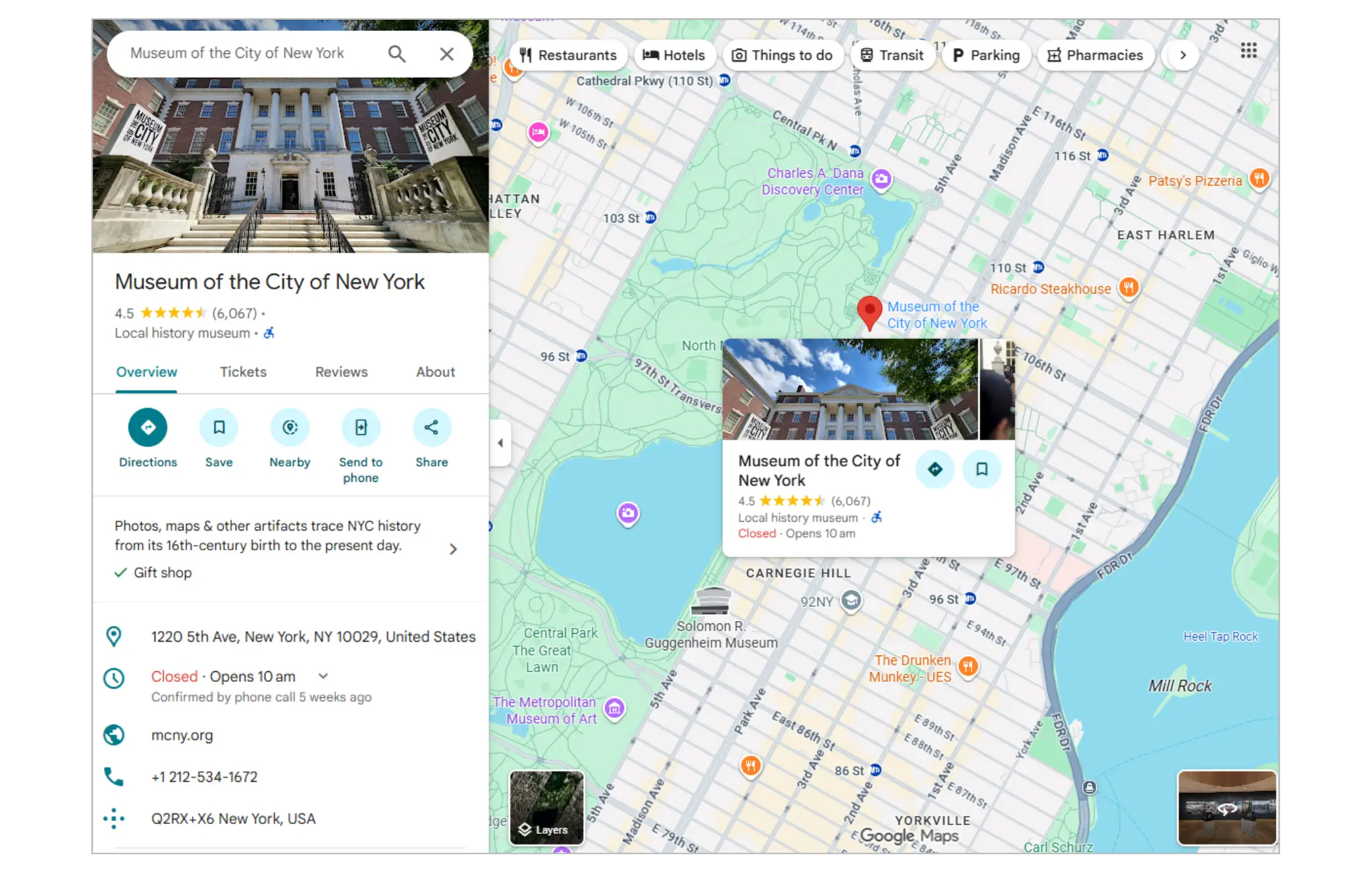
Google Map Points are the digital markers—sometimes called map pins—that represent businesses on Google Maps. When users search on Google or in the Google Maps app, these points show physical business locations available in their area.
Map points differ from traditional organic search listings. Organic results link mainly to websites, while map points provide immediate local context: a business’s location, contact info, hours, photos, and reviews, all directly accessible on the map.
There are two main types of map points:
Google Business Profiles (GBPs) are used by business owners to claim verified business listings, which are indicated by a blue badge.
Unverified listings, shown with Gray markers, may be automatically created from third-party data but lack owner control.
Some businesses operate from physical storefronts, while service-area businesses may serve customers at their locations instead of having a physical address. Both can show as map points but are ranked differently based on proximity and service area settings.
How Businesses Get Their Map Points?
Most companies must create or claim a Google Business Profile to receive a map pin. You can control the way your company shows up on Google Maps and in local search results with this free profile.
If left unclaimed, Google might generate a listing using company information from other sources, but there's a chance it will contain mistakes or out-of-date information. Verified listing ownership is critical—via a verification process Google uses to confirm your business’s legitimacy (mail postcard, phone, email, or instant verification depending on your business type).
Visibility Factors for Map Points
Based on prominence, proximity, and relevancy, Google chooses which map points to display. These variables affect whether your company shows up on full map views or in the local pack, which is the top three map results in search.
A Google search for "coffee shop near me," for instance, will display map points of cafes that the search engine determines are both nearby and extremely relevant to the query. Because of user reviews, completeness of profiles, and other local signals, two similar cafes in the same area might rank differently.

Understanding Proximity Zones or Grids in Local Search
Proximity zones are how Google segments local areas for search ranking, replacing the older notion of a rigid "Grid." Instead of fixed boxes, Google assesses proximity dynamically around the searcher’s location.
This proximity-based ranking allows Google to adapt results based on user location, search intent, and competitiveness.
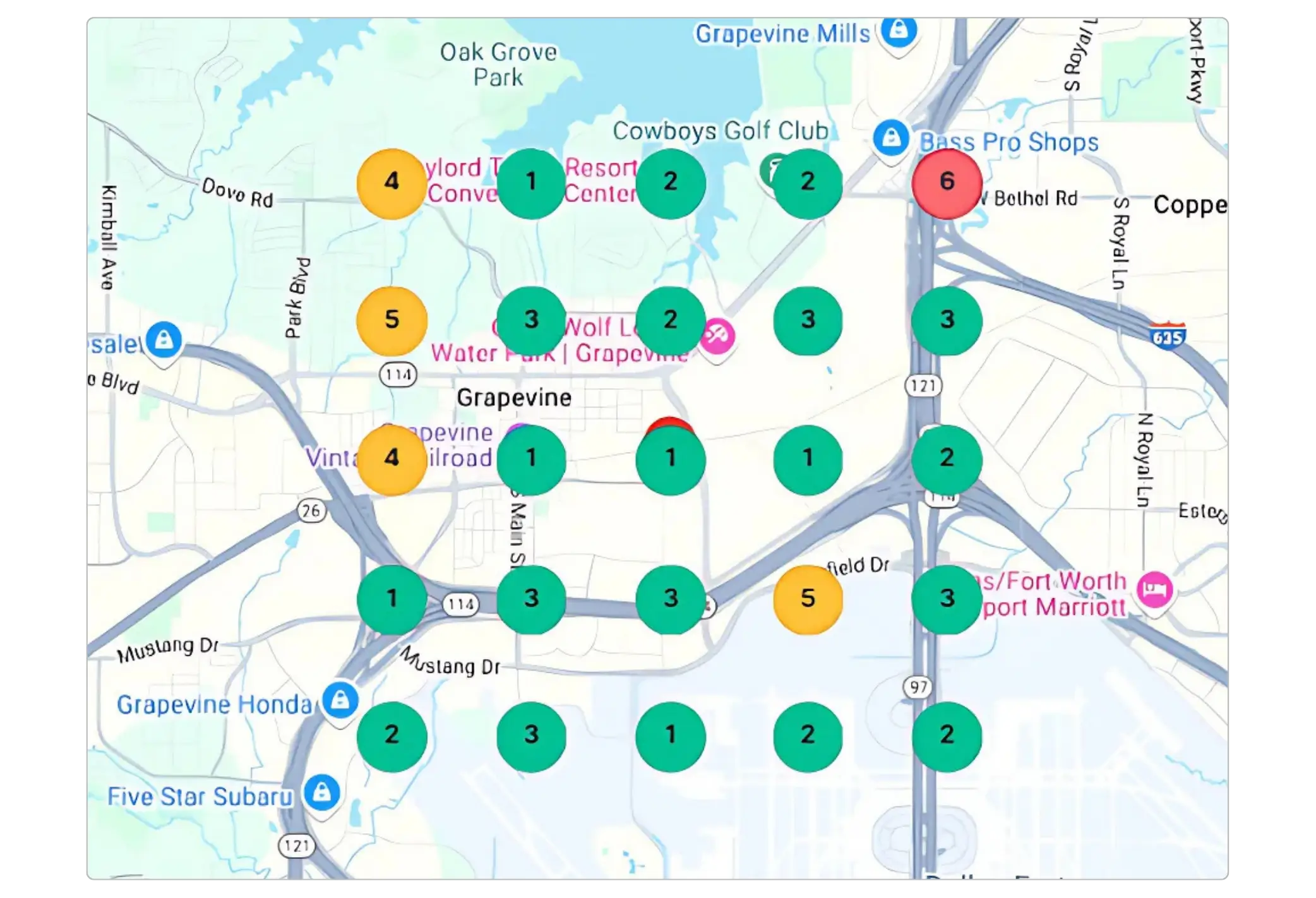
How Does Google Divide Local Areas?
Local ranking behaves differently in various environments:
City centers tend to have high-density, highly competitive zones.
Suburbs generally have moderate competition.
Rural areas face low competition due to fewer businesses.
Google determines your business location by calculating a centroid—a geographic center point representing your address or service area. This centroid is critical because Google measures distance from the searcher’s location to your centroid in straight-line miles, impacting your local ranking potential.
Boundary lines such as neighborhoods, ZIP codes, or city limits also influence visibility. For example, if you’re near a city boundary, you might rank in one city’s proximity zone but not the adjacent one.
The Proximity Factor in Rankings
Proximity remains one of the top three local ranking factors on Google, alongside relevance (match to query) and prominence (business reputation and signals). The closer your business is to the searcher, the better your chances of ranking highly.
“Near me” searches are increasingly common, driven by mobile users looking for immediate local solutions. Service-area businesses can rank within multiple grids if optimized correctly.
Understanding Search Behavior by Zone
Competition varies by zone:
Urban areas typically have many businesses vying for visibility.
Suburban zones show moderate competition.
Rural areas offer opportunities with less competition but lower search volumes.
Conduct a proximity analysis of your competitors to find underutilized zones or opportunistic neighborhoods for expansion.
How Map Points and Proximity Affect Local SEO Rankings?
Google’s local ranking relies primarily on three pillars:
Relevance: How well your profile matches the search intent.
Distance (Proximity): How close your business is to the searcher.
Prominence: How well-known and reputable your business is online.
Since Google's 2021 Vicinity update, proximity has become nearly the most significant local ranking factor. The business physically closest to the searcher often outranks others, even with fewer reviews or weaker optimization.
1. Proximity Factor Deep Dive
Google uses straight-line distance, but for service-area businesses, it takes your defined service radius into account. Centroid accuracy for physical locations is critical to ensure you rank optimally.
Sometimes, a closer business ranks higher despite weaker reviews or less content—a phenomenon called proximity bias. This emphasizes the importance of location in local SEO.
2. Map Point Density and Competition
Dense clusters of competitors can reduce your chances of appearing in top local pack spots. In saturated areas, standing out with profile optimizations and reviews is essential.
Conversely, entering less competitive proximity zones can provide advantage with less effort, gaining visibility that rivals can’t easily match.
3. Impact on Google Local Pack Appearance
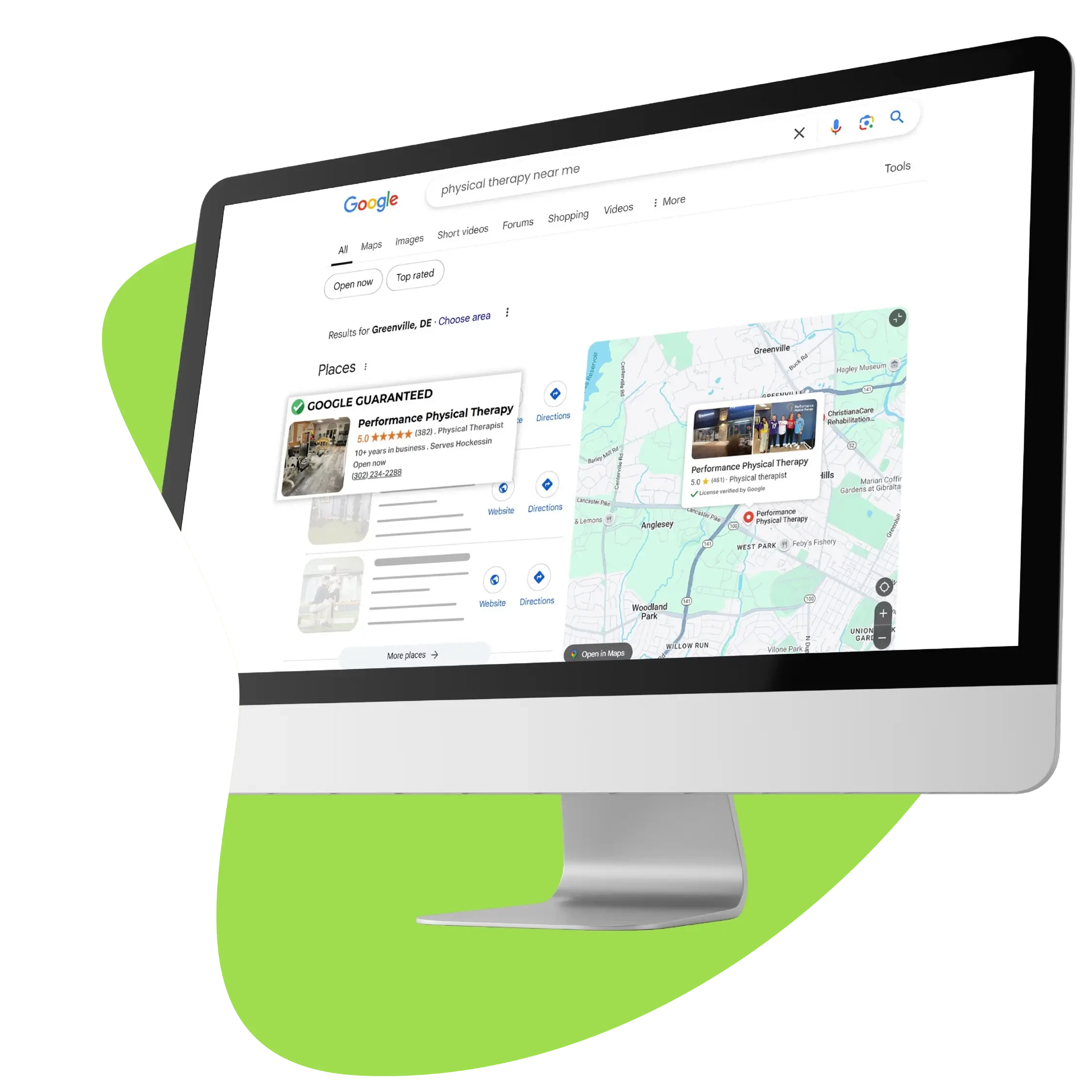
The Local Pack is the prime real estate in local search results, usually showing 3 businesses with map pins. Ranking in the pack dramatically increases your chances of clicks and visits.
Local pack rankings may differ from regular organic or full Google Maps views. Mobile users heavily rely on the pack for their local decisions.
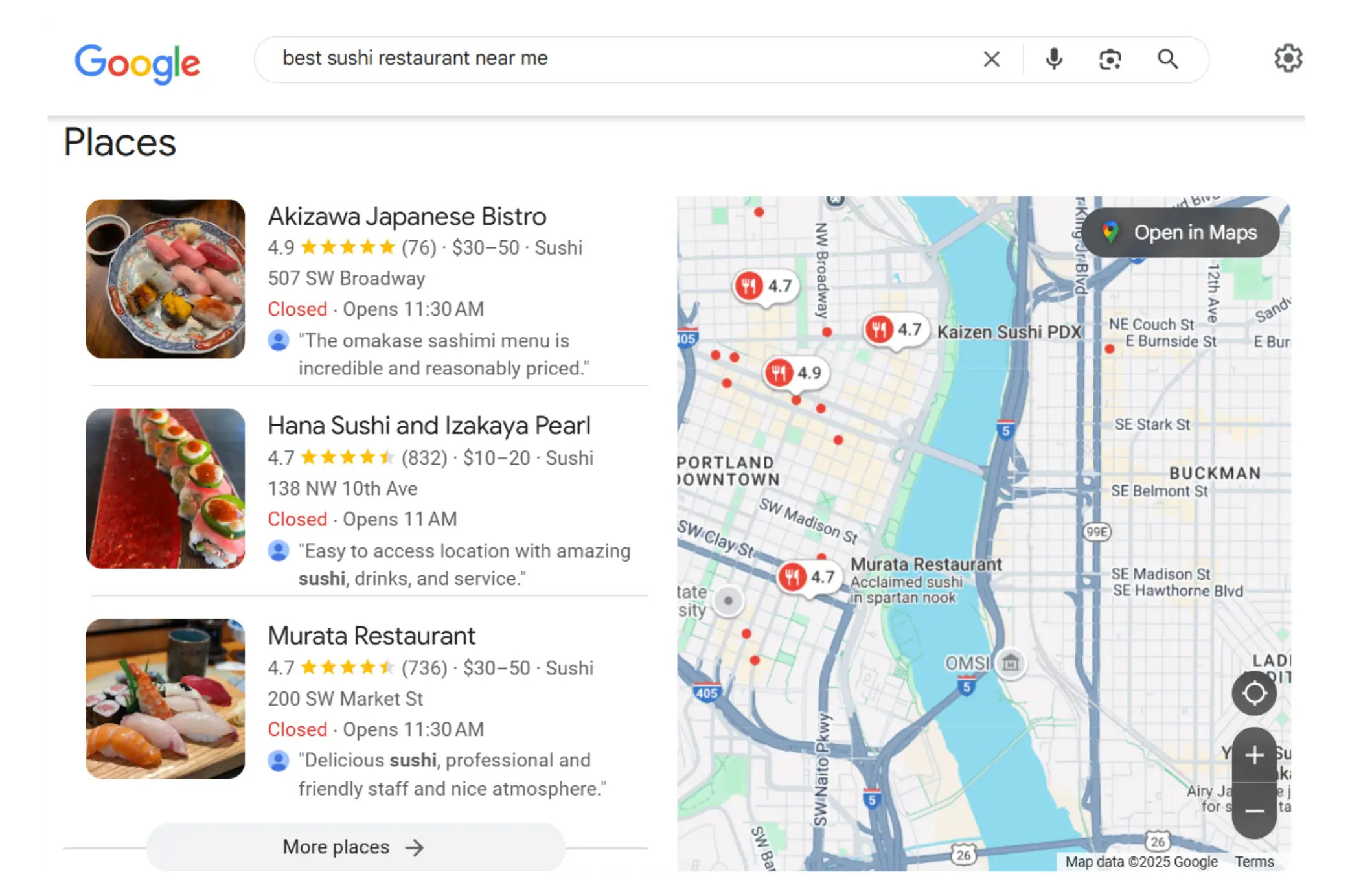
4. Map-Based Search Results
Users can search directly in Google Maps or within Google Search’s local results. Filters like “open now” or “highest rating” change which map points get visibility.
The “areas of interest” feature pushes some relevant hotspots in grids to the front.
Optimizing for Map Points and Proximity – Core Strategies
1. Claim and optimize your Google Business Profile
Verify your listing and complete every section for 100% profile completeness.
Choose the right primary and secondary business categories precisely.
2. Ensure NAP (Name, Address, Phone) consistency across all platforms
3. Generate and manage reviews strategically
Prioritize quantity, quality, and recent reviews.
Use ethical methods like post-purchase requests via text/email or QR codes.
Respond thoughtfully to reviews using relevant keywords naturally.
4. Enhance your profile beyond basics
Add business hours, products/services, special attributes, and regularly post Google updates.
5. Optimize visual content
Upload high-quality photos and videos with proper geotagging.
Use virtual tours when possible.
6. Implement Schema markup for Local Business
Use structured data on your website to highlight local details for Google.
Advanced Proximity-Based Local SEO Tactics
Conduct geo-targeted keyword research for city, neighborhood, and “near me” searches.
Create location-specific landing pages and neighborhood content.
For multi-location businesses, manage separate profiles, avoid duplicate content, and use unique naming.
Service-area businesses should accurately set the radius and areas served and avoid fake addresses or virtual offices without disclosures.
Build local backlinks and citations from trusted local sources like Chambers of Commerce, newsletters, or local blogs.
Measurement, Tracking, and Ongoing Optimization
Track metrics like Google Business Profile views, local pack rankings, review counts and velocity, plus conversions from calls and direction requests. Use tools like Google Analytics and local rank trackers.
Avoid common mistakes like keyword stuffing your business name, buying fake reviews, and inconsistent NAP data.
Maintain a schedule: daily review monitoring, weekly posting, monthly audit of citations and metrics, and quarterly competitive analysis.
Final Thoughts
Google Map Points and proximity zones (Grids) are the foundation of local SEO success. Google favors businesses physically closer to searchers, making location and profile optimization crucial.
Start today by claiming and verifying your Google Business Profile. Then complete it fully, audit NAP consistency, and implement a review generation plan. Create geo-targeted content and build local citations to strengthen your presence.
Remember, local SEO is ongoing, not a one-time setup. Monitor regularly, adapt, and engage with your customers online.
Get your free Google Business Profile Audit now and start dominating your local market!
Did you know that 46% of Google searches are focused locally? Impressively, 76% of people who look for something nearby go to a business within a day. These figures demonstrate the enormous potential that local SEO presents for any company hoping to draw in local clients. Nevertheless, a lot of companies are not visible on Google Maps, which costs them potential customers who know how to maximize their local visibility.
Local SEO means tailoring your online presence, so your business appears in search results when customers look for products or services near them. Google Maps has become the most popular local discovery tool, radically altering the way local consumers locate businesses.
This blog explores two important ideas that are essential to becoming an expert in local SEO: Google Map Points (your business location markers on Google Maps) and grid (how Google evaluates geographic closeness). You'll discover what these are, their significance, and how to best position your company to rule your local market.
What Are Google Map Points?
Google Map Points are the digital markers—sometimes called map pins—that represent businesses on Google Maps. When users search on Google or in the Google Maps app, these points show physical business locations available in their area.
Map points differ from traditional organic search listings. Organic results link mainly to websites, while map points provide immediate local context: a business’s location, contact info, hours, photos, and reviews, all directly accessible on the map.
There are two main types of map points:
Google Business Profiles (GBPs) are used by business owners to claim verified business listings, which are indicated by a blue badge.
Unverified listings, shown with Gray markers, may be automatically created from third-party data but lack owner control.
Some businesses operate from physical storefronts, while service-area businesses may serve customers at their locations instead of having a physical address. Both can show as map points but are ranked differently based on proximity and service area settings.
How Businesses Get Their Map Points?
Most companies must create or claim a Google Business Profile to receive a map pin. You can control the way your company shows up on Google Maps and in local search results with this free profile.
If left unclaimed, Google might generate a listing using company information from other sources, but there's a chance it will contain mistakes or out-of-date information. Verified listing ownership is critical—via a verification process Google uses to confirm your business’s legitimacy (mail postcard, phone, email, or instant verification depending on your business type).
Visibility Factors for Map Points
Based on prominence, proximity, and relevancy, Google chooses which map points to display. These variables affect whether your company shows up on full map views or in the local pack, which is the top three map results in search.
A Google search for "coffee shop near me," for instance, will display map points of cafes that the search engine determines are both nearby and extremely relevant to the query. Because of user reviews, completeness of profiles, and other local signals, two similar cafes in the same area might rank differently.
Understanding Proximity Zones or Grids in Local Search
Proximity zones are how Google segments local areas for search ranking, replacing the older notion of a rigid "Grid." Instead of fixed boxes, Google assesses proximity dynamically around the searcher’s location.
This proximity-based ranking allows Google to adapt results based on user location, search intent, and competitiveness.
How Does Google Divide Local Areas?
Local ranking behaves differently in various environments:
City centers tend to have high-density, highly competitive zones.
Suburbs generally have moderate competition.
Rural areas face low competition due to fewer businesses.
Google determines your business location by calculating a centroid—a geographic center point representing your address or service area. This centroid is critical because Google measures distance from the searcher’s location to your centroid in straight-line miles, impacting your local ranking potential.
Boundary lines such as neighborhoods, ZIP codes, or city limits also influence visibility. For example, if you’re near a city boundary, you might rank in one city’s proximity zone but not the adjacent one.
The Proximity Factor in Rankings
Proximity remains one of the top three local ranking factors on Google, alongside relevance (match to query) and prominence (business reputation and signals). The closer your business is to the searcher, the better your chances of ranking highly.
“Near me” searches are increasingly common, driven by mobile users looking for immediate local solutions. Service-area businesses can rank within multiple grids if optimized correctly.
Understanding Search Behavior by Zone
Competition varies by zone:
Urban areas typically have many businesses vying for visibility.
Suburban zones show moderate competition.
Rural areas offer opportunities with less competition but lower search volumes.
Conduct a proximity analysis of your competitors to find underutilized zones or opportunistic neighborhoods for expansion.
How Map Points and Proximity Affect Local SEO Rankings?
Google’s local ranking relies primarily on three pillars:
Relevance: How well your profile matches the search intent.
Distance (Proximity): How close your business is to the searcher.
Prominence: How well-known and reputable your business is online.
Since Google's 2021 Vicinity update, proximity has become nearly the most significant local ranking factor. The business physically closest to the searcher often outranks others, even with fewer reviews or weaker optimization.
1. Proximity Factor Deep Dive
Google uses straight-line distance, but for service-area businesses, it takes your defined service radius into account. Centroid accuracy for physical locations is critical to ensure you rank optimally.
Sometimes, a closer business ranks higher despite weaker reviews or less content—a phenomenon called proximity bias. This emphasizes the importance of location in local SEO.
2. Map Point Density and Competition
Dense clusters of competitors can reduce your chances of appearing in top local pack spots. In saturated areas, standing out with profile optimizations and reviews is essential.
Conversely, entering less competitive proximity zones can provide advantage with less effort, gaining visibility that rivals can’t easily match.
3. Impact on Google Local Pack Appearance
The Local Pack is the prime real estate in local search results, usually showing 3 businesses with map pins. Ranking in the pack dramatically increases your chances of clicks and visits.
Local pack rankings may differ from regular organic or full Google Maps views. Mobile users heavily rely on the pack for their local decisions.
4. Map-Based Search Results
Users can search directly in Google Maps or within Google Search’s local results. Filters like “open now” or “highest rating” change which map points get visibility.
The “areas of interest” feature pushes some relevant hotspots in grids to the front.
Optimizing for Map Points and Proximity – Core Strategies
1. Claim and optimize your Google Business Profile
Verify your listing and complete every section for 100% profile completeness.
Choose the right primary and secondary business categories precisely.
2. Ensure NAP (Name, Address, Phone) consistency across all platforms
3. Generate and manage reviews strategically
Prioritize quantity, quality, and recent reviews.
Use ethical methods like post-purchase requests via text/email or QR codes.
Respond thoughtfully to reviews using relevant keywords naturally.
4. Enhance your profile beyond basics
Add business hours, products/services, special attributes, and regularly post Google updates.
5. Optimize visual content
Upload high-quality photos and videos with proper geotagging.
Use virtual tours when possible.
6. Implement Schema markup for Local Business
Use structured data on your website to highlight local details for Google.
Advanced Proximity-Based Local SEO Tactics
Conduct geo-targeted keyword research for city, neighborhood, and “near me” searches.
Create location-specific landing pages and neighborhood content.
For multi-location businesses, manage separate profiles, avoid duplicate content, and use unique naming.
Service-area businesses should accurately set the radius and areas served and avoid fake addresses or virtual offices without disclosures.
Build local backlinks and citations from trusted local sources like Chambers of Commerce, newsletters, or local blogs.
Measurement, Tracking, and Ongoing Optimization
Track metrics like Google Business Profile views, local pack rankings, review counts and velocity, plus conversions from calls and direction requests. Use tools like Google Analytics and local rank trackers.
Avoid common mistakes like keyword stuffing your business name, buying fake reviews, and inconsistent NAP data.
Maintain a schedule: daily review monitoring, weekly posting, monthly audit of citations and metrics, and quarterly competitive analysis.
Final Thoughts
Google Map Points and proximity zones (Grids) are the foundation of local SEO success. Google favors businesses physically closer to searchers, making location and profile optimization crucial.
Start today by claiming and verifying your Google Business Profile. Then complete it fully, audit NAP consistency, and implement a review generation plan. Create geo-targeted content and build local citations to strengthen your presence.
Remember, local SEO is ongoing, not a one-time setup. Monitor regularly, adapt, and engage with your customers online.
Get your free Google Business Profile Audit now and start dominating your local market!
Did you know that 46% of Google searches are focused locally? Impressively, 76% of people who look for something nearby go to a business within a day. These figures demonstrate the enormous potential that local SEO presents for any company hoping to draw in local clients. Nevertheless, a lot of companies are not visible on Google Maps, which costs them potential customers who know how to maximize their local visibility.
Local SEO means tailoring your online presence, so your business appears in search results when customers look for products or services near them. Google Maps has become the most popular local discovery tool, radically altering the way local consumers locate businesses.
This blog explores two important ideas that are essential to becoming an expert in local SEO: Google Map Points (your business location markers on Google Maps) and grid (how Google evaluates geographic closeness). You'll discover what these are, their significance, and how to best position your company to rule your local market.
What Are Google Map Points?
Google Map Points are the digital markers—sometimes called map pins—that represent businesses on Google Maps. When users search on Google or in the Google Maps app, these points show physical business locations available in their area.
Map points differ from traditional organic search listings. Organic results link mainly to websites, while map points provide immediate local context: a business’s location, contact info, hours, photos, and reviews, all directly accessible on the map.
There are two main types of map points:
Google Business Profiles (GBPs) are used by business owners to claim verified business listings, which are indicated by a blue badge.
Unverified listings, shown with Gray markers, may be automatically created from third-party data but lack owner control.
Some businesses operate from physical storefronts, while service-area businesses may serve customers at their locations instead of having a physical address. Both can show as map points but are ranked differently based on proximity and service area settings.
How Businesses Get Their Map Points?
Most companies must create or claim a Google Business Profile to receive a map pin. You can control the way your company shows up on Google Maps and in local search results with this free profile.
If left unclaimed, Google might generate a listing using company information from other sources, but there's a chance it will contain mistakes or out-of-date information. Verified listing ownership is critical—via a verification process Google uses to confirm your business’s legitimacy (mail postcard, phone, email, or instant verification depending on your business type).
Visibility Factors for Map Points
Based on prominence, proximity, and relevancy, Google chooses which map points to display. These variables affect whether your company shows up on full map views or in the local pack, which is the top three map results in search.
A Google search for "coffee shop near me," for instance, will display map points of cafes that the search engine determines are both nearby and extremely relevant to the query. Because of user reviews, completeness of profiles, and other local signals, two similar cafes in the same area might rank differently.
Understanding Proximity Zones or Grids in Local Search
Proximity zones are how Google segments local areas for search ranking, replacing the older notion of a rigid "Grid." Instead of fixed boxes, Google assesses proximity dynamically around the searcher’s location.
This proximity-based ranking allows Google to adapt results based on user location, search intent, and competitiveness.
How Does Google Divide Local Areas?
Local ranking behaves differently in various environments:
City centers tend to have high-density, highly competitive zones.
Suburbs generally have moderate competition.
Rural areas face low competition due to fewer businesses.
Google determines your business location by calculating a centroid—a geographic center point representing your address or service area. This centroid is critical because Google measures distance from the searcher’s location to your centroid in straight-line miles, impacting your local ranking potential.
Boundary lines such as neighborhoods, ZIP codes, or city limits also influence visibility. For example, if you’re near a city boundary, you might rank in one city’s proximity zone but not the adjacent one.
The Proximity Factor in Rankings
Proximity remains one of the top three local ranking factors on Google, alongside relevance (match to query) and prominence (business reputation and signals). The closer your business is to the searcher, the better your chances of ranking highly.
“Near me” searches are increasingly common, driven by mobile users looking for immediate local solutions. Service-area businesses can rank within multiple grids if optimized correctly.
Understanding Search Behavior by Zone
Competition varies by zone:
Urban areas typically have many businesses vying for visibility.
Suburban zones show moderate competition.
Rural areas offer opportunities with less competition but lower search volumes.
Conduct a proximity analysis of your competitors to find underutilized zones or opportunistic neighborhoods for expansion.
How Map Points and Proximity Affect Local SEO Rankings?
Google’s local ranking relies primarily on three pillars:
Relevance: How well your profile matches the search intent.
Distance (Proximity): How close your business is to the searcher.
Prominence: How well-known and reputable your business is online.
Since Google's 2021 Vicinity update, proximity has become nearly the most significant local ranking factor. The business physically closest to the searcher often outranks others, even with fewer reviews or weaker optimization.
1. Proximity Factor Deep Dive
Google uses straight-line distance, but for service-area businesses, it takes your defined service radius into account. Centroid accuracy for physical locations is critical to ensure you rank optimally.
Sometimes, a closer business ranks higher despite weaker reviews or less content—a phenomenon called proximity bias. This emphasizes the importance of location in local SEO.
2. Map Point Density and Competition
Dense clusters of competitors can reduce your chances of appearing in top local pack spots. In saturated areas, standing out with profile optimizations and reviews is essential.
Conversely, entering less competitive proximity zones can provide advantage with less effort, gaining visibility that rivals can’t easily match.
3. Impact on Google Local Pack Appearance
The Local Pack is the prime real estate in local search results, usually showing 3 businesses with map pins. Ranking in the pack dramatically increases your chances of clicks and visits.
Local pack rankings may differ from regular organic or full Google Maps views. Mobile users heavily rely on the pack for their local decisions.
4. Map-Based Search Results
Users can search directly in Google Maps or within Google Search’s local results. Filters like “open now” or “highest rating” change which map points get visibility.
The “areas of interest” feature pushes some relevant hotspots in grids to the front.
Optimizing for Map Points and Proximity – Core Strategies
1. Claim and optimize your Google Business Profile
Verify your listing and complete every section for 100% profile completeness.
Choose the right primary and secondary business categories precisely.
2. Ensure NAP (Name, Address, Phone) consistency across all platforms
3. Generate and manage reviews strategically
Prioritize quantity, quality, and recent reviews.
Use ethical methods like post-purchase requests via text/email or QR codes.
Respond thoughtfully to reviews using relevant keywords naturally.
4. Enhance your profile beyond basics
Add business hours, products/services, special attributes, and regularly post Google updates.
5. Optimize visual content
Upload high-quality photos and videos with proper geotagging.
Use virtual tours when possible.
6. Implement Schema markup for Local Business
Use structured data on your website to highlight local details for Google.
Advanced Proximity-Based Local SEO Tactics
Conduct geo-targeted keyword research for city, neighborhood, and “near me” searches.
Create location-specific landing pages and neighborhood content.
For multi-location businesses, manage separate profiles, avoid duplicate content, and use unique naming.
Service-area businesses should accurately set the radius and areas served and avoid fake addresses or virtual offices without disclosures.
Build local backlinks and citations from trusted local sources like Chambers of Commerce, newsletters, or local blogs.
Measurement, Tracking, and Ongoing Optimization
Track metrics like Google Business Profile views, local pack rankings, review counts and velocity, plus conversions from calls and direction requests. Use tools like Google Analytics and local rank trackers.
Avoid common mistakes like keyword stuffing your business name, buying fake reviews, and inconsistent NAP data.
Maintain a schedule: daily review monitoring, weekly posting, monthly audit of citations and metrics, and quarterly competitive analysis.
Final Thoughts
Google Map Points and proximity zones (Grids) are the foundation of local SEO success. Google favors businesses physically closer to searchers, making location and profile optimization crucial.
Start today by claiming and verifying your Google Business Profile. Then complete it fully, audit NAP consistency, and implement a review generation plan. Create geo-targeted content and build local citations to strengthen your presence.
Remember, local SEO is ongoing, not a one-time setup. Monitor regularly, adapt, and engage with your customers online.
Get your free Google Business Profile Audit now and start dominating your local market!




Want to Skyrocket Revenue? Get a Free Audit Today!
Want to Skyrocket Revenue? Get a Free Audit Today!



4.9/5 Ratings!
4.9/5 Ratings!


Don’t miss our revenue growth tips!
Get expert marketing tips—straight to your inbox, like thousands of happy clients.
Don’t miss our revenue growth tips!
Get expert marketing tips—straight to your inbox, like thousands of happy clients.
Don’t miss our revenue growth tips!
Don’t miss our revenue growth tips!
Don’t miss our revenue growth tips!
Get expert marketing tips—straight to your inbox, like thousands of happy clients.
Relevant Blogs on Organic SEO
Relevant Blogs on Organic SEO
Relevant Blogs on Organic SEO
Unlock data-driven insights in Organic SEO—explore our featured blogs and skyrocket your revenue before your competitors do.

SEO
SEO
SEO
Dec 11, 2025
Dec 11, 2025
Dec 11, 2025
10 Min Read
10 Min Read
10 Min Read
How to Share Access of Google Business Profile: GA4, GSC, GTM and GMB
How to Share Access of Google Business Profile: GA4, GSC, GTM and GMB
SEO
SEO
SEO
Dec 10, 2025
Dec 10, 2025
Dec 10, 2025
10 Min Read
10 Min Read
10 Min Read
Google Search Console Now Integrates Social Channels: A New Era of Unified Search Visibility
Google Search Console Now Integrates Social Channels: A New Era of Unified Search Visibility
SEO
SEO
SEO
Dec 10, 2025
Dec 10, 2025
Dec 10, 2025
12 Min Read
12 Min Read
12 Min Read
SEO Alone Can’t Fix Your Rankings in 2026: Why the New Search Era Demands More
SEO Alone Can’t Fix Your Rankings in 2026: Why the New Search Era Demands More


























Ready to speak with an expert?
Data-Driven Marketing Agency That Elevates ROI
Websites Designed & Optimized to Convert
$280M+
Client Revenue Driven & Growing Strong
Discover how to skyrocket
your revenue today!
Trusted by 1000+ Owners!
Ready to speak with an expert?
Data-Driven Marketing Agency That Elevates ROI
Websites Designed & Optimized to Convert
$280M+
Client Revenue Driven & Growing Strong
Want to skyrocket
revenue?
Trusted by 1000+ Owners!
Want to skyrocket revenue?
4.9/5 Ratings!
Want to skyrocket revenue?
4.9/5 Ratings!
Ready to speak with an expert?
Data-Driven Marketing Agency That Elevates ROI
Websites Designed & Optimized to Convert
$280M+
Client Revenue Driven & Growing Strong
Discover how to skyrocket
your revenue today!
Trusted by 1000+ Owners!